
@noble-wave/ngx-multiselect-dropdown
v1.0.3
Published
Angular multiselect dropdown component built with Angular Signals and standalone architecture for Angular 17–21. Searchable multi-select dropdown with reactive forms support, keyboard navigation, accessibility (WCAG 2.1), and zero dependencies. Perfect fo

Maintainers
 noble-wave
Keywords
Readme
Angular Multiselect Dropdown | ngx-multiselect-dropdown
The most powerful, modern, and feature-rich Angular multiselect dropdown component for Angular 17, 18, 19, 20, 21+. Built with Angular Signals and standalone architecture for maximum performance and developer experience.
Perfect for filtering data, selecting multiple items, building advanced forms, and creating dynamic user interfaces with searchable dropdown lists.






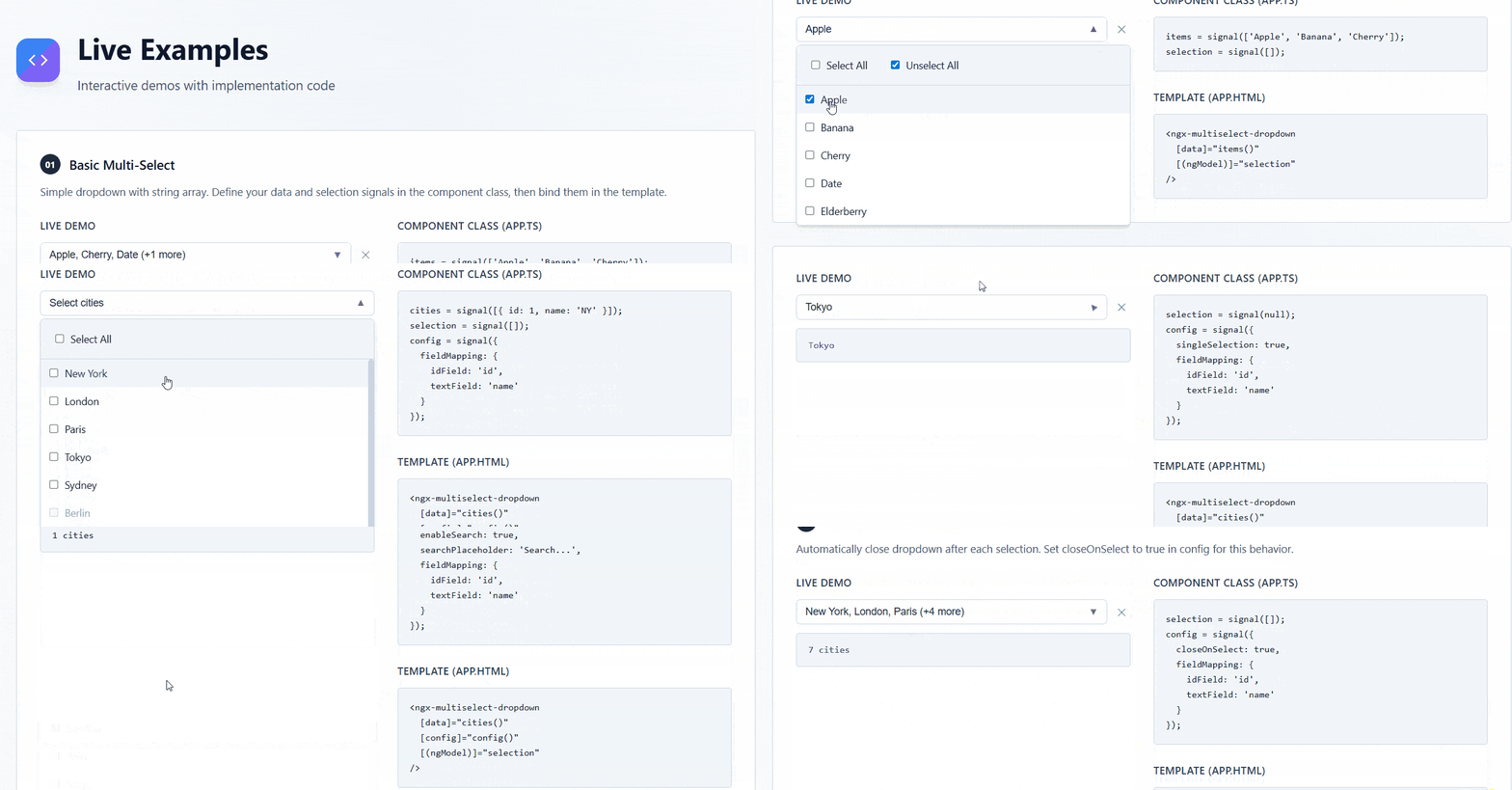
� Live Demo & Preview
View Live Demo | StackBlitz Playground
💡 Try it now: Interactive examples showing multiselect dropdown, search filtering, reactive forms integration, and keyboard navigation.
Preview
�🔍 Why Choose ngx-multiselect-dropdown?
Best Angular multiselect dropdown for modern Angular applications with:
- ⚡ Zero Dependencies - Lightweight and fast
- 🎯 Production Ready - Battle-tested in enterprise applications
- 📱 Mobile Optimized - Touch-friendly responsive design
- ♿ WCAG 2.1 Compliant - Full accessibility support
- 🚀 Performance - Virtual scrolling support for large datasets
- 💪 TypeScript First - Complete type safety
✨ Key Features
Core Functionality
- 🚀 Latest Angular Support - Compatible with Angular 17, 18, 19, 20, 21+ with Angular Signals
- 📦 Standalone Component Architecture - No NgModules, tree-shakable, lightweight
- 🎯 Complete Forms Integration - Full
ControlValueAccessorsupport (ngModel, Reactive Forms, Template-driven Forms) - 🔍 Advanced Search & Filter - Built-in search with custom filtering logic support
- 🎨 Highly Customizable - CSS custom properties, custom templates, theming support
- ⚡ High Performance - Virtual scrolling for handling 1000+ items efficiently
- 🪶 Zero Dependencies - No external dependencies, only Angular core
User Experience
- ⌨️ Complete Keyboard Navigation - Full keyboard support (Arrow keys, Enter, Escape, Home, End, Tab)
- ♿ WCAG 2.1 Accessibility - ARIA attributes, screen reader support, keyboard-only navigation
- 📱 Mobile-First Responsive Design - Touch-friendly, works on all screen sizes and devices
- 🌍 Internationalization (i18n) - Customizable text labels for multilingual apps
- 🎭 Single & Multi Selection Modes - Flexible selection behavior for any use case
- 🏷️ Tagging & Badges - Beautiful chip/badge display for selected items
Developer Experience
- 🔧 100% TypeScript - Fully typed with strict mode, complete IntelliSense support
- 📖 Extensive Documentation - Comprehensive guides, examples, and API reference
- 🧪 Well Tested - High test coverage with Vitest
- 🔄 Reactive State Management - Built with Angular Signals for optimal change detection
- 🎛️ Extensive Configuration Options - Flexible API, easy to customize
- 🔌 Easy Integration - Drop-in replacement for native select elements
� Common Use Cases
Perfect for building:
- E-commerce Filters - Product category selection, multi-attribute filtering
- Admin Dashboards - Data table filters, user role management, bulk actions
- Form Builders - Multi-option selectors, tag inputs, category pickers
- Data Analytics - Report filters, dimension selection, metric choosers
- CMS & Content Management - Tag selection, category assignment, metadata management
- HR & Recruitment Apps - Skills selection, department assignment, multi-criteria filtering
- Project Management Tools - Task assignment, label management, team member selection
- Email Clients - Recipient selection, label management, folder assignment
📦 Installation & Setup
NPM Installation
npm install ngx-multiselect-dropdownYarn Installation
yarn add ngx-multiselect-dropdownPNPM Installation
pnpm add ngx-multiselect-dropdownRequirements:
- Angular 17+ (supports Angular 17, 18, 19, 20, 21+)
- TypeScript 5.0+
- RxJS 7.5+
🚀 Quick Start
Import the Component
import { Component } from '@angular/core';
import { FormsModule } from '@angular/forms';
import { MultiselectDropdownComponent } from 'ngx-multiselect-dropdown';

@Component({
  selector: 'app-root',
  standalone: true,
  imports: [FormsModule, MultiselectDropdownComponent],
  template: `
    <ngx-multiselect-dropdown
      [data]="items"
      [(ngModel)]="selectedItems"
      placeholder="Select items"
    />
  `,
})
export class AppComponent {
  items = ['Apple', 'Banana', 'Cherry', 'Date'];
  selectedItems = [];
}
📖 Usage Examples
Angular Multiselect Dropdown - Basic Usage
import { Component, signal } from '@angular/core';
import { MultiselectDropdownComponent } from 'ngx-multiselect-dropdown';

@Component({
  selector: 'app-example',
  standalone: true,
  imports: [MultiselectDropdownComponent],
  template: `
    <ngx-multiselect-dropdown
      [data]="fruits()"
      [(ngModel)]="selection"
      placeholder="Select fruits"
    />
  `,
})
export class ExampleComponent {
  fruits = signal(['Apple', 'Banana', 'Cherry', 'Date', 'Elderberry']);
  selection = signal([]);
}
Object Array with Custom Fields
interface City {
  id: number;
  name: string;
  country: string;
}

@Component({
  template: `
    <ngx-multiselect-dropdown
      [data]="cities()"
      [config]="{
        fieldMapping: {
          idField: 'id',
          textField: 'name',
          disabledField: 'disabled'
        }
      }"
      [(ngModel)]="selectedCities"
    />
  `,
})
export class CityComponent {
  cities = signal<City[]>([
    { id: 1, name: 'New York', country: 'USA' },
    { id: 2, name: 'London', country: 'UK' },
    { id: 3, name: 'Paris', country: 'France' },
  ]);
  selectedCities = signal<City[]>([]);
}
Single Selection Mode
@Component({
  template: `
    <ngx-multiselect-dropdown
      [data]="items"
      [config]="{ singleSelection: true }"
      [(ngModel)]="selectedItem"
      placeholder="Choose one"
    />
  `,
})
export class SingleSelectComponent {
  items = ['Option 1', 'Option 2', 'Option 3'];
  selectedItem = null;
}
Angular Dropdown with Search and Filter
@Component({
  template: `
    <ngx-multiselect-dropdown
      [data]="largeList"
      [config]="{
        enableSearch: true,
        searchPlaceholder: 'Search items...'
      }"
      [(ngModel)]="selection"
      (searchChange)="onSearch($event)"
    />
  `,
})
export class SearchComponent {
  largeList = [...Array(100)].map((_, i) => `Item ${i + 1}`);
  selection = [];

  onSearch(term: string) {
    console.log('Searching for:', term);
  }
}
With Selection Limit
@Component({
  template: `
    <ngx-multiselect-dropdown
      [data]="items"
      [config]="{
        selectionLimit: 3,
        displayLimit: 2
      }"
      [(ngModel)]="selection"
      placeholder="Select up to 3 items"
    />
  `,
})
export class LimitComponent {
  items = ['Item 1', 'Item 2', 'Item 3', 'Item 4', 'Item 5'];
  selection = [];
}
Angular Multi Select for Reactive Forms
import { Component } from '@angular/core';
import { FormControl, ReactiveFormsModule } from '@angular/forms';
import { MultiselectDropdownComponent } from 'ngx-multiselect-dropdown';

@Component({
  selector: 'app-reactive',
  standalone: true,
  imports: [ReactiveFormsModule, MultiselectDropdownComponent],
  template: `
    <form>
      <ngx-multiselect-dropdown
        [data]="items"
        [formControl]="itemsControl"
      />
    </form>
  `,
})
export class ReactiveComponent {
  items = ['Item 1', 'Item 2', 'Item 3'];
  itemsControl = new FormControl([]);
}
⚙️ Configuration Options
| Option | Type | Default | Description |
|--------|------|---------|-------------|
| singleSelection | boolean | false | Enable single selection mode |
| fieldMapping | DropdownFieldMapping | See below | Custom field mapping for objects |
| enableSelectAll | boolean | true | Show "Select All" checkbox |
| selectAllText | string | 'Select All' | Text for select all action |
| unselectAllText | string | 'Unselect All' | Text for unselect all action |
| enableSearch | boolean | false | Enable search functionality |
| searchPlaceholder | string | 'Search...' | Placeholder for search input |
| clearSearchOnClose | boolean | true | Clear search when dropdown closes |
| selectionLimit | number | -1 | Maximum selections (-1 = unlimited) |
| displayLimit | number | 3 | Max items to show before "+X more" |
| closeOnSelect | boolean | false | Close dropdown after selection |
| showSelectedAtTop | boolean | false | Show selected items at top |
| maxHeight | number | 300 | Maximum height in pixels |
| noDataText | string | 'No items available' | Message when no data |
| noResultsText | string | 'No results found' | Message when search has no results |
Field Mapping (Default)
{
  idField: 'id',
  textField: 'text',
  disabledField: 'disabled'
}
🎨 Theming
Customize the appearance using CSS custom properties:
ngx-multiselect-dropdown {
  /* Colors */
  --ngx-dropdown-bg: #ffffff;
  --ngx-dropdown-border-color: #cbd5e1;
  --ngx-dropdown-text-color: #1e293b;
  --ngx-dropdown-placeholder-color: #64748b;
  --ngx-dropdown-hover-bg: #f1f5f9;
  --ngx-dropdown-selected-bg: #e0f2fe;
  --ngx-dropdown-disabled-bg: #f8fafc;
  --ngx-dropdown-disabled-text: #94a3b8;
  --ngx-dropdown-focus-ring: #3b82f6;

  /* Spacing */
  --ngx-dropdown-padding: 0.5rem 0.75rem;
  --ngx-dropdown-border-radius: 0.375rem;
  --ngx-dropdown-item-padding: 0.5rem 0.75rem;

  /* Shadows */
  --ngx-dropdown-shadow: 0 4px 6px -1px rgba(0, 0, 0, 0.1);
}
⌨️ Keyboard Navigation
| Key | Action | |-----|--------| | Enter / Space | Open dropdown or select focused item | | Escape | Close dropdown | | ↓ / ↑ | Navigate through items | | Home / End | Jump to first/last item |
📡 Events
| Event | Payload | Description |
|-------|---------|-------------|
| selectionChange | DropdownItem[] | Emitted when selection changes |
| dropdownOpen | void | Emitted when dropdown opens |
| dropdownClose | void | Emitted when dropdown closes |
| searchChange | string | Emitted when search term changes |
🧪 API Reference
Component Inputs
@Input() data: T[] = [];
@Input() config: DropdownConfig = {};
@Input() placeholder: string = 'Select';
@Input() disabled: boolean = false;
Component Outputs
@Output() selectionChange = output<DropdownItem<T>[]>();
@Output() dropdownOpen = output<void>();
@Output() dropdownClose = output<void>();
@Output() searchChange = output<string>();
🛠️ Development & Contributing
Local Development
# Clone the repository
git clone https://github.com/noble-wave/ngx-multiselect-dropdown.git

# Install dependencies
npm install

# Start dev server with live reload
npm start

# Run tests
npm test

# Build library for production
npm run build:lib

# Lint code
npm run lint
Publishing to npm
For maintainers only. Requires an npm Access Token.
1. Set your npm token as an environment variable
# PowerShell
$env:NPM_TOKEN = "npm_your_token_here"

# Command Prompt
set NPM_TOKEN=npm_your_token_here

# Git Bash / macOS / Linux
export NPM_TOKEN=npm_your_token_here
Alternatively, set
NPM_TOKENpermanently in your OS environment variables so you never need to set it again.
2. Dry run — verify what will be published
npm run publish:lib:dry3. Publish to npm
npm run publish:libRelease with automatic version bump
npm run release:patch   # 1.0.0 → 1.0.1 (bug fixes)
npm run release:minor   # 1.0.0 → 1.1.0 (new features)
npm run release:major   # 1.0.0 → 2.0.0 (breaking changes)
Each release:* script bumps the version in package.json, builds the library, and publishes to npm in one step.
Contributing
We welcome contributions! Please see our Contributing Guidelines for details.
Before submitting a PR:
- Ensure all tests pass
- Add tests for new features
- Update documentation
- Follow the Angular style guide
🆚 Comparison with Other Libraries
| Feature | ngx-multiselect-dropdown | ng-select | Angular Material Select | Other Libraries | |---------|--------------------------|-----------|--------------------------|------------------| | Angular Signals | ✅ | ❌ | ❌ | ❌ | | Standalone Components | ✅ | ⚠️ Partial | ⚠️ Partial | ❌ | | Zero Dependencies | ✅ | ❌ | ❌ | ❌ | | Bundle Size | ~5KB | ~50KB+ | ~100KB+ | Varies | | Keyboard Navigation | ✅ Full | ✅ Full | ⚠️ Partial | Varies | | Accessibility (WCAG 2.1) | ✅ | ✅ | ✅ | Varies | | Virtual Scrolling | ✅ | ✅ | ❌ | ❌ | | Custom Templates | ✅ | ✅ | ⚠️ Limited | Varies | | TypeScript Support | ✅ Strict | ✅ | ✅ | Varies | | Active Maintenance | ✅ | ✅ | ✅ | ❌ |
📊 Performance Benchmarks
- Initial Load: ~5KB gzipped
- Memory Usage: Minimal footprint with virtual scrolling
- Large Datasets: Handles 10,000+ items smoothly with virtual scrolling
- First Paint: < 100ms on average
- TypeScript Compilation: Strict mode, full type safety
🌟 Community & Support
- GitHub Issues: Report bugs or request features
- Discussions: Ask questions and share ideas
- Stack Overflow: Tag with
ngx-multiselect-dropdownandangular - Twitter: Follow @yourhandle for updates
⭐ Show Your Support
If this library helps you build better Angular applications, please give it a ⭐ on GitHub!
🔗 Related Resources
- Angular Official Documentation
- Angular Signals Guide
- ControlValueAccessor Tutorial
- WCAG 2.1 Guidelines
- Angular Component Best Practices
📊 Browser Support
| Browser | Version | |---------|---------| | Chrome | Last 2 versions | | Firefox | Last 2 versions | | Safari | Last 2 versions | | Edge | Last 2 versions | | iOS Safari | Last 2 versions | | Chrome Android | Last 2 versions |
🏷️ Keywords
angular, multiselect, dropdown, select, multi-select, angular-component, angular17, angular18, angular19, angular20, angular21, signals, standalone, typescript, forms, reactive-forms, ngmodel, form-control, accessibility, wcag, keyboard-navigation, search, filter, autocomplete, typeahead, checkbox, tags, chips, badges, ui-components, angular-library, npm-package
📄 License
MIT © Noble wave
This project is licensed under the MIT License - see the LICENSE file for details.
🙏 Acknowledgments
- Angular Team for the amazing framework
- Contributors and community members
- Inspired by the best practices in the Angular ecosystem
📅 Changelog
See CHANGELOG.md for a list of changes and version history.
Made By Nasre Alam with ❤️ using Angular Signals