
@noguchilin/kaeru
v0.10.2
Published
Verified conversions — every one actually run, not just claimed. Your files are never uploaded to convert them. An MCP server for your agents and a local web page for you.

Maintainers
 linno-inc
Readme
kaeru
Verified conversions — every one actually run, not just claimed. Your files are never uploaded to convert them. One tool your AI agents and you both use.
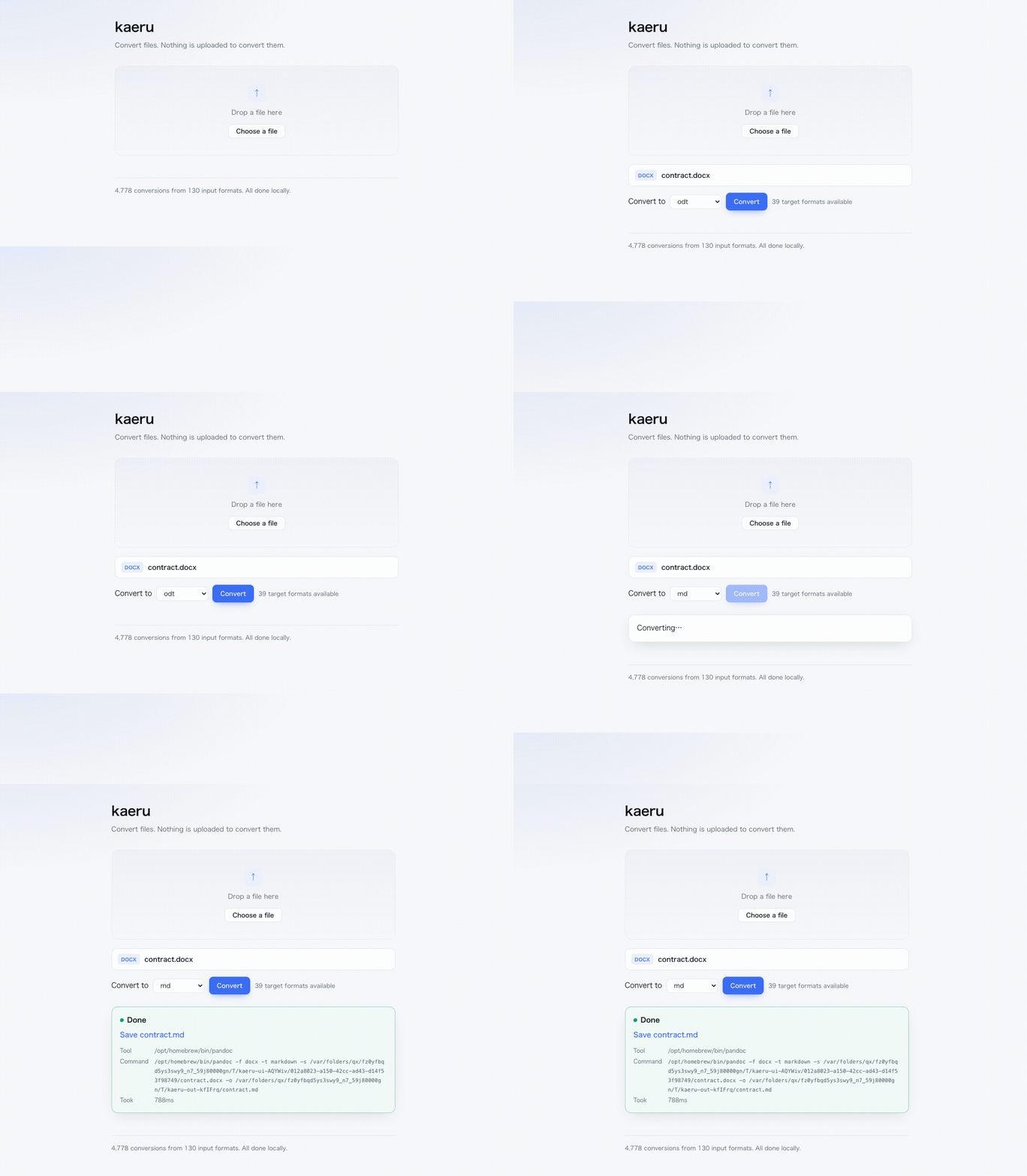
A contract that cannot leave the building, turned into something an agent can read. Note the Tool and Command lines: that is the binary on your machine, and the exact command it ran. Nothing to take on faith.
npx @noguchilin/kaeru --doctor # what can this machine convert?Verified, not claimed
Every conversion listed below was actually run, one by one, on real machines — and the output was re-opened with a second tool to prove it isn't empty. The test suite ships with the code, so you can re-run the count yourself.
| OS | Conversions offered | Actually passed | Tools installed | |---|---|---|---| | macOS 26 | 4,779 | 4,753 / 4,753 | all | | Windows 11 | 4,062 | 3,708 / 3,952 | ImageMagick, pandoc | | Debian (Linux) | 3,426 | 3,218 / 3,329 | ImageMagick, pandoc |
The macOS row was re-run on 2026-08-25. The Windows and Debian rows are from
2026-08-18 on real machines that did not have poppler installed, so they predate
pdf>txt — install poppler there and each gains one more.
npm test        # re-run every combination on your machine
npm run list    # print the conversion table (this is what the numbers count)
Numbers differ per machine on purpose — see below.
The table adapts to your machine
kaeru doesn't bundle converters. It finds the ones you already have — and asks each one what its version actually supports. A conversion that can't work is never offered.
$ npx @noguchilin/kaeru --doctor
This machine can do: 4,062 conversions

Tools:
  ✓ magick      C:\Program Files\ImageMagick-7.1.2-Q16-HDRI\magick.EXE
  ✗ ffmpeg      not found
  ...

Install these to unlock more:
  ffmpeg      +468 conversions   winget install Gyan.FFmpeg
Nothing installed? Nothing breaks — you get 0 conversions and a list of one-line installs.
Three doors, one engine
| Door | For | Start it |
|---|---|---|
| Command line | you, right now | npx @noguchilin/kaeru photo.png --to jpg |
| MCP server | your AI agents | add one line to .mcp.json |
| Local web page | you, with a file picker | npm run ui → http://127.0.0.1:19921 |
All three call the same code, so an agent and a human can never disagree about what's possible.
An option that would do nothing is refused rather than ignored — --max on docx>pdf comes
back with what that conversion does accept — and the web page only shows a field once the
engine says the chosen target accepts it.
For agents (MCP)
{ "mcpServers": { "kaeru": { "command": "npx", "args": ["-y", "@noguchilin/kaeru"] } } }One tool, convert. Ask for something impossible and it replies with what is possible
from that input — or which tool to install.
For humans, from the shell
npx @noguchilin/kaeru photo.png --to jpg
npx @noguchilin/kaeru report.pdf --to pdf --output smaller.pdf   # same format = compress
npx @noguchilin/kaeru a.pdf b.pdf --to pdf --output merged.pdf   # PDFs merge
npx @noguchilin/kaeru contract.pdf --to txt                      # text out of a PDF
npx @noguchilin/kaeru a.png b.png --to png --output tall.png     # images stack
npx @noguchilin/kaeru a.png b.png c.png d.png --to png --columns 2 --output grid.png
npx @noguchilin/kaeru shot.png --to png --max 800 --output small.png  # longest side ≤ 800
It prints the path it wrote and exits. Run it with no arguments and it becomes the MCP server instead — that is how your agent starts it.
For humans, from a page
npm run ui opens a single page on 127.0.0.1 only. Drop a file, pick a target, save the
result. It does not stay running — Ctrl-C and it's gone. No Docker, no daemon, no account.
What it converts
Images · video · audio · documents (md, html, tex, docx, odt, epub, and ~30 more) · Office and spreadsheets · PDF · 3D models · Parquet.
PDFs can be merged, split, compressed, rasterised, and read as text. Images, audio and
PDFs can be shrunk without changing format. --max N bounds an image's longest side —
it only ever shrinks, so a small image is returned untouched rather than blown up. Pass
several images and they are joined into one (--columns sets how many per row). Pass a
URL to pull from video sites.
A scanned PDF has no text to give. --to txt on one does not hand you an empty file
and call it a conversion — it tells you the pages are images, and points you at --to png.
That is the same rule as the headline: a result you can't verify isn't offered.
CJK encodings are detected automatically (a Shift_JIS CSV from Excel just works).
Every result comes with its receipt
Converted: csv>xlsx
Output:    /path/to/data.xlsx
Tool:      soffice
Command:   soffice --headless --convert-to xlsx --outdir /tmp/... /path/to/data.csv
Took:      3,512 ms
You can always see which program touched your file, and repeat it by hand.
Install the converters
kaeru calls these; install the ones you need (or none, and add them later).
brew install imagemagick ffmpeg pandoc weasyprint qpdf poppler img2pdf yt-dlp assimp duckdb ghostscript
brew install --cask libreoffice
winget install ImageMagick.ImageMagick Gyan.FFmpeg JohnMacFarlane.Pandoc QPDF.QPDF `
oschwartz10612.Poppler yt-dlp.yt-dlp Assimp.Assimp DuckDB.cli `
ArtifexSoftware.GhostScript TheDocumentFoundation.LibreOffice
pip install weasyprint img2pdfsudo apt install imagemagick ffmpeg pandoc qpdf poppler-utils img2pdf yt-dlp assimp-utils ghostscript libreoffice
pip install weasyprintPrivacy and security
- Files are processed by local programs. kaeru makes no network requests (except when you explicitly pass a video-site URL — that path downloads, by definition).
- What kaeru does not control: what you do with the result. If your agent then reads the
converted file, its contents go to whatever model provider that agent uses. kaeru governs the
conversion, not the reading. For a file that must never reach a model, convert it and open it
yourself in the local web page (
npm run ui) instead of handing it to an agent. - The web page binds to
127.0.0.1, rejects non-localhostHostheaders, and hands results back by an unguessable id. - Existing files are never overwritten unless you ask for it.
- No telemetry. Ever. Not anonymous, not opt-out — none.
Three independent models reviewed the source on 2026-08-18; every exploitable finding was fixed the same day. One known risk is not fixed: converting untrusted HTML or SVG can embed local files in the output. Details, severities and mitigations: SECURITY.md.
Tests
| Command | What it checks |
|---|---|
| npm test | every listed conversion actually runs, output re-opens |
| node test/quality.mjs | images round-trip pixel-for-pixel; text survives |
| node test/fidelity.mjs | documents keep headings, tables, lists, emphasis |
| node test/languages.mjs | 12 writing systems keep their characters |
| node test/platforms.mjs | tool lookup is correct for macOS / Windows / Linux |
Known gaps are written down, not hidden — see docs/.
Support
Issues are welcome. This is a one-person project: no response time is promised. For a bundled installer or a support contract, see the bottom of this file.
License
MIT. The converters it calls have their own licenses.
Need this installed for a team, or with a support contract? Open an issue titled
commercial and I'll get back to you.