
@notbb/eslint-config-lint
v1.0.38
Published
麦氏eslint校验规则


Readme
@notbb/eslint-config-notbbLint
简介
@notbb/eslint-config-lint 集成了 Eslint+Prettier 配置,通过 Eslint 进行代码质量的校验,Prettier 进行代码样式的格式化。目前支持普通 js 项目、React、vue、React+Typescript、Vue+Typescript、Taro 项目 同时也添加了stylelint校验,配置方法如下
用法
安装依赖(非 ts 项目无需安装 typescript)
npm install eslint typescript prettier yorkie @notbb/eslint-config-lint -D

或者:

yarn add eslint typescript prettier yorkie @notbb/eslint-config-lint -D
.eslintrc.js 配置
1、React 项目(javascript)
module.exports = {
  extends: [require.resolve('@notbb/eslint-config-lint/react')],
  rules: {},
};
2、React+Typescript 项目
module.exports = {
  extends: [require.resolve('@notbb/eslint-config-lint/typescript/react')],
  rules: {},
};
3、Vue 项目(javascript)
module.exports = {
  extends: [require.resolve('@notbb/eslint-config-lint/vue')],
  rules: {},
};
4、Vue+Typescript 项目
module.exports = {
  extends: [require.resolve('@notbb/eslint-config-lint/typescript/vue')],
  rules: {},
};
5、一般项目(javascript)
module.exports = {
  extends: [require.resolve('@notbb/eslint-config-lint')],
  rules: {},
};
6、Taro 项目(React)
// 使用Typescript
module.exports = {
  extends: [require.resolve('@notbb/eslint-config-lint/typescript/react')],
  rules: {},
};

// 不使用Typescript
module.exports = {
  extends: [require.resolve('@notbb/eslint-config-lint/react')],
  rules: {},
};
7、Taro 项目(Vue)
// 使用Typescript
module.exports = {
  extends: [require.resolve('@notbb/eslint-config-lint/typescript/vue')],
  rules: {},
};

// 不使用Typescript
module.exports = {
  extends: [require.resolve('@notbb/eslint-config-lint/vue')],
  rules: {},
};
配置stylelint校验
.eslintrc.js 配置
module.exports = {
  "extends": [
    "@notbb/eslint-config-lint/stylelint"
  ],
};

若使用微信开发者工具进行开发,需安装 Eslint、Prettier 插件(vscode),可将 vscode 中的插件复制过来使用,插件[安装教程](https://developers.weixin.qq.com/miniprogram/dev/devtools/editorextensions.html)

> 注意:微信开发者工具目前可支持大部分 vscode 插件,但有一些版本还不支持。Eslint 插件最新版本不支持,建议使用 2.0.4 版本

### 集成 vscode(两种配置方法,任选其一)

1.在项目中添加.vscode/settings.json 文件,配置如下:(推荐使用)
{ "editor.codeActionsOnSave": { "source.fixAll.eslint": true, "source.fixAll.stylelint": true }, "eslint.validate": [ "javascript", "react", "typescript", "typescriptreact", "vue" ], "editor.formatOnSave": true, "[typescriptreact]": { "editor.defaultFormatter": null }, "[javascript]": { "editor.defaultFormatter": null }, "[typescript]": { "editor.defaultFormatter": null }, "[javascriptreact]": { "editor.defaultFormatter": null }, "[vue]": { "editor.defaultFormatter": null }, "[json]": { "editor.defaultFormatter": "esbenp.prettier-vscode" }, "[less]": { "editor.defaultFormatter": "esbenp.prettier-vscode" }, "[scss]": { "editor.defaultFormatter": "esbenp.prettier-vscode" }, "[css]": { "editor.defaultFormatter": "esbenp.prettier-vscode" }, "[jsonc]": { "editor.defaultFormatter": "esbenp.prettier-vscode" }, "[md]": { "editor.defaultFormatter": "esbenp.prettier-vscode" }, "stylelint.enable": true, "stylelint.syntax": "less", "stylelint.validate": ["css", "less", "scss"], "css.validate": false, "less.validate": false, "scss.validate": false }
2.vscode -> 设置 -> settings.json 中配置(配置同上)

### 提交时执行校验
npm i lint-staged husky -D
React 项目,在 package.json 中配置:
"scripts": { "lint": "eslint 'src//*.{js,jsx,tsx,ts}' --cache", "lint:fix": "eslint 'src//.{js,jsx,tsx,ts}' --cache --fix", "lint:css": "stylelint src/.{html,vue,css,sass,scss} --fix" "prettier": "prettier --write 'src//*.{less,scss,css,md,json}'", }, "gitHooks": { "pre-commit": "tsc --noEmit && lint-staged" // ts项目可通过tsc --noEmit校验类错误 // "pre-commit": "lint-staged" 非ts项目 }, "lint-staged": { "src//.{js,jsx,ts,tsx}": [ "eslint --cache --fix", "git add ." ], ".{less,scss,css,md,json}": [ "npm run prettier", "git add ." ] },
Vue 项目配置:
"scripts": { "lint": "eslint 'src//*.{js,vue}' --cache", "lint:fix": "eslint 'src//.{js,vue}' --cache --fix", "lint:css": "stylelint src/.{html,vue,css,sass,scss} --fix" "prettier": "prettier --write 'src//*.{less,scss,css,md,json}'", }, "gitHooks": { "pre-commit": "tsc --noEmit && lint-staged" // ts项目可通过tsc --noEmit校验类错误 // "pre-commit": "lint-staged" 非ts项目 }, "lint-staged": { "src//.{js,vue}": [ "eslint --cache --fix", "git add ." ], ".{less,scss,css,md,json}": [ "npm run prettier", "git add ." ] },
## 常见问题
### 1.如何确定 Eslint 是否配置成功?
vscode 编辑器右下角有一个提示,显示对号表示配置成功:
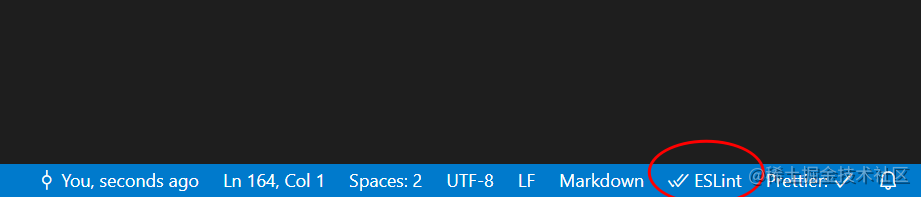
### 2.windows 系统下,提示 CRLF 错误:
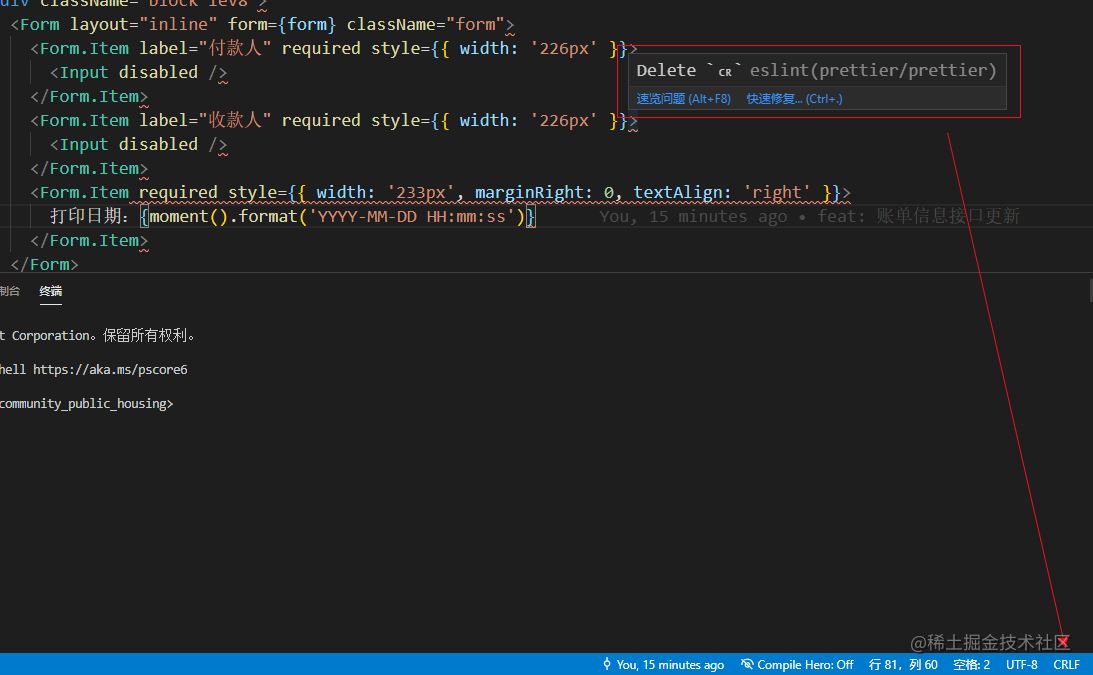
解决方案参考:
https://segmentfault.com/q/1010000011799577
### 3.提交失败
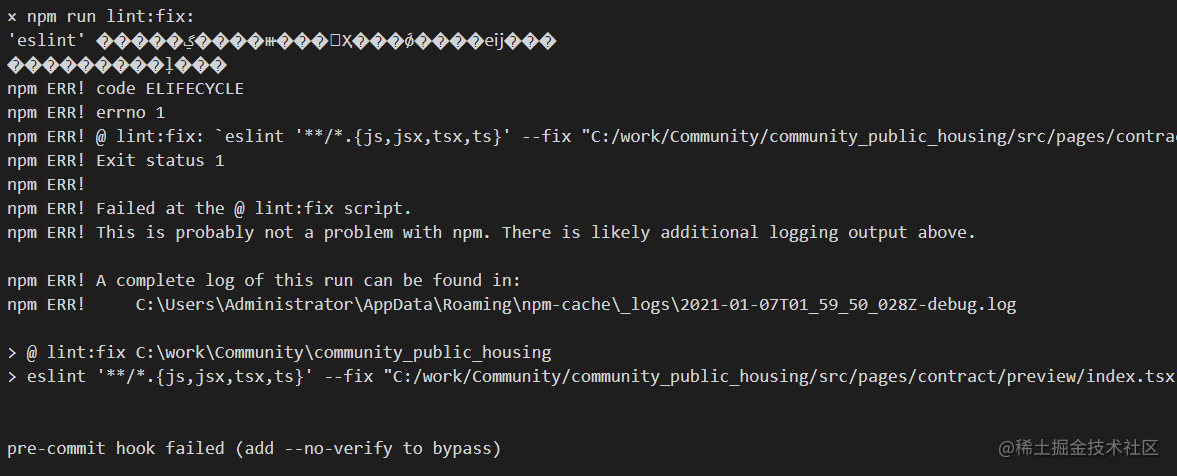
原因:prettier 版本问题:2.0 以下版本需加引号,2.0 以上版本不需要加引号
解决方案:
1、2.0以下版本 "scripts":{ "lint": "eslint 'src//*.{js,jsx,tsx,ts}'", "lint:fix": "eslint 'src//.{js,jsx,tsx,ts}' --fix", "prettier": "prettier --write '**/.{less,css,md,json}'", } 2、2.0以上版本 "scripts":{ "lint": "eslint src//*.{js,jsx,tsx,ts}", "lint:fix": "eslint src//.{js,jsx,tsx,ts} --fix", "prettier": "prettier --write **/.{less,css,md,json}", }
### 4.提交代码时 gitHooks 不生效,没有执行 eslint 校验

原因:git hooks 配置信息出错

解决:把 .git/hooks 文件删除,重新安装下 yorkie 就好了,在 npm install yorkie 时会自动初始化 .git/hooks 配置信息