
@notrac/mage
v1.0.3
Published
[MAGE](https://bsiscoe.github.io/MAGE) is a AI powered music visualizer that utilizes heavy randomization of Shaderpark shaders to create unique, audio-reactive environments. Perfect for musicians looking to produce captivating music videos, artists tryin
Downloads
29


Readme
MAGE: Musical Autonomous Generated Environments
MAGE is a AI powered music visualizer that utilizes heavy randomization of Shaderpark shaders to create unique, audio-reactive environments. Perfect for musicians looking to produce captivating music videos, artists trying to create mesmerizing visual effects, or developers exploring generative AI and audio reactive environments.
Key Features
- Randomly Generated Environments: Experience a new visual every time.
- Music Reactivity: Dynamic visuals that sync with your custom audio.
- Scene Management: Save and share your favorite scenes.
- Preset Selection: Choose from curated visual styles with featured music or save your own custom scenes.
- Song Upload: Visualize your own custom tracks with easy upload.
- Manual Settings: Fine-tune settings to match your vision or randomize settings to look for inspiration.
Target Audience
- Musicians: MAGE is primarily targeted to musicians, and allows you to create stunning visuals for your music at the click of a button, or tweak parameters to handcraft your own scenes.
- Artists: The generative and artistic aspects of MAGE will continue to improve (better generation logic, scene transitions, and video editing/rendering features are planned for the future)
- Developers: The code for MAGE is completely open source and I encourage anyone with the creativity and know how to iterate upon its generation logic or more with their own ideas.
Getting Started
Using the Live Site
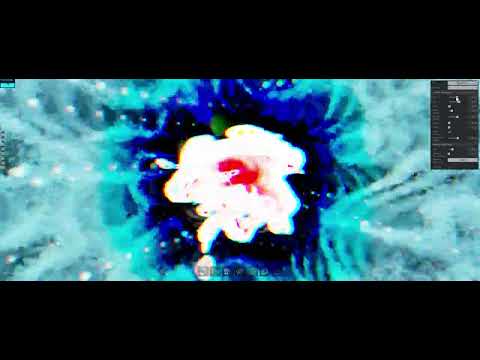
MAGE is live on GitHub Pages and runs as a static HTML site. Its use is quite simple and I have provided a video guide to explain its key features and core concept in more detail.
Using as an npm Package
To use MAGE as a library in your own project:
npm install @notrac/mageQuick Start
import { initMAGE } from '@notrac/mage';

const engine = initMAGE({
	canvas: document.getElementById('myCanvas'),
	withControls: { active: true, integrated: false },
	autoStart: true,
	log: false
});

engine.start();
engine.fx.setBloomEnabled(true);
Public API
The generated declaration file is dist/mage-engine.d.ts. The public API below matches that surface.
initMAGE(options?)
Initializes and returns a MAGEEngineAPI instance.
`previewMAGE(canvas, MAGEPreset, frameCount)
Initializes a non-interactable MAGE instance that loads the given preset and shows audio response without input.
Options:
canvas?: HTMLCanvasElement- Target canvas element for rendering.withControls?: { active?: boolean; integrated?: boolean }- Enables controls. Defaults to{ active: true, integrated: false }.autoStart?: boolean- Starts rendering immediately. Defaults tofalse.log?: boolean- Enables console logging. Defaults tofalse.
Engine API
MAGEEngineAPI exposes the runtime engine, audio, preset, capture, and integration helpers.
Lifecycle and host integration
start()dispose()isRunning()refreshFx()initControls(inputSource?)showViewportMessage(message, durationMs?)setRandomSkybox()showIntegratedControls()hideIntegratedControls()openPresetDock()getEngineFields()
Audio
loadAudio(filePath: string)isAudioLoaded()play()pause()seek(time: number)scrubAudio(time: number)getAudioTime()getAudioDuration()
Presets, capture, and canvas
loadPreset(preset: MAGEPreset)toPreset()captureFramePreview(options?)captureThumbnail(preset, options?)swapCanvas(canvas: HTMLCanvasElement)toggleFullscreen()
Input routing
setInputState(inputState?)attachInputSource(inputSource?)detachInputSource()
Example Usage
import { initMAGE } from '@notrac/mage';

const engine = initMAGE({
	canvas: document.getElementById('visualizer'),
	withControls: { active: true, integrated: false },
	autoStart: true,
});

await engine.loadAudio('/path/to/music.mp3');
engine.play();
engine.fx.setBloomEnabled(true);

engine.loadPreset({
	// preset configuration object
});

const preset = engine.toPreset();
const thumbnail = await engine.captureThumbnail(preset, {
	width: 224,
	height: 224,
	type: 'image/png',
	quality: 0.84,
	settleFrames: 2,
});
const previewCanvas = ...
const magePreset = ...
const previewEngine = previewMAGE(previewCanvas, magePreset, 120) // renders the preview for 120 frames before looping
Effect API
engine.fx exposes the post-processing controls.
Bloom
getBloomEnabled()/setBloomEnabled(value)getBloomStrength()/setBloomStrength(value)getBloomRadius()/setBloomRadius(value)getBloomThreshold()/setBloomThreshold(value)
RGB Shift
getRGBShiftEnabled()/setRGBShiftEnabled(value)getRGBShiftAmount()/setRGBShiftAmount(value)getRGBShiftAngle()/setRGBShiftAngle(value)
After Image
getAfterImageEnabled()/setAfterImageEnabled(value)getAfterImageDamp()/setAfterImageDamp(value)
Colorify
getColorifyEnabled()/setColorifyEnabled(value)getColorifyColor()/setColorifyColor(hex)
Kaleid
getKaleidEnabled()/setKaleidEnabled(value)getKaleidSides()/setKaleidSides(value)getKaleidAngle()/setKaleidAngle(value)
Tone Mapping
getToneMappingMethod()/setToneMappingMethod(method)getToneMappingExposure()/setToneMappingExposure(value)
Pass Toggles
getGlitchEnabled()/setGlitchEnabled(value)getDotEnabled()/setDotEnabled(value)getTechnicolorEnabled()/setTechnicolorEnabled(value)getLuminosityEnabled()/setLuminosityEnabled(value)getSobelEnabled()/setSobelEnabled(value)getHalftoneEnabled()/setHalftoneEnabled(value)getGammaCorrectionEnabled()/setGammaCorrectionEnabled(value)getCopyShaderEnabled()/setCopyShaderEnabled(value)getBleachBypassEnabled()/setBleachBypassEnabled(value)getToonEnabled()/setToonEnabled(value)getOutputPassEnabled()/setOutputPassEnabled(value)
Pass Ordering and helpers
getPassOrder()getDefaultPassOrder()setPassOrder(order)movePass(passId, direction)randomizeSettings()applyPostProcessing(scene, renderer, camera, composer)toggleUI()
Performance
Some of the shaders generated by MAGE can be VERY demanding. There is much improvments to be made in future updates, so the requirements may or may not be lowered in the future.
Technologies Used
MAGE is primarily made in Javascript and leverages the following libraries:
- THREE.js for scene rendering and effects.
- ShaderPark for generating shader effects.
- Tweakpane for the settings menu.
Vanilla HTML, CSS, and JavaScript are used for the frontend.
Embedded Presets And Skyboxes
Preset JSON and skybox textures are embedded in JavaScript automatically during vite build.
Preset embedding source order per resources/presetX/:
preset.v2.json(preferred)preset.json(fallback)
To manually regenerate embedded assets:
npm run generate:embedded-presets
npm run generate:embedded-skyboxes
These scripts update:
js/presets.jsjs/embedded-skyboxes.js
How to add more skyboxes later:
- Add a new folder like
resources/preset11/. - Add
preset.v2.json(orpreset.json) in that folder. - Include all six faces (
sky_left,sky_right,sky_up,sky_down,sky_front,sky_back) with supported extensions. - Run
npx vite buildand the embed file is regenerated automatically before bundling.
Runtime loading behavior:
- Presets: in dev mode (
vite), controls try real resource JSON first, then embedded fallback. - Presets: in build/prod, controls use embedded presets first, then resource-path fallback.
- Skyboxes:
MAGEEngineuses embedded skybox data first, then falls back to file-path loading fromresources/presetX/.
Contributing
Contributions are welcome! Feel free to add changes, suggest new features, or improve existing ones. MAGE is fully open-source, and your creativity is encouraged. Also if the generator spits out a really cool visualizer feel free to send it to me and I can make it a preset!
Current Bugs
There are a few issues with MAGE:
- Animations glitch out if the page is open for too long. This is fixed with a simple refresh and I expect this to be fixed within the next update.
- There is a problem with the kaleidoscope shader effect that is included with the THREE.js library. It does not have a uniform to update screen resolution and stretches if the window is not square. I do not believe this would be fixable without rewriting that effect.
- The Camera Orientation setting changes the camera's up vector, which sometimes works but is incompatible with THREE.js default Orbit Controls. Future versions should implement Trackball or Arcball controls instead, and do away with the "camera orientation" setting entirely
- Some presets must be clicked at least once to display proper animations (Mod 3 not applying properly in tweakpane) Please report any other issues you find as I have tried to iron out as many bugs as I could before release!
Future Goals
There is a suite of feautures that have yet to properly be implemented:
- Extended Audio Controls: Currently you can only pause and play the audio. I would like to add toggleable mouse controls using the middle mouse so that volume and playback time can be controlled. The GUI and logic for this is mostly implemented already but needs to be finalized.
- Bundled Audio: Requires the encoding of mp3 audio into a Base64 string, should be possible to implement within the current system in theory.
- Custom Skybox Textures: Bundling custom skyboxes as a Base64 would allow for much more customization as well and could function well with current scene and preset implementation.
- Custom Icons: At some point I want a script to create custom icons for user generated presets, which can make a gradient that somewhat resembles the look of the scene. I tried to emulate this (poorly) with the already existing presets.
- Web Based Presets: Presets will eventually be stored in a web database so they can be used by anyone (similar to FUZZYW's dddance.party.
Acknowledgments
Special thanks to:
- Toren Blankensmith: Creator of ShaderPark, the core technology that made MAGE possible. Shaderpark is awesome and I really recommend everyone who has any interest in shaders to check it out.
- Mrdoob: Creator of THREE.js and any other developers of THREE.js.
- FUZZYW: For inspiring the UI design and the idea of scene presets.
License
This project is fully open-source. Edit, change, and share as you see fit.
Stay tuned for updates, including even more video demos showcasing MAGE in action!