
@novacraft-engineering/react-native-live-activity
v0.1.0
Published
Dead-simple live-updating notifications for React Native — iOS Live Activities (ActivityKit + Dynamic Island) and Android ongoing progress notifications, one API.

Maintainers
 jaybee4real
Readme
@novacraft-engineering/react-native-live-activity
Live-updating notifications for React Native, one tiny API. On iOS it drives a real Live Activity (ActivityKit + Dynamic Island); on Android it posts an ongoing progress notification that updates in place. Same three calls on both.
import {LiveActivity} from '@novacraft-engineering/react-native-live-activity';

const order = await LiveActivity.start({
  title: 'Order on the way',
  stages: ['Confirmed', 'Preparing', 'Out for delivery', 'Delivered'],
  stage: 1,
  status: 'Arriving in ~20 min',
});

await order.update({stage: 2, status: 'Rider is nearby'});
await order.end({title: 'Delivered', body: 'Enjoy! 🎉'});
That's the whole surface. Everything below is optional.
Gallery
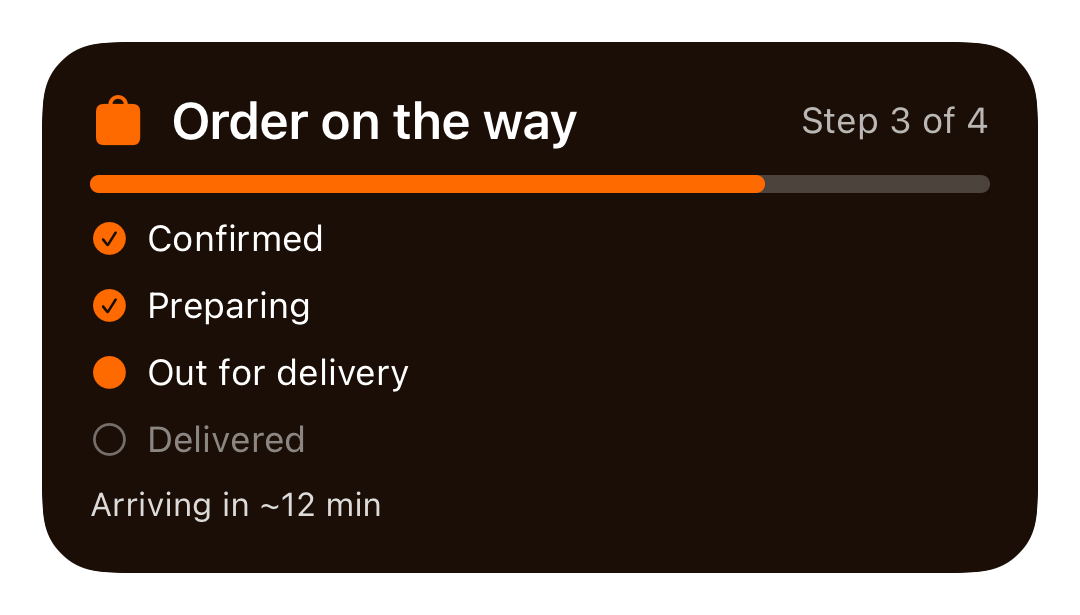
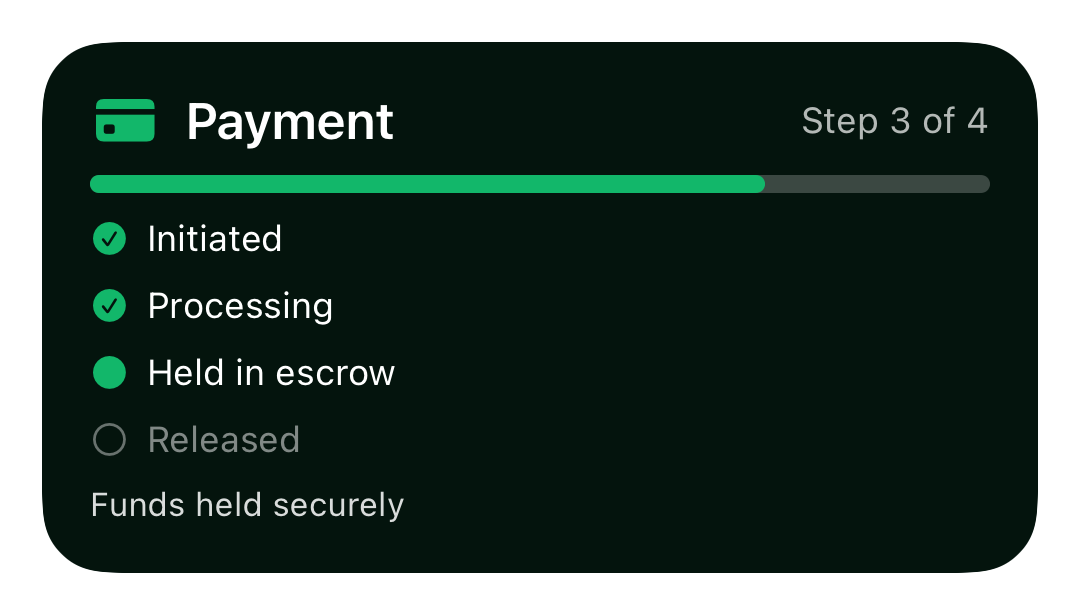
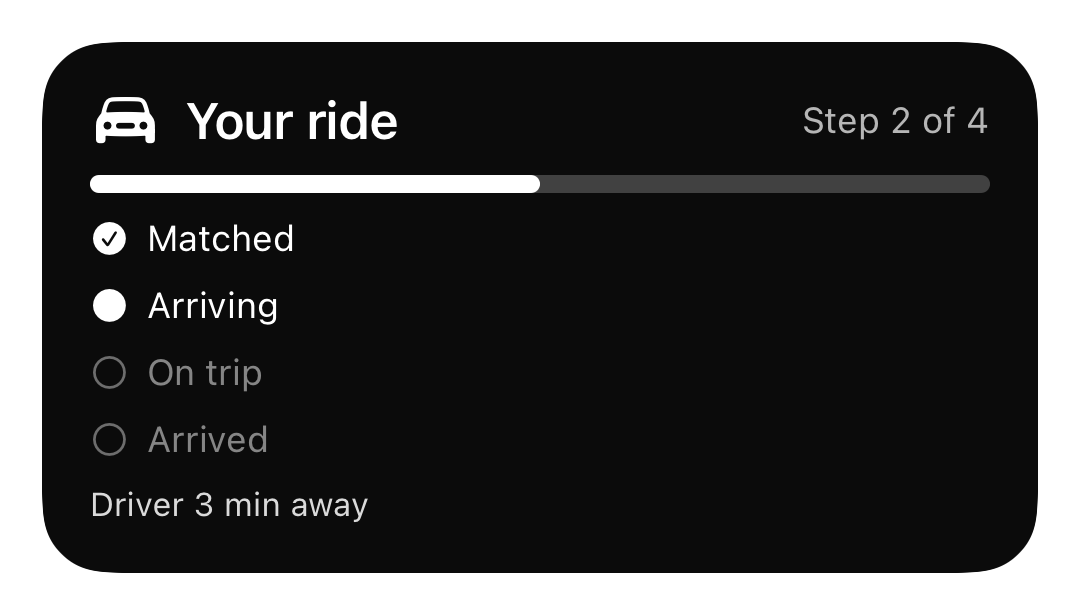
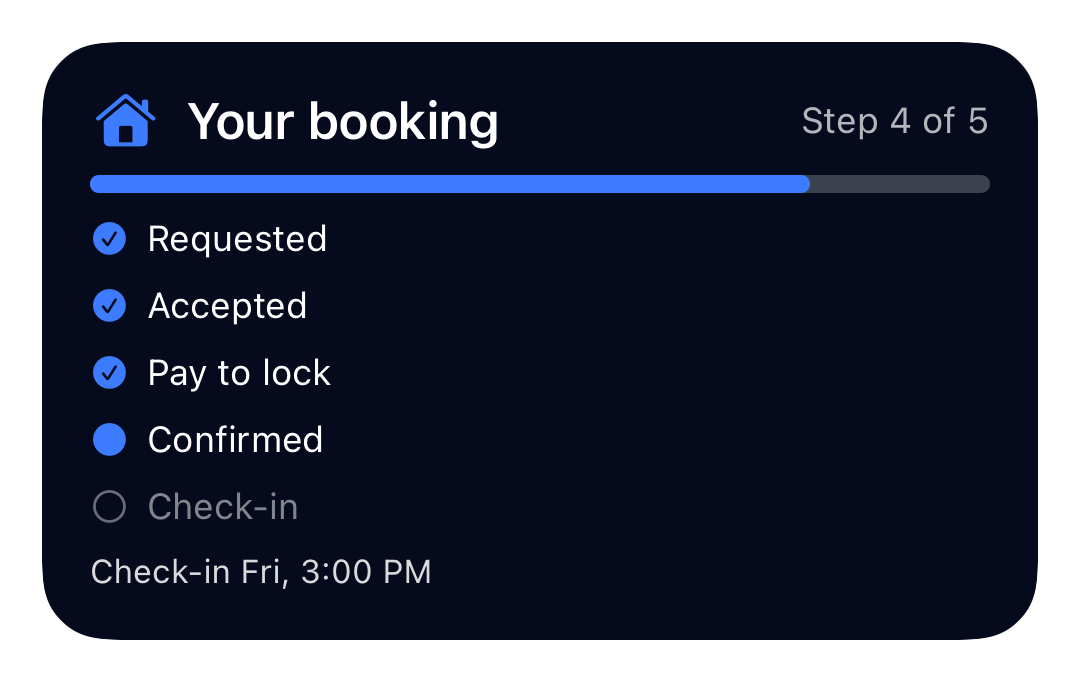
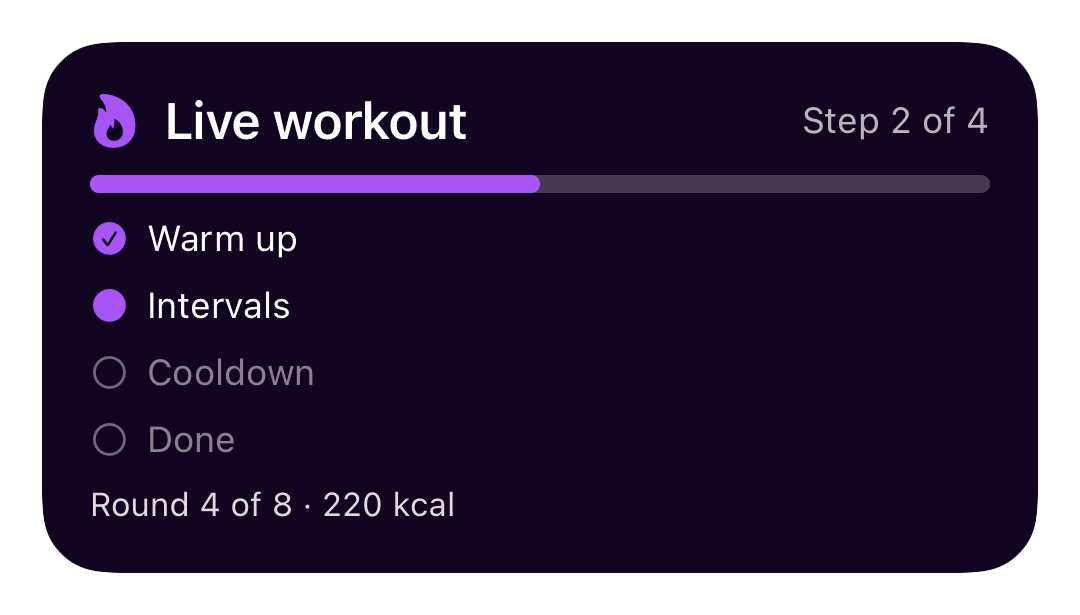
One component, themed from JS — the same lock-screen Live Activity, branded per app. Rendered on an iPhone Air simulator.
| Delivery | Payments | Ride-hailing |
|:--------:|:--------:|:------------:|
|  |
|  |
|  |
|
|
| #FF6A00 · bag.fill | #12B76A · creditcard.fill | #FFFFFF · car.fill |
| Booking | Fitness |
|:-------:|:-------:|
|  |
|  |
|
|
| #3D7BFF · house.fill | #A855F7 · flame.fill |
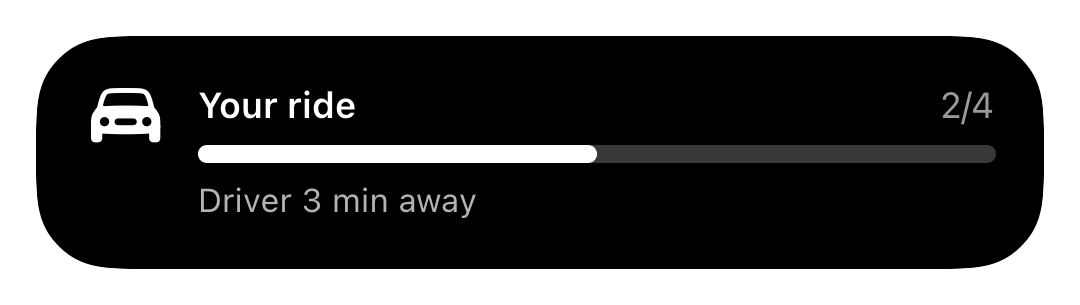
Dynamic Island — expanded and compact:
| Expanded | Compact |
|:--------:|:-------:|
|  |
|  |
|
On Android the same call renders an ongoing progress notification with the stage timeline and accent color.
Contents
- Gallery
- Install
- Android setup — 0 native steps
- iOS setup — one-time widget target
- API
- Reusable flows
- Updating from a push / background
- Customization
- Troubleshooting
Install
npm install @novacraft-engineering/react-native-live-activity @notifee/react-native
# or
yarn add @novacraft-engineering/react-native-live-activity @notifee/react-native
@notifee/react-native is a peer dependency (it powers the
Android notification). Then:
cd ios && pod installAndroid setup
None. The channel is created automatically on first use. Optionally set a brand color / icon once at app start:
LiveActivity.configure({color: '#062FA1', smallIcon: 'ic_notification'});iOS setup
Live Activities render in a Widget Extension — Apple requires it to live in your app. This is a one-time, copy-paste setup (~3 minutes).
1. Allow Live Activities
Add to your app's ios/<App>/Info.plist:
<key>NSSupportsLiveActivities</key>
<true/>
2. Add a Widget Extension target
In Xcode: File → New → Target… → Widget Extension. Name it e.g. AppLive.
Uncheck "Include Configuration Intent". Finish. When asked to activate the
scheme, click Activate.
3. Drop in the two template files
This package ships them under node_modules/@novacraft-engineering/react-native-live-activity/template/ios/:
| File | Add to target(s) | Purpose |
|------|------------------|---------|
| LiveActivityAttributes.swift | app + widget (both) | shared data contract — don't rename it |
| LiveActivityWidget.swift | widget only | the UI — yours to theme |
Delete the placeholder .swift Xcode generated in the new target, and drag these
two in. For LiveActivityAttributes.swift, tick both targets in the file
inspector's "Target Membership".
The native bridge references
LiveActivityAttributesby name — keep the type and its fields (title,stageLabels,stageIndex,statusLine) as-is.
4. Build
cd ios && pod installRun the app. Call LiveActivity.start(...) and watch the lock screen / Dynamic
Island. Done.
Requires iOS 16.2+. On older versions calls resolve to no-ops — guard with
await LiveActivity.isSupported()if you want to branch your UI.
API
LiveActivity.start(options) → Promise<handle>
| option | type | default | notes |
|--------|------|---------|-------|
| id | string | 'live' | stable id; reuse to update/end |
| title | string | '' | headline |
| stages | string[] | {key,label}[] | [] | ordered timeline |
| stage | number | 0 | current stage (0-based) |
| status | string | '' | sub-line (ETA, next step…) |
| deadline | Date | number | — | live countdown target |
| android | object | — | Android overrides |
Returns a handle: { id, update(patch), end(final) } — the easiest way to
drive one activity.
handle.update(patch) / LiveActivity.update(id, patch)
Patch any of stage, status, deadline. Re-renders in place (no stacking).
handle.end(final) / LiveActivity.end(id, final)
Ends the activity. Pass {title, body} to leave a final static notification.
LiveActivity.isSupported() → Promise<boolean>
true when it can actually run (iOS 16.2+ with the widget target present, or any
Android).
LiveActivity.configure(globals)
Set app-wide defaults once: channelId, channelName, importance
('min' | 'low' | 'default' | 'high'), color, smallIcon, ongoing.
Reusable flows
Define a timeline once, reuse it with keyed stages:
import {defineFlow} from '@novacraft-engineering/react-native-live-activity';

export const deliveryFlow = defineFlow({
  id: 'delivery',
  title: 'Your delivery',
  stages: [
    {key: 'CONFIRMED', label: 'Confirmed'},
    {key: 'PREPARING', label: 'Preparing'},
    {key: 'EN_ROUTE', label: 'Out for delivery'},
    {key: 'DELIVERED', label: 'Delivered'},
  ],
});

// drive it by key — no index math
await deliveryFlow.start({stageKey: 'PREPARING', status: 'Boxing it up'});
await deliveryFlow.update('delivery', {stageKey: 'EN_ROUTE', status: '2 stops away'});
await deliveryFlow.end('delivery', {title: 'Delivered'});
Updating from a push / background
You don't need the handle — update by id from anywhere (e.g. a Notifee/FCM background handler):
import {LiveActivity} from '@novacraft-engineering/react-native-live-activity';

messaging().setBackgroundMessageHandler(async message => {
  const {id, stage, status} = message.data;
  await LiveActivity.update(id, {stage: Number(stage), status});
});
On iOS the widget already holds the stage labels, so id + stage + status is
enough. On Android, if the app process was cold-started the in-memory state is
gone — pass title and stages again so it can re-render:
await LiveActivity.update(id, {title, stages, stage, status});Customization
Theme it from JS (both platforms)
The fastest way to change how it looks — no Swift, no rebuild:
await LiveActivity.start({
  title: 'Order on the way',
  stages: ['Confirmed', 'Preparing', 'Out for delivery', 'Delivered'],
  theme: {
    accent: '#FF6A00',   // tints the widget (iOS) + notification accent (Android)
    icon: 'bag.fill',    // iOS SF Symbol — https://developer.apple.com/sf-symbols
    background: '#101010' // iOS card background (defaults to near-black; set = accent for a full-color card)
  },
});
| theme field | iOS | Android |
|---------------|-----|---------|
| accent | widget tint + progress + glyph color | notification accent color |
| icon | SF Symbol glyph | — (use android.smallIcon) |
| background | lock-screen background | — |
theme is applied when the activity starts (ActivityKit fixes it for the
activity's life). To restyle mid-flight, end() and start() again. Set it per
call, per flow, or globally with configure({color}).
For layout changes beyond colors/icon (different rows, fonts, a custom Dynamic
Island), edit LiveActivityWidget.swift — it's plain SwiftUI and reads the same
theme fields off context.attributes.
Android
await LiveActivity.start({
  title: 'Payment',
  stages: ['Initiated', 'Processing', 'Held in escrow', 'Released'],
  stage: 1,
  android: {
    channelId: 'payments_live',
    channelName: 'Payment updates',
    importance: 'default', // keep low so it doesn't heads-up each update
    color: '#062FA1',
    smallIcon: 'ic_stat_payment',
    ongoing: true,
  },
});
iOS layout
Colors and the icon come from theme — you
usually won't touch Swift. For structural changes (rows, fonts, a bespoke Dynamic
Island), edit LiveActivityWidget.swift. It's plain SwiftUI reading:
context.attributes.title/.stageLabels— static textcontext.attributes.accentColorHex/.iconSystemName/.backgroundColorHex— the theme from JScontext.state.stageIndex/.statusLine— live values
The default renders a titled header, a progress bar, a ✓/●/○ stage checklist on
the lock screen, and a compact step/total in the Dynamic Island.
Countdown
const payBy = new Date(Date.now() + 15 * 60 * 1000);
await LiveActivity.start({title: 'Reserve', stages: ['Hold', 'Pay', 'Confirmed'], deadline: payBy});
Android shows a live chronometer counting down to the deadline.
Troubleshooting
| Symptom | Fix |
|---------|-----|
| iOS: nothing appears | Confirm the widget target builds, NSSupportsLiveActivities is set, and Settings → your app → Live Activities is on. iOS 16.2+ only. |
| iOS: disabled rejection | The user turned off Live Activities in Settings. |
| iOS: build error cannot find 'LiveActivityAttributes' | The shared file isn't in the app target too — tick both memberships. |
| Android: no notification | Ensure @notifee/react-native is installed and pods/gradle synced. |
| Android: stacks instead of updating | You changed the id between calls — keep it stable. |
How it works
- iOS — a thin ActivityKit bridge (
start/update/end) requests and updates anActivity<LiveActivityAttributes>. The WidgetKit extension rendersActivityConfigurationon the lock screen and Dynamic Island. - Android — one Notifee notification (
ongoing+progress+BIGTEXTtimeline), re-posted with the sameidso it updates in place.
MIT © Novacraft Engineering