
@novodip/expo-router-devtools
v1.2.2
Published
Development tools for Expo Router - visualize routes, save navigation states, and debug your app's navigation flow
Downloads
531

Maintainers
 novodip
Readme
Expo Router DevTools
A lightweight development utility for inspecting and debugging routes in Expo Router applications. Designed to be embedded directly into React Native apps without affecting production builds.
Demo
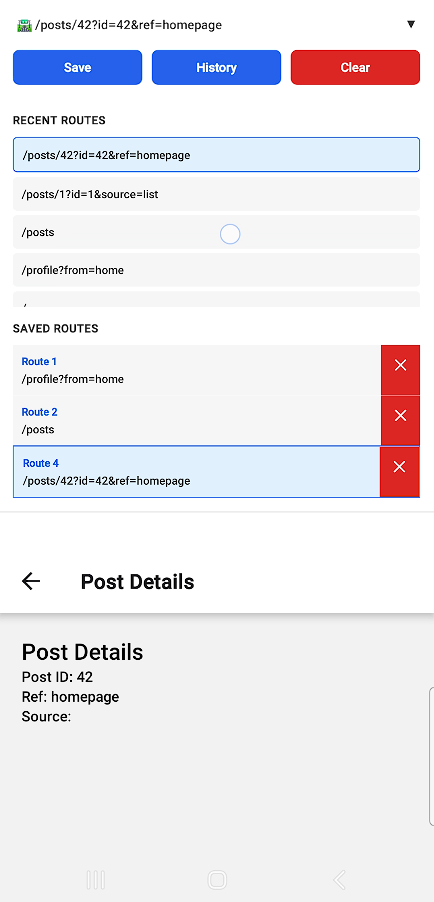
▶ Watch full 34-second demo video https://github.com/user-attachments/assets/71dd6770-7e92-4275-9497-40b3fbbf1cae
Features
- View the current route in real time
- Inspect navigation state changes
- Minimal, non-intrusive UI
- Safe to include during development
- Built with TypeScript and Rollup
Benefits
- Useful for complex projects that has a lot of routing
- Useful for projects with query params in many places
- Keeps track of params and query params and save it in the history
- Automatically hidden in production
- Save whatever routes you want and navigate to it
- Routes are automatically stored in expo secure store
Installation
npm install @novodip/expo-router-devtoolsor
yarn add @novodip/expo-router-devtools
Usage
import { ExpoRouterDevTools } from '@novodip/expo-router-devtools'
import { Stack } from 'expo-router'
import { SafeAreaProvider, SafeAreaView } from 'react-native-safe-area-context'

export default function RootLayout() {
  return (
    <SafeAreaProvider>
      <SafeAreaView style={{ flex: 1 }} edges={['top']}>
        <ExpoRouterDevTools />
        <Stack>
          <Stack.Screen name="index" options={{ title: 'Home' }} />
          <Stack.Screen name="profile" options={{ title: 'Profile' }} />
          <Stack.Screen name="posts/index" options={{ title: 'Posts' }} />
          <Stack.Screen name="posts/[id]" options={{ title: 'Post Details' }} />
        </Stack>
      </SafeAreaView>
    </SafeAreaProvider>
  )
}
API Reference
Props
| Prop | Type | Default | Description |
| ------------------ | ------------------------- | ------------------------- | ------------------------------------ |
| position | 'top' \| 'bottom' | 'top' | Position of the DevTools panel |
| hideInProduction | boolean | true | Hide in production builds |
| storageKeyPrefix | string | 'expo-router-devtools_' | Prefix for SecureStore keys |
| onRouteChange | (route: string) => void | undefined | Callback when route changes |
| enableHistory | boolean | true | Enable route history tracking |
| maxHistory | number | 10 | Maximum history items |
| maxNumOfLines | number | 3 | Max lines for current route display |
| replaceRoute | boolean | false | Whether to replace of push the route |
Example
<ExpoRouterDevTools
  position="bottom"
  maxHistory={20}
  onRouteChange={(route) => console.log(route)}
/>