
@ntruth/dbhub
v0.22.3
Published
Minimal, token-efficient Database MCP Server for PostgreSQL, MySQL, SQL Server, SQLite, MariaDB, Oracle, Dameng (DM8)

Maintainers
 ntruth
Readme
[!NOTE]
由开源数据库 DevSecOps 平台 Bytebase 提供支持。
            +------------------+    +--------------+    +------------------+
            |                  |    |              |    |                  |
            |                  |    |              |    |                  |
            |  Claude Desktop  +--->+              +--->+    PostgreSQL    |
            |                  |    |              |    |                  |
            |  Claude Code     +--->+              +--->+    SQL Server    |
            |                  |    |              |    |                  |
            |  Cursor          +--->+    DBHub     +--->+    SQLite        |
            |                  |    |              |    |                  |
            |  VS Code         +--->+              +--->+    MySQL         |
            |                  |    |              |    |                  |
            |  Copilot CLI     +--->+              +--->+    MariaDB       |
            |                  |    |              |    |                  |
            |                  |    |              |    |    Oracle        |
            |                  |    |              |    |                  |
            |                  |    |              |    |    Dameng (DM8)  |
            |                  |    |              |    |                  |
            +------------------+    +--------------+    +------------------+
                 MCP 客户端            MCP 服务器                数据库
DBHub 是一个零依赖、Token 高效的 MCP 服务器,实现了模型上下文协议 (Model Context Protocol, MCP) 的服务器接口。这个轻量级网关允许兼容 MCP 的客户端连接并探索不同的数据库:
- 本地开发优先:零依赖,仅使用两个 MCP 工具即可实现高 Token 效率,从而最大化上下文窗口
- 多数据库支持:通过单一接口支持 PostgreSQL、MySQL、MariaDB、SQL Server、SQLite、Oracle 和 达梦 (DM8)
- 多重连接:使用 TOML 配置同时连接到多个数据库
- 安全护栏:只读模式、行限制和查询超时功能,防止失控操作
- 安全访问:SSH 隧道和 SSL/TLS 加密
支持的数据库
PostgreSQL、MySQL、SQL Server、MariaDB、SQLite、Oracle 11g+ 和 达梦 (DM8)。
MCP 工具
DBHub 实现了用于数据库操作的 MCP 工具:
- execute_sql:执行支持事务和安全控制的 SQL 查询
- search_objects:通过渐进式揭示搜索和探索数据库中模式、表、列、索引和过程
- Custom Tools (自定义工具):在
dbhub.toml配置文件中定义可重用的参数化 SQL 操作
工作台 (Workbench)
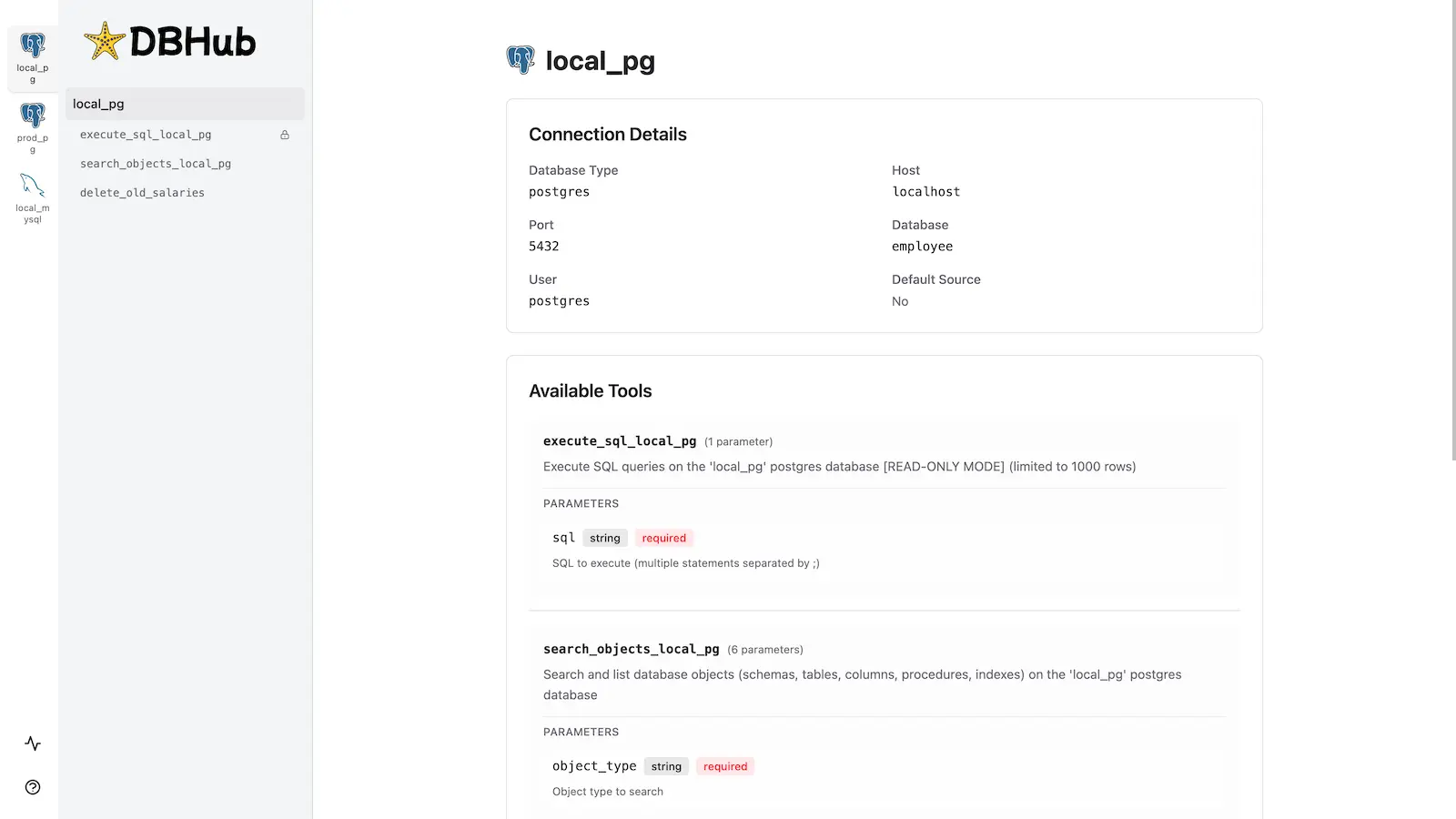
DBHub 包含一个 内置的 Web 界面 来与您的数据库工具进行交互。它提供了一种可视化的方式来执行查询、运行自定义工具以及查看请求跟踪图,而无需 MCP 客户端。
安装
快速开始 (npx / pnpm dlx)
# PostgreSQL
npx @ntruth/dbhub@latest --transport http --port 8080 --dsn "postgres://user:password@localhost:5432/dbname?sslmode=disable"

# MySQL
npx @ntruth/dbhub@latest --transport http --port 8080 --dsn "mysql://user:password@localhost:3306/dbname"

# Oracle
npx @ntruth/dbhub@latest --transport http --port 8080 --dsn "oracle://user:password@localhost:1521/orcl"

# 达梦 (DM8)
npx @ntruth/dbhub@latest --transport http --port 8080 --dsn "dm://user:password@localhost:5236/dbname"

# 演示模式 (SQLite 示例数据 employee)
npx @ntruth/dbhub@latest --transport http --port 8080 --demo
MCP 客户端配置
添加到您的 MCP 客户端配置中 (Claude Desktop, Cursor, VS Code Copilot 等):
PostgreSQL 示例 (stdio 传输方式,推荐本地使用):
{
  "mcpServers": {
    "dbhub": {
      "command": "npx",
      "args": [
        "-y",
        "@ntruth/dbhub@latest",
        "--transport",
        "stdio",
        "--dsn",
        "postgres://user:password@localhost:5432/dbname?sslmode=disable"
      ]
    }
  }
}
MySQL 示例:
{
  "mcpServers": {
    "dbhub": {
      "command": "npx",
      "args": [
        "-y",
        "@ntruth/dbhub@latest",
        "--transport",
        "stdio",
        "--dsn",
        "mysql://user:password@localhost:3306/dbname"
      ]
    }
  }
}
Oracle 示例:
{
  "mcpServers": {
    "dbhub": {
      "command": "npx",
      "args": [
        "-y",
        "@ntruth/dbhub@latest",
        "--transport",
        "stdio",
        "--dsn",
        "oracle://user:password@localhost:1521/orcl?thickMode=true"
      ]
    }
  }
}
Oracle 11g 注意事项: Oracle 11g 及更早版本需要将
node-oracledb运行在 Thick 模式,这可以通过在您的 DSN 后追加?thickMode=true来启用。Thick 模式还需要在您的系统上安装 Oracle Instant Client。如果未配置标准路径,可以通过?libDir=/path/to/instantclient指定其本地目录。如果您使用的是 Oracle 12c+,则可以省略此参数。
达梦 (DM8) 示例:
{
  "mcpServers": {
    "dbhub": {
      "command": "npx",
      "args": [
        "-y",
        "@ntruth/dbhub@latest",
        "--transport",
        "stdio",
        "--dsn",
        "dm://user:password@localhost:5236/dbname"
      ],
      "env": {
        "NODE_OPTIONS": "--openssl-legacy-provider"
      }
    }
  }
}
达梦 (DM8) 注意事项: 由于使用了旧版的 OpenSSL 算法,
dmdb驱动需要设置NODE_OPTIONS=--openssl-legacy-provider环境变量。
Docker
docker run --rm --init \
   --name dbhub \
   --publish 8080:8080 \
   bytebase/dbhub \
   --transport http \
   --port 8080 \
   --dsn "postgres://user:password@localhost:5432/dbname?sslmode=disable"
有关所有可用参数,请参阅 命令行选项 (Command-Line Options)。
多数据库设置
使用 TOML 配置文件同时连接多个数据库。非常适合从单个 DBHub 实例统筹管理生产、预发和开发数据库。
完整的设置说明请参阅 多数据库配置 (Multi-Database Configuration)。
开发
# 安装依赖
pnpm install

# 运行开发环境
pnpm dev

# 构建并运行生产环境
pnpm build && pnpm start --transport stdio --dsn "postgres://user:password@localhost:5432/dbname"
请参阅 测试 (Testing) 和 调试 (Debug)。