
@ntt-data-fe/ui-components
v0.32.0
Published
## Overview
Downloads
13


Readme
@ntt-data-fe/ui-components
Overview
@ntt-data-fe/ui-components is a library of reusable React components designed for modern web applications. It is built with TypeScript, TailwindCSS, and Vite for fast development and efficient bundling. The library includes components for form elements, layout elements, and list elements, along with Storybook integration for showcasing and testing components.
Features
- TypeScript Support: Provides type safety and enhanced developer experience.
- Vite: Leverages Vite for fast development and build processes.
- Storybook Integration: Includes Storybook for isolated component development and documentation.
- Jest Testing: Comprehensive unit testing with Jest and Testing Library.
- TailwindCSS: Built-in support for TailwindCSS for styling.
- Modular Design: Organized folder structure for scalability and maintainability.
- Commit Convention Enforcement: Utilizes Husky, commitlint, and lint-staged to enforce commit message conventions and code quality checks before commits. Configurations ensure commits are formatted and validated against the conventional commit format.
Development
Prerequisites
Ensure you have the following installed:
- Node.js (>= 20.x)
- npm (>= 9.x)
Getting Started
Clone the repository:
git clone <repository-url>
cd accelerator-component-library
Install dependencies:
npm installSetup Husky:
npm run prepareStart the development server:
npm run devOpen http://localhost:5173 in your browser.
Scripts
The following npm scripts are available:
| Script | Description |
| ------------------------- | ------------------------------------------ |
| npm run dev | Starts the development server using Vite. |
| npm run build | Builds the library for production. |
| npm run lint | Runs ESLint for code linting. |
| npm run test | Executes unit tests using Jest. |
| npm run test:watch | Executes continuous unit tests using Jest. |
| npm run coverage | Executes coverage report using Jest. |
| npm run prettier | Formats the codebase with Prettier. |
| npm run storybook | Starts the Storybook server. |
| npm run build-storybook | Builds the Storybook documentation. |
| npm run audit | Executes the vulnerability test. |
| npm run prepare | Prepares the git hooks with Husky. |
Folder Structure
accelerator-component-library
├── .github             # GitHub workflows and configurations
├── .storybook          # Storybook configuration
├── lib                 # Library components
│   ├── components      # Core components
│   │   ├── formElements
│   │   │   ├── Button # Component example
│   │   │   │   ├── configs               # Component configurations
│   │   │   │   │   └── variants.ts
│   │   │   │   ├── stories               # Related Storybook contents
│   │   │   │   │   └── Button.mdx        # Component description
│   │   │   │   │   └── Button.stories.ts # Storibook stories
│   │   │   │   ├── Button.test.tsx       # Unit test
│   │   │   │   ├── button.css            # Style
│   │   │   │   ├── Button.tsx            # Main component
│   │   │   │   └── index.ts              # Component export
│   ├── index.css       # Global styles
│   └── index.ts        # Component exports
├── src                 # Sandbox source code
│   ├── App.tsx
│   ├── assets          # Static assets
│   ├── index.css
│   └── main.tsx
├── test                # Test setup and configurations
│   └── jest.setup.ts
├── stories             # Documentation for Storybook
├── public              # Public assets
├── .commitlintrc.json  # commitlint configuration
├── .lintstagedrc       # lint-stage configuration
├── README.md           # Project documentation
├── tsconfig.json       # TypeScript configuration
├── vite.config.ts      # Vite configuration
└──  tailwind.config.js  # TailwindCSS configuration
Testing
Run unit tests with:
npm run testTest configuration is defined in jest.config.js. Additional setup files are located in the test/jest.setup.ts file.
Storybook
To develop and document components in isolation, use Storybook:
Start Storybook:
npm run storybookOpen http://localhost:6006 in your browser.
Build Storybook documentation:
npm run build-storybook
Styling
This project uses TailwindCSS for styling. Global styles are defined in lib/index.css.
Development Standards
Code Quality
- Code is automatically linted and formatted on save or commit.
- Use ESLint and Prettier to maintain consistency.
Git Hooks
- Husky is configured to run pre-commit checks using Lint-Staged.
Commit Messages
- Follow the Conventional Commits format for commit messages:
feat: A new featurefix: A bug fixchore: Maintenance tasks
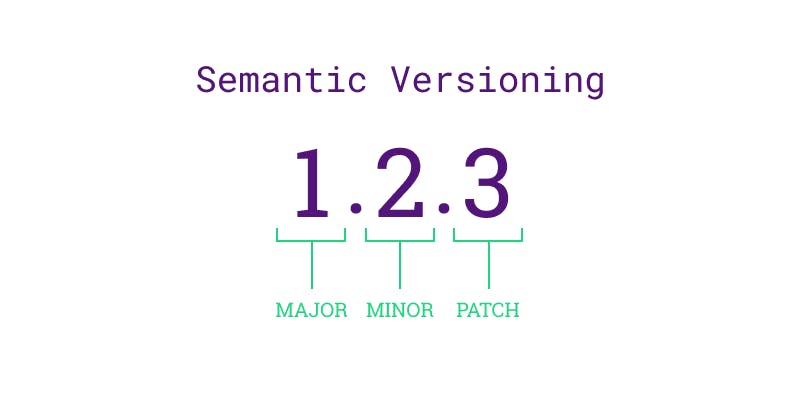
- fix: Will bump the last digit - patch.
- feat - Will bump the middle digit - minor
- feat!: - the
!will bump the first digit by - major
Linting and Formatting
- Run ESLint:
npm run lint - Format code with Prettier:
npm run prettier
Suggested VS Code settings
{
  "folders": [
    {
      "path": "."
    }
  ],
  "settings": {
    "editor.formatOnSave": true, // Automatically formats code on save
    "editor.codeActionsOnSave": {
      "source.fixAll.eslint": "always" // Auto-fix ESLint issues on save
    },
    "editor.defaultFormatter": "esbenp.prettier-vscode", // Set Prettier as the default formatter
    "editor.minimap.enabled": true, // Show a minimap for easy navigation
    "editor.inlineSuggest.enabled": true, // Enable IntelliCode inline suggestions
    "editor.quickSuggestions": {
      "strings": true // Enable quick suggestions in strings
    },
    "editor.tabSize": 2, // Standard for JavaScript/React projects
    "editor.snippetSuggestions": "top", // Show snippets on top of IntelliSense suggestions
    "editor.suggestSelection": "recentlyUsedByPrefix", // Prioritize recent suggestions
    "editor.bracketPairColorization.enabled": true, // Highlight matching brackets
    "files.associations": {
      "*.css": "tailwindcss", // Treat CSS files as Tailwind CSS for enhanced IntelliSense and syntax highlighting
      "*.js": "javascriptreact", // Treat JS files as React for better IntelliSense
      "*.tsx": "typescriptreact"  // Ensure proper handling of TypeScript React files
  }
    },
    "prettier.jsxSingleQuote": true,  // Use single quotes in JSX
    "prettier.trailingComma": "all",  // Add trailing commas
    "prettier.arrowParens": "avoid", // Avoid parentheses for single-parameter arrow functions
    "prettier.singleQuote": true,  // Use single quotes
    "prettier.tabWidth": 2  // Standard for JavaScript/React projects
  }
}
Recommended VS Code Extensions
Code Quality
- ESLint
Ensures code quality and enforces JavaScript/React coding standards. - Prettier - Code Formatter
Automatically formats your code for consistency. - Stylelint
Lints and auto-fixes CSS, Sass, and SCSS files.
Productivity
- GitLens
Enhances Git capabilities directly in VS Code, such as blame annotations and commit history. - Auto Import
Automatically imports React components, hooks, or utilities when typing their name. - Path IntelliSense
Provides auto-completion for file paths in your project.
Styling
- Tailwind CSS IntelliSense
Adds IntelliSense for Tailwind CSS classes and configurations. - CSS Modules
Offers IntelliSense for CSS modules in React projects.
Snippets
- React Snippets
Provides handy code snippets for React, Redux, and GraphQL development.