
@nvq/flowtoken
v2.0.6
Published
Animated React components for streaming text and markdown with GitHub theme syntax highlighting (forked from flowtoken)

Maintainers
 shuncode
Readme
FlowToken 🌊
A smooth Animation Library for LLM Text Streaming
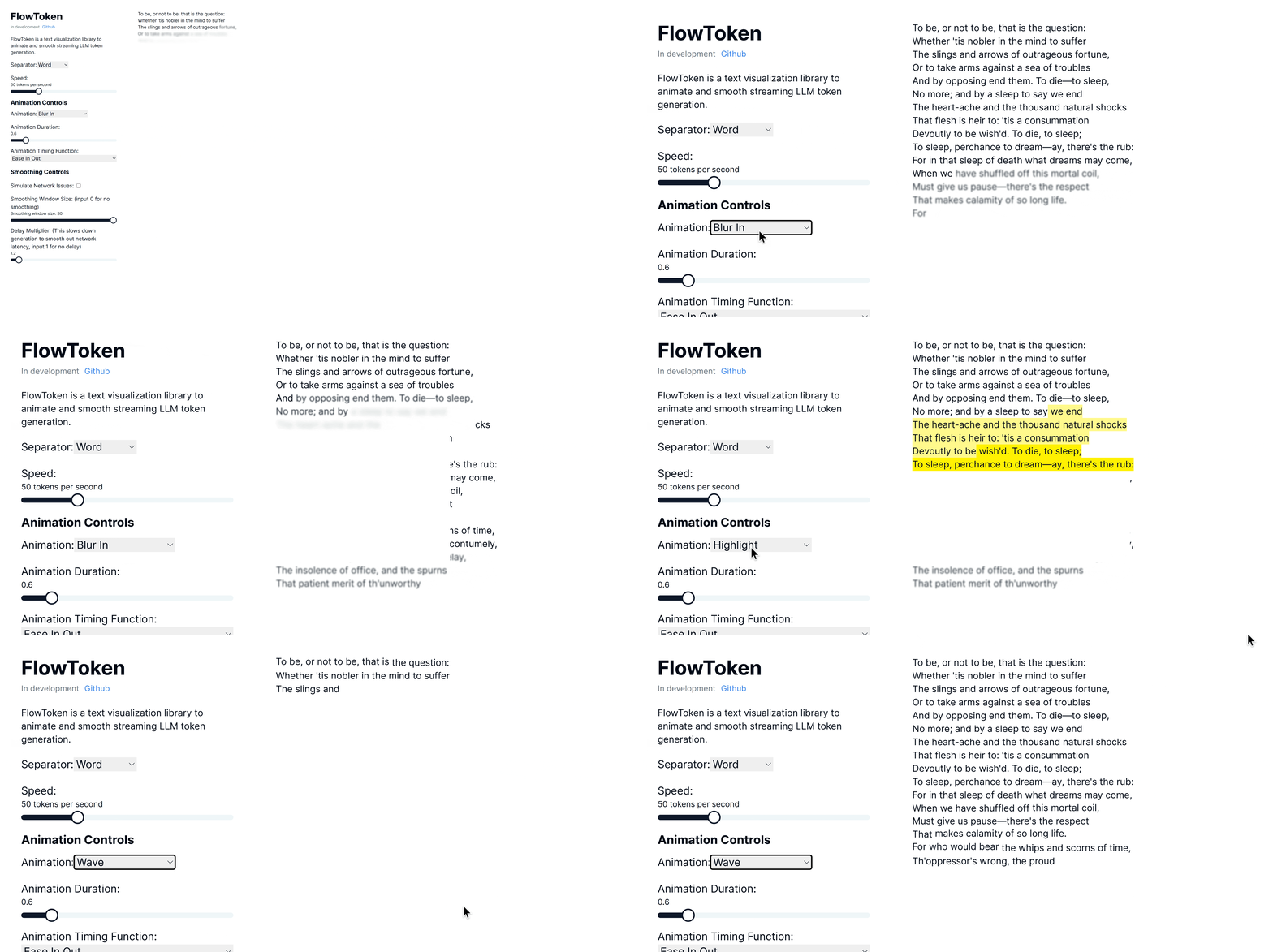
FlowToken is a React component library designed to enhance the visual presentation of text streaming from large language models (LLMs). This library offers a variety of animations that make the text appear smoothly and dynamically, providing an engaging user experience.
Version 2.0 🎉
Major updates in v2.0:
- Tailwind CSS v4 Support: Full compatibility with the latest Tailwind CSS
- Gemini-style Span Removal: Automatic cleanup of animation spans for clean HTML output
- Improved Performance: Direct DOM manipulation without re-rendering
- Modern UI Components: Updated Controls with shadcn-inspired design
- Better Architecture: Self-contained animation completion detection
Demo
Try the demo here: Demo link
Features
FlowToken includes several key features:
- Gemini-style Span Removal: Automatically removes animation spans after completion for clean HTML output
- Zero Re-rendering: Direct DOM manipulation ensures no performance impact during animations
- Tailwind CSS v4 Ready: Full compatibility with the latest Tailwind CSS architecture
- Customizable Animations: A range of animations such as fade, blur-in, drop-in, slide from the left, typewriter effect, word pull-up, flip text, gradual spacing, and more
- Smooth Text Streaming: Options to control the speed and manner of text appearance to handle the variability in text generation speed
- Responsive and Lightweight: Optimized for performance and compatibility across all modern browsers
- TypeScript Support: Full TypeScript definitions included
Installation
For Tailwind CSS v4 (v2.x.x)
npm install @nvq/flowtoken@^2.0.0
# or
pnpm add @nvq/flowtoken@^2.0.0
For Tailwind CSS v3 (v1.x.x - Legacy)
npm install @nvq/flowtoken@^1.4.0
# or
pnpm add @nvq/flowtoken@^1.4.0
Requirements for v2.0:
- Tailwind CSS v4.x
- React 18+
- Node.js 16+
Migration from v1.x to v2.0
Breaking Changes
- Package Name: Updated to scoped package
@nvq/flowtoken - Tailwind CSS v4: Requires Tailwind CSS v4.x
- Default Animation: Changed from
"fadeIn"to"none"for better performance
Migration Steps
# 1. Update Tailwind CSS to v4
npx @tailwindcss/upgrade

# 2. Update FlowToken
npm install @nvq/flowtoken@^2.0.0

# 3. Update imports
# Before: import { AnimatedMarkdown } from 'flowtoken';
# After:  import { AnimatedMarkdown } from '@nvq/flowtoken';
New Features in v2.0
- Automatic Span Cleanup: Animations now automatically remove span elements after completion
- Improved Performance: Zero re-rendering during animation completion
- Better Default Behavior: Default animation is now "none" for better performance
Usage
Markdown Support
To use markdown, import the AnimatedMarkdown component.
import React from "react";

import { AnimatedMarkdown } from "@nvq/flowtoken";
// import the flowtoken css in order to use the animations
import "@nvq/flowtoken/dist/styles.css";

const App = () => {
  return (
    <AnimatedMarkdown
      content="## Hello, world!"
      animation="fadeIn"
      animationDuration="0.5s"
      animationTimingFunction="ease-in-out"
    />
  );
};

export default App;
Real World with Vercel AI SDK
"use client";

import { useChat } from "ai/react";
import { AnimatedMarkdown } from "@nvq/flowtoken";
import "@nvq/flowtoken/dist/styles.css";

export default function Chat() {
  const { messages, input, handleInputChange, handleSubmit } = useChat();

  return (
    <div>
      {messages.map((m) => (
        <div key={m.id}>
          {m.role}:{" "}
          <AnimatedMarkdown
            content={m.content}
            animation="fadeIn"
            animationDuration="0.5s"
            animationTimingFunction="ease-in-out"
          />
        </div>
      ))}

      <form onSubmit={handleSubmit}>
        <label>
          Say something...
          <input value={input} onChange={handleInputChange} />
        </label>
      </form>
    </div>
  );
}
Custom Components
You can use custom components by passing a customComponents prop to the AnimatedMarkdown component where the key is xml tag (ex. MyComponent) to match and the value is the component to render. Then just prompt your LLM to output the custom component syntax and it will be rendered with your custom component.
const customComponents = {
  'customcomponent': ({ animateText, node, children, ...props }: any) => {
    return (
      <>
        {animateText(<div {...props}>{children}</div>)}
      </>
    )
  },
}
...
<AnimatedMarkdown content="Hello, world! <customcomponent>This is a custom component</customcomponent>" customComponents={customComponents} />
Example
This is an example of a custom component.
AnimatedMarkdown Props
- content (string): The text to be displayed.
- sep (
"word"|"char"): How to split and animate the content. Defaults to"word". - animation (string |
null): Name of the CSS animation to apply (e.g.fadeIn,dropIn). Set tonullto disable animations on completed messages. - animationDuration (string): CSS duration of the animation (e.g.
0.6s). - animationTimingFunction (string): CSS timing function for the animation (e.g.
ease,ease-in-out). - codeStyle (object): The syntax-highlighter style object to use for code blocks.
- customComponents (Record<string, React.ComponentType>):
Map of regex patterns or custom tag names to React components. Use this to render arbitrary LLM-emitted syntax. - imgHeight (string): Default height for rendered images (e.g.
200px).
Animations
FlowToken supports various CSS animations:
- fadeIn
- blurIn
- typewriter
- slideInFromLeft
- fadeAndScale
- rotateIn
- bounceIn
- elastic
- highlight
- blurAndSharpen
- dropIn
- slideUp
- wave
For custom animations, define your keyframes in CSS wrap it in a class and pass the animation name to the animation prop.
/* custom-styles.css */

@keyframes custom-animation {
  from {
    opacity: 0;
  }
  to {
    opacity: 1;
  }
}

.custom-animation {
  animation: custom-animation 1s ease-in-out;
}
import 'custom-styles.css';
...
<AnimatedMarkdown content="Hello, world!" animation="custom-animation" />Notes
To lower the memory footprint, disable animations by setting the animation parameter to null on any completed messages.
If using tailwind with generated markdown, be sure to setup tailwind typography: https://github.com/tailwindlabs/tailwindcss-typography
and add prose lg:prose-md prose-pre:p-0 prose-pre:m-0 prose-pre:bg-transparent to your flowtoken markdown container.
Contributing
Contributions are welcome! Please feel free to submit pull requests or open issues to suggest features or report bugs.
License
FlowToken is MIT licensed.