
@oakoliver/huh
v1.1.2
Published
Interactive terminal forms and prompts for TypeScript — zero-dependency port of charmbracelet/huh

Maintainers
 oliveiraantoniocc
Readme
@oakoliver/huh
Interactive terminal forms and prompts for TypeScript. A pure TypeScript port of charmbracelet/huh with zero external dependencies.

Recorded with @oakoliver/vhs from examples/burger.ts; tapes live in assets/tapes.
Upstream parity: huh v2.0.3 + main @ ffb6a97 (includes the post-release fixes #804 and #808). See CHANGELOG.md.
Built on top of @oakoliver/bubbletea, @oakoliver/bubbles, and @oakoliver/lipgloss.
Features
- 7 field types: Input, Text, Select, MultiSelect, Confirm, Note, FilePicker
- Composable forms with Groups and multi-step navigation
- 5 built-in themes: Charm, Base, Dracula, Base16, Catppuccin
- Dynamic fields via
Eval— update titles, descriptions, options at runtime - Validation, filtering, accessible mode, keyboard navigation
- Full Elm Architecture integration (update/view cycle)
- ESM and CommonJS builds with full TypeScript declarations
Install
npm install @oakoliver/huhQuick Start
import {
  NewForm, NewGroup, NewInput, NewSelect, NewConfirm,
  NewOption, ThemeFunc, ThemeCharm,
} from '@oakoliver/huh';

let name = '';
let color = '';
let confirm = false;

const form = NewForm(
  NewGroup(
    NewInput()
      .title('Name')
      .description('What is your name?')
      .placeholder('John Doe')
      .value(() => name, (v) => { name = v; }),

    NewSelect<string>()
      .title('Favorite Color')
      .options([
        NewOption('Red', 'red'),
        NewOption('Blue', 'blue'),
        NewOption('Green', 'green'),
      ])
      .value(() => color, (v) => { color = v; }),

    NewConfirm()
      .title('Are you sure?')
      .affirmative('Yes')
      .negative('No')
      .value(() => confirm, (v) => { confirm = v; }),
  ),
).withTheme(ThemeFunc(ThemeCharm));

await form.run();

console.log(`Hello ${name}, you like ${color}!`);
Every field binds to your data with .value(getter, setter): the getter
supplies the initial value and the setter receives every change.
form.run() throws ErrUserAborted when the user presses Ctrl+C.
Fields
Input
Single-line text input with placeholder, character limit, and validation.
import { NewInput, ValidateNotEmpty } from '@oakoliver/huh';

let email = '';

NewInput()
  .title('Email')
  .description('Enter your email address')
  .placeholder('[email protected]')
  .charLimit(100)
  .validate(ValidateNotEmpty())
  .value(() => email, (v) => { email = v; });
Text
Multi-line text area with character limit and configurable height.
import { NewText, ValidateMaxLength } from '@oakoliver/huh';

let bio = '';

NewText()
  .title('Bio')
  .description('Tell us about yourself')
  .placeholder('Write something...')
  .charLimit(500)
  .lines(5)
  .validate(ValidateMaxLength(500))
  .value(() => bio, (v) => { bio = v; });
Select
Single-choice selection with a scrollable viewport. Press / to filter.

import { NewSelect, NewOption, NewOptions } from '@oakoliver/huh';

let lang = '';

NewSelect<string>()
  .title('Language')
  .description('Pick your primary language')
  .options([
    NewOption('TypeScript', 'ts'),
    NewOption('Go', 'go'),
    NewOption('Rust', 'rust'),
    NewOption('Python', 'py'),
  ])
  .height(5)
  .value(() => lang, (v) => { lang = v; });

// NewOptions builds options whose key and value are the same.
let size = '';
NewSelect<string>()
  .title('Size')
  .options(NewOptions('S', 'M', 'L'))
  .inline(true)
  .value(() => size, (v) => { size = v; });
MultiSelect
Multiple-choice selection with optional limit and filtering.
import { NewMultiSelect, NewOption } from '@oakoliver/huh';

let tools: string[] = [];

NewMultiSelect<string>()
  .title('Tools')
  .description('Select your tools (max 3)')
  .options([
    NewOption('VS Code', 'vscode').setSelected(true),
    NewOption('Vim', 'vim'),
    NewOption('Emacs', 'emacs'),
    NewOption('Helix', 'helix'),
  ])
  .limit(3)
  .height(6)
  .filterable(true)
  .value(() => tools, (v) => { tools = v; });
Confirm
Yes/no confirmation prompt.
import { NewConfirm } from '@oakoliver/huh';

let proceed = false;

NewConfirm()
  .title('Continue?')
  .description('This will overwrite existing files')
  .affirmative('Yes')
  .negative('No')
  .value(() => proceed, (v) => { proceed = v; });
Note
Read-only informational panel. Descriptions support _italic_, *bold*
and `code`.
import { NewNote } from '@oakoliver/huh';

NewNote()
  .title('Welcome')
  .description('This wizard will help you set up your *project*.\nPress Enter to continue.')
  .next(true)
  .nextLabel('Start');
FilePicker
File system browser with extension filtering.
import { NewFilePicker } from '@oakoliver/huh';

let file = '';

NewFilePicker()
  .title('Config File')
  .description('Select a configuration file')
  .currentDirectory('.')
  .allowedTypes(['.json', '.yaml', '.toml'])
  .height(10)
  .value(() => file, (v) => { file = v; });
Forms and Groups
Compose fields into multi-step forms using Groups. Each group is one page;
Enter on the last field of a group moves to the next group.
The form at the top of this README is two groups: see examples/burger.ts.
import { NewForm, NewGroup, NewInput, NewSelect, NewOption } from '@oakoliver/huh';

let name = '';
let email = '';
let plan = 'free';

const form = NewForm(
  // Step 1
  NewGroup(
    NewInput().title('Name').value(() => name, (v) => { name = v; }),
    NewInput().title('Email').value(() => email, (v) => { email = v; }),
  ).title('Personal Info'),

  // Step 2
  NewGroup(
    NewSelect<string>()
      .title('Plan')
      .options([NewOption('Free', 'free'), NewOption('Pro', 'pro')])
      .value(() => plan, (v) => { plan = v; }),
  ).title('Subscription'),
);

await form.run();
To prompt for a single field without building a form, use Run:
import { NewInput, Run } from '@oakoliver/huh';

let name = '';
await Run(NewInput().title('Name').value(() => name, (v) => { name = v; }));
Themes
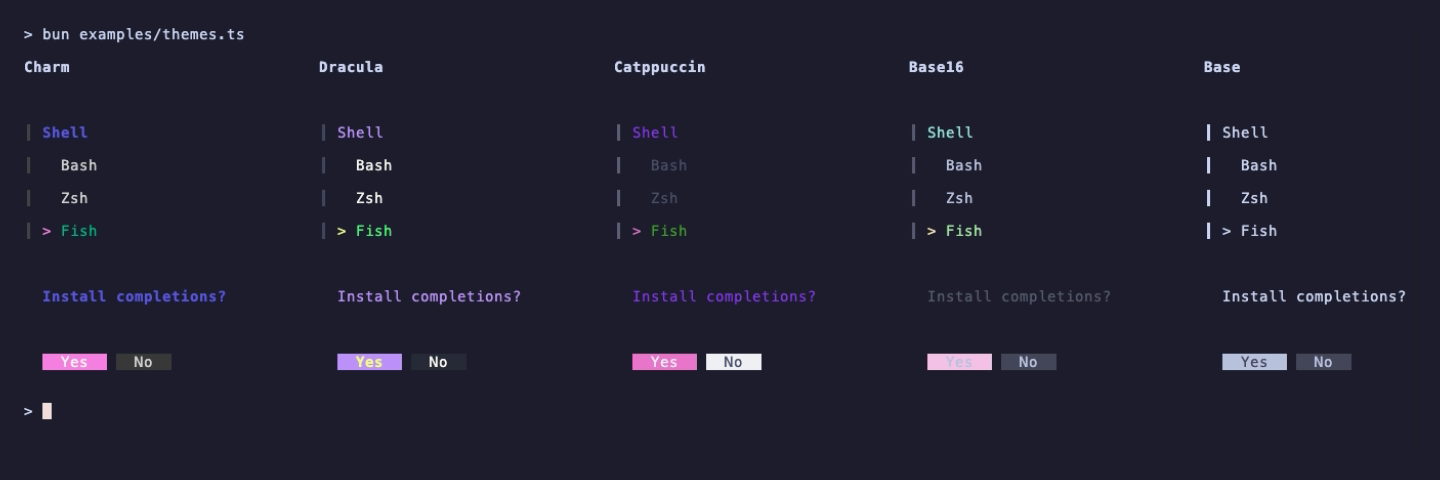
Themes match upstream huh's theme.go: Charm (the default), Base, Dracula,
Base16 and Catppuccin. Each theme has light and dark variants and picks one
from the terminal's reported background colour.
import {
  NewForm, NewGroup, NewInput,
  ThemeDracula, ThemeBase, ThemeFunc, type Styles,
} from '@oakoliver/huh';

let name = '';
const group = NewGroup(NewInput().title('Name').value(() => name, (v) => { name = v; }));

// Use a built-in theme
const form = NewForm(group).withTheme(ThemeFunc(ThemeDracula));

// Build your own theme on top of ThemeBase
function myTheme(isDark: boolean): Styles {
  const t = ThemeBase(isDark);
  t.focused.title = t.focused.title.foreground(isDark ? '#FFD700' : '#8B6F00').bold(true);
  t.group.title = t.focused.title;
  return t;
}
const custom = NewForm(group).withTheme(ThemeFunc(myTheme));
Dynamic Fields with Eval
Update field properties at runtime based on form state. The *Func
variants take a function and a bindings value; the function is re-run
whenever the bindings change.
import { NewForm, NewGroup, NewSelect, NewOption } from '@oakoliver/huh';

const state = { role: 'engineer', dept: '' };

NewForm(
  NewGroup(
    NewSelect<string>()
      .title('Role')
      .options([NewOption('Engineer', 'engineer'), NewOption('Sales', 'sales')])
      .value(() => state.role, (v) => { state.role = v; }),

    NewSelect<string>()
      .titleFunc(() => `Department for ${state.role}`, state)
      .optionsFunc(
        () => state.role === 'engineer'
          ? [NewOption('Backend', 'be'), NewOption('Frontend', 'fe')]
          : [NewOption('Sales', 'sales'), NewOption('Marketing', 'mkt')],
        state,
      )
      .value(() => state.dept, (v) => { state.dept = v; }),
  ),
);
Validation

Validators return an Error to reject the value, or null to accept it.
import { NewInput, ValidateNotEmpty, ValidateMinLength } from '@oakoliver/huh';

let username = '';
let password = '';
let email = '';

NewInput()
  .title('Username')
  .validate(ValidateNotEmpty())
  .value(() => username, (v) => { username = v; });

NewInput()
  .title('Password')
  .validate(ValidateMinLength(8))
  .value(() => password, (v) => { password = v; });

// Custom validation
NewInput()
  .title('Email')
  .validate((s: string) => (s.includes('@') ? null : new Error('must be a valid email')))
  .value(() => email, (v) => { email = v; });
Keyboard Navigation
| Key | Action |
|-----|--------|
| Enter | Submit field / Next group |
| Shift+Tab | Previous field |
| Tab | Next field |
| Ctrl+C | Abort form (form.run() throws ErrUserAborted) |
| Up/Down | Navigate options (Select/MultiSelect) |
| Space / x | Toggle selection (MultiSelect) |
| / | Start filtering (Select/MultiSelect) |
| Ctrl+A | Toggle all (MultiSelect) |
Part of the Charm Ecosystem for TypeScript
| Package | Description | |---------|-------------| | @oakoliver/lipgloss | CSS-like terminal styling | | @oakoliver/glamour | Stylesheet-based markdown rendering | | @oakoliver/bubbletea | Elm Architecture TUI framework | | @oakoliver/bubbles | Pre-built TUI components | | @oakoliver/glow | Terminal markdown reader | | @oakoliver/huh | Interactive terminal forms (you are here) |
License
MIT - See LICENSE for details.
Based on charmbracelet/huh by Charm.