
@oleksandr_krupko/mac-os-debloat
v0.11.0
Published
Debloat your Mac from the terminal. SIP-safe interactive console util to disable 270 non-essential macOS launchd services + Spotlight toggle, with one-key telemetry/balanced presets in the TUI and your own custom presets. Self-validates against your macOS

Maintainers
 oleksandr_krupko
Readme
mac-os-debloat
Debloat your Mac from the terminal. Zero dependencies. Zero install.
Interactive console util to disable 270 non-essential macOS launchd services — Siri, Apple Intelligence, telemetry, ads, and the Apple apps you don't use — plus the Spotlight file index. Frees ~1.5-2 GB of RAM on a 16 GB M4 (how that was measured). Fully reversible. Built for macOS Tahoe 26.x on Apple Silicon. Verify with debloat --status, which reports what is actually in effect and how many of the services are running right now — including after a reboot (see below).
The desktop is not touched. Nothing here disables WindowServer, Finder, Dock, Control Center, audio, networking, Wi-Fi, security or your own apps — those labels are not in the catalog at all, at any setting. Even --disable-all leaves you with a normal, fully working Mac; what it costs you is listed below.
No SIP disable required — works with System Integrity Protection fully on, via Apple's supported launchctl disable. It also validates every service against your actual system at launch, so it never acts on a label that doesn't exist on your macOS build.
npx -y @oleksandr_krupko/mac-os-debloatOr via curl:
curl -fsSL https://raw.githubusercontent.com/OleksandrKrupko/mac-os-debloat/main/debloat | python3Or via Homebrew:
brew install OleksandrKrupko/debloat/debloat && debloatAll three methods need python3 — preinstalled with the Xcode Command Line Tools (xcode-select --install if it's missing). The curl one-liner pipes the script to python3, so it reopens /dev/tty for the interactive keys; if you have no terminal attached, use the non-interactive flags below or the npx launcher.
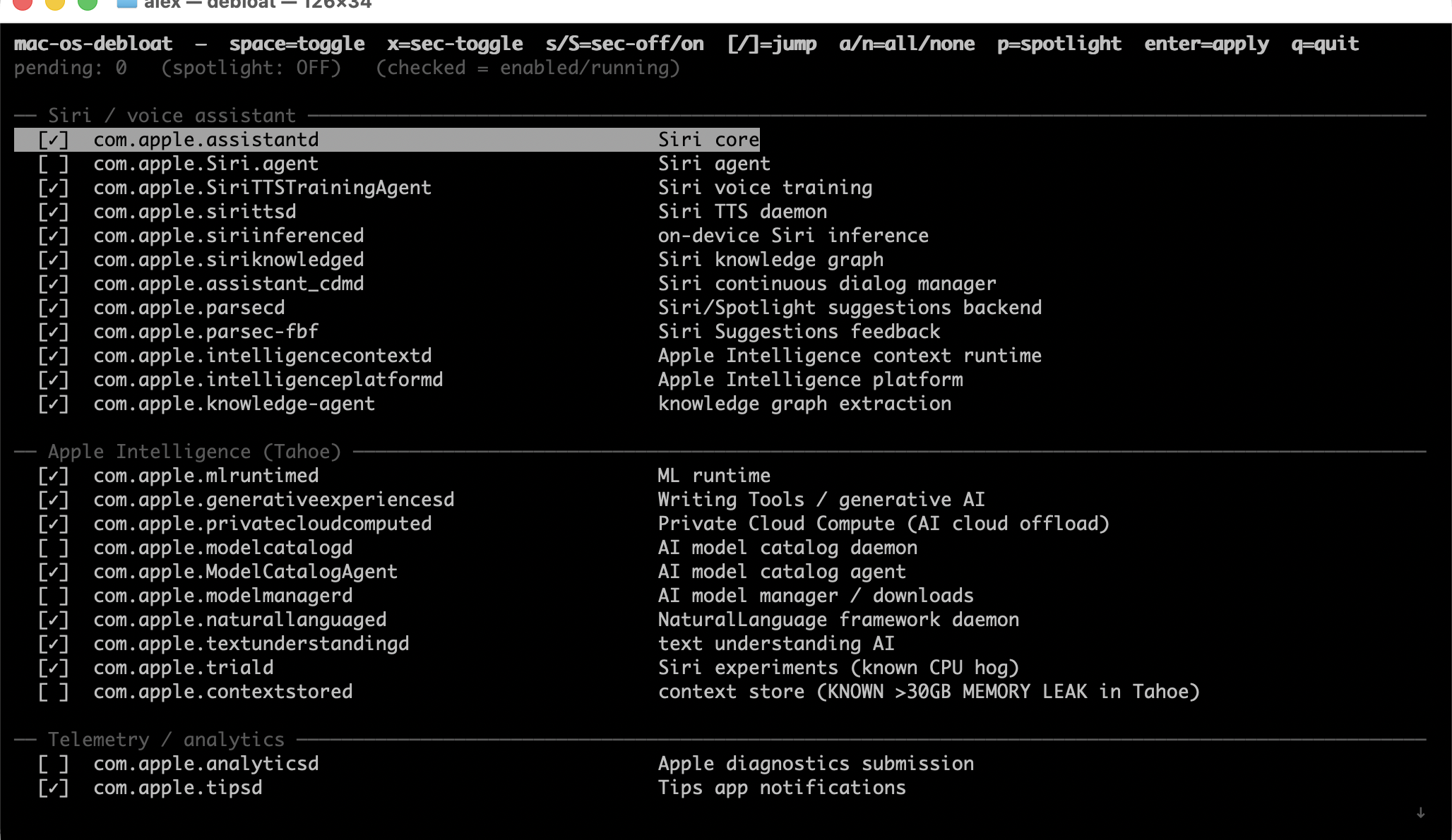
The top block is a menu: arrow onto telemetry, balanced, disable all or enable all and press enter to apply it right away. disable all disappears once everything is off, enable all once everything is on, so every row on offer does something.
Everything below the menu is a checkbox: [✓] on, [ ] off, [▘] spinning while the system is still settling into the state you asked for. space flips the row under the cursor, enter applies whatever is ticked. The bottom line always explains the row under the cursor — what the service does and what you lose with it off. The first checkbox is Spotlight (below); everything after it is a launchd service.
Commands
Runs the interactive TUI by default. Non-interactive flags for scripting and quick recovery:
debloat                    # interactive TUI (default)
debloat --preset telemetry # disable analytics, crash reports, ads, beta enrollment (46)
debloat --preset balanced  # telemetry + Siri, Apple Intelligence, iMessage, Family (172)
debloat --list             # print every label, in preset file format
debloat --status           # per-domain disabled/enabled, how many run, how many ignore the override, free RAM
debloat --audit            # list any embedded labels not present on your macOS build
debloat --disable-all      # disable every label, no exceptions (prompts sudo)
debloat --enable-all       # re-enable everything — the panic button
debloat --restore          # revert to the state before your last apply
debloat --dry-run          # with --preset/--disable-all/--enable-all: preview only
debloat --status --json    # machine-readable status
An apply is two sudo launchctl calls per label per domain, so --disable-all runs several hundred of them; it prints a disabling 137/268 com.apple.… line in place while it works, on the command line and in the TUI alike. Piped output gets none of that.
An apply prompts for your sudo password on the TUI's own bottom line — the TUI never drops back to your shell, and the progress line and the result land in the same place. --status, --audit, --list, and --dry-run need no sudo — reading launchd state is unprivileged. Every apply first snapshots your current state to ~/.mac-os-debloat/latest.json, so --restore always brings you back. If anything feels off, debloat --enable-all turns it all back on.
Spotlight
Spotlight's indexer (mds, mds_stores, mdworker) opens every new or changed file on the disk, extracts its text and metadata, and writes that into an index. A yarn install or a fresh clone hands it thousands of files at once, which is why mds_stores spikes to gigabytes right after one. The index only serves Cmd-Space file search, Finder search and Mail/Notes search — and launchers like Alfred and Raycast that read it.
The Spotlight checkbox turns it off and on. Off runs mdutil -a -d: indexing and search stop on every volume, the daemons go idle, and find, grep, fd, ripgrep, git and VS Code's search (its own bundled ripgrep) keep working exactly as before. On runs mdutil -a -i on plus mdutil -a -E, a full rebuild that costs 10-30 minutes of CPU. Off is the right setting if you search from your editor or the shell and never from Cmd-Space. --restore puts Spotlight back the way it was before your last apply, too.
Turning it on is not instant: mdutil -a -E wipes the store and the rebuild runs for 10-30 minutes. During that window mdutil reports neither on nor off, so the row shows a spinner instead of a checkbox and the bottom line says what is happening. The TUI re-checks every 3 seconds and the row settles to [✓] on its own — you can keep working, or quit; quitting does not stop the rebuild. Tick the row and press enter during the rebuild and your pending * takes the spinner's place, so a change you asked for is never hidden by it.
--status reports spotlight: on, off, or indexing (rebuild in progress).
Presets
Three rungs, safest first. A preset disables its own labels, leaves everything else exactly as it is, and never re-enables anything.
| | disables | what you lose |
|---|---|---|
| --preset telemetry | 46 | nothing — analytics, crash reports, Apple ads, Biome, beta enrollment |
| --preset balanced | 172 | Siri, Apple Intelligence, iMessage/FaceTime/Continuity, Family, News/Stocks/Weather, nags |
| --disable-all | 270 | balanced, plus Safari services, Photos analysis, Mail/Calendar/Contacts, Music/TV/Books, Maps, Time Machine, Screen Time, HomeKit, printing, iCloud sync — and iCloud login, App Store purchases and macOS Update installs break |
--disable-all is not a "console only" mode. The GUI, third-party apps, Wi-Fi, audio, Bluetooth and Spotlight all keep working — it disables Apple's own background services, not the desktop. What it does break are the three things in bold above, because it reaches Apple ID auth, App Store commerce and the bridgeOS update path. Re-enable those from the TUI, or with --restore / --enable-all.
Counts are before pruning: the tool drops labels that don't exist on your macOS build, so what it prints is a little lower.
Neither preset touches Apple ID auth (akd, appleaccountd, adid, AppSSODaemon, AppSSOAgent, identityservicesd), App Store commerce, FairPlay or bridgeOS — 27 labels. Only --disable-all and your own presets can reach those.
98 labels sit between balanced and --disable-all — Safari, Photos, Music/TV/Books, Maps, Time Machine, Contacts/Calendar/Mail, Game Center, HomeKit, Screen Time, iCloud sync, print. Which of those you want is personal, so there's no preset for it: make your own.
Every rung is also a row in the TUI's preset menu — arrow onto it, press enter. To turn something back on, use the TUI (space toggles an item, enter applies), the enable all menu row, --restore, or --enable-all.
Make your own preset
mkdir -p ~/.mac-os-debloat/presets
debloat --list > ~/.mac-os-debloat/presets/mine.txt   # every label, or --list --preset balanced
$EDITOR ~/.mac-os-debloat/presets/mine.txt            # delete the lines for services to keep running
debloat --preset mine --dry-run                       # check
debloat --preset mine
A preset file is a plain list of labels. --list output is valid input, so it round-trips. Sections and comments are optional and only there to be readable:
# === Your section ===
com.apple.something                # what it does, what breaks
--preset NAME looks for ~/.mac-os-debloat/presets/NAME.txt first, then the built-in names — so presets/balanced.txt replaces the built-in balanced with yours.
Add your own labels
~/.mac-os-debloat/labels.txt is appended to the built-in list, in the same format. Labels there show up in the TUI, --list and --disable-all. They are not in the built-in presets — put them in your own preset for that.
270 labels across 69 sections. Highlights:
- Siri / voice assistant (12)
- Apple Intelligence — Tahoe (10), incl.
contextstored(known >30 GB memory leak) andprivatecloudcomputed - More AI / Apple Intelligence (11) — CoreSpotlight semantic, call intelligence, intelligence flow / tasks
- Diagnostics extras (30) — all telemetry to Apple
- Apple Music Player (AMP) suite (5), Apple Music / iTunes / Media streaming (7)
- Safari + Safari extras (7) — for non-Safari users
- Game Center + game controllers (7)
- Family / Parental controls (8)
- Beta program enrollment (6)
- iMessage / FaceTime / phone relay (9)
- Apple Mail / Calendar / Contacts / Reminders + AddressBook (7)
- Continuity / AirDrop / Sidecar / AirPlay / Continuity Capture (7)
- Maps, Apple Books, Apple TV+, Stocks/News/Weather/Sports
- App Store + Apple ID + Apple Pay + SSO
- iCloud Drive / Keychain Circle / Notifications
- Print (no printer), Touch Bar (M4 has none), bridgeOS (Apple Silicon)
- Xcode / iOS dev stack (FE/BE dev, no mobile)
- Telemetry + Apple ads + Proactive / predictive + News / Stocks / Weather
Full curated list with per-label comments lives inside the script (EMBEDDED_LABELS).
| Key | Action |
|-----|--------|
| ↑ / ↓ or j / k | move |
| PgUp / PgDn | jump 10 |
| [ / ] | jump to prev / next section |
| space | toggle the row under the cursor |
| enter | on a preset menu row, apply that preset; anywhere else, apply the ticked changes (prompts sudo) |
| r | reload state from system |
| q / esc | quit |
[✓] = on · [ ] = off · [▘] = the system is still settling into the state you asked for · * = changes on enter. The Spotlight row is toggled and applied like any other. The preset menu rows carry no checkbox — space does nothing on them, enter runs them. disable all asks for confirmation first.
Uses launchctl disable, which writes an override table per launchd domain: system jobs (a LaunchDaemons plist) go to /var/db/com.apple.xpc.launchd/disabled.plist, gui/$UID jobs (a LaunchAgents plist) to disabled.$UID.plist. An override only takes effect in the domain the job is actually registered in, so the tool resolves each label's domains and writes only there.
- Wiped by macOS updates (26.3 → 26.4 etc) — re-run after one
system/disables affect all users ·gui/$UIDdisables only current user- Multi-user: run once per account
macOS 26.x does not reliably honour these overrides. Two separate failures, both measured on 26.5.2 (25F84) with SIP enabled:
- Overrides are cleared at boot, selectively. After a boot, 264 of the 268 catalog labels had no override in effect in the domain their job runs in. The ones that get cleared are the ones that would have taken effect; overrides sitting in a domain where the job isn't registered survive untouched. Both store files are rewritten within two minutes of boot. The write itself is fine —
sudo launchctl disable gui/$UID/<agent>returns 0 and the key appears immediately — so they are lost after the apply, not during it. Reported in #8. - launchd also starts jobs whose override is intact. On a machine 8 days into an uptime, 14 catalog labels were disabled in every domain they are registered in and running anyway, started by launchd (
ppid 1) up to 19 hours after the override store was last written.launchctl print-disabled systemreads=> disabledfor them the whole time.
Neither mechanism is established, and no version of this tool can fix either from userspace — launchctl disable is the supported SIP-safe interface, and it is what is being ignored.
So don't trust it, check it. debloat --status reports the per-domain truth, how many catalog services are running right now, and how many of them are disabled but running anyway — that last number is the one that catches both failures. If it's non-zero, the overrides are not being honoured on your build. Every apply also verifies itself and prints any label whose override did not take effect, rather than reporting success.
Boot-out failed: 150: Operation not permitted while System Integrity Protection is engaged (e.g. on com.apple.followupd)
Expected for daemons Apple protects even from a live bootout, and not a reason to disable SIP. bootout only kills the running process, and when it fails that process keeps running until it exits on its own — launchctl disable stops the next launch, it does not stop a live one. The two are separate steps and are now reported separately. An apply prints how many bootouts failed and with which message, lists any disable that failed outright, and then re-reads launchd to name every label whose override did not end up in effect. Trust that list, not the "N disabled" count.
--status says a service is disabled but it's still running (pre-0.7.0)
Up to 0.6.0 --status treated a label as disabled if either domain had an override, so an override written to the domain the job doesn't run in read as success. 0.7.0 resolves each label's real domains and requires an override in every one, and prints a live count of catalog services still running. Re-apply after upgrading — the earlier applies may not have taken effect.
iCloud / App Store operations time out on UDP 443, looking exactly like a VPN or firewall block
They aren't. The local daemon the request is handed to (identityservicesd, appstoreagent, akd, …) isn't running to answer it, so the request never leaves. Check debloat --status before touching network settings. Only reachable via --disable-all or your own preset — no built-in preset disables those.
macOS Update finds and downloads an update, then never installs it — no error, no dialog
bridgeOSUpdateProxy / bosreporter / boswatcher are required for macOS Update installs on Apple Silicon too, not only Intel T2. No preset disables them; only --disable-all does. Turn them back on in the TUI, or with --restore / --enable-all. Reported on macOS 26.6 by #7; not reproduced here.
AKAnisetteError Code=-8025 on iCloud sign-in after disabling Siri
Reported on Tahoe: com.apple.Siri.agent provides Mach services the sign-in dialog consults even with Siri off. --preset balanced disables it. If you hit this, re-enable com.apple.Siri.agent from the TUI. Reported in #7; not reproduced here.
None of these are in the catalog, so the tool never touches them. Listed because you can reach them yourself via ~/.mac-os-debloat/labels.txt — don't:
com.apple.WindowServer,controlcenter,notificationcenterui,Finder,Dock,SystemUIServer— UI diescom.apple.coreaudiod— sound diescom.apple.accountsd,syspolicyd,securityd,trustd— auth / codesign breakcom.apple.mds*,corespotlightd— usemdutil -a -i offinsteadcom.apple.softwareupdated— kills security updatescom.apple.XprotectService— kills malware scanningcom.apple.CoreLocationAgent,searchpartyd— Find My breaks
macOS Tahoe (26.x) baselines at ~4-5 GB RAM and a steady CPU drip from ~50 Apple daemons you mostly don't use — Siri, Apple Intelligence, telemetry, ads, predictions, AirPlay, Photos analysis, etc. On a 16 GB Mac that's a third of your memory gone before any of your own apps start.
This tool turns off the ones you don't need, with no install. ~1.5-2 GB of RAM back for whatever you're actually running.
That figure is the drop in used memory on an idle M4 MacBook Pro 16 GB (macOS 26.3.1) after disabling the full default set and rebooting, measured against the same machine beforehand. Yours will differ — it depends on which of these services you actually use.
The reclaimable RAM line in --status is not a prediction of that gain: it's this machine's free + inactive + speculative + purgeable pages from vm_stat right now. Run it before and after a reboot and compare the two numbers.
Two shell scripts in extras/ are not part of the TUI:
disable-animations.sh/enable-animations.sh— reduce motion and transparency (the Liquid Glass memory-leak workaround on Tahoe), zero Dock/window/Finder animation durations, restart Dock and Finder.defaults writeonly, no sudo, fully reversible with the enable script.disable-spotlight.sh/enable-spotlight.sh— the Spotlight toggle as a standalone script for setups that never open the TUI. Samemdutil -a -d/-i on+-Eas the TUI row; the disable script also erases the existing index to reclaim its disk space.
| Tool | Console UI | Curated list | Persistent | No SIP disable | Zero install |
|------|-----------|--------------|------------|----------------|--------------|
| mac-os-debloat | ✓ | ✓ 270 labels + Spotlight | launchctl disable + verified per domain (caveat) | ✓ | ✓ Python stdlib |
| launchtui | ✓ | ✗ generic | ✗ bootout only | ✓ | ✗ cargo install |
| Silverback-Debloater | ✗ | ✓ | ✓ | ✓ | ✗ Intel-desktop only |
| b0gdanw Tahoe gist | ✗ | ✓ | ✓ | ✗ needs SIP off | gist copy |
| LaunchControl / Lingon | GUI | ✗ | ✓ | ✓ | ✗ commercial |
MIT · macOS Tahoe 26.x · Apple Silicon · Python 3.9+ (the Xcode CLT ship 3.9.6)
Keywords: macOS debloat, macOS Tahoe debloat, Apple Silicon debloat, disable Apple Intelligence, disable Siri permanently, launchctl disable, free RAM macOS, mac performance mode, macOS privacy, kill Apple telemetry, macOS service manager, launchd console util, contextstored memory leak, Tahoe RAM usage, Apple Intelligence disable launchctl.