
@omercnet/paseo-pr-radar
v3.5.0
Published
A viewer-aware delivery queue for pull requests linked to Paseo workspaces.

Maintainers
 omercnet
Readme
PR Radar
A Paseo plugin that turns pull requests linked to active workspaces into a viewer-aware delivery queue.
PR Radar combines Paseo workspace and agent state with pull request checks, review status, mergeability, and the current GitHub user's relationship to each pull request. It answers which deliverables need you, which are already being handled, and which are waiting elsewhere.
Demo
https://github.com/user-attachments/assets/ce0b4d61-59ce-49cf-881e-132db58d3038
Screenshots
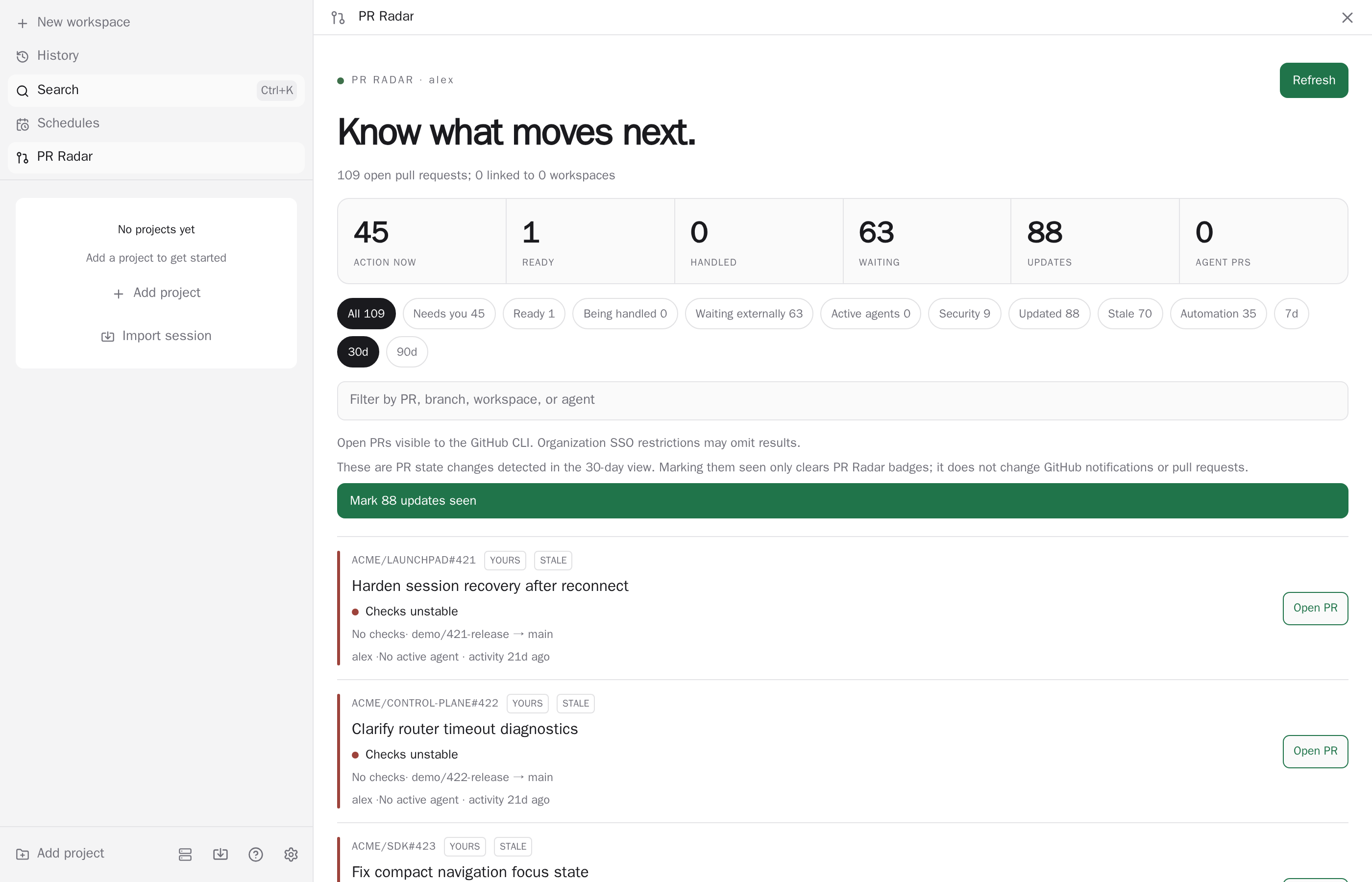
Repository, pull request, workspace, and agent names are rewritten to synthetic values in browser DevTools before capture. Both PNGs come from an isolated Paseo test daemon at 2× pixel density.
Wide dashboard
Compact dashboard
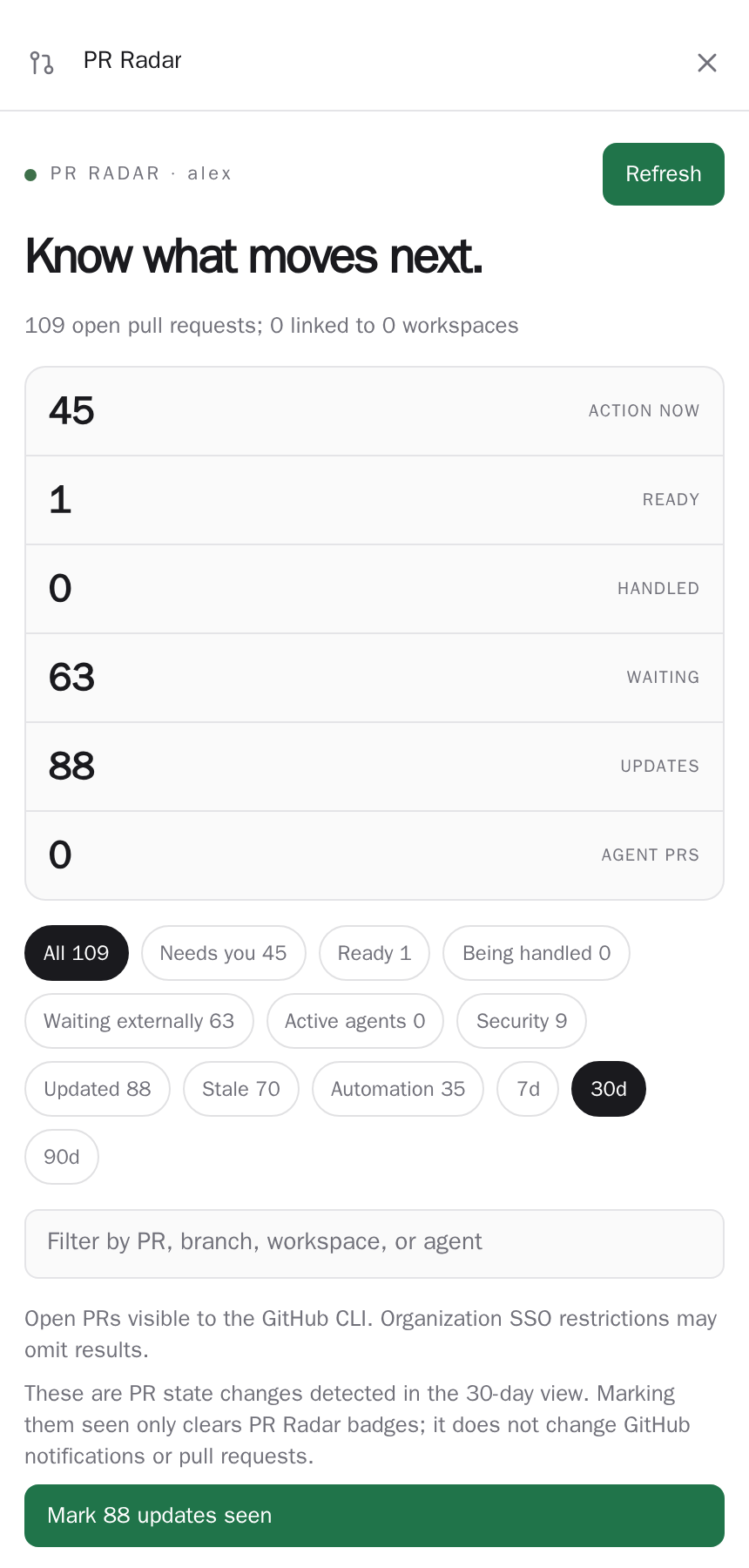
What it shows
- Needs you: authored blockers and review requests whose checks have completed.
- Being handled: actionable work with an active Paseo agent.
- Waiting externally: running checks, pending reviews, repository requirements, and external-author work.
- Ready: authored pull requests that are mergeable with settled checks and reviews.
- Viewer labels:
YOURS,REVIEW, andEXTERNAL. - Working-directory tags:
CWD-WORKTREE,CWD-BASE, andCWD-TBD(shown on rows and maintained as Paseo workspace/agent labels). - Draft PRs (DPRs): displayed in a separate collapsible section below regular pull requests.
- Issues tab: switch between
Pull RequestsandIssues(authored by you, assigned to you, or in your owned repos) with the sameStart New Agent,Open Existing Agent,CWD-*tags,Copy link, andOpen Issueworkflow. - Action cluster on every PR:
Open issues (N): opens all linked/closing GitHub issues in your browser when present.Start New Agent: available on every PR (orange when a local checkout/worktree exists, brown whenCWD-TBDand a clone or directory pick is needed). Opens an interactive directory/worktree chooser (supporting incremental typing, GUI selection,CWD-WORKTREEvsCWD-BASE, and one-click clone + worktree creation), or launches immediately when configured in Settings.Open Existing Agent: jumps directly to an existing linked Paseo agent.Ask agent/Open workspace/Copy link/Open PR.
- Settings (
PR Radar settings): configuresourceCodeDir(default~/src),defaultCwdMode(CWD-WORKTREEorCWD-BASE),autoLaunchMode(prompt,existing_only, orexisting_or_clone), default agent launch options (profile, provider, model, effort, mode, context mode), and an optional absolute/~/routing script path (copyexamples/pr-radar-route.py, a small example of the stdin/stdout contract, to e.g.~/.config/pr-radar/route.pyand edit it). The script path andsourceCodeDirare read from the saved settings on the server, never from the request. The script must be an executable regular file owned by you or root, in directories that group and others cannot write (a sticky directory such as/tmpis fine). Symbolic links on the configured path are checked hop by hop: each link must be owned by you or root, and the directory holding it and that directory's parents must not be writable by group or others. The check reads owners and the classic permission bits only: it does not read macOS extended ACLs (or POSIX ACLs on Linux), so an ACL that grants another user write access to the script or one of its directories is not detected. Reviewls -leoutput for such entries yourself. The script runs with a minimal environment and a fixedPATH(/opt/homebrew/bin:/usr/local/bin:/usr/bin:/bin:/usr/sbin:/sbin, not the daemon's), so an interpreter named with#!/usr/bin/envis found only there (a directory in that list is dropped if another user owns it, or if group or others can write it or one of its parents. Homebrew leaves/opt/homebrew/binwritable by theadmingroup on many Macs, so#!/usr/bin/env python3then finds the root-owned/usr/bin/python3. To use Homebrew's interpreter, runchmod go-won/opt/homebrew/binand on any parent that group or others can write; that restores the PATH entry but does not check the interpreter it links to (for example underCellar). A#!/opt/homebrew/bin/python3line also works but skips this check: anyadminmember could replace that interpreter); name any other tool by absolute path. If none of those directories passes the check the script is not run and the launch window shows the error. The script's working directory is/, not the daemon's, so it should open files by absolute path. The interpreter a#!line names is not itself checked. It has a 30 second timeout (time spent waiting for an earlier call counts against it) a 1 MiB output cap, and a 1 MiB cap on the input it is sent (PR text is written by others; an oversize payload is refused and the script is not run, and the launch then goes ahead without routing). One script runs at a time: up to two more calls wait their turn, and further calls are refused while they wait (not on Windows). Its whole process group is killed as soon as the script exits, so a background process it starts does not outlive it unless it detaches itself (setsid). When Paseo stops, reloads or disables the plugin, the plugin's cleanup ends a script that is still running (SIGTERM, then SIGKILL after one second) and refuses calls still waiting; the script runs in its own process group, so stopping the plugin process alone would not reach it. A daemon that is killed outright (SIGKILL, a crash) never runs the cleanup, and the script then keeps running until it ends by itself, because nothing is left to time it out. It may set only thedefault,plan,acceptEditsandread-onlypermission modes and thecontextModeoption; other values are ignored and the launch notice says so. A profile it names is ignored too when that profile sets another permission mode, option or feature value. Directories outsidesourceCodeDirare refused for clones, checkouts and worktrees. These checks are defense in depth against crafted requests, not a privilege boundary: the settings are the trust source, but any Paseo client can write them.
Routing script labels
A routing script may return "labels": {"key": "value"}, and PR Radar puts them on the agent it launches (next to its own pr-radar.cwd). The script reads PR text on stdin, so its labels are untrusted and are checked as a whole:
Namespaced by default. A label key is stored as
pr-radar.route.<key>({"kind": "external-review"}becomespr-radar.route.kind=external-review). The namespaced key must still fit the 128 character key limit.Allowed label prefixes (setting
routingLabelPrefixes, empty by default; separated by commas, ASCII spaces, tabs or line breaks, for exampleade.kindorade.; any other character, such as a no-break space, a byte order mark or an ideographic space, stays inside its entry and makes it malformed, so it can never split one entry into two valid ones). An empty list protects nothing: with no prefix, every script label is namespaced and no label counts as a downgrade label. A key that a prefix admits keeps its own name. Everything else stays namespaced. A prefix admits a key that equals it, a key that continues it with.or/(ade.kindadmitsade.kindandade.kind.x, notade.kinder;teamadmitsteam/x, notteamx), and every key under a prefix that itself ends in.or/(ade.admitsade.anything). That can include keys other tools treat as control labels, so list the narrowest prefix you trust (ade.kinddoes not admitade.lead) rather than a whole family (ade.) unless every key under it is safe for a script to set. A prefix never admits a reserved key, and a prefix that is a root of or extendspr-radarorpaseo(p,paseo-,pr-radar/) or a malformed entry voids the whole setting, so every script label then stays namespaced.Always reserved:
pr-radar,pr-radar.*(includingpr-radar.cwd, which PR Radar sets itself, andpr-radar.route.*, which only PR Radar writes),paseoandpaseo.*, compared without regard to case. A script cannot set them; naming one is an invalid label.Limits: at most 16 script labels (PR Radar adds
pr-radar.cwd, so an agent carries up to 17), keys of letters, digits and. _ / -that start with a letter or digit, trimmed non-empty string values of at most 128 characters. A set with more than 64 keys is refused outright. Control characters (UnicodeCc), invisible or direction-changing format characters (Cf: zero-width characters, bidi overrides and isolates such as U+202A to U+202E and U+2066 to U+2069, the byte order mark), other default-ignorable characters (fillers, variation selectors), line and paragraph separators and lone surrogates are refused in keys and values. Notices quote the rejected keys and list the first five withand N more; the Start New Agent window lists every rejected key. Two keys that become the same label (for example after trimming) are both refused.All or nothing, never silent. If any label is invalid, no label is applied and the launch is blocked on both paths. The start-agent modal shows each rejected key with its reason and disables Start New Agent; auto-launch starts nothing and shows the same notice. A label set the script returns therefore either applies or stops the launch. This covers the labels only: if the script itself fails (error, timeout, oversized output, or a result with another invalid field), the modal shows the error and can still launch with your own choices, and auto-launch uses PR Radar defaults, so the script's labels are absent in that case.
Temporary fallback rules (setting
routingLabelFallbacks, empty by default; add them in the routing script section of the settings). A rule is{ repository: "owner/name" | "*", until: <ISO-8601 time with a zone>, note?: string }. While a rule that matches the repository has not expired, a launch with invalid script labels goes ahead without any script label (all or nothing still holds) and shows a warning that names each rejected key and the rule. A rule must end within 7 days: a later one is refused when added, and one already stored with a later end is ignored until its end is within 7 days of the current time, then applies for those last days (the settings show it as ignored until then). A rule whose date does not exist (such as 2026-11-31) is refused when added and never applies. A rule note cannot hold control or invisible characters; any stored rule that fails validation (including an unsafe or over-long note or malformed repository) is dropped on load (fail closed). Expired rules show as expired in the settings. Use a rule to keep working while you fix the script, then remove it. Upgrading from a release that stored rules before settings version 3 drops them (any document older than version 3 is stripped ofroutingLabelFallbackson load, so a rule an intermediate release retired cannot come back after a skipped upgrade); add a rule again if you still need it. A rule never drops a downgrade label. A downgrade label is one an Allowed label prefix trusts to keep its own name (for exampleade.kind=external-review). With an empty Allowed label prefixes list no label is trusted that way, so nothing counts as a downgrade label and a rule may skip every script label (they are all namespacedpr-radar.route.*, which means nothing to other tools). If any key the script returned, valid or not, is admitted by a prefix (compared without regard to case, with invisible and compatibility characters normalized away on both the prefix and the key, and reading the prefix setting entry by entry even when one entry voids it), or if any Allowed label prefix is malformed (a look-alike letter, say, which no key can be matched against), or if the script's labels are not a key and value object while a prefix is set, the rule does not apply and the launch stays blocked, on both paths, with a message naming the label. Namespacedpr-radar.route.*labels mean nothing to other tools, so the rule may still skip those.What the never-drop guarantee covers. It covers fallback rules only. It does not cover a routing script that fails: when the script itself errors, times out or prints output PR Radar cannot read, the modal shows the error and still lets you launch, and auto-launch uses PR Radar defaults, both without any script labels, so a downgrade label can be missing. That behavior comes from the routing labels feature and is a separate follow-up. If you rely on a downgrade label, make the script exit cleanly on every input.
Whose clock decides. A rule's end time and the seven day cap are read from the clock of the device that starts the launch, not the host's. The host does not check them. A device with a wrong clock can keep an expired rule alive or end one early, so keep device clocks synced. The Start New Agent window follows the rule as it ends while open, and the launch checks again when you press Start.
When PR Radar checks out or fetches a repository, it runs git with a hardened environment: ~/.gitconfig and the system git config are ignored, repository hooks, filters, credential helpers and transport helpers are neutralized, and GitHub credentials come only from the gh CLI (never from git's environment). Network proxies must be provided through the environment (HTTPS_PROXY/http_proxy/NO_PROXY and friends), not through git config.
- Linked workspaces and agents include those in background workspaces. Helpers, meaning background agents that Paseo hides from tabs, lists and attention, never appear on a row. They also do not count toward its active agents, attention, permission state or the sidebar count.
Paseo supplies normalized workspace pull request status. A daemon-side plugin handler uses the authenticated gh CLI to distinguish authored pull requests from review requests. If viewer lookup fails, PR Radar falls back conservatively and does not claim that a row needs the user.
Sorting
The Sort row applies after the current filters and search. Needs attention first is the default: bucket order, then oldest activity first. Mergeable first puts Ready rows first, newest activity first, then the remaining buckets. Recently updated and Oldest first order by activity, not creation time. Repository orders by repository name, then PR number.
Activity ties use ascending titles; fully tied rows keep their input order. Missing or invalid activity times count as the epoch, so they sort first in oldest-first orders and last in newest-first orders. Sort selection stays local to the open screen and resets on reload, like search and the time window.
On web, Tab enters the group at the selected option and Tab or Shift+Tab leaves it. Space selects the focused option. Arrow keys select and focus the next or previous option, wrapping at either end.
Sidebar row
The sidebar row shows a "needs you" count; pressing the count opens a popover of those pull requests. Pressing one opens PR Radar focused on it (param.pr), and the needs-you link filters the queue (param.filter), so both survive reload and can be linked. A trailing + marks a count that may be incomplete: viewer lookup failed, a pagination or inbox cap was hit, or workspace status was unavailable.
Install
Install the published package on the daemon host:
paseo plugin install npm:@omercnet/paseo-pr-radarUpdate an npm installation to the latest published release:
paseo plugin update pr-radarThe npm install and update flow requires Paseo ^0.12.0 || ^0.13.0 || ^0.14.0 || ^0.15.0 || ^0.16.0 || ^0.17.0 with npm available on the daemon host.
The daemon must have plugins enabled and gh authenticated for GitHub viewer-aware triage.
Develop
bun install
bun run check
bun run test
bun run test:coverage
bun run typecheck
Release Please maintains the version, changelog, component tag, and GitHub release from Conventional Commits in the monorepo.
The manifest supports Paseo ^0.12.0 || ^0.13.0 || ^0.14.0 || ^0.15.0 || ^0.16.0 || ^0.17.0. Development uses the 0.16 CLI, client, plugin SDK,
and protocol packages together from the workspace catalog. Host-owned navigation opens linked agents and workspaces without private routes or
page reloads on web, desktop, iOS, and Android. React 19.1 and React Native 0.81 match the versions supplied by
the plugin host.