
@omniforge/mission-control
v0.6.0
Published
Mission Control is a local-first control panel for running AI coding agents against your own repositories. It turns a request into a scoped ticket, routes that ticket through a workflow, streams each agent turn, keeps local project memory, and can hand co


Readme
OmniForge Mission Control
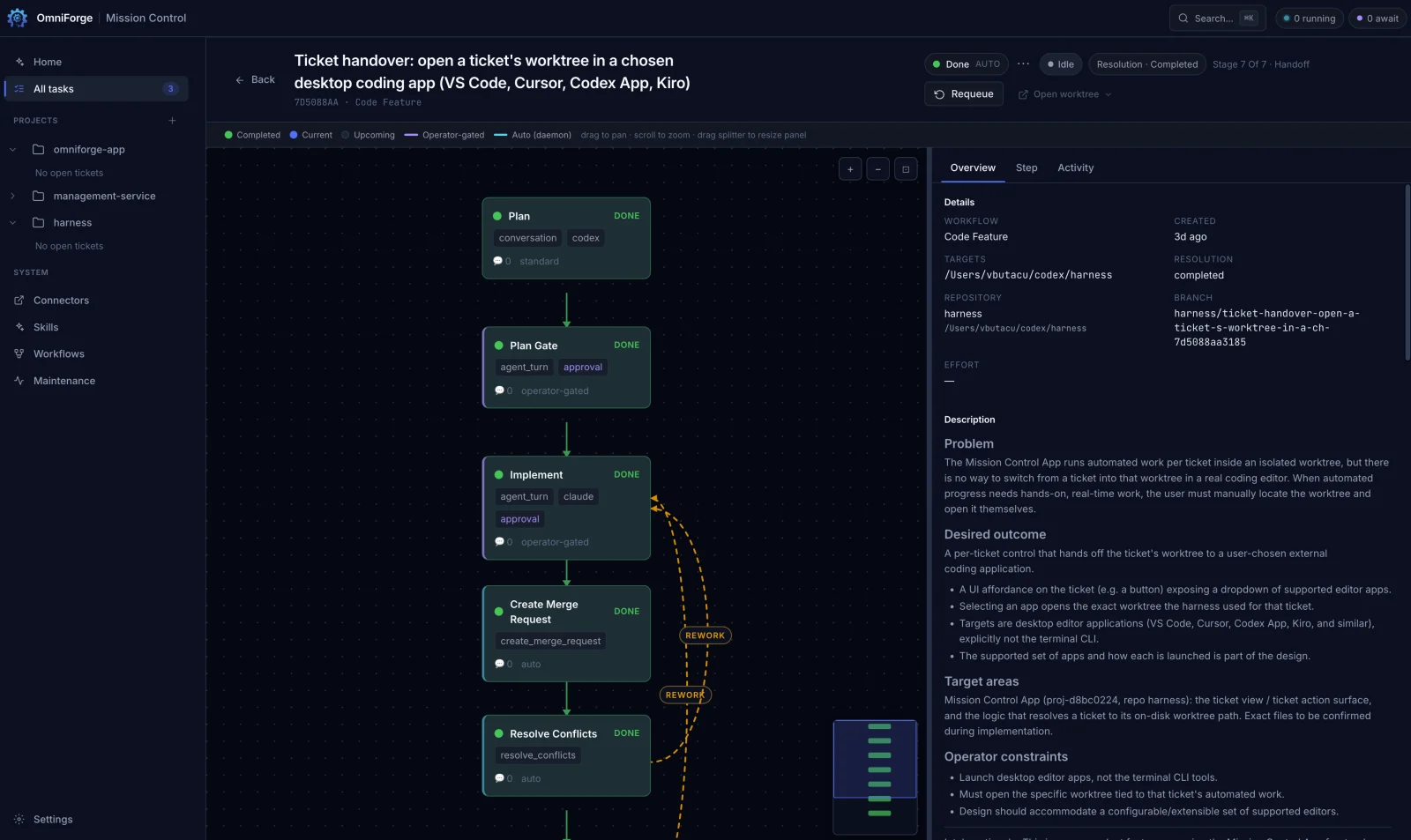
Mission Control is a local-first control panel for running AI coding agents against your own repositories. It turns a request into a scoped ticket, routes that ticket through a workflow, streams each agent turn, keeps local project memory, and can hand completed work to PR or MR creation when you connect a Git provider.
It is designed for people who want agentic coding workflows they can inspect: source code stays on your machine, runtime state lives outside the checkout, and connectors are optional.
What You Can Do
- Add local git repositories as projects and keep tasks scoped to a real repo.
- Run workflows for bug fixes, features, docs, incident response, frontend changes, research, and more.
- Use Claude, Codex, Grok, OpenCode, or ACP-compatible agents such as Kiro.
- Watch live agent output, workflow steps, handoff notes, checks, and review status.
- Keep durable local memory for each project.
- Connect GitHub or GitLab when you want Mission Control to open PRs or MRs.
Quick Start
Install globally from npm, then open the local app:
npm install -g @omniforge/mission-control
mission-control
Open http://127.0.0.1:4827.
Prefer not to install globally? Run it on demand:
npx @omniforge/mission-controlFirst Run
The app opens with an inline setup checklist instead of a blocking wizard. A good first pass is:
- Install at least one supported agent CLI and confirm it is on your
PATH. - Add a project with the
+next to Projects in the sidebar. - Open Settings -> Agents and choose the default agent you want workflow steps to use.
- Optional: open Connectors and add GitHub or GitLab only if you want PR or MR workflows.
- Open a project and run one of its quickstarts.
Tasks require at least one supported agent CLI available in the shell that launches Mission Control.
Prerequisites
- Node.js
>=20and npm>=10. - git on your
PATH. - One or more agent CLIs such as
claude,codex,grok,opencode, or an ACP-compatible tool. - Optional for GitHub:
gh auth loginor a token withreposcope. - Optional for GitLab: a token with
apiscope.
The published package runs compiled JavaScript. Building from source additionally follows the repo's .nvmrc and Vite requirements.
From Source
npm install
npm start
Open http://127.0.0.1:4827. Press Ctrl+C to stop.
On macOS and Linux, ./mc is a shorthand for npm start.
Commands
| Command | Description |
| --- | --- |
| npm start | Build the UI and start with real agents. |
| npm run build | Build the browser UI. |
| npm test | Run the Vitest suite. |
| npm run check | Full local quality gate: lint, typecheck, tests, knip, UI build, server build. |
Stopping Mission Control
Stop the running server gracefully (it terminates all in-flight agent processes, stops the daemon, and closes the UI):
mission-control stopYou can also stop from the UI: open System → Maintenance → Power → Shut down Mission Control and confirm the warning. From the terminal where it runs, Ctrl+C works too. After a shutdown the UI stays offline until you start the app again with mission-control.
Runtime State
Runtime state is not stored in the source checkout by default. Mission Control uses a platform-standard state directory:
- macOS:
~/Library/Application Support/mission-control - Linux:
$XDG_DATA_HOME/mission-controlor~/.local/share/mission-control - Windows:
%APPDATA%\mission-control
The runtime state directory contains settings, tasks, runs, generated indexes, seeded policies, project memory, and connector state.
Environment Variables
| Variable | Default | Description |
| --- | --- | --- |
| PORT | 4827 | HTTP port. |
| HARNESS_HOST | 127.0.0.1 | Network interface. Use 0.0.0.0 only when you intentionally want network access. |
| HARNESS_ROOT | Platform default | Runtime state directory. |
| HARNESS_AUTONOMY | 1 | Enables scheduled autonomy jobs. Set 0 to disable. |
| HARNESS_EXECUTION_ENV | native | native runs against host paths; container expects task targets under HARNESS_PROJECTS_ROOT. |
| HARNESS_PROJECTS_ROOT | Settings value | Root used for target suggestions and container-accessible project paths. |
| HARNESS_VAULT | Platform default | Connector token store: keychain, file, or memory. |
Architecture
src/
├── agents/       # Agent configuration, capabilities, optimization, runtime helpers
├── autonomy/     # Scheduled autonomy jobs and proposal generation
├── connectors/   # GitHub/GitLab connector state and operations
├── core/         # Projects, tasks, settings, workflows, checks, shared types
├── daemon/       # Task turn processing and workflow advancement
├── mcp/          # MCP tools exposed to agents
├── memory/       # Local gbrain memory search, indexing, and capture
├── runners/      # Headless and ACP runner implementations
├── server/       # HTTP routes and app server
└── ui/           # Preact browser UI

workflows/        # YAML workflow definitions
kernel/           # Seeded policy documents
tests/            # Unit and integration tests
The main loop is:
- A project-scoped ticket is created from intake or a quickstart.
- The daemon resolves the workflow step and agent.
- The runner starts the configured agent with project context, memory tools, and execution boundaries.
- Output streams into the UI and durable run state.
- Checks, review, handoff, and PR/MR creation advance through workflow steps.
Connectors
Git providers are optional. Without connectors, Mission Control can still run local tasks, checks, memory, and reviews. Add connectors only when you want workflow steps to open PRs or MRs.
- GitHub: use
gh auth loginor add a token in Connectors. - GitLab: add a token in Connectors.
Workflow PR/MR creation is handled by the create_merge_request step, not by ad-hoc shell commands.
Local-First Notes
- Source repositories are selected explicitly as projects.
- Project memory is local and gitignored.
- Agent CLIs may contact their own providers according to how those tools are configured.
- Git provider tokens are stored through the configured vault backend.
- Set
HARNESS_HOST=127.0.0.1unless you intentionally want the app reachable from another machine.
Contributing
Run the full gate before opening a change:
npm run checkFor targeted work, prefer the closest test first, then run the full gate before handoff. Tests that create harness state should use temporary roots and ensureHarnessRepository(root) rather than ambient runtime state.
Policy Documents
Seeded operating policies live in:
These documents are copied into runtime state and used by the harness and agents.
Support
- Bugs and feature requests: GitHub Issues.
- Contact: [email protected].
License
This project is open source under the MIT License. See LICENSE for the full terms.