
@onion-party/galaxy
v0.4.1
Published
Interactive 3D galaxy map of a JS/TS codebase's imports, powered by dependency-cruiser

Maintainers
 ryangibbs
Readme
onion-galaxy


An interactive 3D galaxy map of a JavaScript/TypeScript codebase's imports, built on dependency-cruiser. Think of madge, but you can fly through it.
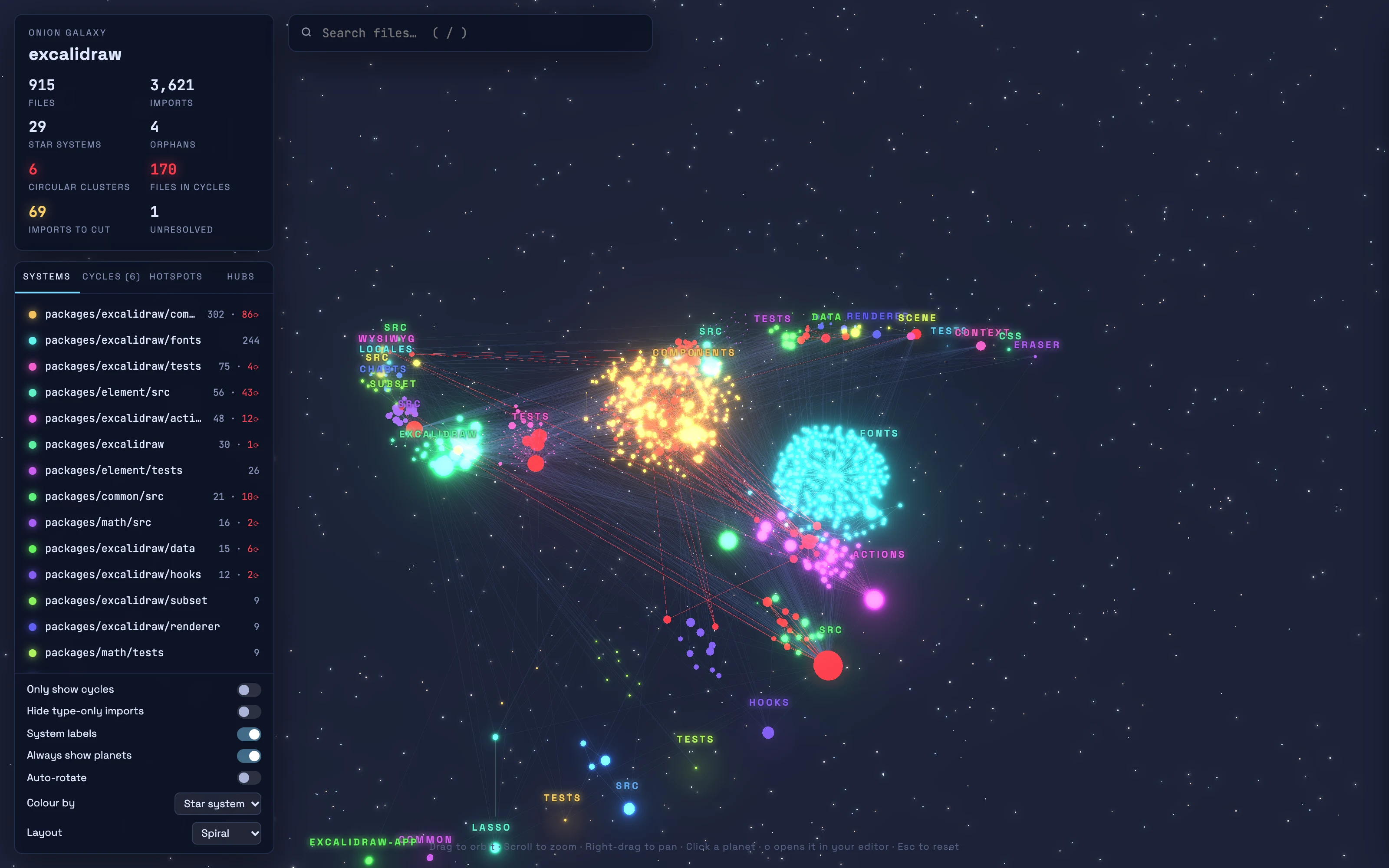
- Star systems are directories, laid out along spiral arms with the biggest at the galactic core.
- Stars are each system's most-imported file; planets are the other files, sized by how many files import them.
- Red planets and edges are runtime circular dependencies.
import typeedges are ignored, since they're erased at compile time (pass--type-cyclesto include them). - Click a planet for its dependents and imports (tagged
type,lazy,cycleor✂ cut), instability, lines of code, size, commits in the last year, unresolved imports and the shortest cycle through it. - Cycle-breaking hints: click a cycle to see the imports to remove to break it. The suggestion is minimal: every cut is needed, since putting any one back recreates a cycle.
- Hotspots: big files that change often (commits in the last year × lines), the usual best place to start refactoring. Listed in their own tab, and "Colour by: Hotspots" turns the map into a heat map. Tests, data and generated files are left out. Needs git history.
- Blast radius: see everything that depends on a file, directly or indirectly, rippling outward hop by hop, or everything it pulls in.
- Path finder: pick two files to highlight the shortest chain of imports between them.
- Zoom-dependent detail: from far away each system is a single star, with trade routes sized by the imports between systems; fly closer and its planets appear.
- Layouts: a spiral galaxy, a ring, a sphere, or stability, where distance from the centre is instability.
- Open in your editor: a button (or
o) opens the selected file in VS Code, Cursor, Zed, WebStorm or IntelliJ.
Only your own files and the imports between them are mapped; npm packages and Node built-ins are left out.
Usage
Run it in the root of a project:
pnpm dlx @onion-party/galaxy --openor with npm: npx @onion-party/galaxy --open. This writes galaxy.html, one self-contained file that opens offline.
onion-galaxy [paths...] [options]
  paths                  Files/dirs to cruise, relative to --root (default: src, or .)
  -r, --root <dir>       Project root (default: .)
  -o, --out <file>       Output HTML (default: galaxy.html)
      --json <file>      Also write the graph data as JSON
      --ts-config <file> tsconfig to resolve paths with (default: <root>/tsconfig.json)
  -x, --exclude <regex>  Paths to skip (default: dist, build, coverage, tmp, *.d.ts)
      --cluster-depth <n> Directory depth that defines a star system (default: auto)
      --type-cycles      Count `import type` edges when detecting cycles
      --layout <name>    Initial layout: spiral, stability, ring, sphere (default: spiral; switchable in the map)
      --editor <name>    Editor that "Open file" links use: vscode, cursor, zed, webstorm, idea, none (default: vscode)
      --no-git           Skip git churn stats
      --open             Open the result in your browser
  -h, --help             Show this help
In the map: / searches, o opens the selected file in your editor, Esc resets the view, drag to orbit, scroll to
zoom and right-drag to pan.
Star systems (--cluster-depth)
Files are grouped by the first N parts of their folder path. At depth 2, src/services/analytics/foo.ts belongs to
the src/services system; at depth 3, to src/services/analytics. By default the shallowest depth that gives at
least 6 systems is used.
Hotspots
A hotspot is a file that is both large and frequently changed, after Adam Tornhill's Your Code as a Crime Scene.
Lines of code stand in for complexity and commits in the last year for change frequency: a big file nobody touches
isn't a problem, nor is a tiny one that changes all the time, but one that is both is where bugs and slow changes
concentrate. Files are ranked by commits × lines, and the top 2% are flagged 🔥. Tests (*.test.*, *.spec.*,
test/, __tests__/, mocks), JSON and generated files are left out of the ranking but stay in the map.
Change frequency comes from the checked-out branch's git history, with three corrections:
- Bulk commits touching 100+ files (dependency upgrades, codemods, reformatting) aren't counted as changes.
- Renames are followed, so a moved file keeps its history.
- Shallow clones are detected and skipped rather than giving wrong numbers. In CI, check out with
fetch-depth: 0(actions/checkout) to get hotspots.
Instability
Each file's instability is imports / (dependents + imports), Robert C. Martin's metric applied to single files:
0 means many files depend on it and it depends on little (stable, costly to change), 1 means the opposite.
Neither is bad in itself; the smell is a stable file importing an unstable one.
Notes
- Needs Node 22.18 or newer.
- A generated map contains the full file structure of the project it maps, so treat it like the code itself before sharing it.
- Works with TypeScript and JavaScript projects, including Angular and React. Template-only relationships (such as Angular components used only by selector inside NgModules) aren't imports, so they don't appear.
Contributing
See CONTRIBUTING.md. Release notes are on GitHub Releases; earlier versions are in CHANGELOG.md.