
@oods/foundry
v0.5.0
Published
OODS Foundry is the object-oriented design system that builds your screens from your objects. Your AI assistant drives it over MCP: your objects, traits and brand become React and Vue apps of governed components and tokens, with charts it certifies.

Maintainers
 kneelinghorse
Readme
OODS Foundry
OODS Foundry is the object-oriented design system that builds your screens from your objects. Your AI assistant drives it over MCP. You name a screen by its object and its context, such as Subscription and detail; OODS Foundry composes it from its governed components (each has a versioned contract, React and Vue implementations and verified accessibility and theme evidence) and design tokens, generates it as React or Vue code, renders charts from your data, and certifies the charts it renders against accuracy, accessibility, contrast and determinism rules. It runs on your machine as a local MCP server for Claude Desktop, Claude Code or Cursor, and advertises 19 tools by default (20 in all).
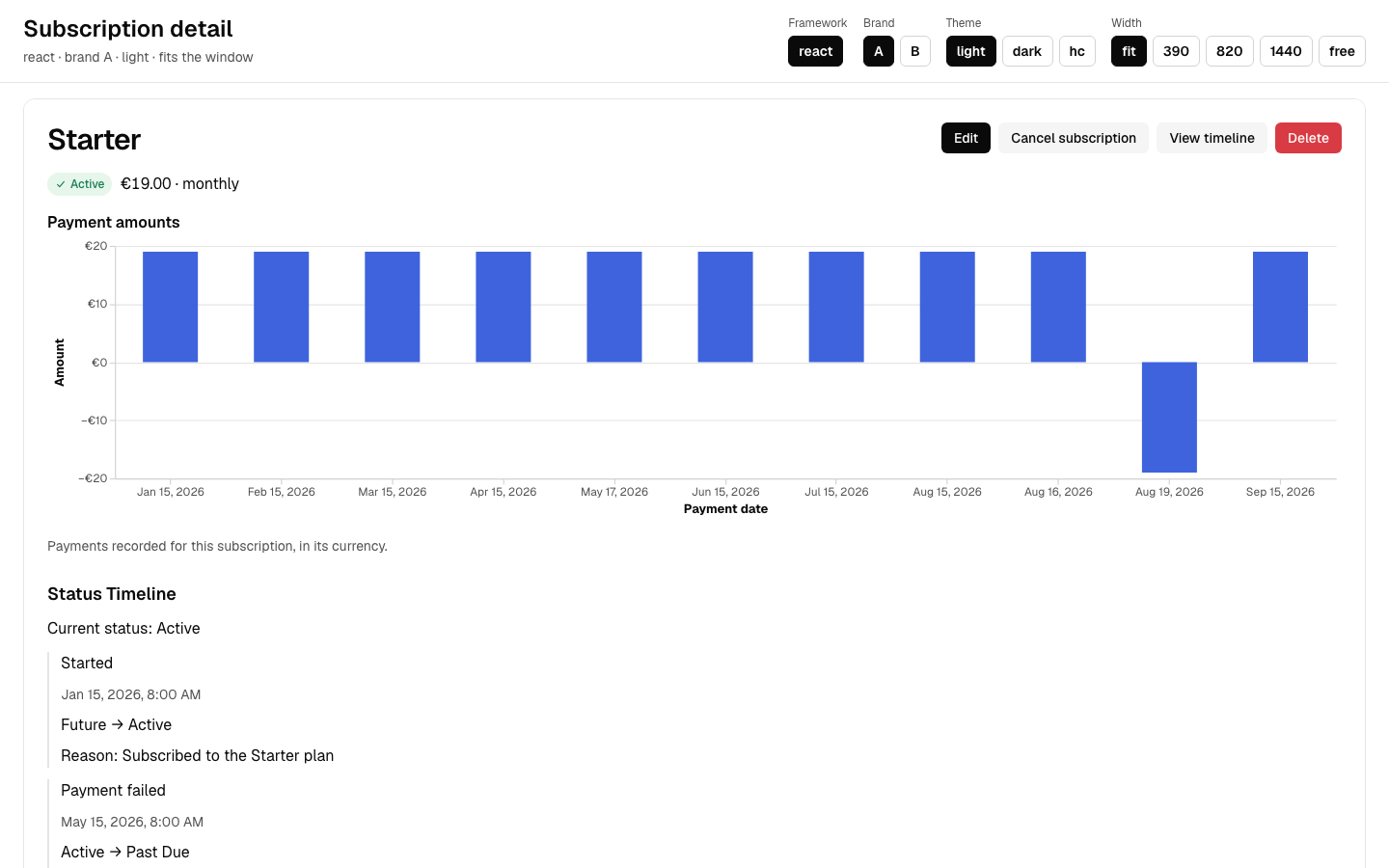
This document describes version 0.5.0. Check the npm package page for published availability.
Requirements
- Node.js 22.0.0 or newer, as the
nodeyour client starts. Use a current LTS release; 22.0.0 is the floor, and the runtime says so in one sentence on a Node below it. - macOS or Linux. The running-app preview (
design_preview) compiles generated screens with a bundled esbuild binary on macOS (arm64, x64) and Linux (arm64, x64); other tools do not need that compiler, and on other platformsdesign_previewreturnsOODS-N021naming the platform. Windows is untested: no run there has been recorded, and no Windows esbuild binary ships. npx(it comes with Node.js) andtaron the PATH your client starts with. macOS and the common Linux distributions includetar; the first start unpacks the runtime with it.- One of Claude Desktop, Claude Code or Cursor.
Install
Every client starts the same command, npx -y @oods/foundry, and registers it under the name oods-foundry. The first start downloads the package and unpacks its runtime once into ~/.oods-foundry/runtime/; later starts reuse it.
Claude Code
claude mcp add oods-foundry -- npx -y @oods/foundry
claude mcp get oods-foundry
The second command prints the registration and its status; Status: ✓ Connected means the server started and answered. Options go after the name: claude mcp add oods-foundry -s user -e MCP_TOOLSET=all -- npx -y @oods/foundry registers it for every project (-s user) and adds the on-demand tools (-e MCP_TOOLSET=all, 20 in all). claude mcp remove oods-foundry undoes it.
Agent skill, plugin and registry entry
The Claude Code plugin bundles the OODS Foundry server with the oods-foundry skill. Add its marketplace, then install it by name:
claude plugin marketplace add https://github.com/kneelinghorse/oods-foundry-claude-plugin.git
claude plugin install oods-foundry@oods-foundry
The server is also listed in the official MCP registry as com.oods-foundry/foundry. The manual connection above remains available.
The npm package also carries the skill as plain files at skills/oods-foundry/. Claude Code does not discover skills in node_modules, so install the package in your project first, then copy the whole folder into your project's skill directory:
npm install @oods/[email protected]
mkdir -p .claude/skills
cp -R node_modules/@oods/foundry/skills/oods-foundry .claude/skills/
Restart Claude Code and invoke /oods-foundry, with the server connected as above. Other agents can read SKILL.md and its bundled quickstart reference directly, or copy the folder into their own supported skill location. The skill explains the calls, receipts and unchecked work; installing the plain files does not register an MCP server.
Claude Desktop
Open the configuration file (create it if it does not exist): ~/Library/Application Support/Claude/claude_desktop_config.json on macOS, %APPDATA%\Claude\claude_desktop_config.json on Windows. Add the entry under mcpServers:
{
  "mcpServers": {
    "oods-foundry": {
      "command": "npx",
      "args": [
        "-y",
        "@oods/foundry"
      ]
    }
  }
}
Restart Claude Desktop. The tools appear under the oods-foundry server. If they do not, the server's log says why: ~/Library/Logs/Claude/mcp-server-oods-foundry.log on macOS. If the log says spawn npx ENOENT, which can happen when Node comes from a version manager, put the full path of npx (what which npx prints) in command and add an env block whose PATH includes the directory of node.
Cursor
Create .cursor/mcp.json in the project (or ~/.cursor/mcp.json for every project):
{
  "mcpServers": {
    "oods-foundry": {
      "type": "stdio",
      "command": "npx",
      "args": [
        "-y",
        "@oods/foundry"
      ]
    }
  }
}
Reload the Cursor window. The server shows up in the MCP settings with its tools.
The design preview inside the conversation
design_preview returns the generated screen running in a browser. A client that renders MCP Apps can show it inside the conversation, where you edit the composition, compare two versions side by side, accept one and request changes. The MCP Apps SDK reference host v1.7.5 rendered React and Vue inside the conversation with OODS_MCP_APPS_UI=1 through a local HTTP-to-stdio relay; its default initialize request advertises no UI capability and receives text instead. That run used a fixed-file serving adjustment for the hidden repository checkout. No Claude Desktop or Cursor run is recorded; the two lines below come from their documentation. Any other client gets the same result as text, with links to the preview in your browser, served on 127.0.0.1.
- Claude Desktop, by its documentation, renders an app from a local server only with Developer Mode on, and keeps the tool list and the app it fetched until you choose Reload MCP Configuration after a newer version installs.
- Cursor, by its documentation, renders MCP Apps from version 2.6. Reload the window after a newer version installs.
- Claude Code does not render MCP Apps; it shows the text result.
Register oods-foundry directly, beside any other entry such as an MCP hub, not behind it. The app reaches the conversation only when the client talks to the server itself, or when a hub passes the MCP Apps extension (io.modelcontextprotocol/ui), the tool's _meta.ui and resources/read through to it. When a client connects, the server writes one line to its standard error naming the client and whether it negotiated the extension; the client's log for the oods-foundry server shows whether the app was offered.
The first run, in ten minutes
To change one trait and predict which screens follow, start with the first change in the QUICKSTART.
Your client lists the tools with underscores, the form MCP clients accept: tokens_build, structuredData_fetch, brand_apply, brand_intake, catalog_list, code_generate, design_compose, design_preview, pipeline, health, registry_snapshot, viz_render, dashboard_render, artifact_certify, fidelity_preview, map, schema, object, repl. Ask your assistant for each step below; it makes the call. One rule shapes the run: a schemaRef lives in the server your client started, for 30 minutes and for that conversation, so make steps 2 to 6 in one conversation.
- Check the server. Ask for
health. It answersstatus: "ok"with the registry counts (objects, traits, components),server.version(0.5.0) andserver.uptimein milliseconds. - Compose one screen.
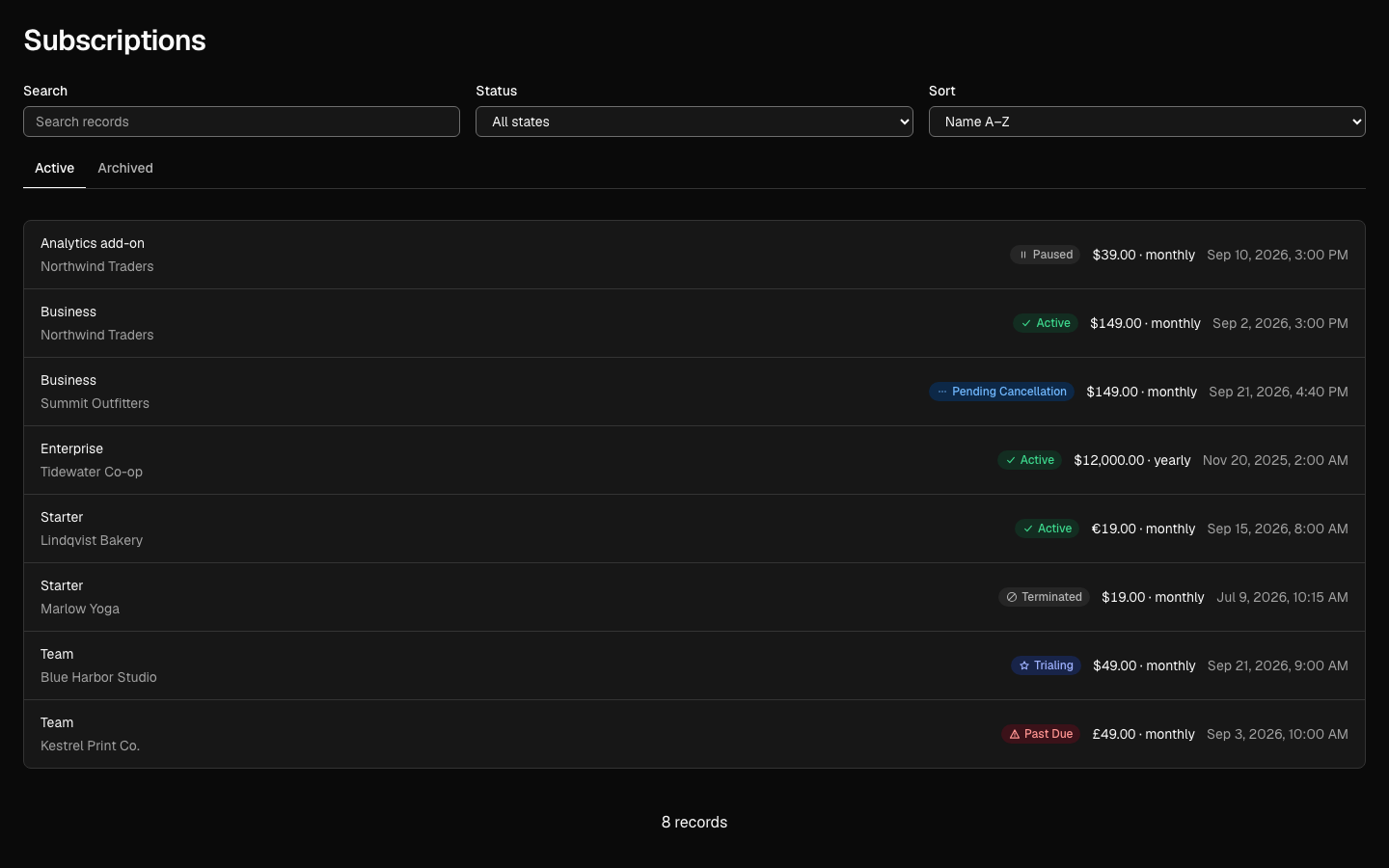
design_composewith{"object": "Subscription", "context": "detail"}answersstatus: "ok", aschemaRefsuch ascompose-dae744a8,objectUsed(the object, its version, the traits and the fields it composed) and one entry inselectionsper slot, naming the component chosen, the reason and any available review evidence. Missing confidence is not inferred; layout detection and intent selection use keyword rules. - See it running.
design_previewwith{"object": "Subscription", "context": "detail"}answers with one link per framework to the generated React and Vue screen, mounted with generated sample records and running on 127.0.0.1. Open one in your browser. - Certify a chart. Ask for
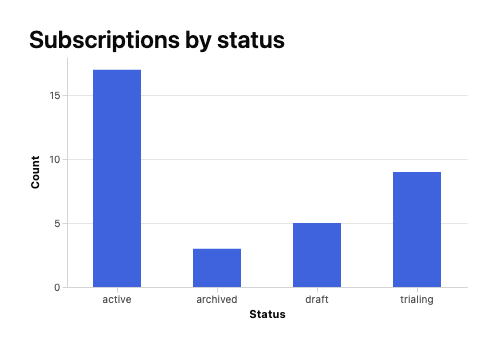
viz_renderwith
It returns the spec, a{"chartType": "bar", "rows": [{"status": "active", "count": 17}, {"status": "draft", "count": 5}, {"status": "archived", "count": 3}], "encodings": {"x": {"field": "status", "type": "nominal"}, "y": {"field": "count", "type": "quantitative", "aggregate": "sum"}}, "output": {"includeNormalizedSpec": true, "includeA11y": true}}contentHash, a narrative and data table, andnormalizedSpec. Thenartifact_certifywith{"spec": <that normalizedSpec>}answerscoverage: "certified",conformant: trueandpillars: {"a11yEquivalence": "pass", "determinism": "pass", "contrast": "pass", "accuracy": "pass"}, withaccuracyRulesnaming the rules it checked. For several charts on one page,dashboard_renderlays out shared datasets and panels (KPI tiles and 11 of the 13 chart types) in one fixed metric-overview layout: a row of KPIs, a trend, a breakdown and an optional map, each chart rendered asviz_renderrenders it. With"output": {"html": true}it also returns the page as static HTML in light, dark or high contrast; the page does not fetch or refresh its data. - Generate the code.
code_generatewith{"schemaRef": "<from step 2>", "framework": "react", "profile": "build", "options": {"payloadMode": "file"}}writes the files (src/GeneratedUI.tsx, the screen's chart andartifact.jsonwith the content hash and exact dependency versions) to the directory the result names aspayload.directory, and answers with avalidationReceiptlisting the checks that ran and, undernotChecked, the ones that did not. The file is this one screen as a component to mount in your own app;"context": "workflow"in step 2 composes a whole application instead. Itsinstallblock names the@oodspackages the code imports, at exact versions, and thenpm installcommand that fetches them from npm."framework": "vue"gives the Vue component. - Open the sample HTML.
replwith{"action": "render", "schemaRef": "<from step 2>", "apply": true, "output": {"compact": false, "payloadMode": "file"}}writesindex.htmlto the directory the result names aspayload.directory: a static sample HTML screen with the record, chart, working tabs and token CSS inline. Open it in your browser. Domain actions show an integration notice and do not persist records. For an HTML artifact with a content hash, use code_generate with framework html and profile build.
Steps 5 and 6 use file mode in every client: their inline results are larger than some clients accept from one tool (Claude Code accepts 25,000 tokens by default, MAX_MCP_OUTPUT_TOKENS), and a file is easier to open anyway.
Your own objects and traits
OODS Foundry composes from the objects and traits it ships and from yours. Put a *.object.yaml file in ~/.oods-foundry/objects and a *.trait.yaml file in ~/.oods-foundry/traits, or ask your assistant to use the object tool: validate checks a definition without writing it, register writes it into your folder once it validates and composes in every context it declares, and reload reads the folders again without a restart. An object of yours with a shipped object's name is used in its place; a trait of yours cannot reuse a shipped trait's name. object list and health name every file that is not in use and why. Your folders are outside the unpacked runtime, so they survive upgrades. A trait of yours can place only the components OODS Foundry ships (catalog_list names them); mapped implementations can come from your own components by substitution. The authoring guide is OBJECTS-AND-TRAITS.md.
Your own brands
OODS Foundry renders in the brands it ships and in yours. Ask your assistant to use the brand_intake tool. Use derive with your own DTCG tokens or shadcn theme CSS to get a recipe with source paths and named gaps, then review it and fill the gaps before create. The recipe has six values: the neutral's hue and tint, the accent's hue, whether the primary action is the neutral or the accent, the corner radius and the font. template with from.recipe returns the complete brand it gives, graded; template alone returns every slot of a brand with what it paints and a starting value, for you to fill. validate checks a recipe or your values (the contrast of every pair included) without writing, and create writes the brand into ~/.oods-foundry/brands and builds it there, outside the unpacked runtime, so every tool, the preview and the apps you generate use it at once. brand_apply changes your brand the same checked way. A generated React or Vue app for your brand carries its stylesheet. Your brands survive upgrades; the first start of a new version rebuilds them. The guide is BRANDS.md.
Your own components
OODS Foundry supports your own components by substitution in React and Vue: map a shipped component id to your package, exact version and export, then compose as usual. One map create call can check a list from mappingsPath before writing all of it. The preview bundles your local package and code generation imports it. React projects on shadcn/ui’s Radix base and Tailwind 4 can map their copied source files, install the eight shipped registry adapters and use their own theme in previews and generated apps. Mapped components carry advisory contract reports with met, unmet and not-checked obligations; this is not blanket conformance. New components beyond the shipped catalog are not supported. See COMPONENTS.md.
For a single screen, ask for code_generate with options.output set to application. It includes an entry, Vite configuration and a package.json that pins the @oods libraries and your mapped packages at exact versions; run npm install, then npm run build. A mapped package that is not on a registry installs from its own tarball or folder. The sample app marks its data and actions that still need your application's handlers.
When a definition changes, GENERATED-APPS.md explains which generated files to replace, which are your starting points, and how to keep your data and action wiring in your own files.
Bring your own design system
Follow the quickstart: your colour tokens become a brand, your trait and object define a Warehouse, and your component package replaces a shipped Button. The same sequence composes a screen, certifies a chart, opens a running preview, and generates React and Vue application files. All example inputs ship in the package's quickstart/ folder; the private repository is not required. The package also ships quickstart/expected.json, the hashes the quickstart's React app, Vue app and chart come out with, and facts.json, the facts this page states, each with where it comes from. Beside facts.json, errors.json lists the runtime's error codes, severity, cause, fix and tools.
Limits
Composition matches object definitions and keyword rules; it does not interpret arbitrary natural language. Chart certification measures the chart operand and declared scope, not the surrounding screen or application. Read each pillar and its exemptions. Static HTML is sample output with local controls, not a persistent app. Generated applications still need your data, navigation and persistence handlers. Mapped-component reports are advisory and can contain unmet or not-checked obligations. Measured runtime and browser evidence is bounded by its recorded head, inputs and platform; health distinguishes historical proof from this build.
Each tool accepts 60 calls a minute, except design_preview (10); brand_apply and a11y_scan (12); tokens_build, brand_intake, fidelity_preview, map and schema (30); and pipeline (40). A call past its tool's limit is refused with a rate-limit error; wait a few seconds and call again.
Settings
Environment variables are optional; every default is the documented one. Set them in the client's env block (Claude Desktop, Cursor) or with -e KEY=value after the name on claude mcp add.
| Variable | Default | Effect |
| --- | --- | --- |
| MCP_TOOLSET | default | default advertises 19 tools; all adds the 1 on-demand tools, 20 in all. |
| MCP_EXTRA_TOOLS | (none) | Comma-separated on-demand tools added to the default surface, for example a11y.scan. |
| MCP_ROLE | designer | Policy role (designer or maintainer). |
| MCP_SCHEMA_STORE_ROOT | ~/.oods-foundry | Where saved schemas, every composed and previewed version, and file-mode output are kept. |
| OODS_NODE_PATH | the Node running the adapter | Node binary used to start the native server. |
| OODS_MCP_APPS_UI | (unset) | 1 offers the preview app on design_preview even to a client that did not negotiate the MCP Apps extension. |
| OODS_OBJECTS_DIR | ~/.oods-foundry/objects | Folder your own objects are read from, after the ones OODS Foundry ships; the object tool's register writes there. |
| OODS_TRAITS_DIR | ~/.oods-foundry/traits | Folder your own traits are read from, after the ones OODS Foundry ships. |
| OODS_BRANDS_DIR | ~/.oods-foundry/brands | Folder your own brands are kept in and built in, outside the runtime; brand_intake's create writes there. |
| OODS_MAPPINGS_DIR | ~/.oods-foundry/mappings | Folder your component mappings are kept in (component-mappings.json), outside the runtime; map writes there. |
| MCP_MAPPINGS_PATH | (unset) | A mappings file used instead of that folder's; it takes precedence. A relative path resolves against the runtime directory. |
Network and tracing
In the server implementation, trace export is disabled unless OODS_OTLP_ENDPOINT is configured. When set, OpenTelemetry exports spans to that endpoint; OODS_OTLP_HEADERS supplies optional request headers. Generated previews use a local host on 127.0.0.1 by default. Installation downloads, caller-supplied URLs, configured preview hosts and your AI client's own traffic are separate. This describes configuration and source behavior, not a measurement of all network activity.
Where things go
~/.oods-foundry/runtime/<version>-<digest>/holds the unpacked runtime, one directory per version. Delete an old one to reclaim its space; the current one is unpacked again if it is missing.~/.oods-foundry/schemas/,compositions/andpayloads/hold your saved schemas, every composed and previewed version, and file-mode output. They survive upgrades; delete them to start over.~/.oods-foundry/objects/andtraits/hold your own objects and traits. They survive upgrades.~/.oods-foundry/brands/holds your own brands, andbrands/.build/the token build made from them. They survive upgrades.~/.oods-foundry/mappings/component-mappings.jsonholds your component mappings. It survives upgrades.OODS_MAPPINGS_DIRmoves the folder;MCP_MAPPINGS_PATHnames a mappings file instead, and takes precedence.- Run records from
apply: truecalls are written inside the unpacked runtime, underartifacts/current-state/<date>/, and go when you delete that version.
To remove OODS Foundry, remove the client entry and delete ~/.oods-foundry.
Without npm
The same runtime also comes as an archive, oods-foundry-runtime.tar.gz, with its own short install guide. It needs no package manager: you extract it and point your client at node and its adapter.
Legacy identifiers
Some identifiers keep the product's earlier name: the runtime manifest and SBOM formats (forge-runtime-manifest/v1, forge-runtime-sbom-lite/v1), the readiness attestation (forge-readiness-attestation/v1) and the preview app's resource address (ui://oods-forge/preview/…). Saved files and clients depend on them, so they stay as they are. They are identifiers, not product names.
Feedback
What you noticed is the point of this release: a screen that reads wrong, a certification you disagree with, install friction, a sentence that did not make sense. Email [email protected] with the tool call as you made it, what came back and what you expected. A short note is worth more than a polished one.
License
OODS Foundry is licensed under the Apache License 2.0 (LICENSE, NOTICE). What OODS Foundry generates for you is yours. You may use, change and distribute generated code, markup, styles and other output under any terms you choose, without including OODS Foundry's LICENSE or NOTICE. The fonts OODS Foundry bundles (Geist, Geist Mono and DM Sans) stay under the SIL Open Font License 1.1 wherever they go, so generated HTML that embeds them carries their notice. The OODS Foundry packages that generated code installs as dependencies remain under the Apache License 2.0. The third-party packages inside keep their own licenses (THIRD-PARTY-NOTICES.md). Security notes are in SECURITY.md and changes by version in CHANGELOG.md.