
@opsydyn/elysia-spectral
v1.5.4
Published
Thin Elysia plugin that lints generated OpenAPI documents with Spectral.

Maintainers
 opsydyn
Readme
@opsydyn/elysia-spectral
Thin Elysia plugin that lints the OpenAPI document generated by @elysiajs/openapi with Spectral.
@opsydyn/elysia-spectral does not generate OpenAPI documents by itself. Your app must expose an OpenAPI JSON document — most commonly by mounting @elysiajs/openapi, or by configuring source.specPath / source.baseUrl to point at an equivalent route.
What Is Elysia?
Elysia is a fast, ergonomic TypeScript web framework for Bun. It uses a plugin model for composing functionality and integrates with @elysiajs/openapi to generate OpenAPI documentation directly from route schemas — no separate spec file or annotation layer required.
- Official site: https://elysiajs.com/
@elysiajs/openapi: https://elysiajs.com/plugins/openapi
What Is Spectral?
Spectral is an open-source linter and style guide engine for API descriptions. It was built with OpenAPI, AsyncAPI, and JSON Schema in mind, and is commonly used to enforce API style guides, catch weak or inconsistent contract definitions, and improve the usefulness of generated API descriptions.
For API teams, that matters because a spec can be technically valid while still being poor for:
- generated documentation
- client generation
- contract testing
- consistency across teams and services
- long-term API governance
@opsydyn/elysia-spectral uses Spectral to turn the OpenAPI document generated by @elysiajs/openapi into an automated quality gate for Elysia apps.
Official Spectral references:
- Stoplight overview: https://stoplight.io/open-source/spectral
- GitHub repository: https://github.com/stoplightio/spectral
Standards
- RFC 9457 — Problem Details for HTTP APIs: https://datatracker.ietf.org/doc/html/rfc9457
The strict preset enforces RFC 9457 by requiring that all 4xx and 5xx responses declare application/problem+json as their content type.
This README is organized using the Diataxis documentation model:
- Tutorial: learn by building a working setup
- How-to guides: solve specific tasks
- Reference: look up exact behavior and API shape
- Explanation: understand the design choices
Current package scope:
- startup linting
- threshold-based failure
- first-party governance presets:
recommended,server,strict - RFC 9457 Problem Details enforcement (strict preset)
- repo-level and local rulesets
- YAML, JS, TS, and in-memory rulesets
- resolver pipeline for advanced ruleset loading
- console output
- JSON report output
- self-describing JSON report metadata (
failOn,durationMs, relative artifact paths) - JUnit report output
- SARIF report output
- OpenAPI snapshot output
- Bruno collection output (OpenCollection YAML or JSON)
- reusable runtime for CI and tests
- opt-in healthcheck endpoint for cached and fresh runs
- opt-in HTML lint dashboard with severity filters, search, and copy-friendly artifact paths
Data flow
flowchart TD
    A["Elysia routes\n(TypeScript + t.Object schemas)"]
    B["@elysiajs/openapi\ngenerates OpenAPI spec at runtime"]
    C["PublicSpecProvider\nfetches /openapi/json"]
    D["lintOpenApi\nSpectral rules engine"]
    E["LintRunResult\n{ ok, source, summary, findings }"]

    F["Console output"]
    G["JSON report\nopenapi-lint.json"]
    H["OpenAPI snapshot\n*.open-api.json"]
    I["SARIF\nGitHub code scanning"]
    J["JUnit\nCI test reporters"]
    K["Bruno collection\n.yml / .json"]

    A -->|"route schemas are\nthe source of truth"| B
    B -->|"spec JSON"| C
    C -->|"spec JSON"| D
    D -->|"findings + summary"| E
    E --> F
    E --> G
    E --> H
    E --> I
    E --> J
    E --> K
Tutorial
Add OpenAPI linting to an Elysia app
This tutorial takes a minimal Elysia app and adds startup OpenAPI linting using the strict preset. The strict preset is the recommended starting point for teams shipping production APIs — it enforces summaries, descriptions, operation IDs, tags, server declarations, and RFC 9457 Problem Details on error responses.
- Install the dependencies.
# bun
bun add elysia @elysiajs/openapi @opsydyn/elysia-spectral

# npm
npm install elysia @elysiajs/openapi @opsydyn/elysia-spectral
@elysiajs/openapi is the recommended generator because it exposes the default /openapi/json route this package expects. If your app uses a different OpenAPI generator or serves the JSON at a different path, configure source.specPath accordingly.
- Add
@elysiajs/openapiandspectralPluginto your app with thestrictpreset.
import { Elysia, t } from 'elysia'
import { openapi } from '@elysiajs/openapi'
import { spectralPlugin } from '@opsydyn/elysia-spectral'

new Elysia()
  .use(
    openapi({
      documentation: {
        info: {
          title: 'Example API',
          version: '1.0.0',
          contact: { name: 'API Team', url: 'https://example.com/support' }
        },
        servers: [{ url: 'https://api.example.com' }],
        tags: [{ name: 'Users', description: 'User operations' }]
      }
    })
  )
  .use(
    spectralPlugin({
      preset: 'strict',
      failOn: 'error',
      startup: { mode: 'enforce' },
      output: {
        console: true,
        jsonReportPath: './artifacts/openapi-lint.json',
        specSnapshotPath: true
      }
    })
  )
  .get('/users', () => [{ id: '1', name: 'Ada Lovelace' }], {
    detail: {
      summary: 'List users',
      description: 'Return all registered users.',
      operationId: 'listUsers',
      tags: ['Users']
    },
    response: {
      200: t.Array(
        t.Object({ id: t.String(), name: t.String() })
      ),
      500: t.Object(
        {
          type: t.String(),
          title: t.String(),
          status: t.Number(),
          detail: t.String()
        },
        { description: 'Internal server error (RFC 9457 Problem Details)' }
      )
    }
  })
  .listen(3000)
The strict preset requires error responses to use application/problem+json (RFC 9457). The 500 response above satisfies that when @elysiajs/openapi generates the schema with the correct content type.
- Start the app.
bun run src/index.ts- Confirm the outcome.
- the app serves OpenAPI JSON at
/openapi/json - the plugin lints that generated document during startup using the
strictpreset - a clean run prints a success banner in the terminal
./artifacts/openapi-lint.jsoncontains the full lint result./<package-name>.open-api.jsoncontains the generated OpenAPI snapshot
A passing run:

If startup fails, the terminal output includes:
- the failing rule code
- the affected operation
- a fix hint when one is known
- a spec reference in
open-api.json#/json/pointerform

Choose a preset
Three first-party presets are available. Import them directly or set preset in the plugin options.
| Preset | Use case | elysia rules | description / operationId | servers | RFC 9457 |
|---|---|---|---|---|---|
| recommended | local dev, low friction | warn | — | off | — |
| server | production API gate | error | warn | warn | — |
| strict | full API governance | error | error | error | warn |
// simplest — preset string
spectralPlugin({ preset: 'strict' })

// or import the preset object and pass as ruleset
import { strict } from '@opsydyn/elysia-spectral'
spectralPlugin({ ruleset: strict })
When preset is set, autodiscovered spectral.yaml overrides merge on top of the preset rather than the package default. This lets you tighten or loosen individual rules without losing the preset baseline.
Provide an OpenAPI JSON route
@opsydyn/elysia-spectral needs a public OpenAPI JSON document to lint. By default it looks for /openapi/json via app.handle(new Request(...)).
The recommended setup is to mount @elysiajs/openapi:
import { Elysia } from 'elysia'
import { openapi } from '@elysiajs/openapi'
import { spectralPlugin } from '@opsydyn/elysia-spectral'

new Elysia()
  .use(openapi())
  .use(spectralPlugin())
If your app exposes the OpenAPI JSON document somewhere else, point the plugin at that route:
spectralPlugin({
  source: {
    specPath: '/docs/openapi.json'
  }
})
If the route is missing, the runtime throws an actionable provider error explaining that an OpenAPI generator (for example @elysiajs/openapi) must be installed and mounted, or that source.specPath should be updated.
How-to Guides
Use a repo-level ruleset
Use a ruleset file at the consuming app root:
spectralPlugin({
  ruleset: './spectral.yaml'
})
Or let the plugin autodiscover a standard ruleset filename:
spectralPlugin()Autodiscovery looks for these files in order:
spectral.yamlspectral.ymlspectral.tsspectral.mtsspectral.ctsspectral.jsspectral.mjsspectral.cjsspectral.config.yamlspectral.config.ymlspectral.config.tsspectral.config.mtsspectral.config.ctsspectral.config.jsspectral.config.mjsspectral.config.cjs
Autodiscovered repo-level rulesets are merged with the package default ruleset.
Use a JS or TS ruleset module
Module rulesets can export the ruleset as the default export or as a named ruleset export.
export default {
  extends: ['spectral:oas'],
  rules: {
    operation-description: {
      severity: 'error'
    }
  }
}
Module rulesets can also export custom Spectral functions:
const startsWithPrefix = (input, options) => {
  if (typeof input !== 'string' || !input.startsWith(options.prefix)) {
    return [{ message: `OperationId must start with "${options.prefix}".` }]
  }
}

export const functions = {
  startsWithPrefix
}

export default {
  extends: ['spectral:oas'],
  rules: {
    'operation-id-prefix': {
      given: '$.paths[*][get,put,post,delete,options,head,patch,trace]',
      then: {
        field: 'operationId',
        function: 'startsWithPrefix',
        functionOptions: { prefix: 'fetch' }
      }
    }
  }
}
Keep the app running when lint fails at startup
Use startup.mode: 'report' when you want the full package-owned terminal report but do not want lint findings to block boot.
spectralPlugin({
  failOn: 'warn',
  startup: {
    mode: 'report'
  }
})
This is useful for local development and intentionally broken fixtures.
startup.mode: 'report' relaxes threshold failures only. Missing OpenAPI routes, invalid spec JSON, broken rulesets, or artifact writes promoted to output.artifactWriteFailures: 'error' still surface as startup errors.
Disable startup lint entirely
Use startup.mode: 'off' when you only want manual or healthcheck-triggered runs.
spectralPlugin({
  startup: {
    mode: 'off'
  }
})
enabled: false is still supported as a backwards-compatible way to disable startup lint.
startup.mode takes precedence over the legacy enabled flag.
Add a lint healthcheck endpoint
The healthcheck route is opt-in.
spectralPlugin({
  healthcheck: {
    path: '/health/openapi-lint'
  }
})
Behavior:
GET /health/openapi-lintreturns the cached startup result when availableGET /health/openapi-lint?fresh=1forces a fresh lint run- the route returns
200when findings stay belowfailOn - the route returns
503when findings meet or exceedfailOn - the route is hidden from generated OpenAPI docs
Add an HTML lint dashboard endpoint
The dashboard route is opt-in and renders the latest lint result as a self-contained HTML page — no JS bundle, no build step, no external assets.
spectralPlugin({
  dashboard: {
    path: '/__openapi/dashboard'
  }
})
dashboard: {} mounts the default path (/__openapi/dashboard); pass path to override.
To gate the dashboard behind a static bearer token, pass bearerToken:
spectralPlugin({
  dashboard: {
    path: '/__openapi/dashboard',
    bearerToken: process.env.LINT_DASHBOARD_TOKEN
  }
})
When bearerToken is set the route returns 401 Unauthorized (with a WWW-Authenticate: Bearer header) unless the request carries a matching Authorization: Bearer <token> header. Leave bearerToken undefined to keep the route open — useful in local dev. This mirrors the bearer pattern documented in the Elysia OpenAPI guide.
What it surfaces:
- pass / fail banner at the configured
failOnthreshold - run metadata (timestamp, source, duration, cache hit)
- severity summary chips that filter the findings table
- a search input that matches rule code, operation, message, and JSON pointer
- copy-to-clipboard buttons next to artifact paths
- the trademarked
SPEC IS TIGHT, SHIP IT RIGHTtagline on a clean run
Keyboard shortcuts: r re-runs, / focuses the filter, Enter/Space toggles the focused severity chip.
Four dark themes ship with the dashboard, selectable from the header dropdown and persisted per-browser via localStorage:
- Astro Houston (default) — purple / blue gradient
- Elysia — pink on deep purple, sourced from the Scalar palette
- Tron Legacy — cyan neon on near-black
- Detroit 808 — TR-808 amber, red, and yellow
Append ?fresh=1 to force a fresh lint run instead of returning the cached result.
| State | Screenshot |
| --- | --- |
| Pass | 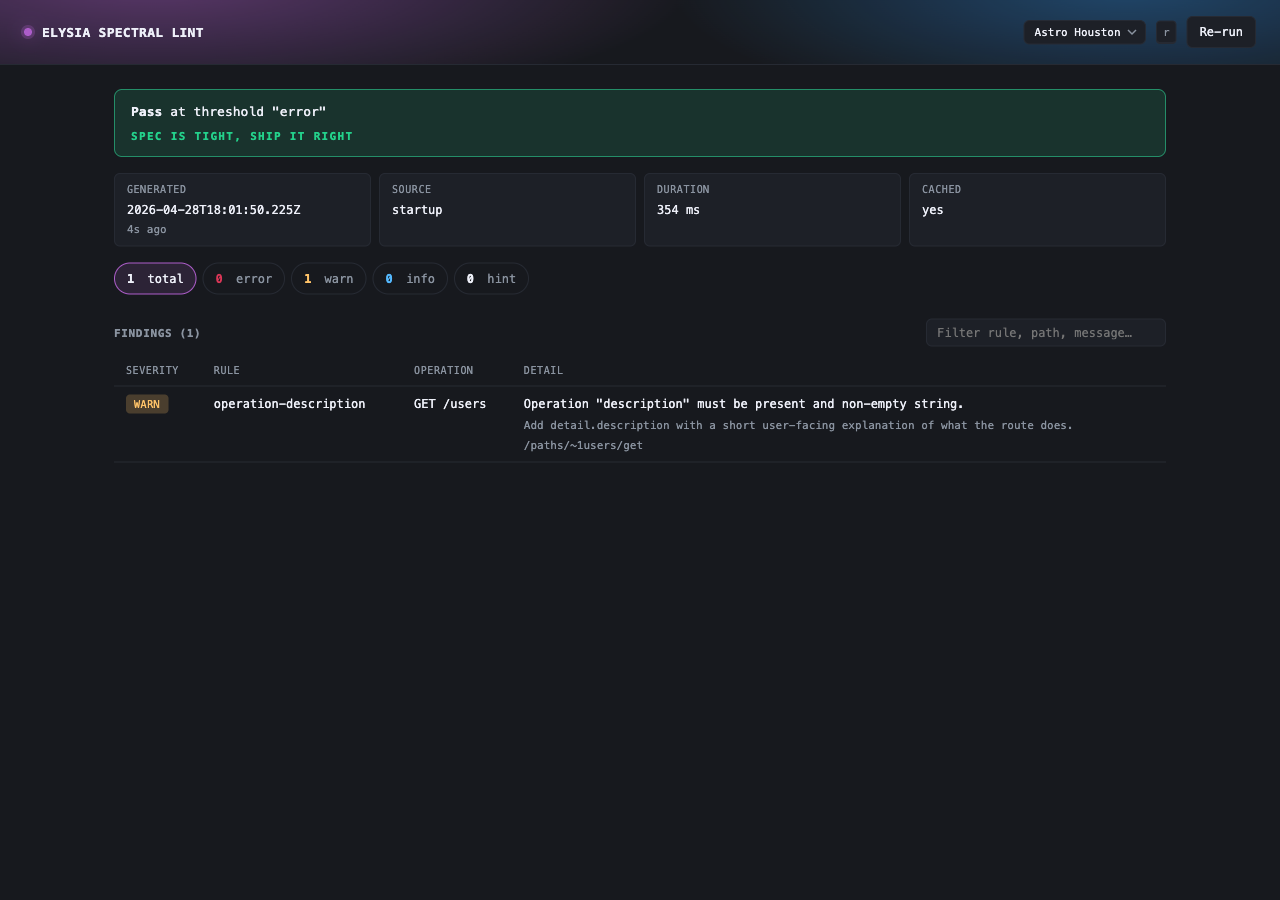 |
| Fail |
|
| Fail | 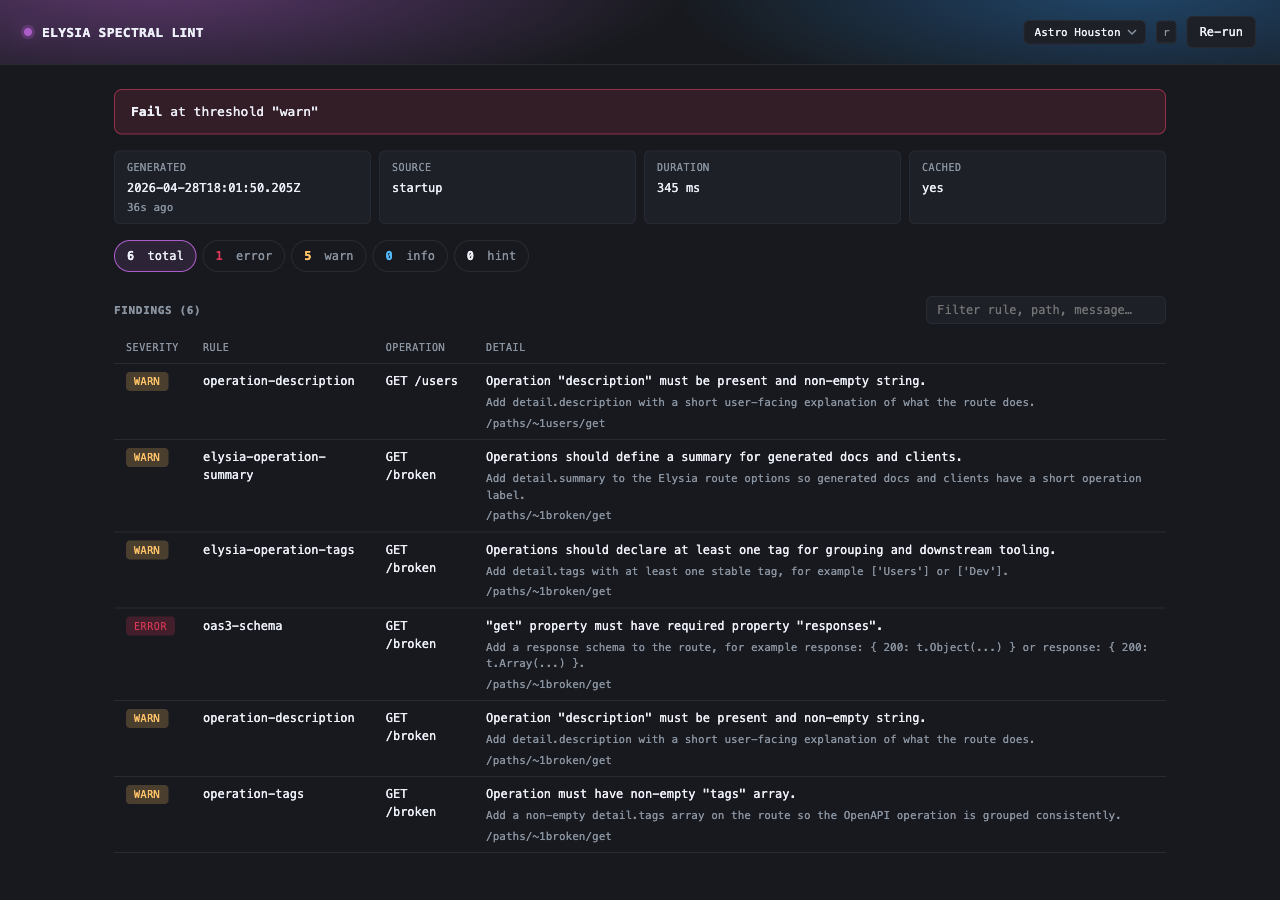 |
| Recovered |
|
| Recovered | 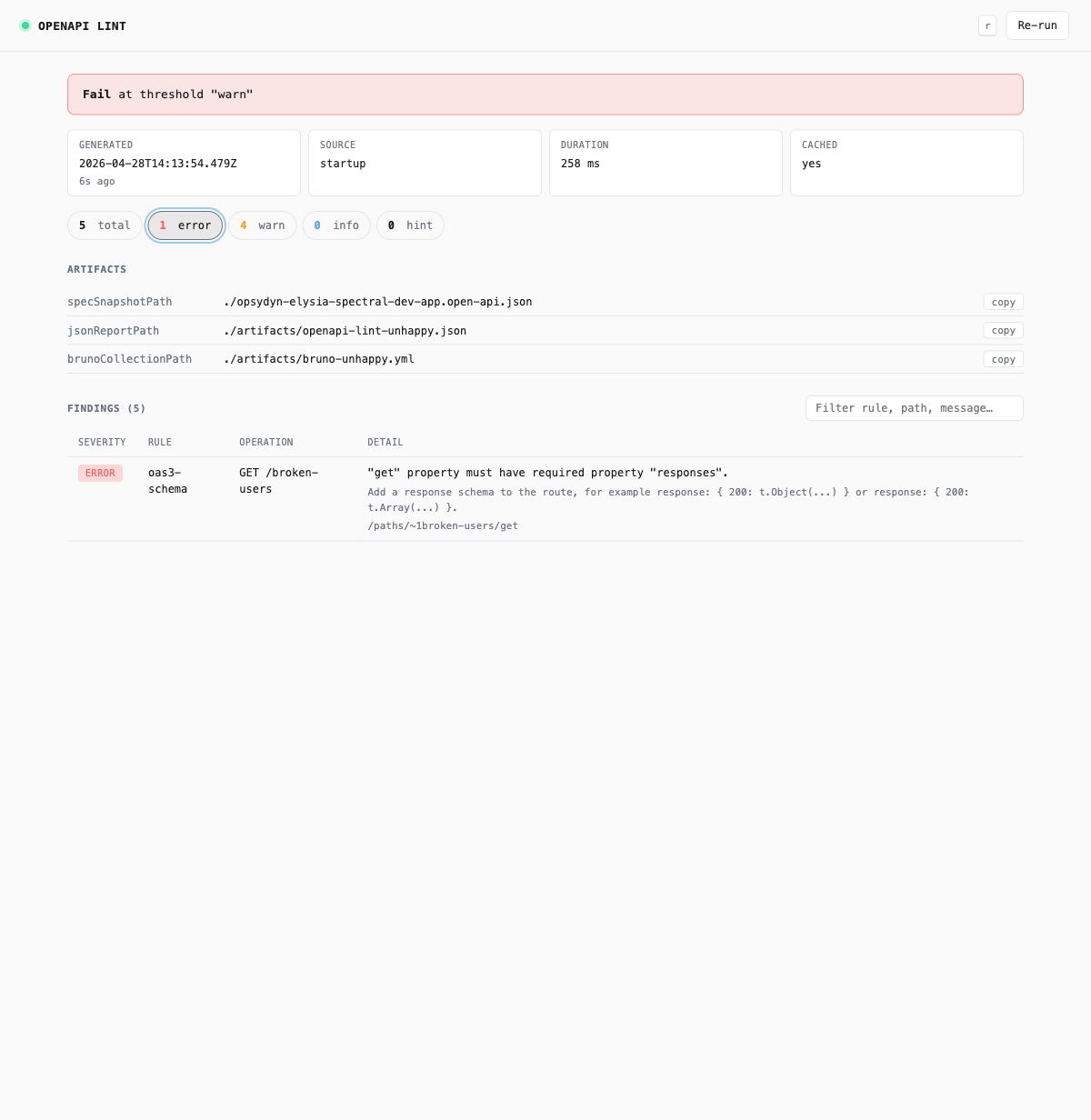 |
|
The dashboard is hidden from generated OpenAPI docs and is intended for local and internal-only environments. Gate it behind your standard auth or environment checks before exposing it on a public host.
Persist JSON reports and OpenAPI snapshots
spectralPlugin({
  output: {
    jsonReportPath: './artifacts/openapi-lint.json',
    specSnapshotPath: true
  }
})
Snapshot behavior:
specSnapshotPath: truederives./<package-name>.open-api.jsonfrom the consuming app'spackage.jsonnamespecSnapshotPath: './contracts/openapi.json'writes to the exact relative path you provide- scoped package names are sanitized, so
@acme/orders-apibecomes./acme-orders-api.open-api.json
All report and snapshot paths resolve from the consuming app's process.cwd().
Emit SARIF for code scanning tools
spectralPlugin({
  output: {
    sarifReportPath: './artifacts/openapi-lint.sarif'
  }
})
SARIF is useful when you want lint results in a standard machine-readable format for platforms such as GitHub code scanning and other static analysis tooling.
Emit JUnit XML for CI test reporting
spectralPlugin({
  output: {
    junitReportPath: './artifacts/openapi-lint.junit.xml'
  }
})
JUnit is useful when your CI system expects test-style XML output and you want lint findings to appear in standard test reports.
Add a custom sink
The existing output convenience flags are built on top of sink abstractions. You can add your own sink for custom reporting or automation:
spectralPlugin({
  output: {
    sinks: [
      {
        name: 'capture',
        async write(result, context) {
          console.log(result.summary.total)
          console.log(context.spec.openapi)
        }
      }
    ]
  }
})
Custom sinks run after linting and can read:
- the normalized lint result
- the resolved OpenAPI document
- artifact paths already produced by earlier built-in sinks
Use a custom ruleset resolver pipeline
If you use the runtime programmatically, you can provide your own resolver pipeline to loadRuleset or loadResolvedRuleset.
import {
  defaultRulesetResolvers,
  loadRuleset,
} from '@opsydyn/elysia-spectral/core'

const ruleset = await loadRuleset('virtual://team-ruleset', {
  resolvers: [
    async (input) =>
      input === 'virtual://team-ruleset'
        ? {
            ruleset: {
              extends: ['spectral:oas'],
              rules: {
                'team-summary': {
                  given: '$.paths[*][get,put,post,delete,options,head,patch,trace]',
                  then: {
                    field: 'summary',
                    function: 'truthy'
                  }
                }
              }
            }
          }
        : undefined,
    ...defaultRulesetResolvers
  ]
})
defaultRulesetResolvers is a supported advanced export from @opsydyn/elysia-spectral/core. Prefer prepending your resolver and then spreading the defaults so built-in autodiscovery, path loading, and inline ruleset resolution continue to work.
This is an advanced extension point. Most apps should continue using repo-level spectral.* files.
Make artifact write failures fatal in CI
Artifact writes are non-fatal by default. In CI, set them to fatal:
spectralPlugin({
  output: {
    jsonReportPath: './artifacts/openapi-lint.json',
    specSnapshotPath: true,
    artifactWriteFailures: 'error'
  }
})
Use 'warn' for local development and 'error' when artifact generation is required.
Run the runtime in CI
Use createOpenApiLintRuntime to run a standalone lint check in CI without starting an HTTP server. Import your Elysia app instance directly — the runtime uses app.handle() in-process to retrieve the generated OpenAPI document. No port binding required.
Before using the runtime, make sure the app instance mounts an OpenAPI generator (typically @elysiajs/openapi) or otherwise serves a reachable OpenAPI JSON route.
Create a script at scripts/lint-openapi.ts:
import { app } from '../src/app'
import { createOpenApiLintRuntime } from '@opsydyn/elysia-spectral'

const runtime = createOpenApiLintRuntime({
  preset: 'strict',
  failOn: 'error',
  output: {
    console: true,
    sarifReportPath: './reports/openapi.sarif',
    junitReportPath: './reports/openapi.junit.xml',
    specSnapshotPath: './reports/openapi-snapshot.json',
    artifactWriteFailures: 'error',
  },
})

try {
  await runtime.run(app)
  process.exit(0)
} catch {
  process.exit(1)
}
Run it as a CI step:
- name: Lint OpenAPI spec
  run: bun scripts/lint-openapi.ts
Integrate SARIF with GitHub code scanning
SARIF output maps lint findings to code locations and surfaces them as GitHub code scanning alerts on pull requests.
- name: Lint OpenAPI spec
  run: bun scripts/lint-openapi.ts

- name: Upload SARIF to GitHub code scanning
  uses: github/codeql-action/upload-sarif@v3
  with:
    sarif_file: reports/openapi.sarif
  if: always()
if: always() ensures the SARIF upload runs even when the lint step fails, so findings are visible on failing PRs.
Report lint findings as JUnit test results
JUnit output lets CI systems that consume test XML (Buildkite, CircleCI, GitLab, GitHub via third-party actions) show lint findings alongside test results.
- name: Lint OpenAPI spec
  run: bun scripts/lint-openapi.ts

- name: Publish lint results
  uses: dorny/test-reporter@v1
  with:
    name: OpenAPI Lint
    path: reports/openapi.junit.xml
    reporter: java-junit
  if: always()
Generate a Bruno collection
Export the generated OpenAPI spec as a Bruno collection. Bruno is an open-source API client — generated collections let your team test API endpoints without manual import steps.
The output format is determined by the file extension:
.yml/.yaml— OpenCollection YAML (recommended, Bruno v3.0.0+).json— Bruno collection JSON (compatible with all Bruno versions)
// OpenCollection YAML — recommended
spectralPlugin({
  output: {
    brunoCollectionPath: './bruno/collection.yml'
  }
})

// Bruno JSON — for older Bruno versions
spectralPlugin({
  output: {
    brunoCollectionPath: './bruno/collection.json'
  }
})
The collection is written after each lint run — at startup, on healthcheck, or in CI. Commit it alongside the spec snapshot so it stays in sync with the API surface.
To regenerate in CI as part of your lint script:
const runtime = createOpenApiLintRuntime({
  preset: 'strict',
  output: {
    specSnapshotPath: './reports/openapi-snapshot.json',
    brunoCollectionPath: './bruno/collection.yml',
  },
})

await runtime.run(app)
Track OpenAPI snapshot drift
Commit the generated OpenAPI snapshot and use git diff --exit-code to detect when the API surface changes unexpectedly in a PR.
- Generate and commit the initial snapshot:
bun scripts/lint-openapi.ts
git add reports/openapi-snapshot.json
git commit -m "chore: add openapi snapshot"- In CI, regenerate the snapshot and check for drift:
- name: Lint OpenAPI spec
  run: bun scripts/lint-openapi.ts

- name: Check for snapshot drift
  run: git diff --exit-code reports/openapi-snapshot.json
If the snapshot has changed, the CI step fails and the diff is visible in the logs. Deliberate API changes are acknowledged by updating the committed snapshot — accidental ones are caught before they ship.
Generate a typed client
If your consumer is a TypeScript project that can import from your Elysia app, use Eden Treaty instead. It derives types directly from the app instance with no codegen, no snapshot, and no drift.
import { treaty } from '@elysiajs/eden'
import type { App } from '../server'

const client = treaty<App>('localhost:3000')
// fully typed — zero codegen
For vendor-agnostic consumers — cross-repo TypeScript, non-TypeScript clients, or a published SDK — use the committed OpenAPI snapshot as input to openapi-ts:
{
  "scripts": {
    "generate:client": "openapi-ts --input ./reports/openapi-snapshot.json --output ./src/generated/client --client @hey-api/client-fetch"
  }
}
Chain it after the lint step in CI and guard against drift:
- name: Lint OpenAPI spec
  run: bun scripts/lint-openapi.ts

- name: Generate typed client
  run: bun run generate:client

- name: Check for client drift
  run: git diff --exit-code src/generated/client/
The lint gate runs first — if the spec is invalid the codegen step never runs.
Work on this repository locally
From the monorepo root:
bun install
bun run dev
That starts apps/dev-app with:
- OpenAPI UI at
/openapi - raw OpenAPI JSON at
/openapi/json - opt-in lint healthcheck at
/health/openapi-lint - opt-in HTML lint dashboard at
/api-lint/dashboard - JSON lint report output at
./artifacts/openapi-lint.json - OpenAPI snapshot output at
./elysia-spectral-dev-app.open-api.json
To run an intentionally failing fixture:
bun run dev:unhappyThat example uses startup.mode: 'report', so the app still boots while the package prints the full lint report during startup.
Reference
Supported import surfaces
Use @opsydyn/elysia-spectral for the primary stable consumer API:
spectralPlugincreateOpenApiLintRuntimerecommended,server,strict, andpresetsloadRuleset,loadResolvedRuleset, andlintOpenApishouldFail,enforceThreshold, and the exported error classes
Use @opsydyn/elysia-spectral/core for advanced composition details:
defaultRulesetResolvers- resolver pipeline types such as
RulesetResolver,RulesetResolverInput, andLoadResolvedRulesetOptions - the same programmatic runtime helpers when you want an explicitly advanced import surface
defaultRulesetResolvers is a supported extension hook. Prefer [myResolver, ...defaultRulesetResolvers] when extending the resolver pipeline instead of replacing the defaults outright.
When used as a plugin, app.store.openApiLint is part of the supported plugin contract.
Package API
// ── Ubiquitous language types ──────────────────────────────────────────────────────────

type PresetName = 'recommended' | 'server' | 'strict'
type LintSeverity = 'error' | 'warn' | 'info' | 'hint'
type SeverityThreshold = 'error' | 'warn' | 'info' | 'hint' | 'never'
type StartupLintMode = 'enforce' | 'report' | 'off'
type LintRunSource = 'startup' | 'healthcheck' | 'manual'
type ArtifactWriteFailureMode = 'warn' | 'error'
type OpenApiLintRuntimeStatus = 'idle' | 'running' | 'passed' | 'failed'

// ── Plugin options ────────────────────────────────────────────────────────────

type SpectralPluginOptions = {
  /** First-party governance preset. Sets the base ruleset and autodiscovery merge target. */
  preset?: PresetName
  /** Custom ruleset path, object, or inline definition. Merged on top of preset when both are set. */
  ruleset?: string | RulesetDefinition | Record<string, unknown>
  /** Severity level at which the lint run is considered failed. Defaults to 'error'. */
  failOn?: SeverityThreshold
  healthcheck?: false | { path?: string }
  dashboard?: false | { path?: string; bearerToken?: string }
  output?: {
    /** Print findings to the console. Default: true. */
    console?: boolean
    jsonReportPath?: string
    junitReportPath?: string
    sarifReportPath?: string
    /** true derives the path from the consuming app's package name. */
    specSnapshotPath?: string | true
    /** .yml/.yaml → OpenCollection YAML (Bruno v3+), .json → Bruno collection JSON */
    brunoCollectionPath?: string
    pretty?: boolean
    /** Whether artifact write failures throw or warn. Default: 'warn'. */
    artifactWriteFailures?: ArtifactWriteFailureMode
    sinks?: OpenApiLintSink[]
  }
  source?: {
    /** Public OpenAPI JSON route. Defaults to '/openapi/json'. Mount @elysiajs/openapi or serve an equivalent route yourself. */
    specPath?: string
    /** Optional base URL fallback when the OpenAPI document is only reachable over HTTP. */
    baseUrl?: string
  }
  /**
   * Controls startup lint behaviour.
   * startup.mode takes precedence over the legacy enabled option.
   *   'enforce' — lint runs at startup and throws on threshold failure (default)
    *   'report'  — lint runs at startup, prints findings, but does not block boot on threshold failures
   *   'off'     — startup lint is skipped entirely
   */
  startup?: {
    mode?: StartupLintMode
  }
  /**
   * Legacy enable flag. Prefer startup.mode for new code.
   * false or () => false is equivalent to startup.mode: 'off'.
   * The function form receives process.env for environment-based toggling.
   */
  enabled?: boolean | ((env: Record<string, string | undefined>) => boolean)
  logger?: SpectralLogger
}

// ── Result types ──────────────────────────────────────────────────────────────

type LintFinding = {
  code: string
  message: string
  severity: LintSeverity
  path: Array<string | number>
  documentPointer?: string
  recommendation?: string
  source?: string
  range?: {
    start?: { line: number; character: number }
    end?: { line: number; character: number }
  }
  operation?: {
    method?: string
    path?: string
    operationId?: string
  }
}

type LintRunResult = {
  /** True when no findings meet or exceed the configured failOn threshold. */
  ok: boolean
  generatedAt: string
  /** Where the lint run was triggered from. */
  source: LintRunSource
  /** The configured threshold that produced this result. */
  failOn: SeverityThreshold
  /** Duration of the completed lint run in milliseconds. */
  durationMs: number | null
  summary: {
    error: number
    warn: number
    info: number
    hint: number
    total: number
  }
  artifacts?: OpenApiLintArtifacts
  findings: LintFinding[]
}

type OpenApiLintArtifacts = {
  jsonReportPath?: string
  junitReportPath?: string
  sarifReportPath?: string
  specSnapshotPath?: string
  brunoCollectionPath?: string
}

type OpenApiLintRuntimeFailure = {
  name: string
  message: string
  generatedAt: string
}

// ── Runtime ───────────────────────────────────────────────────────────────────

type OpenApiLintRuntime = {
  status: OpenApiLintRuntimeStatus
  startedAt: string | null
  completedAt: string | null
  durationMs: number | null
  latest: LintRunResult | null
  lastSuccess: LintRunResult | null
  lastFailure: OpenApiLintRuntimeFailure | null
  running: boolean
  run: (app: AnyElysia, source?: LintRunSource) => Promise<LintRunResult>
}

function createOpenApiLintRuntime(options?: SpectralPluginOptions): OpenApiLintRuntime

// ── Root utility exports ──────────────────────────────────────────────────────

const presets: Record<PresetName, RulesetDefinition>

function loadRuleset(
  input?: string | RulesetDefinition | Record<string, unknown>,
  baseDirOrOptions?: string | LoadResolvedRulesetOptions,
): Promise<RulesetDefinition>

function loadResolvedRuleset(
  input?: string | RulesetDefinition | Record<string, unknown>,
  baseDirOrOptions?: string | LoadResolvedRulesetOptions,
): Promise<LoadedRuleset>

function lintOpenApi(
  spec: Record<string, unknown>,
  ruleset: RulesetDefinition,
): Promise<LintRunResult>

function shouldFail(result: LintRunResult, threshold: SeverityThreshold): boolean
function enforceThreshold(result: LintRunResult, threshold: SeverityThreshold): void

// ── Extension points (advanced) ───────────────────────────────────────────────

type SpectralLogger = {
  info: (message: string) => void
  warn: (message: string) => void
  error: (message: string) => void
}

type OpenApiLintSinkContext = {
  spec: Record<string, unknown>
  logger: SpectralLogger
}

type OpenApiLintSink = {
  name: string
  write: (
    result: LintRunResult,
    context: OpenApiLintSinkContext,
  ) => undefined | Partial<OpenApiLintArtifacts> | Promise<undefined | Partial<OpenApiLintArtifacts>>
}

type RulesetResolverInput =
  | string
  | RulesetDefinition
  | Record<string, unknown>
  | undefined

type RulesetResolver = (
  input: RulesetResolverInput,
  context: RulesetResolverContext,
) => Promise<ResolvedRulesetCandidate | undefined>

type RulesetResolverContext = {
  baseDir: string
  defaultRuleset: RulesetDefinition
  mergeAutodiscoveredWithDefault: boolean
}

type ResolvedRulesetCandidate = {
  ruleset: unknown
  source?: LoadedRuleset['source']
}

type LoadedRuleset = {
  ruleset: RulesetDefinition
  source?: {
    path: string
    autodiscovered: boolean
    mergedWithDefault: boolean
  }
}

type LoadResolvedRulesetOptions = {
  baseDir?: string
  resolvers?: RulesetResolver[]
  mergeAutodiscoveredWithDefault?: boolean
  /** Override the base ruleset used for autodiscovery merging and the fallback when no ruleset is configured. */
  defaultRuleset?: RulesetDefinition
}

const defaultRulesetResolvers: RulesetResolver[]

// ── Error classes ─────────────────────────────────────────────────────────────

class OpenApiLintThresholdError extends Error {
  readonly threshold: SeverityThreshold
  readonly result: LintRunResult
}

class OpenApiLintArtifactWriteError extends Error {
  readonly artifact: string
  readonly cause: unknown
}

class RulesetLoadError extends Error {}
Presets
| Preset | Extends | elysia-operation-summary | elysia-operation-tags | operation-description | operation-operationId | oas3-api-servers | info-contact | rfc9457-problem-details |
|---|---|---|---|---|---|---|---|---|
| recommended | spectral:oas/recommended | warn | warn | — | — | off | off | — |
| server | spectral:oas/recommended | error | error | warn | warn | warn | off | — |
| strict | spectral:oas/recommended | error | error | error | error | error | warn | warn |
All three presets are exported as RulesetDefinition objects and can be passed directly to ruleset if you need to compose them:
import { strict } from '@opsydyn/elysia-spectral'

spectralPlugin({
  ruleset: {
    ...strict,
    rules: {
      ...(strict.rules as object),
      'rfc9457-problem-details': 'error' // escalate to error for this service
    }
  }
})
Runtime state
The runtime object exposes:
status:idle | running | passed | failedstartedAt: ISO timestamp for the most recent run startcompletedAt: ISO timestamp for the most recent run completiondurationMs: duration of the most recent runlatest: last completed lint resultlastSuccess: last successful lint resultlastFailure: last thrown runtime error summaryrunning: boolean convenience flag
When used as a plugin, the runtime is also available on app.store.openApiLint as part of the supported plugin contract.
Healthcheck response shape
Example successful response:
{
  "ok": true,
  "cached": true,
  "threshold": "error",
  "result": {
    "ok": true,
    "generatedAt": "2026-04-06T12:00:00.000Z",
    "source": "startup",
    "failOn": "error",
    "durationMs": 42,
    "summary": {
      "error": 0,
      "warn": 0,
      "info": 0,
      "hint": 0,
      "total": 0
    },
    "findings": []
  }
}
Ruleset resolution
- ruleset paths resolve from the consuming app's
process.cwd() - in a typical service repo,
./spectral.yamlmeans the repo root - in this monorepo,
apps/dev-appresolves./spectral.yamlfromapps/dev-app - supported local ruleset files are
.yaml,.yml,.js,.mjs,.cjs,.ts,.mts, and.cts - module rulesets may export the ruleset as the default export or a named
rulesetexport - module rulesets may export
functionsto register custom Spectral functions - in-memory ruleset objects are supported
loadRulesetandloadResolvedRulesetalso accept an options object with a customresolverspipeline- autodiscovered rulesets merge with the package default ruleset by default and can opt out with
mergeAutodiscoveredWithDefault: false
Error behavior
- startup mode
enforcethrows on threshold failures - startup mode
reportprints the same lint report but allows boot to continue on threshold failures - startup mode defaults to
enforce - startup mode
offskips startup lint failOndefaults toerror- missing OpenAPI generator / missing OpenAPI JSON route, bad
source.specPath, or invalid spec JSON produces an actionable provider error - artifact writes warn by default and can be made fatal with
output.artifactWriteFailures: 'error' enabled: falseremains a backwards-compatible alias forstartup.mode: 'off', andstartup.modetakes precedence when both are provided
Output model
The current output model has two layers:
- convenience options such as
jsonReportPath,junitReportPath,specSnapshotPath,sarifReportPath, andbrunoCollectionPath - sink abstractions under
output.sinks
The convenience options compile down to built-in sinks so the current API stays simple while the internal output model becomes extensible.
Persisted JSON reports are self-describing: they embed the configured failOn threshold, the completed durationMs, and relative artifact paths so the same report shape is portable across CI runners and developer machines.
Explanation
Why this package exists
@opsydyn/elysia-spectral is meant to add contract-quality feedback to Elysia APIs without inventing a second schema system. The source of truth remains the route metadata and response schemas you already define for @elysiajs/openapi.
How it works
The plugin does not inspect private @elysiajs/openapi internals. It resolves the generated OpenAPI JSON document through Elysia's public app.handle(new Request(...)) API, using source.specPath or the default /openapi/json.
@elysiajs/openapi is the default and recommended source for that document, but it is not the only supported source. Any equivalent OpenAPI JSON route works as long as source.specPath and, when needed, source.baseUrl point to it.
If source.baseUrl is configured, the provider can also fall back to loopback HTTP fetch. This keeps spec resolution on public surfaces rather than framework internals.
Why startup and healthcheck are separate
Startup linting and route exposure solve different problems:
- startup linting protects boot and local feedback loops
- healthchecks expose operational state to external callers
- the dashboard turns the same cached result into a human-readable page
Separating them avoids a production surprise where enabling linting also adds a route you did not intend to expose. Each route is opt-in, so dashboards stay off by default and never leak into generated OpenAPI docs.
Why repo-level rulesets are the default customization path
Teams usually want policy to live with the service, not inside library code. A repo-level ruleset keeps API governance close to the app, easy to review in pull requests, and easy to override without forking this package.
That is why spectralPlugin() can autodiscover a repo-level ruleset and merge it with the package defaults.
Why the runtime is exported separately
The runtime exists so the same linting behavior can run in:
- app startup
- healthcheck-triggered manual runs
- CI pipelines
- tests
That keeps the plugin thin while still giving teams a stable programmatic surface for automation.
Why runtime state is tracked explicitly
Production-grade linting needs more than a pass/fail boolean. The runtime tracks status, timestamps, last success, and last failure so operators and automated systems can understand what happened without re-running lint blindly.
Project status
The package is published to npm and used in production. The current pre-1.0 feature roadmap is functionally complete: startup/runtime flows, presets, output sinks, CI workflows, dashboard support, and self-describing result artifacts are all shipped. Remaining work is primarily final 1.0 release-readiness and package-boundary polish, tracked in roadmap.md.
If you are upgrading from an early v0.1-style or other pre-1.0 setup, see the published migration guide: 1.0 migration notes.