
@ordervschaos/babel-plugin-react-component-tagger
v1.2.0
Published
A Babel plugin that tags the topmost JSX element in React components with the component's file path for easier debugging and development

Maintainers
 ordervschaos
Readme
babel-plugin-react-component-tagger
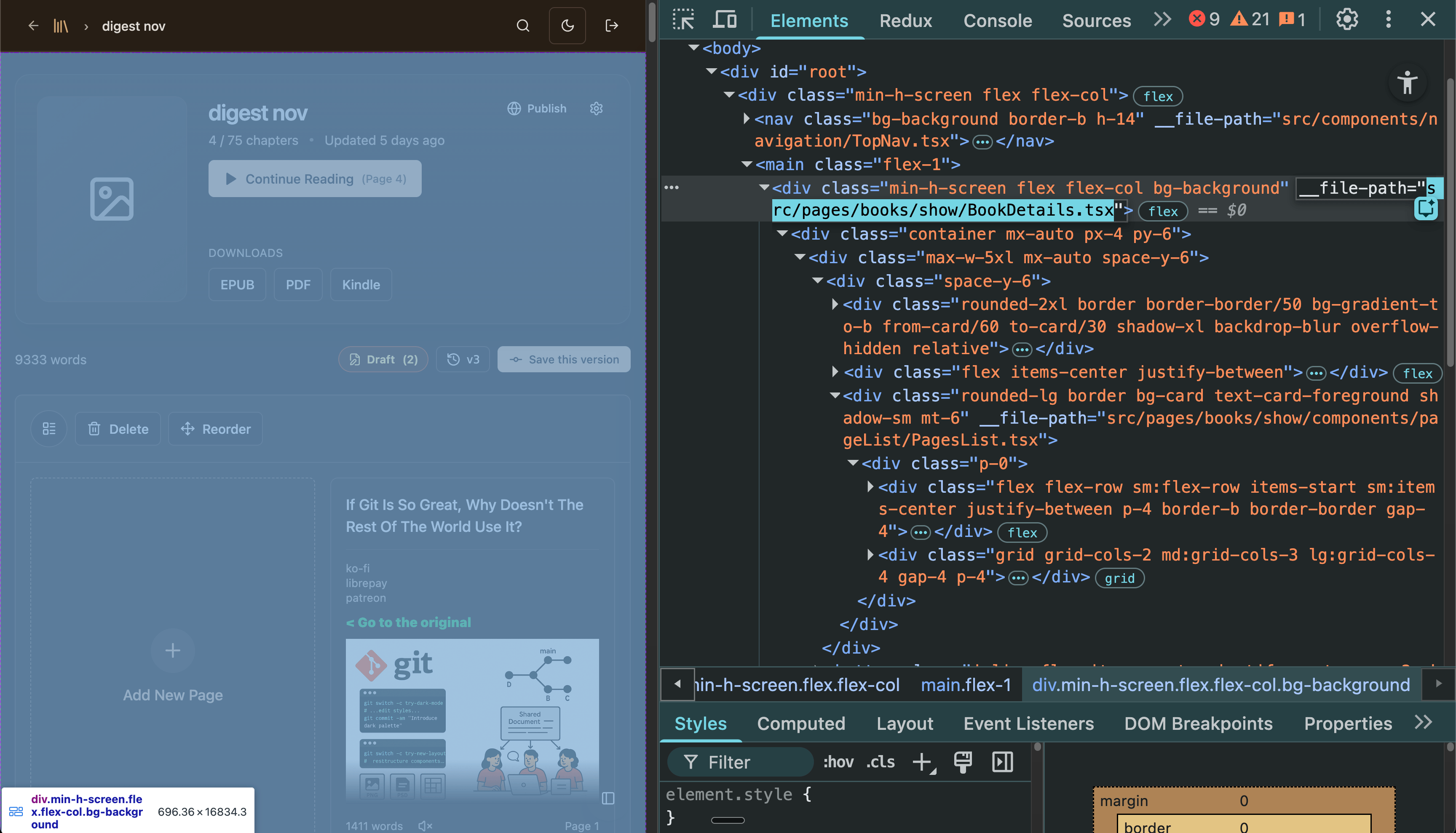
A Babel plugin that automatically tags the topmost JSX element in React components with the component's file path. This makes debugging and development significantly easier by allowing you to quickly identify which file a component comes from directly in the browser's DevTools.
Why This Plugin?
The Problem
When working on large React applications with hundreds of components, it's often difficult to:
- Identify which file a specific component in the DOM comes from
- Debug styling issues when you can't find the source component
- Navigate a complex component hierarchy during development
- Find conditionally rendered components in fragments
- Onboard new developers who need to understand the codebase structure
The Solution
This plugin automatically adds a __file-path attribute to the topmost element of each React component during development builds. This means you can:
- Right-click any element in the browser → Inspect → See the exact file path
- Quickly navigate to the source file in your editor
- Find conditionally rendered components (even with nested
&&expressions) - Track all top-level elements in fragments (not just the first one)
- Understand component hierarchy at a glance
- Debug with confidence knowing exactly where each component is defined
Features
- Fragment Support: Tags ALL top-level elements in fragments, not just the first
- Conditional Rendering: Handles
condition && <Component />expressions - Nested Conditionals: Recursively processes
a && b && c && <Component /> - Ternary Expressions: Tags both branches of
condition ? <A /> : <B /> - Expression Containers: Tags JSX in
{<Component />}syntax
Installation
npm install @ordervschaos/babel-plugin-react-component-tagger --save-dev
# or
yarn add -D @ordervschaos/babel-plugin-react-component-tagger
# or
pnpm add -D @ordervschaos/babel-plugin-react-component-tagger
Usage
With Vite + React
// vite.config.ts
import { defineConfig } from 'vite';
import react from '@vitejs/plugin-react';
import componentTaggerPlugin from '@ordervschaos/babel-plugin-react-component-tagger';

export default defineConfig(({ mode }) => ({
  plugins: [
    react({
      babel: {
        // Only enable in development mode
        plugins: mode === 'development' ? [componentTaggerPlugin] : [],
      },
    }),
  ],
}));
With Vite + React (SWC variant)
// vite.config.ts
import { defineConfig } from 'vite';
import react from '@vitejs/plugin-react-swc';
import componentTaggerPlugin from '@ordervschaos/babel-plugin-react-component-tagger';

export default defineConfig(({ mode }) => ({
  plugins: [
    react({
      babel: {
        // SWC plugin also supports Babel plugins
        plugins: mode === 'development' ? [componentTaggerPlugin] : [],
      },
    }),
  ],
}));
With Create React App
// Create a custom babel configuration
// .babelrc or babel.config.js
module.exports = {
  presets: ['react-app'],
  plugins: [
    process.env.NODE_ENV === 'development' && '@ordervschaos/babel-plugin-react-component-tagger'
  ].filter(Boolean)
};
With Next.js
// next.config.js
module.exports = {
  webpack(config, { dev }) {
    if (dev) {
      config.module.rules.push({
        test: /\.(tsx|ts|jsx|js)$/,
        use: {
          loader: 'babel-loader',
          options: {
            plugins: ['@ordervschaos/babel-plugin-react-component-tagger']
          }
        }
      });
    }
    return config;
  }
};
With Webpack + Babel Loader
// webpack.config.js
module.exports = {
  module: {
    rules: [
      {
        test: /\.(js|jsx|ts|tsx)$/,
        exclude: /node_modules/,
        use: {
          loader: 'babel-loader',
          options: {
            plugins: [
              process.env.NODE_ENV === 'development' && '@ordervschaos/babel-plugin-react-component-tagger'
            ].filter(Boolean)
          }
        }
      }
    ]
  }
};
With Standalone Babel
{
  "env": {
    "development": {
      "plugins": ["@ordervschaos/babel-plugin-react-component-tagger"]
    }
  }
}
How It Works
Input (Your Component)
// src/components/ui/Button.tsx
const Button = ({ children, onClick }) => {
  return (
    <button className="btn" onClick={onClick}>
      <span>{children}</span>
    </button>
  );
};
Output (After Plugin Processing - Development Only)
const Button = ({ children, onClick }) => {
  return (
    <button className="btn" onClick={onClick} __file-path="src/components/ui/Button.tsx">
      <span>{children}</span>
    </button>
  );
};
What Gets Tagged
✅ Tagged:
- The topmost JSX element returned by the component
- Components with fragments: ALL top-level elements inside the fragment
- Conditional renders: All possible top-level elements (logical AND expressions)
- Nested conditionals: Recursively handles nested logical AND expressions
- Ternary expressions: Both branches
- Direct JSX in expressions: JSX wrapped in curly braces
Examples
Simple Component
const Card = () => <div>Content</div>
// Output: <div __file-path="src/components/Card.tsx">Content</div>
Fragment with Multiple Children (ALL Tagged!)
const Layout = () => (
  <>
    <Header />    {/* ✅ Tagged */}
    <Main />      {/* ✅ Tagged */}
    <Footer />    {/* ✅ Tagged */}
  </>
);
// All three components get the __file-path attribute
Conditional Rendering (Logical AND)
const Alert = ({ show }) => {
  return show && <div>Alert</div>;
};
// Output when show=true: <div __file-path="src/components/Alert.tsx">Alert</div>
Nested Conditional Rendering (Recursive!)
const FloatingButton = ({ collapsed, noFile }) => (
  <>
    <MainContent />
    {collapsed && noFile && <Button>Click</Button>}
  </>
);
// Both <MainContent /> AND <Button /> get tagged!
// Handles nested logical AND expressions recursively
Fragment with Conditional Elements
const VSCodeLayout = ({ sidebarCollapsed, selectedFile }) => (
  <>
    <Sidebar />
    <Editor />
    {sidebarCollapsed && !selectedFile && (
      <Button>Floating Action</Button>
    )}
  </>
);
// All three elements get tagged: Sidebar, Editor, and Button (when visible)
Ternary Expression
const Status = ({ isOnline }) => (
  isOnline ? <div>Online</div> : <div>Offline</div>
);
// Both <div> elements get tagged with __file-path
Expression Container with Direct JSX
const Wrapper = () => (
  <>
    {<DirectComponent />}    {/* ✅ Tagged */}
    <RegularComponent />     {/* ✅ Tagged */}
  </>
);
// Both components get tagged
Configuration
Customizing the Attribute Name
If you want to use a different attribute name instead of __file-path:
// Fork or modify the plugin
// In index.js, line 152:
t.jsxIdentifier('__file-path'),  // Change to your preferred name
Customizing the Path Format
By default, the plugin uses paths relative to the src/ directory. To change this:
// In index.js, lines 114-118:
const srcIndex = state.filePath.indexOf('src/');
if (srcIndex !== -1) {
  state.filePath = state.filePath.substring(srcIndex);
}
// Modify this logic to use a different base path
Enabling in Production (Not Recommended)
// vite.config.ts
export default defineConfig({
  plugins: [
    react({
      babel: {
        // Always enable (use with caution!)
        plugins: [componentTaggerPlugin],
      },
    }),
  ],
});
⚠️ Warning: Enabling in production adds metadata to your production bundle. This increases bundle size and exposes your internal project structure. Only do this if you have a specific debugging need in production.
Benefits
1. Faster Debugging
No more searching through dozens of files to find where a component is defined. Just inspect the element and see the path.
2. Better Developer Experience
New team members can navigate the codebase much faster when they can see file paths directly in DevTools.
3. Reduced Context Switching
Stay in the browser DevTools longer without switching back to your editor to search for component files.
4. Cleaner Than Alternatives
Only tags the topmost element per component, unlike some alternatives that tag every element, cluttering the DOM.
5. Zero Runtime Impact in Production
When configured correctly, this plugin only runs in development mode, so there's zero performance or bundle size impact in production.
6. Framework Agnostic (within React ecosystem)
Works with Vite, Webpack, Next.js, Create React App, and any other React tooling that supports Babel plugins.
Comparison with Alternatives
vs. React DevTools
| Feature | React DevTools | This Plugin | |---------|----------------|-------------| | Setup | Browser extension required | Build-time plugin, always available | | Visibility | Only in React DevTools panel | Visible in standard DOM inspector | | Performance | Runtime overhead | Zero runtime overhead | | File paths | Not always clear | Explicit file paths |
vs. Manual Data Attributes
| Feature | Manual Attributes | This Plugin | |---------|-------------------|-------------| | Maintenance | Must manually add to every component | Fully automatic | | Consistency | Easy to forget or make mistakes | Consistent across all components | | Updates | Must update manually when files move | Automatically updates on build |
Troubleshooting
Plugin Not Working?
Restart your dev server Changes to Babel plugins require a restart:
# Stop current dev server (Ctrl+C)
npm run dev
Check you're in development mode The plugin only runs in development by default:
npm run dev✅npm run build❌ (unless configured otherwise)
Clear build cache Sometimes Babel caches need to be cleared:
# For Vite
rm -rf node_modules/.vite

# For Webpack
rm -rf node_modules/.cache

# Then restart
npm run dev
Verify Babel is being used Some tools (like SWC-only configs) may not process Babel plugins. Ensure your build tool supports Babel plugins.
Performance
- Build time: Negligible impact on build time (< 1% in typical projects)
- Runtime: Zero runtime overhead (attributes are just data attributes)
- Bundle size: No bundle size impact when properly configured for development only
- Memory: No memory overhead (attributes are part of normal DOM)
Contributing
Contributions are welcome! Please feel free to submit issues or pull requests.
License
MIT License - feel free to use this in your projects!
Support
- Issues: GitHub Issues
Changelog
1.0.0
- Initial release
- Support for function components, arrow functions, and function expressions
- Support for fragments, conditional rendering, and ternary expressions
- Configurable path formats
- Development-mode only by default
Made with ❤️ for React developers who value their time and sanity during debugging sessions.