
@origami-minecraft/stable
v2.3.5
Published
Origami is a terminal-first Minecraft launcher that supports authentication, installation, and launching of Minecraft versions — with built-in support for Microsoft accounts, mod loaders, profile management, and more. Designed for power users, modders, an
Downloads
116

Maintainers
 merasgd
Readme
🌸 Origami
✨ Lightweight Minecraft CLI Launcher — beautiful, fast, and scriptable.
Origami is a terminal-first Minecraft launcher that supports authentication, installation, and launching of Minecraft versions — with built-in support for Microsoft accounts, mod loaders, profile management, and more. Designed for power users, modders, and anyone who loves minimalism and productivity.



📥 Install Node.js
Before installing Origami, you need Node.js and npm (Node's package manager) installed.
🪟 Windows
Download the LTS version of Node.js from the official website.
Run the installer and follow the setup instructions.
Open Command Prompt and verify installation:
node -v
npm -v
🍎 macOS
You can use Homebrew:
brew install nodeOr download the LTS installer from nodejs.org.
Verify installation:
node -v
npm -v
🐧 Linux (Ubuntu/Debian)
sudo apt update
sudo apt install nodejs npm
Alternatively, for newer versions:
curl -fsSL https://deb.nodesource.com/setup_lts.x | sudo -E bash -
sudo apt install -y nodejs
Then check versions:
node -v
npm -v
📦 Alternative: Using NVM (Node Version Manager)
NVM allows you to easily switch between Node.js versions:
macOS/Linux:
curl -o- https://raw.githubusercontent.com/nvm-sh/nvm/v0.39.7/install.sh | bash
source ~/.nvm/nvm.sh
nvm install --lts
Windows:
Use nvm-windows:
Download the latest
nvm-setup.exefrom the releases page.Install and open Command Prompt:
nvm install lts
nvm use lts
node -v
npm -v
✅ Make sure you're using Node.js v18 or higher for best compatibility.
🚀 Installation
🔒 Stable (Recommended)
Install the latest stable version from NPM:
npm install -g @origami-minecraft/stableOnce installed, you can use the origami command anywhere in your terminal.
🧪 Development Builds
🚧 Development builds are experimental. These builds may include experimental features and are considered unstable.
You can install them directly from NPM:
Install the latest dev build:
npm install -g @origami-minecraft/devbuilds🧶 Yarn Support
Prefer Yarn over npm? Origami supports it too!
Install with:
yarn global add @origami-minecraft/stableOr for dev builds:
yarn global add @origami-minecraft/devbuilds✅ Make sure Yarn is installed globally:
corepack enable
🗒️ Changelog
See what's new in stable builds in the Changelog.
⚠️ Dev builds are expermental — use them at your own risk!
⚠️ Check out the latest dev build updates on the GitHub Actions page.
🎮 Features
🎨 Beautiful terminal UI with gradient animations and ASCII art
🔐 Microsoft, Mojang & Custom Auth support (Littleskin, Ely.by, etc)
📂 Profile system - create, select, and configure per-profile settings
⬇️ Install and manage Minecraft versions (Vanilla, Forge, NeoForge, Fabric, Quilt)
🧪 Experimental Modpack Installer
- Installs mods, sets up loaders automatically via
origami menu
- Installs mods, sets up loaders automatically via
🌐 Universal Game Directory Mode
- Enable globally or per profile, great for switching between traditional
.minecraftand isolated setups
- Enable globally or per profile, great for switching between traditional
⚙️ Per-Profile JVM & Java Runtime config
- Control memory, JVM flags, and choose Java binary per profile
📦 Modrinth browser with filters
- Browse mods, resource packs, and shaders with pagination and custom filters
💬 Friendly error prompts and CLI feedback
- Errors are shown clearly, with retry logic and detailed messages
✨ Supports GraalVM, Zulu, Corretto, Temurin, install JDKs right in the launcher
💨 Launch Minecraft directly from terminal
📦 Usage
After installation, just run:
origami menu🖼️ Preview
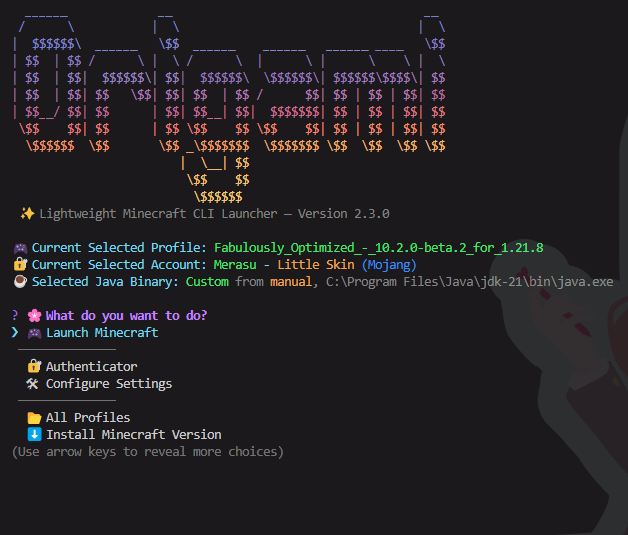
Navigate using your keyboard to log in, manage accounts, install versions, or launch the game.
Demo Video
⚙️ Settings Guide
Curious what all those launcher settings actually do?
🧠 Check out the full settings breakdown in Settings Guide It explains every toggle and feature, like memory usage, window modes, safe exit, and more!
📘 CLI Documentation
See the full CLI documentation here: 📖 CLI.md
📝 License
This project is licensed under the GPL-3.0-only license.
🧪 Development
git clone https://github.com/merasugd/origami-launcher.git
cd origami-launcher
npm install

# testing
npm run compile
npm run origami
💖 Credits
- Inquirer for interactive menus
- Figlet for ASCII banners
- Gradient-string for rainbow text
- MCLC for the back bone of the launcher
- Temurin for JDK base
- Minecraft is copyright Mojang
🌐 Links
- 📁 GitHub: Click Here
- 📦 NPM Stable: Click Here
- 📦 Yarn Stable: Click Here
🙏 Support
Found a bug or want to suggest a feature? Open an issue or submit a PR!
🤝 Contributing
We welcome contributions of all kinds — from bug fixes and documentation to new features.
- 📖 See our CONTRIBUTING.md guide to get started.
- 📜 Please review our Code of Conduct before participating in discussions or contributing.
Enjoy the terminal. Happy crafting :D 🧵