
@originoneai/agent-work-runtime
v0.5.1
Published
AWR — the open-source project delivery platform for people and AI. Native CLI and MCP for persistent tasks, context and verified progress.

Maintainers
 originoneai-maintainer
Readme
AWR
Let your AI team keep complex projects moving—from goal to verified delivery.
The open-source project delivery platform for people and AI.
Website · Documentation · 简体中文 · Release notes
AWR connects goals, workstreams, dependencies, context and acceptance into one project delivery workflow. Keep the project's intent, constraints and verified progress when you change sessions or agents. People set direction and review outcomes; agents work through the same project using CLI or MCP.
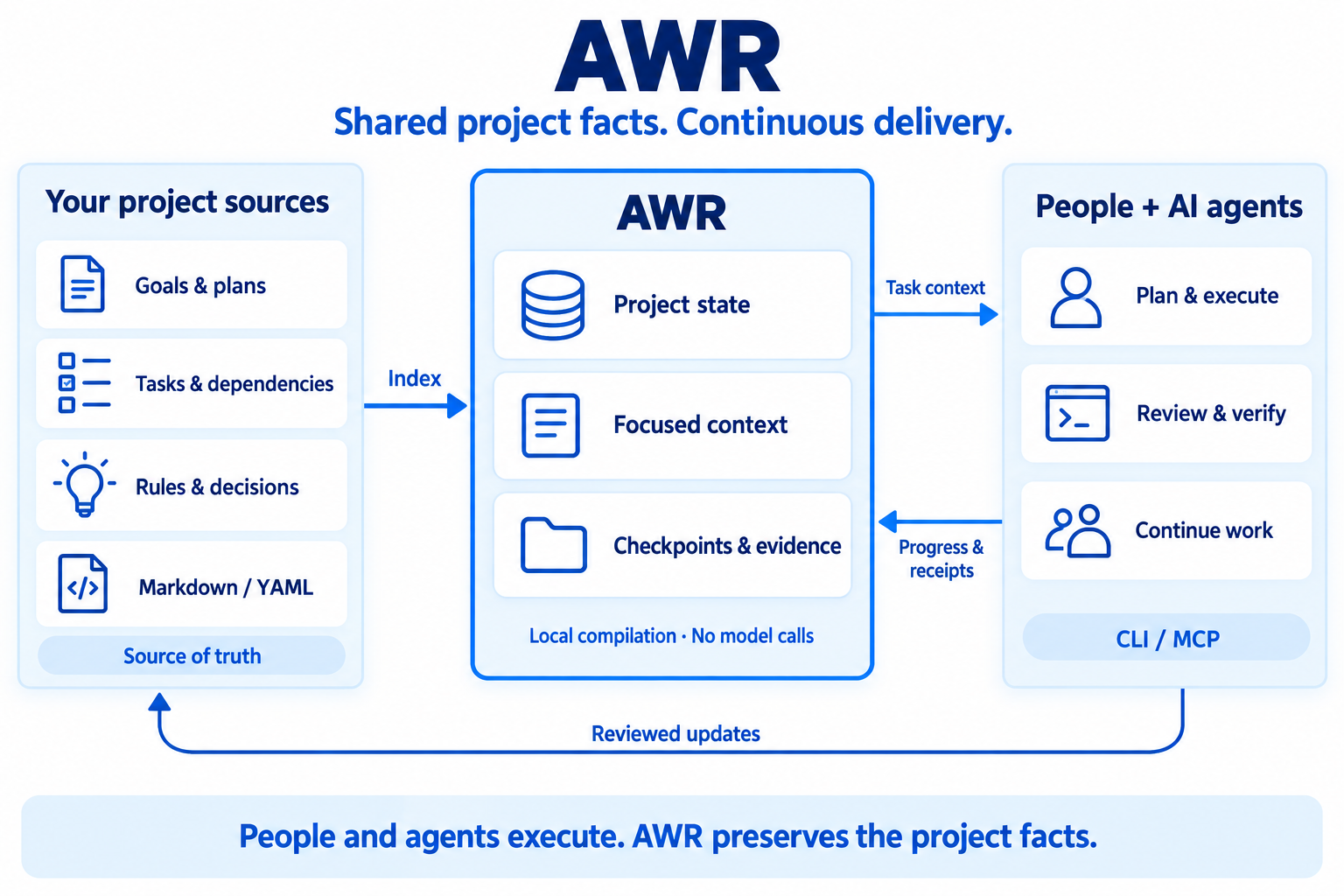
What 0.5.1 provides
This package installs the native Rust awr CLI and awr-mcp server for
personal, local SQLite projects. No model call is needed to compile context.
- Continue across sessions. Keep goals, rules, decisions, claims and checkpoints connected to the current work.
- Use the context that matters. Compile task-specific project context within a budget while retaining required facts and exposing missing dependencies.
- Keep progress honest. Distinguish source status, checkpoint observations and version-bound verification evidence; retain caller attribution.
- Check source freshness consistently. Build a shared file inventory that
ignores
.DS_Storeand other supported metadata, and records real file changes. - Organize personal workstreams. Explicit source ownership, session attribution and scoped context form the foundation for parallel work.
- Use your existing agent. CLI, stdio MCP and a shared HTTP MCP service connect supported clients and projects; optional lifecycle adapters deepen integration.
The optional Inspector runs from source and is not bundled in npm/PyPI. This release's source includes Chinese/English views, complete queue pagination and session/event panels.
Team/PG collaboration, advanced delivery adoption, DEC extensions, usage and ETA accounting are outside 0.5.1. The personal workstream foundation is not a claim of complete authenticated Team isolation. See the workstream guide for the supported boundaries.
Install with npm
Requires Node.js 22.14+.
npm install -g @originoneai/[email protected]
awr --version
awr-mcp --version
Or run a pinned version without a global installation:
npx --package=@originoneai/[email protected] awr --helpKeep optional dependencies enabled: the wrapper selects the exact-version native
package for your OS and architecture. There is no install script or binary
downloader, and this is not a JavaScript SDK. The package also includes the
CLI/MCP, session workflow and daily-work reference documents under docs/.
Connect a project
From your project directory, preview initialization and review the proposed sources before accepting the same goal:
awr init --goal "Deliver a customer portal with verified sign-in"
awr init --goal "Deliver a customer portal with verified sign-in" --accept
awr status
awr intake inspect
Existing Markdown/YAML sources remain authoritative. If intake reports
NeedsOrganization, fill in the required goal, work and acceptance information
before implementation. See the project intake guide.
Give your agent this working agreement:
Use AWR to carry this project from its goal to verified delivery. Read the current goals, rules, dependencies and checkpoint before starting. Keep clear acceptance criteria and ownership. Record actual progress and evidence, and save a checkpoint before stopping so the next session can continue.
Connect through MCP
After initialization, add this entry using your client's supported MCP configuration format and your project's absolute path:
{
  "mcpServers": {
    "awr": {
      "command": "awr-mcp",
      "args": ["--project", "/absolute/path/to/your/project"]
    }
  }
}
Reconnect the client and verify the project identity. For multiple clients and projects, see the shared HTTP MCP service guide. CLI/MCP is the common entry point for Codex, Cursor, Claude Code and other compatible agents. Host hooks are optional and require their own activation; a saved configuration does not prove a checkpoint was executed.
Supported systems and upgrades
Prebuilt packages support macOS 15+ (Apple Silicon and Intel), Linux x64/arm64 with glibc 2.39+, and Windows x64. SQLite is bundled; Git-bound operations also need Git. Other platforms require a separately verified source build. See the distribution guide.
Upgrading from 0.5.0: stop writers and retain matching program, runtime and source snapshots first. Explicit source refresh upgrades SQLite schema 4 through 5 and 6 to 7, preserving legacy identities and history. Old binaries refuse schema 7. A rollback requires the matching pre-upgrade snapshot, not just a package downgrade; keep any post-upgrade history separately.
Learn more
- Session and checkpoint workflow
- CLI/MCP response contract
- Source freshness inventory
- Content review
- Contributing · Report an issue
Licensed under Apache-2.0.