
@overpunch/magnettype
v1.4.0
Published
Cursor-field per-word variable font axis variation and per-character legibility mode


Readme
magnetType




Type that responds to your cursor. As the cursor sweeps across the text, each word — or each character — pulls toward a heavier weight, then settles back as it passes. CSS font-variation-settings applies a single value to the whole element, with no native way to drive axis values per word from cursor proximity, to tell visually confusable characters apart for legibility, or to vary weight per-character across a block element. magnetType adds all three.
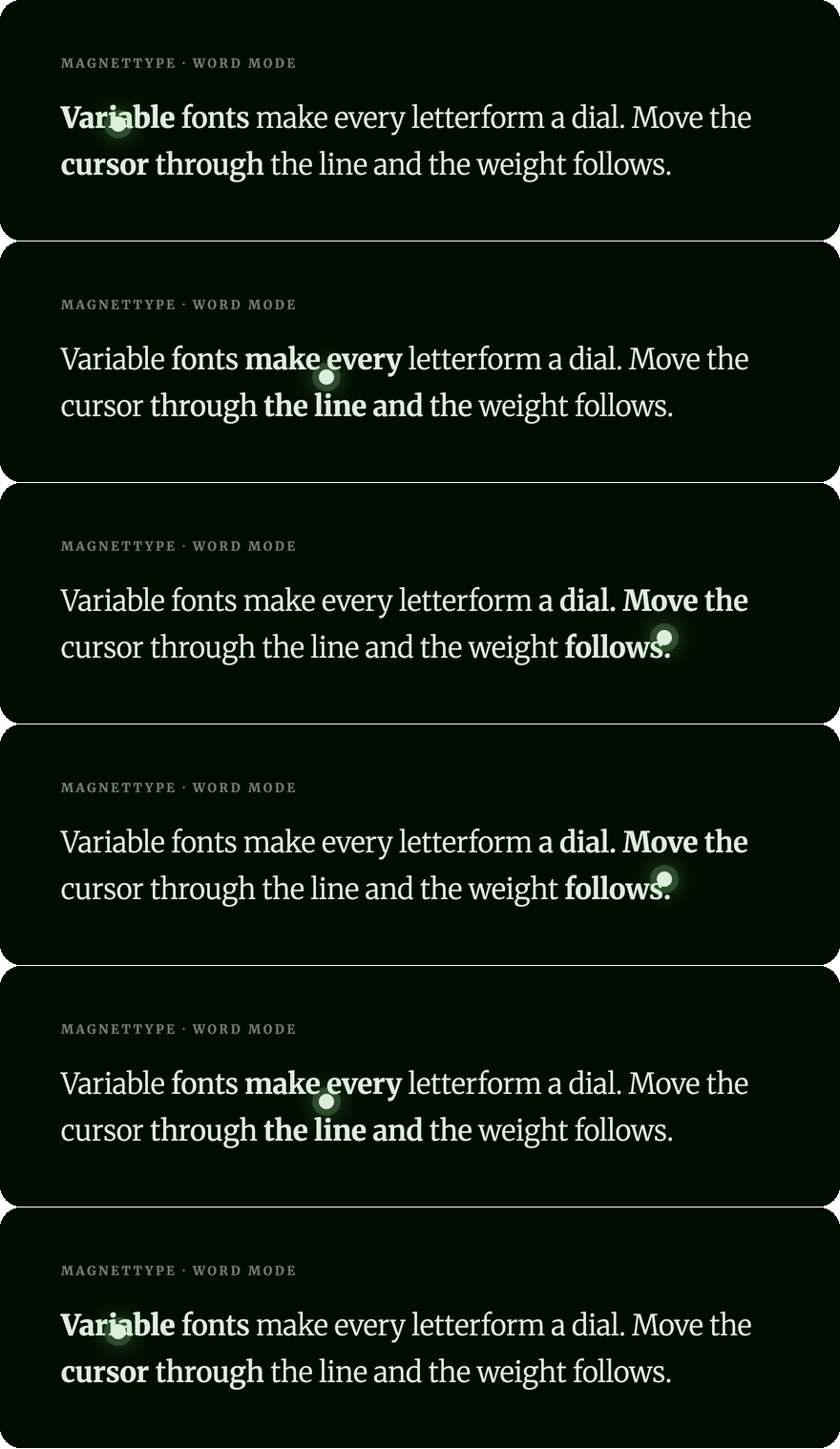
Try the live demo at magnettype.com → · npm · GitHub
TypeScript · Zero dependencies (~5 kB gzipped) · React + Vanilla JS
Install
npm install @overpunch/magnettypeVariable font required: magnetType sets
font-variation-settingsper word or per character. The target font must support the axes you specify (e.g. a font with awghtaxis for weight-based effects, orwdth/wghtaxes for legibility mode, whose r–n spacing works in any font). The effect is invisible with non-variable fonts.
Axis jargon, decoded: variable fonts expose adjustable axes, each a four-letter tag. wght is weight (boldness), wdth is width, opsz is optical size. An axis range like [300, 700] means "interpolate from 300 (light) up to 700 (bold)" as the cursor approaches. magnetType drives these axes live; CSS can only set them once.
Compatibility: ~5 kB gzipped, zero runtime dependencies. React 17+ is an optional peer dependency — the main entry also exports the hook and components, so it imports react; without React, import the vanilla API from @overpunch/magnettype/core. Requires a browser that supports variable fonts and font-variation-settings (all evergreen browsers; Chrome/Edge 62+, Firefox 62+, Safari 11+). On touch screens, all three modes follow a finger while it drags over the text; word and legibility modes return to rest when it lifts.
Complete example (copy-paste, runs as-is)
The examples below assume a loaded variable font with a wght axis. Here is a full setup — load the font, point font-family at it, then wrap your text:
import { MagnetTypeText } from '@overpunch/magnettype'

// 1. Load a variable font (any font with a `wght` axis works — Inter, Recursive,
//    Roboto Flex, Source Serif…). Put this in your global CSS:
//
//    @font-face {
//      font-family: 'Recursive';
//      src: url('/fonts/Recursive_VF.woff2') format('woff2');
//      font-weight: 300 1000;   /* declare the supported wght range */
//    }

export default function Hero() {
  return (
    <MagnetTypeText
      mode="word"
      axes={{ wght: [300, 800] }}   // light → bold as the cursor nears each word
      radius={150}                   // px from the cursor at which the pull begins
      falloff="quadratic"
      style={{ fontFamily: 'Recursive, sans-serif', fontSize: '2rem' }}
    >
      Type that responds to presence.
    </MagnetTypeText>
  )
}
Without a
font-familyresolving to a variable font, the effect is silently invisible — the markup is correct but the glyphs cannot change weight. This is the most common first-run gotcha.
Word mode vs character mode
| | Word mode (MagnetTypeText mode="word") | Character mode (MagnetChar) |
|---|---|---|
| Unit affected | whole words | individual characters |
| Visual | 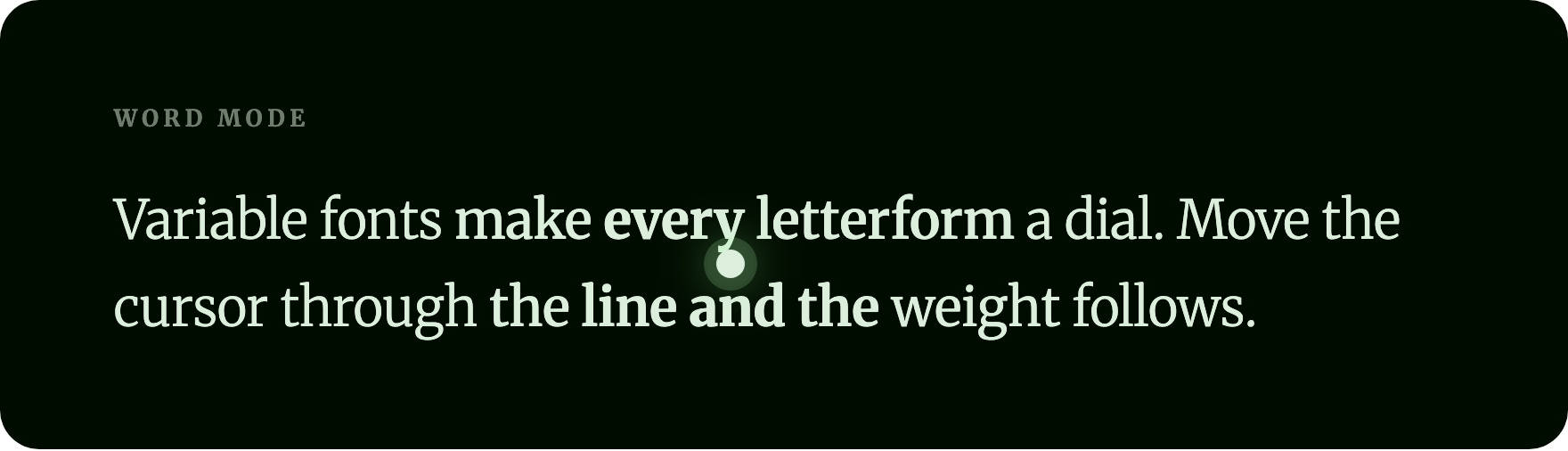 |
| 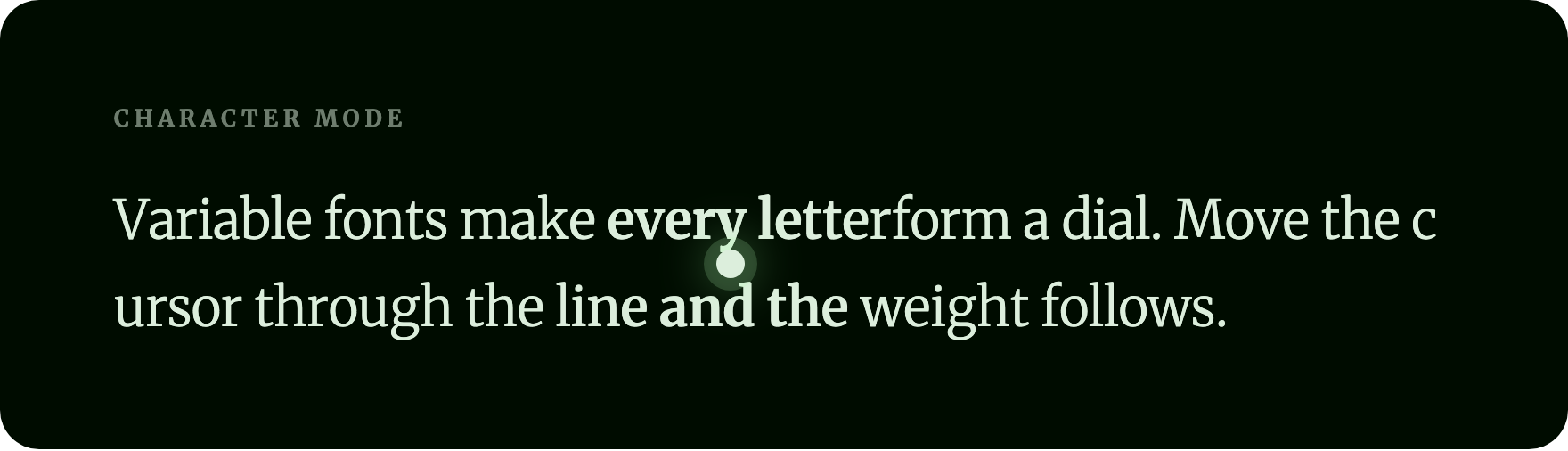 |
| Driven by | a continuous
|
| Driven by | a continuous requestAnimationFrame loop | passive, batched per-frame on mousemove / scroll |
| Mixed inline content (links, <code>) | — | yes |
Usage
React — field mode (MagnetTypeText)
Per-word cursor-proximity weight variation driven by a continuous rAF loop.
import { MagnetTypeText } from '@overpunch/magnettype'

<MagnetTypeText
  mode="word"
  axes={{ wght: [300, 700] }}
  radius={150}
  falloff="quadratic"
  magnetMode="attract"
>
  Your paragraph text here...
</MagnetTypeText>
React — block mode (MagnetChar)
Per-character cursor-proximity weight variation. Works with mixed content (inline elements, links, <code>, etc.) inside any block element. Characters are wrapped as React elements — no DOM mutation.
import { MagnetChar } from '@overpunch/magnettype'

// Per-character spread — each character responds to cursor distance
<MagnetChar
  spreadRadius={200}
  minWeight={300}
  maxWeight={700}
>
  Typography that responds to presence.
</MagnetChar>

// Whole-element gate — the effect only activates when the cursor is within proximityRadius of the element edge
<MagnetChar
  proximityRadius={120}
  minWeight={300}
  maxWeight={700}
>
  Weight rises when the cursor enters.
</MagnetChar>

// Both combined — proximity gates the spread effect
<MagnetChar
  proximityRadius={200}
  spreadRadius={120}
  minWeight={300}
  maxWeight={700}
>
  Only spreads when the cursor is close.
</MagnetChar>
MagnetChar props:
| Prop | Default | Description |
|------|---------|-------------|
| as | 'p' | HTML element to render — 'h1', 'div', 'span', etc. |
| minWeight | 300 | wght axis value at rest (cursor beyond any radius) |
| maxWeight | 600 | wght axis value at peak (cursor directly over the character) |
| spreadRadius | — | Pixel distance from the cursor within which each character's weight rises to maxWeight. When omitted, per-character splitting is skipped |
| proximityRadius | — | Pixel distance from the element edge that gates the effect. Without spreadRadius, drives a whole-element weight ramp. With spreadRadius, acts as an outer gate — the spread only fires while the cursor is within this distance |
| fixedAxes | {} | Additional axis values to hold constant in every font-variation-settings string (e.g. { opsz: 144 }) |
| stabilizeLayout | true | Apply compensating letter-spacing to prevent text reflow as weight rises. Measures the element's width at rest and peak weight via an off-screen probe and applies proportional negative letter-spacing per character. Disable if you want natural bold spacing, or if your font expands glyphs very unevenly (compensation is a per-element average) |
| cachePositions | true | Cache character centre positions in page-relative coordinates, eliminating getBoundingClientRect calls on every mousemove. Rebuilt on resize and after fonts load. Disable if the element is inside a custom scroll container (overflow: scroll on a non-window element) |
| rafThrottle | true | Throttle proximity updates to one per animation frame (≈ 60 fps on most displays). Disable for lowest input latency on 120 Hz displays or very fast-moving effects |
| className | — | Forwarded to the root element |
| style | — | Merged with the root element's style; fontVariationSettings at minWeight is set as the base |
React hook — field mode
import { useMagnetType } from '@overpunch/magnettype'

const ref = useMagnetType({ mode: 'word', axes: { wght: [300, 700] }, radius: 150 })
return <p ref={ref}>{children}</p>
The hook starts the cursor-proximity rAF loop on mount and tears it down cleanly on unmount. After fonts load (document.fonts.ready), the hook re-runs to ensure measurements are taken on the loaded font. When cachePositions is true (the default), a ResizeObserver is attached to rebuild the position cache on resize.
React — legibility mode
import { MagnetTypeText } from '@overpunch/magnettype'

<MagnetTypeText mode="legibility">
  Near the cursor, I widens, l and 1 get heavier, 0 narrows and O widens, and rn gets a gap.
</MagnetTypeText>
Vanilla JS — field mode
import { startMagnetType, removeMagnetType, getCleanHTML } from '@overpunch/magnettype/core'

const el = document.querySelector('p')
const original = getCleanHTML(el)
const opts = { mode: 'word', axes: { wght: [300, 700] }, radius: 150 }

let stop

function run() {
  if (stop) stop()
  stop = startMagnetType(el, original, opts)
}

document.fonts.ready.then(run)

// Later — cancel the loop and restore original markup:
// stop()
// removeMagnetType(el, original)
Vanilla JS — legibility mode
import { applyMagnetType, removeMagnetType, getCleanHTML } from '@overpunch/magnettype/core'

const el = document.querySelector('p')
const original = getCleanHTML(el)
const opts = { mode: 'legibility', wdthBoost: 30, wghtBoost: 200 }

// applyMagnetType returns a stop function and manages its own ResizeObserver internally —
// no need to wrap it in an external ResizeObserver.
let stop = applyMagnetType(el, original, opts)
document.fonts.ready.then(() => {
  stop()
  stop = applyMagnetType(el, original, opts)
})

// Later — stop the effect and restore original markup:
// stop()
// removeMagnetType(el, original)
TypeScript
import type { MagnetTypeOptions, FalloffType, MagnetModeType, MagnetCharProps } from '@overpunch/magnettype'

const fieldOpts: MagnetTypeOptions = {
  mode: 'word',
  axes: { wght: [300, 700], wdth: [90, 110] },
  radius: 120,
  falloff: 'quadratic' as FalloffType,
  magnetMode: 'attract' as MagnetModeType,
}

const legibilityOpts: MagnetTypeOptions = {
  mode: 'legibility',
  wdthBoost: 30,
}
Field mode options (MagnetTypeText / useMagnetType / vanilla JS)
| Option | Default | Description |
|--------|---------|-------------|
| mode | 'word' | 'word' (alias: 'field') — cursor proximity drives per-word font-variation-settings via a continuous rAF loop. 'legibility' — near the cursor, visually confusable characters are told apart (see Legibility mode) |
| axes | { wght: [300, 500] } | (field mode) Map of axis tag → [restValue, peakValue] |
| radius | 120 | Pixel radius over which the field effect fades from each word's centre (field mode) or each character's centre (legibility mode) |
| falloff | 'quadratic' | 'linear' or 'quadratic' falloff curve |
| magnetMode | 'attract' | (field mode) 'attract' — near words approach peakValue. 'repel' — near words stay at restValue, far words approach peakValue |
| scope | 'document' | 'document' — cursor events listened on the document, enabling cross-element effects. 'element' — events restricted to the target element |
| props | undefined | Additional CSS effects driven by cursor proximity. { opacity: [rest, peak] } fades words/chars; { italic: true } toggles italic at strength > 0.5 |
| wdthBoost | 30 | (legibility mode) wdth units at full strength: I and O widen, 0 narrows, 1 widens by half. Needs a wdth axis |
| wghtBoost | 200 | (legibility mode) wght units at full strength: l and 1 get heavier, i by half. Needs a variable weight |
| trackBoost | 0.08 | (legibility mode) em of space added after an r that's followed by n or m (taken back after the n/m, so the line keeps its length). Works in any font |
| stabilizeLayout | true | (word mode) Cancel each word's width change with letter-spacing, so lines don't reflow as the axes change (your own letter-spacing is kept). Disable for natural bold spacing |
| cachePositions | true | Cache word/character centre positions to avoid getBoundingClientRect on every mousemove. Rebuilt when the element moves or resizes (including inside scrolled or transformed containers), on viewport resize and after fonts load |
| transitionMs | 0 | Duration in ms for CSS transition back to rest when cursor leaves. 0 = instant snap. Cleared on the next mousemove so live tracking is not delayed |
| as | 'p' | HTML element to render. (React component only) |
How it works
Field mode
On activation, magnetType wraps each word in an mt-word span. A mousemove listener records cursor coordinates, and a requestAnimationFrame loop runs while the cursor is inside the element. Each frame, the loop batch-reads every word span's getBoundingClientRect, computes Euclidean distance from cursor to word centre, and maps it through the falloff formula:
normalised = max(0, 1 − distance / radius)
strength   = normalised² (quadratic) or normalised (linear)
Each word's font-variation-settings interpolates between restValue and peakValue at that strength. Reads are batched before writes on every frame to avoid layout thrashing. When the cursor leaves, one final frame resets all words to restValue.
Block mode (MagnetChar)
MagnetChar splits string children into per-character <span> elements during the React render pass using useMemo — no DOM mutation. Callback refs collect each span element. On mousemove (and on scroll, using the stored last position), the component reads each span's getBoundingClientRect, computes cursor-to-character-centre distance, and sets font-variation-settings directly on the span's style. This is passive and batched per frame via the event handler.
proximityRadius measures cursor distance to the element edge (not its centre) — useful as an outer gate so the effect only fires when the cursor is actually near the block. spreadRadius measures cursor distance to each character centre — controls how wide the weight gradient spreads around the cursor within the block. Both are independent and combinable.
Legibility mode
magnetType scans text nodes recursively and checks each character (grapheme, so accents stay with their letter, looked up by its base letter). Characters that are easy to confuse get different treatments near the cursor, so members of the same group stop looking alike:
| Character | Near the cursor |
|---|---|
| I | wider (wdthBoost) |
| l | heavier (wghtBoost) |
| 1 | heavier and a little wider |
| i | a little heavier |
| 0 | narrower |
| O | wider |
| r before n/m | a gap after it (trackBoost), so "rn" can't read as "m" |
The table is exported as LEGIBILITY_TREATMENTS. Each changed character's width change is cancelled with letter-spacing (see Layout stability), so the shapes change but lines don't move. At rest the characters carry no styles of their own, so kerning and ligatures are unchanged; other characters pass through as plain text.
Measured in Roboto Flex at 40px, at the defaults: I and l are identical at rest (3px of ink) and differ at peak (I 4px wide, l 6px and twice the ink); 0 goes from 17 to 14px wide while O goes from 22 to 24px; the n in "turn" moves 3px away from the r. The wdth and wght changes need those axes (Inter has wght only, so there I and 0/O don't change); the r–n gap works in any font.
Markup and accessibility
Words and characters are wrapped in place: the original elements, their listeners and form values are kept, and styles, scripts, text areas and SVG are left alone. The text stays in the DOM, so screen readers read it as before (no aria-hidden copies, no aria-label). stop() and removeMagnetType() put the original text nodes back; getCleanHTML() returns the original markup. Word mode keeps each word's own weight and axes in proportion: bold text inside the element stays bolder than its neighbours, and other axes are kept. A tap on a touch screen doesn't leave a word lit, and scrolling under a still cursor updates the effect.
Layout stability
Changing wght does change advance widths: from 300 to 800, a line of Roboto Flex grew 13% and Inter 9% in our measurements. With stabilizeLayout (the default), word mode measures each word at nine points from rest to peak and cancels its width change with letter-spacing; across 54 cursor positions over a Roboto Flex paragraph no line break changed. Legibility mode is stabilized the same way: each changed character's width change is cancelled, and the r–n gap is taken back after the n/m. Over a Roboto Flex paragraph under the cursor, no line break changed.
prefers-reduced-motion
All three modes respect prefers-reduced-motion: reduce. If the media query matches at activation time, field mode (startMagnetType) and legibility mode (applyMagnetType) return immediately, leaving the element untouched; if the reader turns it on while the effect runs, the effect stops and restores the element. Block mode (MagnetChar) skips attaching its mousemove/scroll listeners, so the text renders statically at minWeight. No cursor-driven motion runs for users who have requested reduced motion.
Dev notes
next in root devDependencies
package.json at the repo root lists next as a devDependency. This is a Vercel detection workaround — not a real dependency of the npm package. Vercel's build system inspects the root package.json to detect the framework; without next present it falls back to a static build and skips the Next.js pipeline, breaking the /site subdirectory deploy.
The package itself has zero runtime dependencies. Do not remove this entry.
README visuals
The images in this README are generated by a reproducible Playwright harness in scripts/. From the repo root, with playwright and ffmpeg available:
node scripts/capture.mjs # writes assets/hero.gif, hero.png, word.png, char.pngThe harness loads the variable font and reproduces the package's falloff math at frozen cursor positions, then assembles the sweep into a GIF. The assets/ directory is not part of the published package (files ships dist only), so these images add nothing to the install size.
Future improvements
- Custom confusable table — allow callers to pass their own
Record<string, number>to override or extend the built-in character risk map - Axis clamping — optional per-axis min/max clamp to prevent values from exceeding a font's supported range
- SSR hydration — pre-render legibility mode markup on the server so boosted characters are present from first paint
See the npm badge at the top of this file for the current published version.