
@overpunch/opszstepper
v1.1.1
Published
Multi-cut optical family hot-swap by font-size — automatically applies Micro, Text, or Display cuts based on the element's computed font-size


Readme
opszStepper


font-optical-sizing: auto only works for variable fonts with an opsz axis. opszStepper solves the other case: professional typeface families that ship separate font files for each optical size cut (Micro, Text, Display) with no axis at all. It automatically swaps the correct cut onto an element as its font-size changes.
opszstepper.com · npm · GitHub
TypeScript · Zero dependencies · React + Vanilla JS
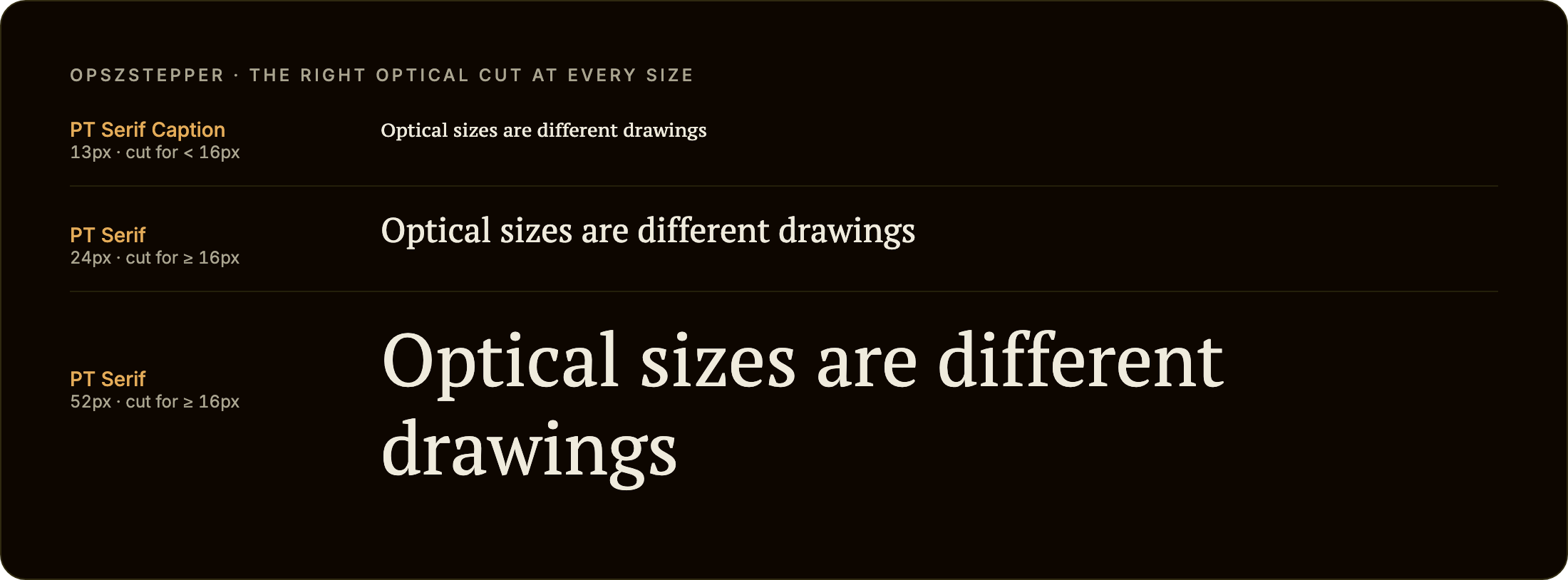
Try it: opszstepper.com has a live demo (drag the font-size slider across the threshold). No build step? See Webflow and Framer.
Install
npm install @overpunch/opszstepperQuick start with free fonts
PT Serif and PT Serif Caption are the same design drawn at two optical sizes and published as two families on Google Fonts, so this runs as written. Any bundler will do; no React needed:
<link href="https://fonts.googleapis.com/css2?family=PT+Serif&family=PT+Serif+Caption&display=swap" rel="stylesheet">

<p id="intro" style="font-size: clamp(12px, 2vw, 40px)">Optical sizes are different drawings.</p>

<script type="module">
  import { startOpszStepper } from '@overpunch/opszstepper/core'

  startOpszStepper(document.getElementById('intro'), {
    cuts: [
      { family: '"PT Serif Caption", serif', maxSize: 16 },  // below 16px
      { family: '"PT Serif", serif', minSize: 16 },          // 16px and up
    ],
  })
</script>
Narrow the window until the text drops below 16px and the paragraph's font-family switches to PT Serif Caption. Most examples further down use Halyard, a commercial family: swap in the names of the fonts you have licensed and loaded.
Usage
Next.js App Router: this library uses browser APIs. Add
"use client"to any component file that imports from it.
What are optical cuts?
Many professional editorial typefaces ship as a family of separate font files — each drawn specifically for a different size range. Halyard has Halyard Micro (captions and footnotes), Halyard Text (body), and Halyard Display (headlines). Tiempos has Tiempos Text, Tiempos Headline, and Tiempos Fine. Each cut has different contrast, spacing, and stroke weight tuned for its intended size. CSS has no mechanism to switch between them automatically — font-optical-sizing: auto only controls the opsz axis of a single variable font file. opszStepper fills that gap.
Scaling one cut to every size is the problem opszStepper avoids. On the left, PT Serif is scaled down to 11px: the drawing made for text and headlines, with its tighter spacing, shrunk. On the right, opszStepper has swapped in PT Serif Caption, the cut drawn for that size. The enlarged words underneath are the same two drawings at 4×, so you can see what changes:
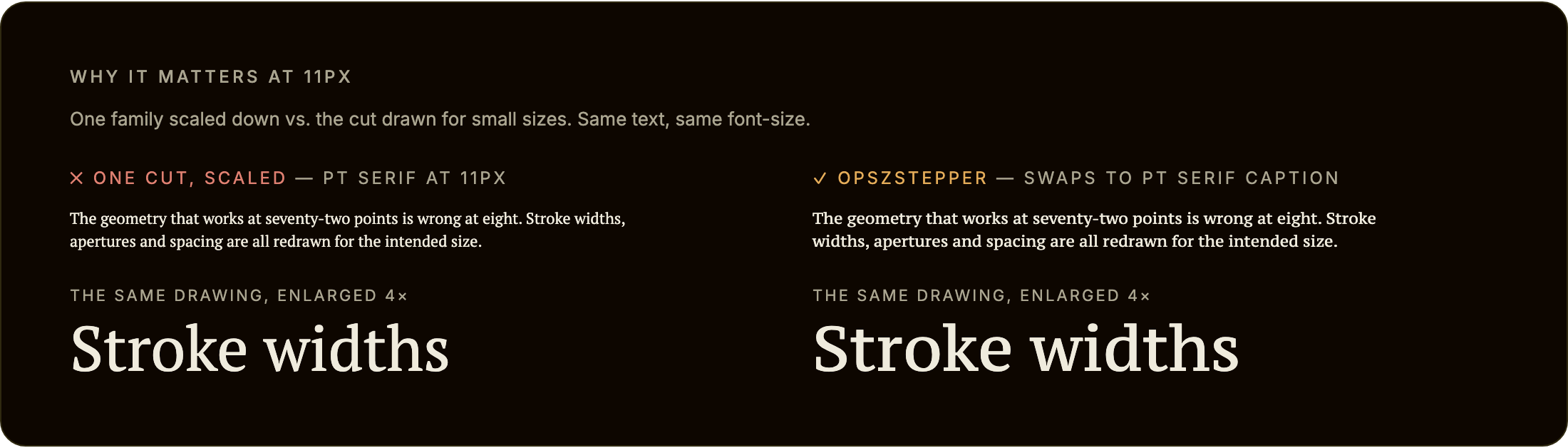
Measured in Chromium at the same font-size, PT Serif Caption sets a 43-character pangram 12.6% wider than PT Serif and has a taller x-height (0.525 em against 0.500 em). That is the kind of difference an optical size makes, and it is also why a swap reflows the text (see Cost and limits).
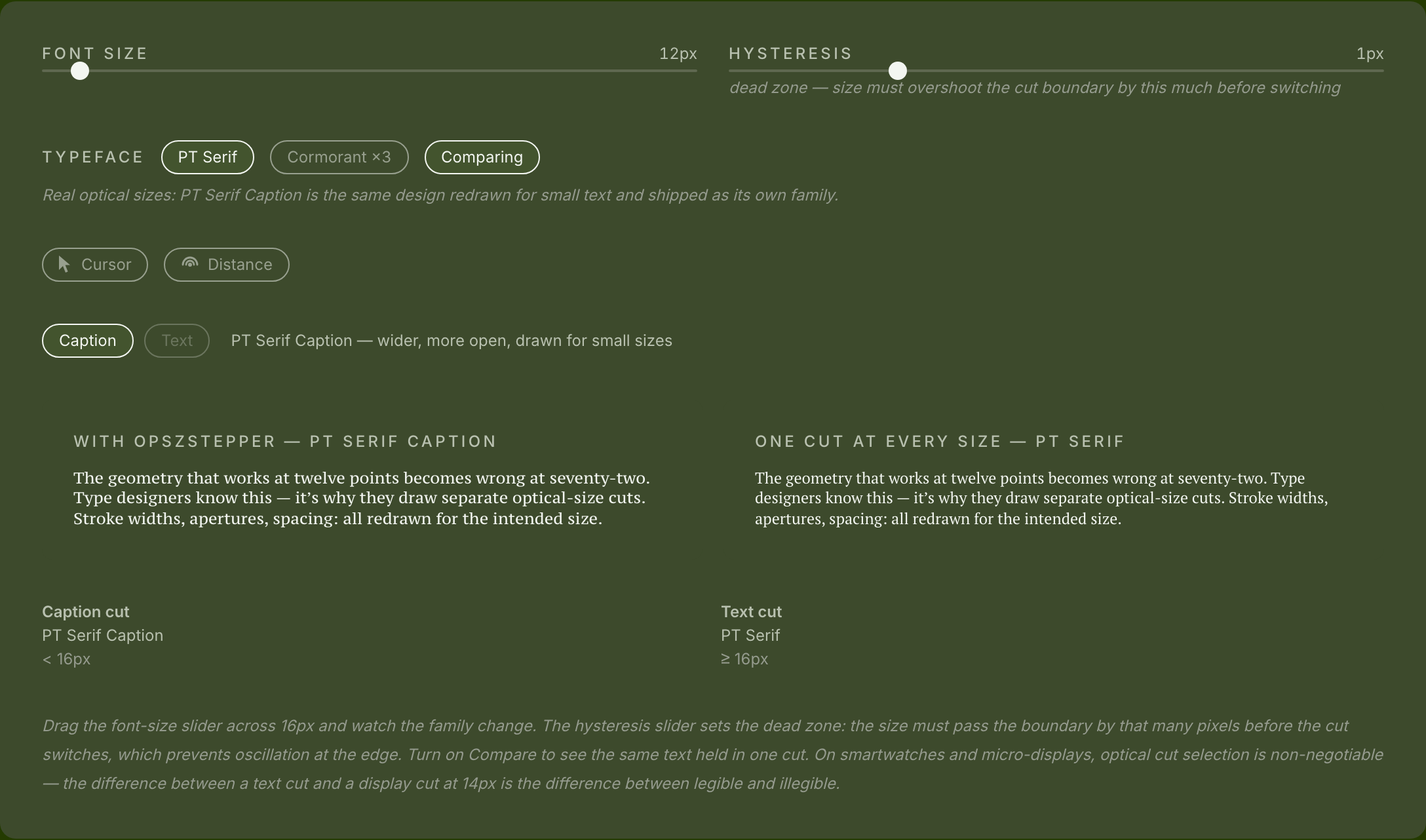
The live demo has a Compare switch that shows the same thing interactively:
Choosing thresholds
The sizes in a cuts list are yours to choose; opszStepper has no built-in ranges. Start from the foundry's guidance for each cut, which is usually given in points for print: 1pt is 1.333 CSS px (96 ÷ 72), so a caption cut meant for 6–9pt covers roughly 8–12px. The examples in this README use 13px and 28px for a three-cut family and 16px for the PT Serif pair; treat them as placeholders, and check the result on the screens you care about.
Two modes: family hot-swap or opsz axis
opszStepper covers both ways type families ship optical sizes:
- Multi-family hot-swap (the primary case) — separate font files per cut (Halyard Micro / Text / Display). Give each cut a different
family; opszStepper setsfont-familyto the matching cut asfont-sizecrosses each threshold. Every example below uses this mode. - Single variable font,
opszaxis — one variable font with anopszaxis (Fraunces, Source Serif 4, Amstelvar). Use the samefamilyin every cut and add anopszValueper cut; opszStepper sets theopszaxis infont-variation-settings(keeping any other axes you've set, such aswght) instead of swapping files. OptionalopszMin/opszMaxclamp the value to the font's fvar range:
cuts: [
  { family: 'Fraunces, serif', maxSize: 13,              opszValue: 9,  opszMin: 9, opszMax: 144 },
  { family: 'Fraunces, serif', minSize: 13, maxSize: 28, opszValue: 24, opszMin: 9, opszMax: 144 },
  { family: 'Fraunces, serif', minSize: 28,              opszValue: 72, opszMin: 9, opszMax: 144 },
]
This steps the axis at discrete thresholds with hysteresis, which is useful when you want explicit control over the opsz value per size band rather than the browser's continuous font-optical-sizing: auto. If the browser's automatic behaviour already looks right for your font, you don't need this mode.
React component
import { OpszStepperText } from '@overpunch/opszstepper'

<OpszStepperText
  cuts={[
    { family: 'Halyard Micro, sans-serif', maxSize: 13 },
    { family: 'Halyard Text, sans-serif', minSize: 13, maxSize: 28 },
    { family: 'Halyard Display, sans-serif', minSize: 28 },
  ]}
>
  Your paragraph text here...
</OpszStepperText>className, style, id, ARIA attributes and a ref are passed through to the rendered element, so the font-size can come from your own CSS, for example className="intro" with .intro { font-size: clamp(0.8rem, 2vw, 2.5rem) }.
Next.js App Router and next/font
next/font generates its own family names, so a literal 'Halyard Micro' won't match a font loaded that way. Give each font a CSS variable and use the variable as the cut's family. This is how opszstepper.com loads its demo fonts:
// app/layout.tsx
import { PT_Serif, PT_Serif_Caption } from 'next/font/google' // or next/font/local for licensed files

const text = PT_Serif({ subsets: ['latin'], weight: '400', variable: '--font-text' })
const caption = PT_Serif_Caption({ subsets: ['latin'], weight: '400', variable: '--font-caption' })

export default function RootLayout({ children }: { children: React.ReactNode }) {
  return <html lang="en" className={`${text.variable} ${caption.variable}`}><body>{children}</body></html>
}
// components/Intro.tsx
'use client'
import { OpszStepperText } from '@overpunch/opszstepper'
const cuts = [
{ family: 'var(--font-caption), serif', maxSize: 16 },
{ family: 'var(--font-text), serif', minSize: 16 },
]
export function Intro({ children }: { children: React.ReactNode }) {
return <OpszStepperText cuts={cuts} className="intro">{children}</OpszStepperText>
}First paint: the server renders the element with whatever font-family your stylesheet gives it, and opszStepper sets the cut in a layout effect when the component mounts in the browser. Set the stylesheet family to the cut most of your visitors will get (usually the text cut), so the server-rendered HTML is already right for them and only the other sizes change on load.
React hook
import { useOpszStepper } from '@overpunch/opszstepper'

// Inside a React component:
const ref = useOpszStepper({
  cuts: [
    { family: 'Halyard Micro, sans-serif', maxSize: 13 },
    { family: 'Halyard Text, sans-serif', minSize: 13, maxSize: 28 },
    { family: 'Halyard Display, sans-serif', minSize: 28 },
  ],
})
return <p ref={ref}>{children}</p>
The hook starts the stepper on the element and re-evaluates the active cut whenever its font-size may have changed (see How it works). It restarts when the cuts or hysteresis change, follows the element if React replaces it (a changed as, a conditional mount), always calls the latest onCutChange, and cleans up on unmount.
Vanilla JS — live
The main entry also exports the React hook and component, so it imports react. Without React installed, import from the React-free subpath @overpunch/opszstepper/core:
import { startOpszStepper } from '@overpunch/opszstepper/core'

const el = document.querySelector('p')

const cuts = [
  { family: 'Halyard Micro, sans-serif', maxSize: 13 },
  { family: 'Halyard Text, sans-serif', minSize: 13, maxSize: 28 },
  { family: 'Halyard Display, sans-serif', minSize: 28 },
]

let stop = startOpszStepper(el, { cuts })

// Later — stop watching and restore the original styles:
// stop()
Vanilla JS — one-shot
applyOpszStepper picks the cut for the current size once and doesn't watch. It doesn't apply hysteresis: it's a direct lookup.
import { applyOpszStepper, removeOpszStepper } from '@overpunch/opszstepper/core'

const el = document.querySelector('p')

applyOpszStepper(el, {
  cuts: [
    { family: 'Halyard Micro, sans-serif', maxSize: 13 },
    { family: 'Halyard Text, sans-serif', minSize: 13, maxSize: 28 },
    { family: 'Halyard Display, sans-serif', minSize: 28 },
  ],
})

// Later — restore the original styles:
// removeOpszStepper(el)
TypeScript
import type { OpszStepperCut, OpszStepperOptions } from '@overpunch/opszstepper'

const cuts: OpszStepperCut[] = [
  { family: '"PT Serif Caption", serif', maxSize: 16 },
  { family: '"PT Serif", serif', minSize: 16 },
]

const opts: OpszStepperOptions = { cuts, hysteresis: 2 }
Options
| Option | Default | Description |
|--------|---------|-------------|
| cuts | (required) | Array of OpszStepperCut objects defining each optical size cut and the font-size range it applies to. Each cut has a family string (CSS font-family value), an optional minSize in px (inclusive, default 0), and an optional maxSize in px (exclusive, default Infinity). Ranges should be contiguous and non-overlapping. They can be listed in any order, and a cut with only maxSize starts where the previous one ends — see the cuts configuration guide below |
| cut.opszValue | undefined | (per-cut, opsz-axis mode only) When set, opszStepper sets the opsz axis in the element's font-variation-settings, keeping its other axes. Use with a single variable font shared across all cuts — see Two modes |
| cut.opszMin / cut.opszMax | undefined | (per-cut, opsz-axis mode only) Clamp the written opszValue to the font's fvar opsz axis range. Ignored unless opszValue is set |
| hysteresis | 1 | Dead zone in px around each cut boundary. When font-size sits within hysteresis px of a threshold, the current cut is held rather than switching. Prevents oscillation when font-size is computed to hover right at a boundary due to sub-pixel rendering or responsive scaling. Increase to 2–4 if you observe rapid toggling. A value larger than half the narrowest cut is reduced to that (with a warning), so a cut can't be skipped. Used by startOpszStepper, the hook and the component; the one-shot applyOpszStepper ignores it |
| onCutChange | undefined | Callback fired each time the active cut changes. Receives the newly applied OpszStepperCut. Useful for logging, analytics, or synchronising sibling elements |
| as | 'p' | HTML element to render. Accepts any valid React element type, e.g. 'h1', 'div', 'span'. Every other prop (className, style, ARIA attributes, ref) is passed through to that element. (React component only) |
Cuts configuration guide
A cut is active when the element's computed font-size satisfies minSize <= fontSize < maxSize. The bounds are in CSS pixels as returned by getComputedStyle(el).fontSize.
Structure cuts as contiguous ranges — each maxSize should equal the next cut's minSize:
cuts: [
  { family: 'Halyard Micro, sans-serif',   maxSize: 13       },  // 0px – 13px
  { family: 'Halyard Text, sans-serif',    minSize: 13, maxSize: 28 },  // 13px – 28px
  { family: 'Halyard Display, sans-serif', minSize: 28       },  // 28px – ∞
]
You can omit the smallest cut's minSize (defaults to 0) and the largest cut's maxSize (defaults to Infinity). If font-size falls outside all defined ranges — which should not happen with a complete contiguous set — the active cut is left unchanged.
Hysteresis at boundaries: if font-size is 13.4px and the active cut was Halyard Text (minSize: 13), the tool will not switch to Halyard Micro until fontSize < 13 - hysteresis (i.e. < 12 with the default hysteresis: 1). Moving in the other direction — Text to Display — requires fontSize >= 28 + hysteresis (i.e. 29 or more). This prevents flicker when a responsive layout computes font-size to a value that oscillates across a boundary.
How it works
startOpszStepper reads the element's computed font-size via getComputedStyle(el).fontSize and finds the matching cut. It then sets el.style.fontFamily to that cut's family string, overriding whatever the stylesheet specifies. The original inline font-family and font-variation-settings (with any !important) are saved so they can be restored exactly when removeOpszStepper or the stop function is called. In family mode font-variation-settings is left alone.
A font-size can change without the element's box changing size (a fixed line-height, an inline <span>, a fixed-size box), so a ResizeObserver alone isn't enough. opszStepper re-checks when the element or its parent resizes (container queries), when a class or style attribute changes anywhere on the page, and when the window resizes (viewport units, media queries). All watched elements share these observers, and each check reads every font-size first and then writes the changed cuts, so a resize with thousands of elements costs one style recalculation. Hysteresis is applied before switching, so a swap only fires when the size has moved clearly past a threshold.
Limits: a font-size change that comes from none of these (for example an animation of font-size on a parent, or a container several levels up resizing without the element or its parent changing size) isn't seen until one of them fires; call applyOpszStepper yourself in that case. The size used is the computed font-size, so CSS zoom and transforms don't change the cut. opszStepper doesn't move the page's scroll position: browsers' scroll anchoring handles the small reflow a swap can cause.
document.fonts.load() is not awaited. The cut swap is immediate — opszStepper sets font-family and the browser handles the font load. If a cut's font file has not yet loaded, the browser will show a fallback until it arrives (standard FOUT behaviour). If you need to eliminate FOUT, preload each cut's font file in the document <head> using <link rel="preload" as="font">. opszStepper does not manage font loading.
Original fontFamily is saved and restored. When removeOpszStepper(el) or the stop function from startOpszStepper is called, the element's style.fontFamily is reset to exactly the value it had before the first call. If the element had no inline fontFamily, the inline property is removed (deferring to the stylesheet), and an element that had no style attribute is left without one.
Webflow and Framer
Both ports ship with the package and need no build step.
Webflow (or any plain HTML page). Add the script once (Site Settings → Custom Code → Footer, or an Embed element), then mark the elements to manage with data-opszstepper:
<script src="https://cdn.jsdelivr.net/npm/@overpunch/opszstepper/dist/opszstepper.webflow.min.js"></script>

<!-- Separate families: a JSON list of cuts -->
<p data-opszstepper
   data-os-cuts='[{"family":"PT Serif Caption, serif","maxSize":16},{"family":"PT Serif, serif","minSize":16}]'>
  Your text
</p>

<!-- One variable font with an opsz axis: "min-max:opsz" per size band -->
<h1 data-opszstepper data-os-family="Fraunces, serif" data-os-opsz="0-13:9, 13-28:24, 28-:72"
    data-os-opsz-min="9" data-os-opsz-max="144">Your headline</h1>
| Attribute | Meaning |
|---|---|
| data-opszstepper | Opts the element in |
| data-os-cuts | JSON array of cuts, with the same fields as the cuts option |
| data-os-family + data-os-opsz | Shorthand for one variable font: comma-separated min-max:opszValue bands; leave a bound empty for "from 0" or "and up" |
| data-os-opsz-min / data-os-opsz-max | Clamp for the shorthand's opsz values |
| data-os-hysteresis | Dead zone in px (default 1) |
The script starts after the DOM is parsed and fonts have loaded. window.OpszStepper.init(root), .restart(root) and .destroy(el) are there for content added later. You still load the fonts yourself (Webflow's font settings, or a <link>).
Framer. src/framer/OpszStepper.tsx is a code component: in Framer choose Insert → Code → New Component and paste the file. It loads the library from esm.sh at a pinned version and exposes Text, Font, Size, Cuts and Hysteresis as property controls.
Cost and limits
- Size. The React-free entry (
@overpunch/opszstepper/core) is 5.5 kB minified, 2.1 kB minified and gzipped; the React hook and component add about 0.5 kB gzipped. The Webflow script is 7.5 kB, 2.9 kB gzipped. (Measured on the builtdist/with esbuild's minifier andgzip -9; the Webflow figure is the 1.1.0 file on jsDelivr.) No runtime dependencies. - Watching. One
ResizeObserver, one document-wideMutationObserver(attributesclass,style,lang,dir) and one windowresizelistener are shared by every watched element, and are removed when the last one stops. Each trigger queues a single check per task that reads every watched element's computed font-size. - How long a check takes. In headless Chromium on a machine that was busy at the time (so read these as upper bounds): with 1,000 watched paragraphs, a class change that moved all of them across a threshold took 11 ms including the swap and reflow, against 3.7 ms for the same class change with no stepper; with 3,000 it was 32 ms against 11 ms. A class change elsewhere that moved no font-size cost 0.7 ms with 1,000 watched elements and 1.8 ms with 3,000. A page that animates inline styles every frame pays that second figure every frame, so keep the number of watched elements modest there.
- Reflow. A swap changes the text's width (PT Serif Caption is 12.6% wider than PT Serif), so lines re-break and the element's height can change at the moment of the swap. Hysteresis keeps that from happening repeatedly at a boundary; it doesn't remove the one reflow.
- First paint. With server rendering the cut is applied when the component mounts in the browser. See Next.js App Router and
next/font. - Browser APIs.
ResizeObserver,MutationObserverandqueueMicrotask. WithoutResizeObserverorMutationObserverthat trigger is skipped rather than throwing. On the server every function is a no-op. - Tests. 53 unit tests (
npm test, vitest with happy-dom) cover cut selection, hysteresis, axis merging, restore and the React bindings.
When plain CSS is enough
If an element's size is fixed, or only changes at breakpoints you control, you don't need JavaScript: set the family per role and per media query.
.caption { font-family: "PT Serif Caption", serif; }
h1 { font-family: "Halyard Text", sans-serif; }
@media (min-width: 60rem) { h1 { font-family: "Halyard Display", sans-serif; } }
opszStepper earns its place when the size isn't known where the CSS is written: fluid type (clamp(), vw, container units) whose crossing point depends on the viewport, components reused at different sizes, user-adjustable text size, or a design system that wants the rule "this family below 16px" stated once rather than repeated in every breakpoint.
Dev notes
next in root devDependencies
package.json at the repo root lists next as a devDependency. This is a Vercel detection workaround — not a real dependency of the npm package. Vercel's build system inspects the root package.json to detect the framework; without next present it falls back to a static build and skips the Next.js pipeline, breaking the /site subdirectory deploy.
The package itself has zero runtime dependencies. Do not remove this entry.
Regenerating the README visuals
The hero and comparison images live in assets/ and are produced by a committed, re-runnable harness in scripts/ (it loads PT Serif and PT Serif Caption in headless Chromium, runs the built library on the page so the families shown are the ones opszStepper picked, and screenshots each scene). The demo image is captured from a local build of the site. assets/ and scripts/ are kept out of the npm tarball — the package ships dist only.
npm i -D playwright && npx playwright install chromium
npm run build
node scripts/capture.mjs   # writes assets/hero.png and assets/compare.png

# also writes assets/demo.png, from a local build of the site:
(cd site && npx next build && npx next start -p 5969) &
SITE_URL=http://localhost:5969 node scripts/capture.mjs
Bump the ?v=N cache-buster on the image URLs in this README after regenerating.
Future improvements
- Deeper container query support — the element and its direct parent are already observed, which covers the usual container-query layout; a container further up that resizes without changing the size of either is not yet seen (see Limits)
- Smooth crossfade — optionally apply a short CSS
transition: font-familyequivalent using a brief opacity fade between cuts to soften the swap on large editorial pages - Multi-element sync — a
syncGroupoption to tie multiple elements to the same active cut, so a heading and its pull-quote always use the same optical cut at all times - Font preload hints — automatically inject
<link rel="preload">tags for all cut font files on first call, so the browser can fetch them before they are needed - SSR hydration — detect the correct cut server-side via a CSS custom property or data attribute so the initial render uses the right
font-familywithout a post-hydration swap