
@overpunch/opticalmargin
v2.0.1
Published
Font-metric hanging punctuation — optical margin alignment that measures each mark's advance width in the rendered font, not a lookup table


Readme
Optical Margin


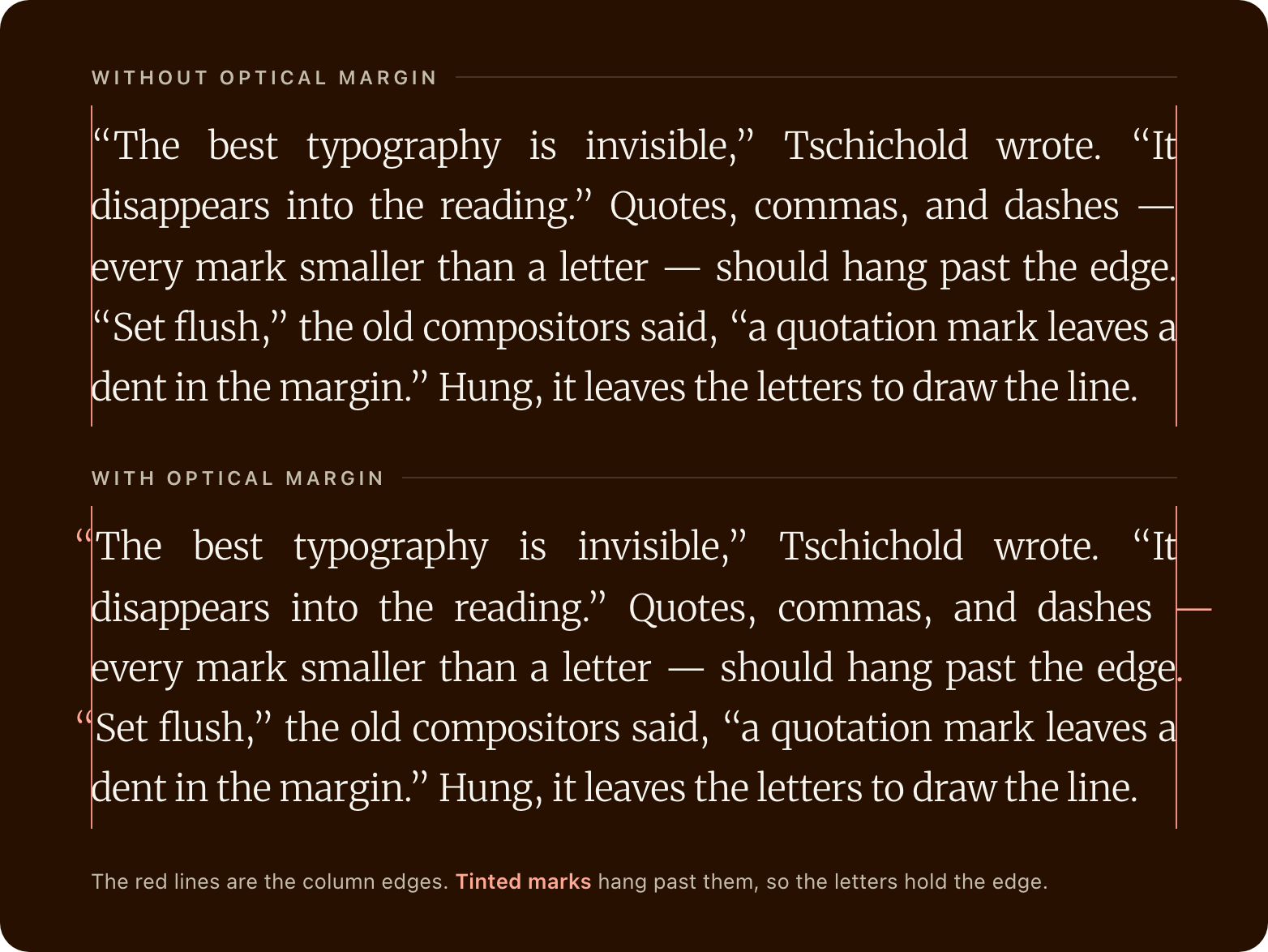
Hanging punctuation nudges marks smaller than a letter — opening quotes, commas, dashes, periods — slightly past the edge of a text block, so the letters, not the punctuation, hold a clean optical margin. It's what fine book typesetting does to make a column edge look straight.
CSS hanging-punctuation is Safari-only, uses hard-coded character tables, and gives no control over hang amount, threshold, or which characters hang. Optical Margin measures each punctuation character's actual width in the rendered font — not a lookup table — and hangs a set fraction of it into the margin with a negative margin. How far each mark hangs is an option; the set of marks that hang is built in. Works in every browser, with every font.
opticalmargin.com · npm · GitHub
TypeScript · Zero dependencies · Measured in the rendered font · Cross-browser · React + Vanilla JS · 4 kB gzipped (vanilla core)
Install
npm install @overpunch/opticalmarginUsage
Next.js App Router: this library uses browser APIs. Add
"use client"to any component file that imports from it.
React component
import { OpticalMarginText } from '@overpunch/opticalmargin'

<OpticalMarginText style={{ textAlign: 'justify' }}>
  “Typography is the craft of endowing human language with a durable visual form.”
</OpticalMarginText>
Both hangStart and hangEnd default to true, so no props are required for standard use.
Which edge hangs depends on
text-align. Marks hang only on an edge the text is aligned to. Left-aligned text (the default) hangs opening marks at line starts and nothing at line ends, because a ragged right edge has nothing to align. To hang closing marks too, justify the text (or align it to the end):<OpticalMarginText style={{ textAlign: 'justify' }}>…</OpticalMarginText>The marks hang outside the element's box, so give it room: a parent with padding, and no
overflow: hiddenon the element itself, or the hung marks are clipped.
In the Next.js App Router, a complete client component looks like this:
// app/components/Quote.tsx
'use client'

import { OpticalMarginText } from '@overpunch/opticalmargin'

export default function Quote({ children }: { children: React.ReactNode }) {
  return (
    <OpticalMarginText as="blockquote" style={{ textAlign: 'justify' }}>
      {children}
    </OpticalMarginText>
  )
}
On the server the text renders flush; the hangs are applied when the component hydrates, and again when fonts finish loading. Only the hung marks move, and occasionally a later line break.
React hook
import { useOpticalMargin } from '@overpunch/opticalmargin'

// All options are optional; useOpticalMargin() uses the defaults.
function Quote({ children }: { children: React.ReactNode }) {
  const ref = useOpticalMargin({})
  return <blockquote ref={ref}>{children}</blockquote>
}
The hook re-runs automatically on resize via ResizeObserver (width changes only — vertical-only resizes are skipped) and after fonts load via document.fonts.ready. Give each paragraph or blockquote its own hook or component; alignment is read from the element it is attached to.
Inline markup is preserved — italics, bold, and links are never split or copied (there is no per-line wrapping):
<OpticalMarginText as="blockquote">
  “Typography is the craft of endowing <em>human language</em> with a
  durable <strong>visual form</strong>.”
</OpticalMarginText>
Vanilla JS
import { applyOpticalMargin, removeOpticalMargin, getCleanHTML } from '@overpunch/opticalmargin'

const el = document.querySelector<HTMLElement>('blockquote')!
const original = getCleanHTML(el)
const opts = { hangStart: true, hangEnd: true }

function run() {
  applyOpticalMargin(el, original, opts)
}

run()
document.fonts.ready.then(run)

const ro = new ResizeObserver(() => run())
ro.observe(el)

// Later — disconnect and restore original markup:
// ro.disconnect()
// removeOpticalMargin(el, original)
TypeScript
import type { OpticalMarginOptions } from '@overpunch/opticalmargin'

const opts: OpticalMarginOptions = { threshold: 1, maxHangRatio: 0.8 }
Options
| Option | Default | Description |
|--------|---------|-------------|
| hangStart | true | Hang opening punctuation at line starts. Applies to start-aligned and justified text |
| hangEnd | true | Hang closing punctuation and sentence-end marks at line ends. Applies to end-aligned and justified text |
| threshold | 0.5 | Minimum hang in px before applying. Prevents near-zero corrections. A non-finite value falls back to the default, with a warning |
| maxHangRatio | 0.9 | Max proportion of the character's advance width to hang (0–1). Clamped to [0,1]. Caps every character's fraction |
| hangFractions | see below | Per-character hang fractions: the proportion of the character's advance width to hang (0 = no hang, 1 = the whole character outside the margin). Keys are single characters. You can pass a sparse object — unspecified characters fall back to built-in defaults. Default fractions: hyphens/dashes (- – —) 1.0 (so maxHangRatio caps them at 0.9 by default); quotes (" ' “ ” ‘ ’ « ») and . ! ? … ) ] 0.8; opening parens/brackets (( [) and , ; : 0.6 |
OpticalMarginText component only:
| Prop | Default | Description |
|------|---------|-------------|
| as | 'p' | HTML element to render, e.g. 'blockquote', 'h1' |
OpticalMarginText also forwards all standard HTML attributes (aria-label, id, role, className, style, etc.) to the root element.
How it works
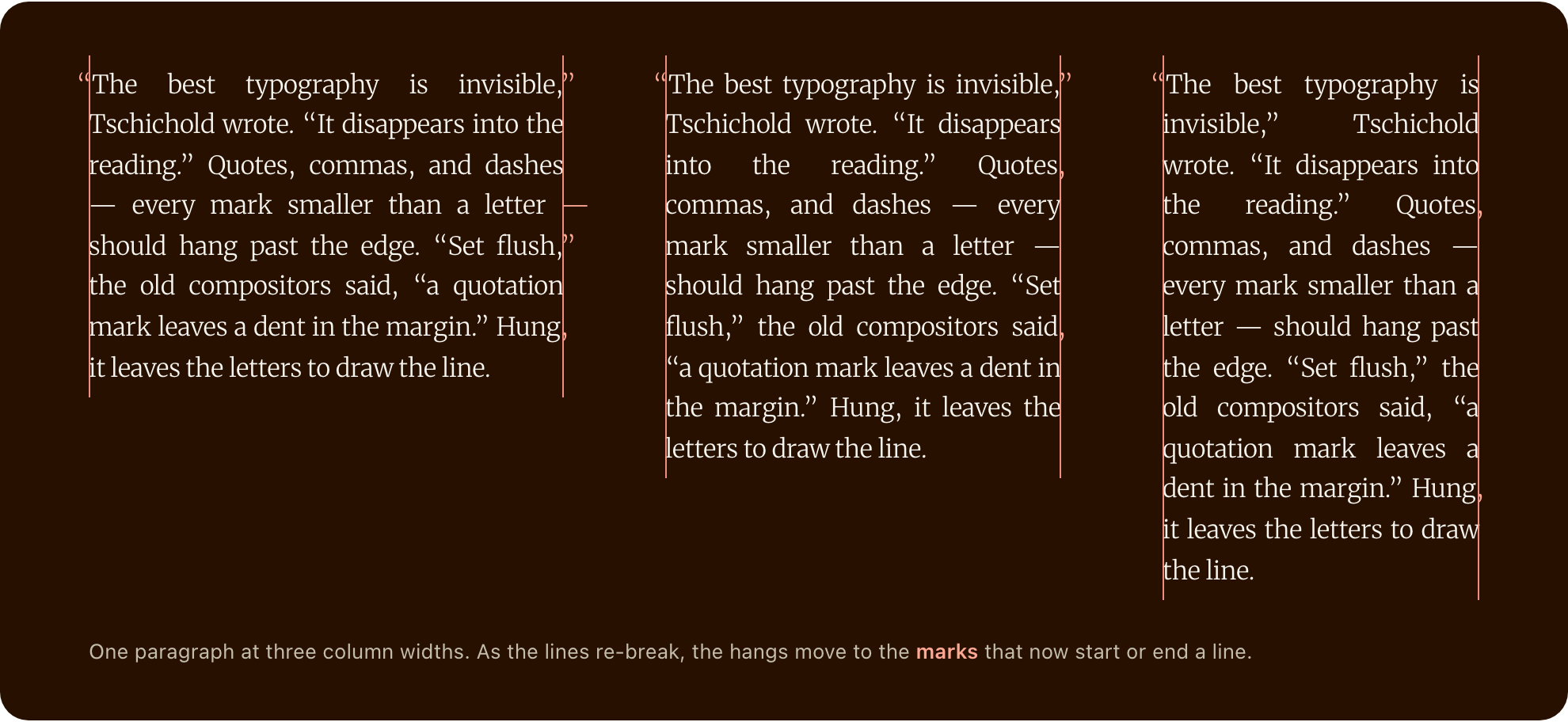
Words that begin with an opening mark or end with a closing mark are wrapped whole in a plain inline span (om-start, om-end, or both), in place; nothing else in the paragraph changes, and the browser keeps laying it out as usual. After layout, each mark is measured with a DOM Range, so the measurement uses the rendered font: its size, variation settings, features and your letter-spacing. (Canvas measureText is the fallback where the DOM can't measure.) A word whose opening mark starts a line gets a negative margin-inline-start, and one whose closing mark ends a line a negative margin-inline-end, of the mark's advance × its fraction (capped by maxHangRatio). Logical properties keep the direction right in both LTR and RTL. Calling applyOpticalMargin again with the same snapshot and options only re-measures and re-checks which marks start or end a line; the React hook and Webflow embed do this on resize and after fonts load.
Start character set: " ' “ ‘ « ( [
End character set: . , ; : ! ? " ' ” ’ » - – — … ) ]
Aligned edges only: start hangs apply to start-aligned and justified text, end hangs to end-aligned and justified text. A ragged edge has nothing to align, and a hang there would only move line breaks.
Line breaks: the text is never locked into lines, so hyphenation (hyphens: auto, ­) keeps working, CJK and Thai break as usual, and text-indent, justification and white-space: pre behave as normal. A hang gives its line a little more room (like CSS hanging-punctuation where it's supported), which can occasionally move a later line break. The layout check goes through the marks in reading order and repeats until it settles; a mark whose own hang would move a line break (its word would fit on the line above, or the next word would fit after it) is left flush rather than flip back and forth. In our test paragraphs (justified, 4 fonts, 6 widths, 603 lines), 117 lines started with an opening mark: 99 hung, by 0.60–0.80 of the mark's width, and 18 were left flush. 144 lines ended with a closing mark: 125 hung, by 0.59–0.90 of the mark's width, and 19 were left flush. No letter crossed a column edge, and no paragraph's line count changed. npm run measure repeats this (see Measurements).
Markup: the author's markup is never split or copied: a link that wraps stays one link, with its listeners, and copy-paste gives the original text. removeOpticalMargin() puts the original text nodes back; getCleanHTML() returns the original markup.
Size and cost: the vanilla core (@overpunch/opticalmargin/core) is 4.0 kB gzipped; the main entry adds the React hook and component, 1.2 kB gzipped. The first run wraps the words and lays out; later runs with the same snapshot and options only re-check the layout, which took about 1 ms for a 12-line paragraph in headless Chromium. The check reads the layout once per round, and a hang that moves a line break adds a round, so the cost grows with the length of the element: apply it to paragraphs, not to a whole article in one element.
Browser support: it uses standard DOM APIs (Range measurement, logical margins) that every modern browser has; the measurements in this README were taken in Chromium. Where nothing can be measured (SSR), the hang is 0 and text renders flush — the same as not applying the effect.
React is optional. The main entry also exports the React hook and component, so it imports react; without React installed, import the vanilla API from @overpunch/opticalmargin/core.
Limits
- Marks: only the characters in the two sets above hang. There are no CJK full-width marks (
「」、。) and no Arabic or Hebrew punctuation in the sets, so text in those scripts is left as it is. - Hyphens the browser inserts (
hyphens: auto,­) are not in the text, so they don't hang. A hyphen you typed hangs only where it ends a word; a compound such aswell-knownthat breaks at its hyphen does not. - Straight apostrophes: a straight
'at the start of a word ('tis) is treated as an opening quote and hangs at a line start. A curly’there is not. - Hidden elements: an element with no width (
display: none, not yet attached) is skipped. Apply again once it is visible. - Style changes: the hook re-runs when the element's width changes, when fonts load and when its options change (
OpticalMarginTextalso re-runs when its children change). A change it can't see (text-align,font-sizeorletter-spacingset later, at the same width) needs anotherapplyOpticalMargincall, or in React a newkeyon the element. - One block per call: alignment and direction are read from the element you pass. Apply it to each paragraph, heading or blockquote, not to a container of several.
- Native
hanging-punctuation: don't set the CSS property on the same element; the two were not tested together. - Tested in Chromium. The measurements and checks in this README were run in headless Chromium; the code uses only standard DOM APIs (
Range, logical margins), but Safari and Firefox were not measured.
Accessibility
Optical Margin is a presentation transform that keeps the readable text and markup as they are:
- The injected spans carry no semantics, and no line breaks are added. Nothing is animated.
- A link or emphasis that wraps across lines stays one element, so a screen reader announces one link. (Checked in the DOM: one
<a>, the same node. Not tested with a screen reader.) - Copy-paste gives the original text, reflowing as one paragraph (the selected text of a paragraph is identical before and after, checked by
npm run measure). - In right-to-left text the hang is on the correct side: an opening quotation mark at the start of an RTL line hangs past the right edge (checked with one Hebrew paragraph; Hebrew and Arabic punctuation itself is not in the sets, see Limits).
- On
OpticalMarginText,aria-labeland all other HTML attributes pass through to the root element unchanged.
Migrating from 1.x
2.0 stops locking lines. The generated markup changed: there are no om-line / om-word spans or <br data-om> breaks any more, only om-start / om-end spans around the words with hanging marks (OPTICAL_MARGIN_CLASSES is now { start, end }). If your CSS targeted .om-line or .om-word, update it. End hangs now apply only to justified or end-aligned text, where they show. The options and function signatures are unchanged.
The Webflow embed loads the latest version from jsDelivr, so Webflow sites get 2.0 within the CDN's cache window.
API reference
getCleanHTML(el: HTMLElement): string
Returns the element's innerHTML with any optical-margin markup (om-start / om-end spans) unwrapped and adjacent text nodes merged, which is the markup the element had before it was processed. Safe to call multiple times — idempotent.
Use this to capture the original HTML snapshot before the first applyOpticalMargin call. The snapshot must be passed as the second argument to both applyOpticalMargin and removeOpticalMargin every time they are called.
const original = getCleanHTML(el)  // capture once, before any apply

function run() {
  applyOpticalMargin(el, original, opts)
}

// Later:
removeOpticalMargin(el, original)  // same snapshot
Important: Always capture the snapshot from the element's initial state (or via getCleanHTML on an already-applied element). Never pass el.innerHTML directly after applyOpticalMargin has run — the snapshot will include injected markup and the algorithm will double-wrap on the next call.
applyOpticalMargin(el: HTMLElement, originalHTML: string, options?: OpticalMarginOptions): void
Wraps the words with hangable marks and sets the hangs. With the same snapshot and options as the last call it only re-checks the layout. Does nothing on the server.
removeOpticalMargin(el: HTMLElement, originalHTML: string): void
Puts the element's original text nodes back.
useOpticalMargin(options?: OpticalMarginOptions, contentKey?: string)
React hook. Returns a ref to attach to the element. The library rewrites the element's text nodes, so if the element's content changes while it is mounted, pass a contentKey that changes with it and use the same value as the element's key (a fresh element, a fresh snapshot). OpticalMarginText does this for you.
OPTICAL_MARGIN_CLASSES
{ start: 'om-start', end: 'om-end' } — the class names of the injected spans.
Webflow
No build step: add the script once (Site Settings → Custom Code → Footer, or an Embed element), then add the data-opticalmargin attribute to any text element.
<script src="https://cdn.jsdelivr.net/npm/@overpunch/opticalmargin/dist/opticalmargin.webflow.min.js"></script>

<p data-opticalmargin style="text-align: justify">“Your paragraph…”</p>
Options are attributes on the same element: data-om-hang-start="false", data-om-hang-end="false", data-om-threshold, data-om-max-hang-ratio, and data-om-hang-fractions (a JSON object, e.g. {"-":1,".":0.7}). The script re-fits on resize and after fonts load. That URL has no version in it, so it follows new releases; put a version in it (@overpunch/[email protected]/dist/…) to pin one.
Measurements
The numbers in this README come from two scripts in scripts/, run in headless Chromium against the built bundle:
npm run build
npm run measure   # hang ratios, the behaviour checks, timings
npm run capture   # regenerates the images in assets/
measure sets two quote-heavy paragraphs justified at 18px in four fonts (Merriweather, Georgia, Helvetica Neue, Times New Roman) and six widths (280–760px), and reports for every line that starts or ends with a hangable mark whether it hung and by what share of the mark's width. It also checks that the selected text, getCleanHTML() and removeOpticalMargin() give back the original, that hyphens: auto and ­ still break words, that a wrapped link stays one <a>, that unspaced Japanese and Thai text keeps its line count, that RTL hangs on the right, which edges hang at each text-align, and that a narrower column moves the hangs. Both need Playwright's Chromium (npx playwright install chromium).
Dev notes
npm test          # vitest (happy-dom), watch mode; npm run test:run for one pass
npm run build     # library build to dist/
next in root devDependencies
package.json at the repo root lists next as a devDependency. This is a Vercel detection workaround — not a real dependency of the npm package. Vercel's build system inspects the root package.json to detect the framework; without next present it falls back to a static build and skips the Next.js pipeline, breaking the /site subdirectory deploy.
The package itself has zero runtime dependencies. Do not remove this entry.
Future improvements
- Hanging numerals — detect and hang numerals (
1,7) that protrude into the margin at display sizes - Configurable character set — expose a
hangCharsoption to override which characters are considered candidates, beyond the built-in punctuation list - Per-side max hang — separate
maxHangStart/maxHangEndratios for asymmetric control - Intersection Observer — skip measurement for off-screen elements and re-run when they enter the viewport
See CHANGELOG for version history.