
@overpunch/sales-portal
v3.1.19
Published
Sales dashboard and analytics components for Next.js type foundry sites — Stripe integration, MUI DataGrid, charts, CSV export, and multi-designer reporting.


Readme
@overpunch/sales-portal
Drop-in sales dashboard and analytics components for Next.js type-foundry sites — designers log into their foundry's site and see their own typeface sales and revenue, pulled live from Stripe, with designer authentication via Sanity. Build the dashboard once, reuse it across every foundry site.

-lightgrey.svg)
-black.svg)

Internal package.
UNLICENSED— published public on npm for convenient installation across Liiift Studio foundry sites, but all rights reserved; it is not licensed for use outside Liiift Studio projects.
Features
- Designer authentication via Sanity CMS
- Admin multi-designer view with sequential loading
- Monthly and full-year sales data from Stripe (invoices + payment intents)
- Interactive charts and data visualization (MUI X-Charts)
- Spreadsheet-style data tables with sorting, filtering, and CSV export (MUI DataGrid)
- Date range selection for custom export reports
- Stripe balance reconciliation checks
- Top performers analysis (typefaces and designers)
- Typeface and license type breakdowns
- Summary cards with key metrics
- Login modal with two-column layout
How it works
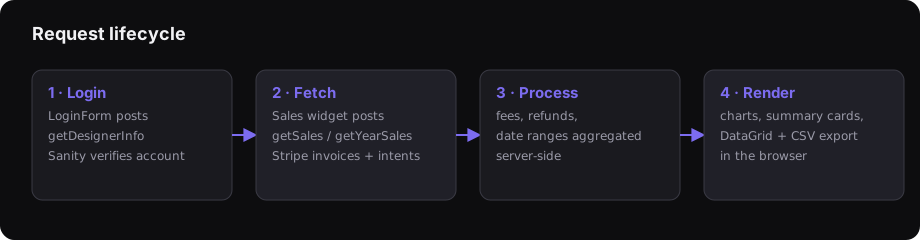
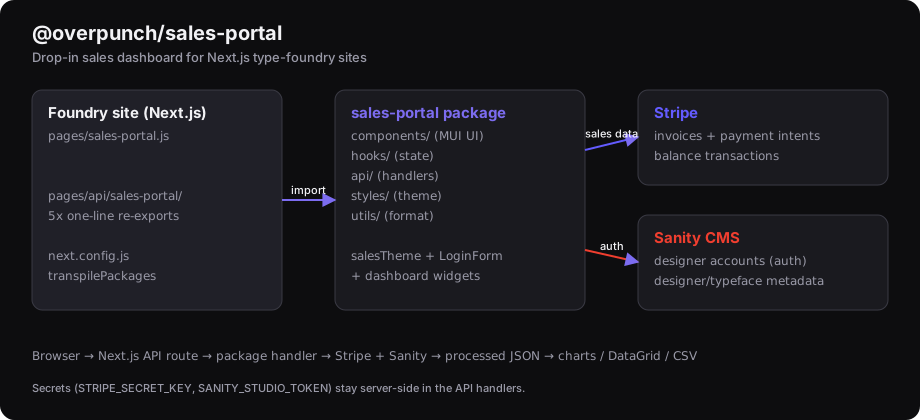
The package ships React/MUI components plus Next.js API handlers. Your site
re-exports the handlers as API routes and renders <SalesPortalPage />. All
Stripe and Sanity secrets stay server-side inside the API handlers — they are
never exposed to the browser.
Installation
npm install @overpunch/sales-portalPages Router only. This package wires into
pages/api/...route handlers and assumes the Next.js Pages Router.
Prerequisites
Peer dependencies required in your project:
{
  "@mui/material": ">=5.10.0 <8",
  "@mui/icons-material": ">=5.10.0 <8",
  "@mui/x-data-grid": "^8.0.0",
  "@mui/x-date-pickers": ">=7.0.0 <9",
  "@mui/x-charts": "^7.0.0",
  "@sanity/client": ">=6.0.0",
  "stripe": ">=11.0.0",
  "react": ">=18.0.0 <20",
  "react-dom": ">=18.0.0 <20",
  "next": ">=14.0.0 <16",
  "dayjs": "^1.11.0",
  "slugify": "^1.6.0"
}
stripe and @sanity/client are used by the API handlers, @mui/icons-material
by the dashboard UI. npm 7+ installs missing peers automatically.
Compatibility
| Peer | Version |
|------|---------|
| @mui/material | >=5.10.0 <8 (v5–v7; uses Box/flexbox, not Grid) |
| @mui/x-data-grid | ^8.0.0 |
| @mui/x-date-pickers | >=7.0.0 <9 |
| @mui/x-charts | ^7.0.0 |
| react / react-dom | >=18.0.0 <20 |
| next | >=14.0.0 <16 (Pages Router) |
| dayjs | ^1.11.0 |
| slugify | ^1.6.0 |
| stripe | >=11.0.0 (API handlers) |
| @sanity/client | >=6.0.0 (API handlers) |
| @mui/icons-material | >=5.10.0 <8 |
Note
@mui/x-data-gridis on major v8 while the other MUI X packages are on v7 — install the matching majors as listed above.
Quick Start
Everything below is for developers integrating the package. See
SETUP.mdfor the full setup guide and a step-by-step checklist.
1. Create API route wrappers
Create these 5 files — all are required. The dashboard calls every endpoint,
so a missing wrapper produces a 404 at runtime (the year-over-year view needs
getYearSales):
pages/api/sales-portal/
  getDesignerInfo.js
  getDesigners.js
  getSales.js
  getYearSales.js
  getBalanceTransactions.js
Each file is a one-line re-export:
// pages/api/sales-portal/getSales.js
export { default, config } from '@overpunch/sales-portal/api/getSales';
2. Create the page
SalesPortalPage wraps its own MUI ThemeProvider with the exported salesTheme
by default (pass includeTheme={false} to supply your own).
// pages/sales-portal.js
import { SalesPortalPage } from '@overpunch/sales-portal';

export default function SalesPortal() {
  return (
    <SalesPortalPage
      texts={{
        title: 'Sales Portal',
        dashboardTitle: 'Sales',
        dashboardSubtitle: 'by designer'
      }}
    />
  );
}
3. Configure Next.js
// next.config.js
const nextConfig = {
  transpilePackages: ['@mui/x-charts', '@overpunch/sales-portal'],
};

module.exports = nextConfig;
Merge transpilePackages into your existing config rather than replacing it —
and keep the module.exports, or the file silently exports nothing and the
setting has no effect.
4. Set environment variables
# .env.local
SANITY_STUDIO_PROJECT_ID=your_project_id
SANITY_STUDIO_DATASET=production
SANITY_STUDIO_TOKEN=your_sanity_token
STRIPE_SECRET_KEY=your_stripe_secret_key

# Optional — defaults to 2022-04-01 if unset
SANITY_STUDIO_API_VERSION=2022-04-01

# Optional kill switch — set to the literal string "false" to disable the portal.
# Any other value (or unset) leaves it enabled.
SALES_PORTAL_ENABLED=true
Designer accounts (Sanity)
Authentication matches an account document in your Sanity dataset by email,
password, and isDesigner. Each designer needs an account document with those
fields for login to succeed. To grant access to the admin multi-designer view,
set isAdmin: true on that designer's account document.
Credential handling — know this before you deploy
Passwords are stored in plaintext on the Sanity
accountdocument and compared by direct GROQ equality (password == $password) — there is no hashing and no rate limiting.getDesignerInfoalso returns thepasswordfield in its JSON response, and for anisAdminaccount it returns every designer's credentials in a single payload.Stripe and Sanity secrets do stay server-side, as described above — this is a separate issue about designer credentials. Treat the portal as trusted-internal, keep it off shared logins, and don't reuse those passwords anywhere else. Hashing is the obvious fix and is not yet implemented.
Data contract — what your checkout must write
The dashboard only reads. If your checkout doesn't write these, the portal logs in and renders perfectly with every figure at zero — the worst failure mode, because nothing errors.
Stripe metadata (the hard gate)
Note the naming trap: plural on the transaction, singular on the line.
| Where | Key | Value | Used for |
|---|---|---|---|
| Invoice / PaymentIntent | authors | JSON array of Sanity account._ids in the order | Transactions whose authors don't include the designer are dropped outright |
| Each invoice item / line | author | a single Sanity account._id | Attributes that line to one designer (authorId) |
| PaymentIntent | items | JSON array of line objects | Splitting a payment intent into rows |
| PaymentIntent | orderNumber, discount | order reference / discount amount | Matching and discount display |
// when creating the invoice
metadata: { authors: JSON.stringify(cartTypefaces.map(t => t.author)) }

// on each typeface invoice item
metadata: { author: typeface.author }
A line with no resolvable author falls back to matching the typeface title in
its description, and is otherwise excluded from designer views — so a missing
author shows up as revenue quietly going missing, not as an error.
Sanity documents
Beyond the account documents used for login, sales association reads order
documents shaped roughly:
order {
  orderNumber,
  cost,
  discount->,
  orderStatus { invoiceId, paymentIntentId },
  typefaces[]{ fonts, typeface-> { _id, title, author-> { _id, firstName, lastName, email } } }
}
orderStatus.invoiceId / paymentIntentId are what tie a Stripe transaction to
its order; without them the portal falls back to fuzzy email-and-timestamp
matching.
Troubleshooting
| Symptom | Likely cause |
|---|---|
| Dashboard renders, all figures zero | metadata.authors missing, or it doesn't contain that designer's Sanity _id |
| A designer is missing revenue they expect | line item has no metadata.author and its description doesn't match a typeface title |
| Totals look too high for one designer | something is summing a transaction-scoped field — see the money model above |
| Every API route 500s | one of the undeclared runtime deps isn't installed |
API Endpoints
| Endpoint | Method | Purpose |
|----------|--------|---------|
| getDesignerInfo | POST | Authenticate designer, return account data |
| getDesigners | GET | List all designers (admin) |
| getSales | POST | Fetch sales data for a month or date range |
| getYearSales | POST | Fetch a full year of sales with year-level aggregates |
| getBalanceTransactions | POST | Fetch Stripe balance transactions for reconciliation |
Component & Hook Exports
import {
  SalesPortalPage,     // Full page with login modal + dashboard
  LoginForm,           // Login modal component
  Sales,               // Individual designer sales dashboard
  SalesTable,          // Sales data table with CSV export
  DateRangeSalesTable, // Custom date range export table
  SalesChart,          // Revenue trend charts
  YearOverview,        // Full-year overview view
  SummaryCards,        // Key metrics cards (a.k.a. Insights)
  TopPerformers,       // Top typefaces/designers
  TypefaceList,        // Typeface breakdown
  LicenseTypeList,     // License type analysis
  PeriodComparison,    // Period comparison charts
  SalesErrorBoundary,  // Error boundary for dashboard sections
  salesTheme,          // MUI theme
  // Table helpers
  TableRowCells, getCellValue, COLUMNS,
  // Hooks
  useSalesDateQuery, useColumnSelection, useReconciliation,
} from '@overpunch/sales-portal';
API handlers are imported individually from the ./api/* subpath, e.g.
import handler from '@overpunch/sales-portal/api/getSales'.
Architecture
@overpunch/sales-portal
  api/
    getDesignerInfo.ts        # Authenticate designer
    getDesigners.ts           # List designers (admin)
    getSales.ts               # Month / date-range sales
    getYearSales.ts           # Full-year sales + aggregates
    getBalanceTransactions.ts # Stripe balance transactions
    utils/
      clients.ts              # Shared Sanity + Stripe clients
      apiResponse.ts          # Standardized error/success responses
      authMiddleware.ts       # Request authentication
      dateUtils.ts            # UTC date range utilities
      salesDataProcessor.ts   # Core sales data pipeline
      stripeFetcher.ts        # Stripe API pagination
      feeCalculator.ts        # Fee distribution + rounding
      processors/             # Stripe invoice / payment-intent processors
  components/                 # React components (Box/flexbox, no MUI Grid)
  styles/                     # SCSS + MUI theme
  hooks/                      # Custom React hooks
  utils/                      # Client-side utilities
How the numbers are calculated
Full reference: .agent/specs/money-model.md.
Read it before changing anything that produces a figure.
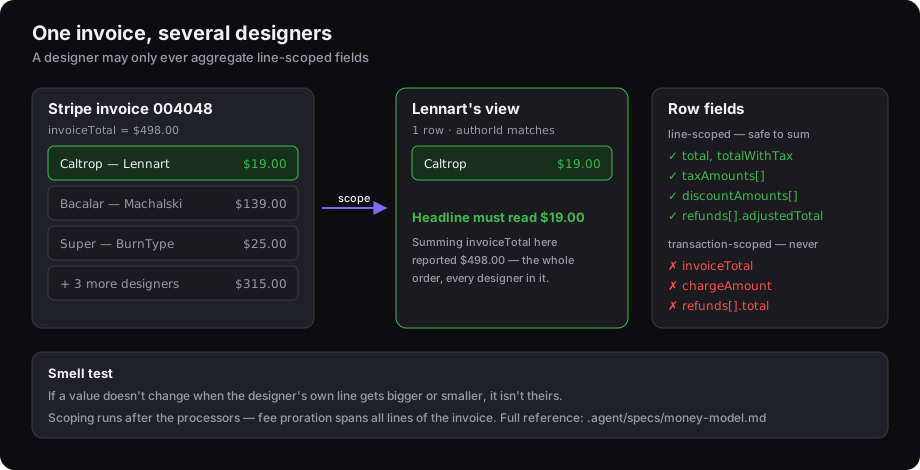
Line-scoped vs transaction-scoped
One Stripe invoice can hold typefaces by several designers. After scoping, a designer's rows are only their own lines — but every row still carries fields describing the whole invoice.
A designer's dashboard may only aggregate line-scoped fields.
| Safe to sum (line-scoped) | Never sum in a designer view |
|---|---|
| total, totalWithTax | invoiceTotal, invoiceTotalWithTax |
| taxAmounts[], discountAmounts[] | chargeAmount |
| stripeFees, totalTransactionFee (prorated share) | id (invoice ID — repeats per line) |
| refunds[].adjustedTotal | refunds[].total (full refund, repeats per line) |
| lineId, authorId | order, orderNumber, customer |
Deduplicate on lineId, never on id — id is the invoice and repeats across
every line. refunds[].total is only safe deduplicated by refund.id, and only
for whole-transaction reconciliation.
Smell test: if a value doesn't change when a designer's line gets bigger or smaller, it isn't theirs.
Units
Row fields and getYearSales are in cents. processChartData is the only
place that converts to dollars — mixing its output with a raw row field is a
100× error.
Scoping runs after processing
Rows are filtered once the processors have finished, never inside their loops:
Stripe fee proration depends on isPrimaryItem and a remainder-allocation pass
across all lines of an invoice, so dropping lines early corrupts the fee share
of every line that survives. Admin views are never filtered.
Reconciliation is the deliberate exception
calculateGrossSales sums chargeAmount deduplicated by charge ID —
transaction-scoped on purpose, because it reconciles against what Stripe
actually charged. It is admin-only. Don't reuse it for a designer figure.
Changing a calculation safely
The rule above is enforced by tests, not just prose — extend them rather than relying on a manual check:
| File | Covers |
|---|---|
| api/utils/__tests__/designerScoping.test.ts | a multi-designer invoice; asserts each designer sees only their own line and admin still sees all |
| api/utils/__tests__/feeCalculator.test.ts | fee proration and remainder allocation |
| api/utils/__tests__/yearSalesAggregation.test.ts | year rollups |
| hooks/__tests__/useReconciliation.test.ts | Stripe reconciliation |
| api/utils/__tests__/dateUtils.test.ts | UTC month/range boundaries |
| __fixtures__/sampleSales.ts | shared row fixtures |
When you touch anything that produces a figure:
npm test          # 61 tests
npx tsc --noEmit  # see the typecheck caveat below
A good regression test for this bug class asserts the invariant that broke: for a mixed-designer invoice, the headline total equals the sum of that designer's own visible rows.
Typecheck caveat.
tsc --noEmitaborts with exit code 2 on a tsconfig error before checking any file, printing only that error — so a run that "shows no errors" may have checked nothing. Always check the exit code. There are ~123 known pre-existing type errors (mostlyObject.entries→unknownproperty access), so treat new errors as the signal.
Currently deployed on
- The Designers Foundry — production
- Darden Studio — production
- Positype — on the older v1.x line
- Sorkin Type Co — on the older v1.x line
Consumers track the package with a ^ range, so a published fix reaches every
site on its next deploy. That cuts both ways: verify money-affecting changes
before publishing, because they propagate without further review.
Contributing / Local Development
This is a published package built with tsup and tested
with vitest. Type definitions are hand-maintained in
index.d.ts (tsup runs with dts: false).
npm install          # install dev + peer tooling
npm run build        # bundle with tsup -> dist/
npm run dev          # tsup --watch (rebuild on change)
npm test             # run the vitest suite
npm run capture      # regenerate the README diagrams in assets/
When adding a new component/hook/util, register it as an entry in
tsup.config.ts (or it won't be built) and add the matching export to index.ts
and index.d.ts.
Test against a consumer site
Use the link:* scripts to npm link the package into a consumer for local
testing before publishing (run npm run dev alongside so changes rebuild):
npm run link:tdf       # link into sites/tdf
npm run link:darden    # link into sites/darden
npm run link:positype  # link into sites/positype
Publishing
- Make and verify your changes (
npm test, then test against a consumer site) - Bump the version in
package.json - Commit and push to
master - Publish:
npm publish(prepublishOnlyruns the build automatically;publishConfig.accessis alreadypublic) - Foundry sites pick up the new version on their next deploy (they use
^semver)
Before bumping, check the currently published version with
npm view @overpunch/sales-portal versionso the new number is ahead of npm.
License
UNLICENSED — internal Liiift Studio package. All rights reserved.