
@owenlamont/ryl-linux-armv7-gnu
v0.24.0
Published
Fast YAML linter inspired by yamllint
Downloads
508


Readme
ryl
ryl - the Rust YAML linter - is intended to ultimately be a drop-in replacement for yamllint. It is usable today, but parity and edge-case behaviour are still maturing.
Full documentation lives at https://ryl-docs.pages.dev/.
Compatibility note
rylaims to matchyamllintbehaviour and includes many parity tests.ryluses thegranit-parserparser stack, whileyamllintuses thePyYAMLparser stack.granit-parserandPyYAMLdo not always agree on which files are valid YAML.ryltargets YAML 1.2 strictly.yamllintdefaults to YAML 1.1 semantics, so bareword booleans likeyes/no/on/off(and case variants) are plain strings inryland booleans inyamllint. Leading-zero integers like0755are decimal inryland octal inyamllint. The same 1.2 semantics also apply whenrylparses.yamllintconfiguration files inherited fromyamllint. See the YAML version compatibility page for the practical implications.
Quick start
ryl enables no rules by default, so it needs a configuration or --enable that
turns rules on. -d 'extends: default' opts into yamllint's standard rule set for
a one-off run, and --enable <RULES> runs just the named rules; for a project,
drop a .ryl.toml at the root (see
Configuration).
ryl check is the lint subcommand (a ryl format formatter is coming) and the
recommended form. Bare ryl <paths> still lints identically but is deprecated: it
prints a warning to stderr (silenced by --no-warnings) and a later release will
remove it, so prefer ryl check.
# Using uv (Python)
uvx ryl check -d 'extends: default' .

# Using npx (Node.js)
npx @owenlamont/ryl check -d 'extends: default' .
For prek / pre-commit integration, see
ryl-pre-commit.
Installation
uv tool install ryl                 # uv
npm install -g @owenlamont/ryl      # npm
pip install ryl                     # pip
cargo install ryl                   # cargo
pixi global install ryl             # conda-forge
winget install owenlamont.ryl       # winget (Windows)
Building from source (cargo install, or a pip sdist) needs Rust 1.99.0 or
newer. The prebuilt wheels, npm, conda-forge and winget packages do not.
Status and scope
- All 23 yamllint rules are implemented, plus four ryl-only rules with no
yamllint equivalent (
tags,merge-keys,block-scalar-chomping, andunicode-line-breaks), configured in TOML only. The current rule reference and per-rule pages are at https://ryl-docs.pages.dev/rules/. - Auto-fixing (
--fix) is supported forbraces,brackets,commas,comments,comments-indentation,document-end,document-start,empty-lines,key-ordering,new-line-at-end-of-file,new-lines,quoted-strings,trailing-spaces, andtruthy(case only, e.g.Truetotrue). The set of rules that may apply fixes is configurable via the TOML[fix]table. --diffpreviews those safe fixes as a unified diff on stdout instead of writing them (modelled onruff check --diff); it is mutually exclusive with--fix, works with stdin, and exits1iff some file would change.- TOML is the recommended configuration format and supports ryl-only
features that have no upstream equivalent: the
[fix]table,[per-file-ignores], and rule options such asallow-double-quotes-for-escaping. - TOML assigns each file a source kind via the
[files]table (yaml = [...],markdown = [...]). The legacyyaml-fileskey is YAML-only; in TOML use[files].yaml. - YAML embedded in Markdown (front matter and fenced
yaml/ymlblocks) can be linted by listing globs under[files].markdown; diagnostics map back to the Markdown file. It is off by default;--fixwrites safe fixes back into the embedded blocks and--diffpreviews them at the host-file level. See https://ryl-docs.pages.dev/markdown/. - yamllint-style YAML configuration is also accepted (
.yamllint,.yamllint.yml,.yamllint.yaml) for drop-in compatibility, including the built-indefault,relaxed, andemptypresets viaextends. An existing yamllint configuration can be converted withryl --migrate-configs --migrate-write. --list-filesprints the files ryl would lint (after ignores and config discovery) and exits, without running rules.--no-warningssuppresses warning-level diagnostics in the output.--strictturns a warning-only run into exit code2.--enable <RULES>runs exactly the listed rules (comma-separated IDs, orALL) in place of the config's selection, and needs no config file.- Pass
-as the input to read YAML from stdin (ruff convention). Add--stdin-filename <PATH>so diagnostics, project-config discovery, and path-based filtering (yaml-files, per-file-ignores, per-ruleignore) use that filename. Without it, diagnostics are labelled<stdin>, config is anchored at the current working directory, and all path-based filtering is skipped so every enabled rule runs.-cannot be combined with other inputs;--fixcannot read from stdin, but--diffcan. ryl serverruns ryl as a Language Server (LSP) over stdio, giving editors inline diagnostics, asource.fixAll.rylcode action, and formatting (= apply safe fixes). It complements Red Hat'syaml-language-serverrather than replacing it, and is built in by default (a minimal binary without it builds withcargo install ryl --no-default-features). See https://ryl-docs.pages.dev/editor-integration/.- Run
ryl --helpfor the authoritative CLI reference.
For installation walkthroughs, configuration presets, and per-rule documentation, see the docs site.
Performance
ryl is significantly faster than yamllint on large trees. The figure
below is from a 5x5 file-count × file-size matrix with 5 runs per point:
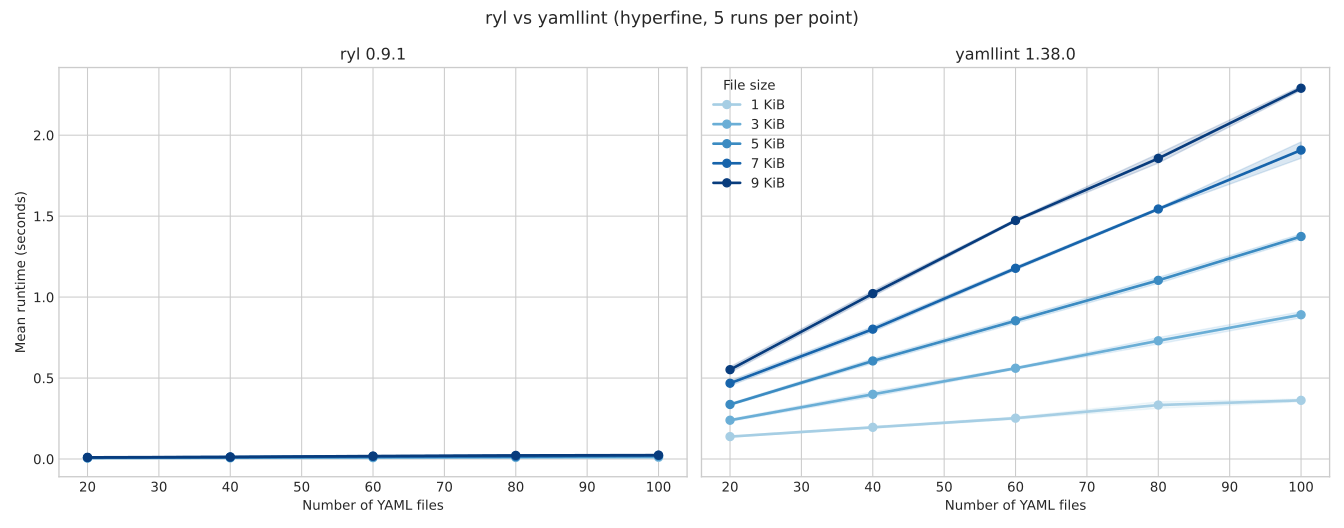
The benchmark script is in scripts/benchmark_perf_vs_yamllint.py; run
it with --help for the full option set.
Acknowledgements
This project exists thanks to the tooling and ecosystems around YAML linting and developer automation, especially:
- yamllint - for giving me the shoulders to stand on and the source of many of the automated tests that ryl uses now to check for behaviour parity. Copying the behaviour of an existing tool is infinitely easier than building one from scratch - there'd be no ryl without yamllint.
- ruff - for showing the power of Rust tooling for Python development and inspiring the config and API for ryl.
- rumdl - for giving me another template to follow for Rust tooling and showing me almost the only dev tool I was still using after this that wasn't written in Rust was yamllint (which inspired me to tackle this project).
- saphyr - ryl's vendored YAML DOM is derived from saphyr, and saphyr's developers were very patient in showing some of the nuance and complexity of parsing YAML which I was embarrassingly ignorant of when starting ryl.
- granit-parser - a
saphyr-parserfork with comment and style metadata that ryl uses for event-stream parsing. - esbuild and biome - for providing the "binary wrapper" blueprint for distributing high-performance native tools via NPM.