
@pablog02/fornac
v2.0.0
Published
An RNA secondary structure display component


Readme
FornaContainer
FornaContainer provides a simple way to display RNA secondary structures on web pages. This is particularly useful for applications like structure prediction servers, where you need to visualize dot-bracket notation output without complex user interactions.
Trivial Example
Below is an example of a simple web page that uses FornaContainer to display a simple RNA molecule:
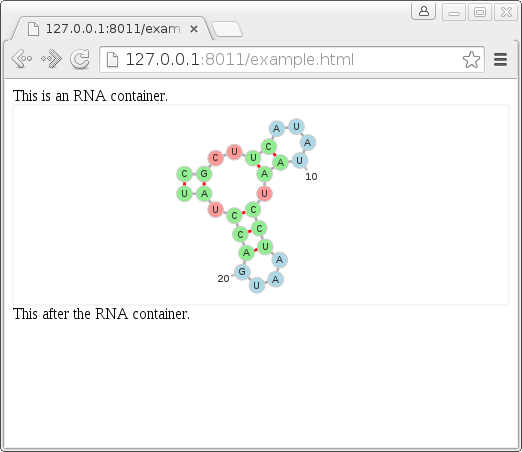
The code is straightforward. After importing the necessary JavaScript files, create a container with new FornaContainer("#rna_ss", {'animation': false}), passing #rna_ss as the ID of the div that will hold the container. Then populate it with a structure and sequence using container.addRNA:
<!DOCTYPE html>
<html>
  <head>
    <meta charset="utf-8" />
    <link rel="stylesheet" type="text/css" href="fornac.css" />
  </head>
  <body>
    This is an RNA container.
    <div id="rna_ss"></div>
    This is after the RNA container.

    <script src="https://unpkg.com/[email protected]"></script>
    <script type="module">
      import { FornaContainer } from './fornac.esm.js';

      const container = new FornaContainer('#rna_ss', { animation: false });

      const options = {
        structure: '((..((....)).(((....))).))',
        sequence: 'CGCUUCAUAUAAUCCUAAUGACCUAU',
      };

      container.addRNA(options.structure, options);
    </script>
  </body>
</html>
Cofolded Sequences
Display two cofolded sequences using the format from RNAcofold:
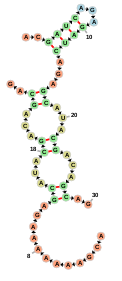
import { FornaContainer } from '@pablog02/fornac';

const container = new FornaContainer('#cofold_ss', {
  animation: false,
  zoomable: true,
  initialSize: [500, 300],
});

const options = {
  structure: '..((((...))))...((...((...((..&............))...))...))..',
  sequence: 'ACGAUCAGAGAUCAGAGCAUACGACAGCAG&ACGAAAAAAAGAGCAUACGACAGCAG',
};

container.addRNA(options.structure, options);
container.setSize();
Programmatic Use
Extracting the Secondary Structure (Dot-Bracket String)
container.getStructuresDotBracket();Returns a dot-bracket representation of the visible structure. This is useful when integrating this component with structure editing functionality. Returns an array of length 2, for example: ['CCCCAAAAGGGG', '((((....))))'].
Options
FornaContainer supports several options to customize the RNA presentation:
animation [default=false]
Indicates whether the force-directed layout will be applied to the displayed molecule. Enabling this option allows users to change the layout by selecting and dragging individual nucleotide nodes.
zoomable [default=true]
Allows users to zoom in and pan the display. When enabled, pressing the 'c' key on the keyboard will center the view.
circularizeExternal [default=true]
Only relevant when animation is enabled. If true, external loops will be arranged in a neat circle. If false, they will move freely according to the force layout:
labelInterval [default=10]
Controls how frequently nucleotide positions are labelled with their numbers.
initialSize [default=[300, 300]]
Sets the initial dimensions of the container as [width, height] in pixels.
Implementation
Each RNA molecule is represented as a JSON structure that encodes all necessary display information. The structure is created in rnagraph.js from a sequence and dot-bracket string.
Node Types
- nucleotide: Represents an RNA nucleotide
- label: Represents nucleotide number labels
- middle: Placeholder node for maintaining aesthetic layout
Link Types
- basepair: Base pair between two nucleotides
- backbone: Backbone bond between adjacent nodes
- pseudoknot: Pseudoknot extracted from structure using maximum matching algorithm
- extra: User-specified extra links
- label_link: Links between nucleotides and their number labels
- fake / fake_fake: Invisible links for maintaining layout
Example JSON Structure
{
  "nodes": [
    {
      "name": "A",
      "num": 1,
      "radius": 5,
      "rna": null,
      "nodeType": "nucleotide",
      "structName": "empty",
      "elemType": "e",
      "uid": "44edb966-aca9-4058-a6bc-784a34959329",
      "linked": false,
      "prevNode": null,
      "nextNode": null,
      "x": 100,
      "px": 100,
      "y": 100,
      "py": 100
    }
  ],
  "links": [
    {
      "source": null,
      "target": null,
      "linkType": "basepair",
      "value": 1,
      "uid": "6664a569-5af1-4d86-8ada-d1c00da72a899f87a224-52a0-4ede-a29c-04fddc09e4c4"
    }
  ]
}
Development
Installation
npm installDebug and View Examples
npm run devBuild Minified Distribution
npm run buildThe output will be placed in the dist directory. To use fornac in a web page, include dist/fornac.esm.js and the CSS stylesheet dist/fornac.css.
Acknowledgements
Thanks to Benedikt Rauscher for the JavaScript version of the NAView layout algorithm, and to the creators of VARNA for the Java implementation it's based on.