
@pazmo/ai-workflow-kit
v4.1.0
Published
Portable DDD-inspired AI engineering workflow with concise contracts and a human understanding gate.

Maintainers
 joshua_kim
Readme
AI Workflow Kit
한국어 · English
Give AI a task. Keep the work ordered, checked, and approved by a person.
AI Workflow Kit adds a work process to Codex and Claude Code. It defines what to build, tracks each task, checks results, and records useful lessons.
Version 4 includes a graph runner. A graph is a list of tasks and the rules for which task runs next.
Start
You need Node.js 20 or later and Codex or Claude Code. Run these commands in your project folder:
npx @pazmo/ai-workflow-kit init
npx @pazmo/ai-workflow-kit doctor
Open a new Codex task or Claude Code session after installation or updates.
| Tool | Start a task | Check progress | Finish |
|---|---|---|---|
| Codex | $workflow Fix the empty search results page | $workflow status | $workflow finish |
| Claude Code | /workflow Fix the empty search results page | /workflow status | /workflow finish |
The agent follows the installed workflow and uses the graph after you approve the scope. You do not need to run each graph command yourself. Installation does not start an AI agent in the background.
Use init --host codex or init --host claude to install for one tool only.
ChatGPT: In an environment that supports custom skills, skill selection may happen automatically. The graph also needs Node.js and access to project files. A chat by itself does not provide the full workflow.
How work moves
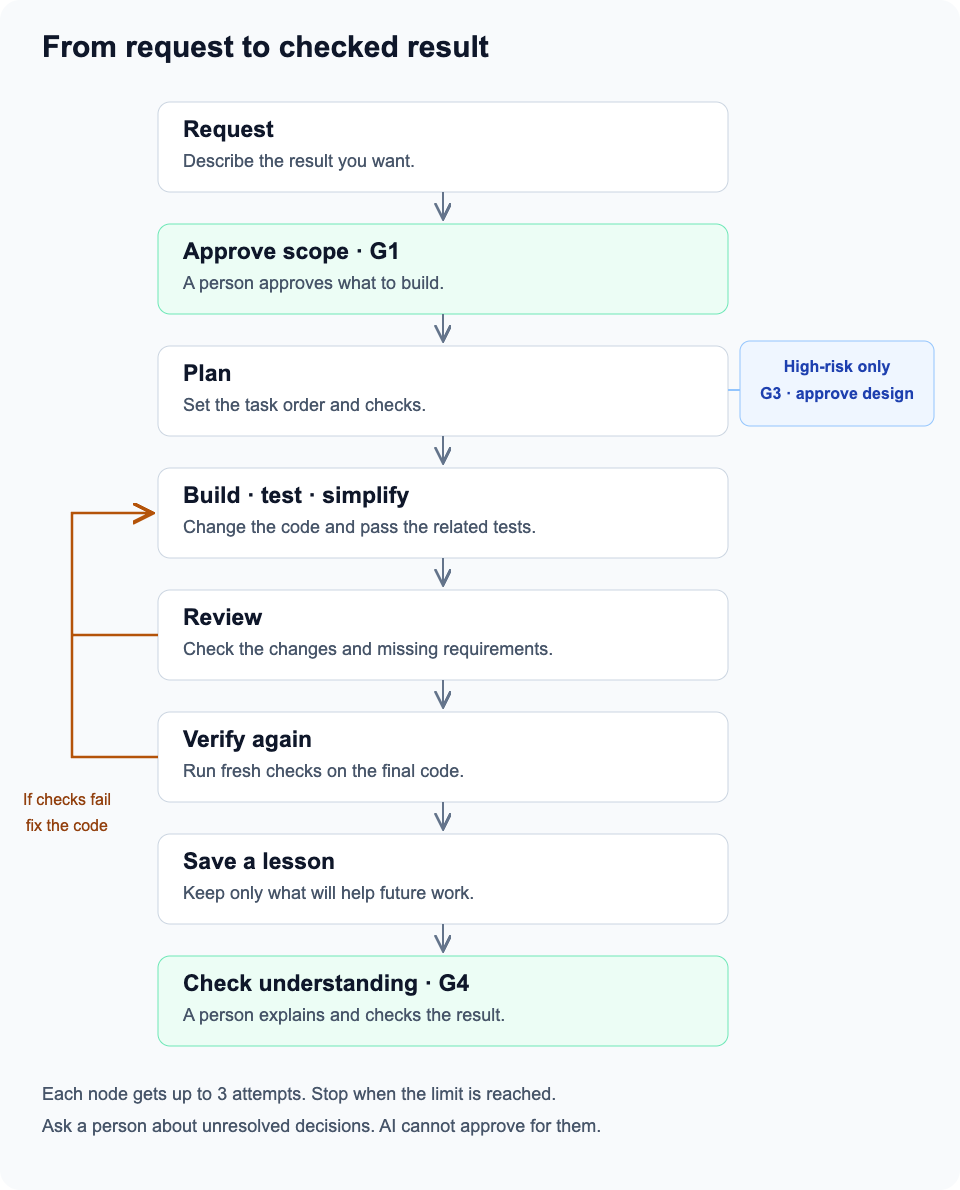
- Describe the result. The agent asks only questions that affect the work.
- Approve the scope. You check what will change and how success will be tested.
- Plan the work. Small changes use a short plan. Larger changes use linked tasks.
- Build and test. The agent changes the code, runs tests, and removes needless complexity.
- Review and verify. Review findings go back for fixes. Changed code gets fresh checks.
- Save useful lessons. Keep proven lessons for future tasks. Skip notes that add nothing.
- Check the result yourself. Explain the change, then compare your understanding with the evidence.
High-risk changes need a design check before implementation. The kit does not merge or publish just because tests pass.
What the graph does
The normal code-change graph is:
Implement, test, and simplify → review → final verification
Each task has a name, inputs, dependencies, a result, and evidence. A dependency is a task that must finish first.
The runner:
- Starts only tasks whose dependencies passed.
- Allows independent read tasks to run together.
- Allows one code-writing task at a time within a run.
- Requires a recorded result and evidence for each task.
- Rejects duplicate results and old task tokens.
- Resets affected tasks after a failed check. It keeps unrelated completed work.
- Stops after three attempts at a node. Unresolved decisions go to a person.
- Pauses for questions, resumes on matching answers, and applies review feedback to affected work.
The agent does the work. The runner checks the saved state and returns the next action. It does not call an AI model itself.
Plans, results, and progress are saved in the project. This helps a new session continue the work. If a worker stopped mid-task, inspect its changes before retrying.
When all nodes pass, the runner returns action: g4. This means ready for human review, not approved.
When you decide
| Check | What you decide | When | |---|---|---| | G1: scope | Is this the right work and success condition? | Before implementation | | G3: design | Is this approach acceptable? Can we recover if it fails? | For high-risk changes | | G4: understanding | What changed? Which rules must hold? What do the tests prove? | Before completion |
For G4, you see the changed code and test results before the explanation. You answer first. The agent then points out what you understood, missed, or got wrong. You explain the corrected version in your own words.
A small change may qualify for a documented G4 exception. The reason must be specific.
The checker checks records and files. It cannot prove who wrote an approval or whether a test report is true. The person and the host must supply real approval and real evidence.
Keep one requirements document
The requirements live in one short document called a Story.
| Field | Meaning | |---|---| | Goal | The result you want | | Domain | The rules this change must respect | | MUST | Required behavior | | SHOULD | Optional improvements | | OUT | Work excluded from this request | | Decisions | Agreed choices and stated assumptions | | Verify | How to check each required behavior |
The agent asks at most three questions per round, for up to two rounds. It marks safe defaults as ASSUMED. A decision that blocks the work stays OPEN BLOCKING; it cannot be hidden by approval.
Split a Story into Tasks only when it is too large to review in one change. Each Task is at most 30 non-empty lines and points to the Story's requirement and verification IDs. The plan explains how to build it.
Superpowers and Compound Engineering
The kit controls the overall process. Available skills handle individual steps.
| Step | Preferred skill |
|---|---|
| Plan | CE ce-plan |
| Implement with tests | Superpowers test-driven-development |
| Diagnose a failure | Superpowers systematic-debugging |
| Simplify after tests pass | CE ce-simplify-code |
| Review | CE ce-code-review mode:agent |
| Run fresh final checks | Superpowers verification-before-completion |
| Save a proven lesson | CE ce-compound |
A Developer performs its assigned task. It does not restart the full Superpowers or CE process. CE ce-work mode:return-to-caller is an alternative when explicitly selected, not a second implementation pass.
These plugins are not bundled. The agent checks which skills are installed. If a skill is missing, it follows the kit's direct procedure and reports that choice.
Lessons normally go in docs/solutions/. Later tasks read relevant lessons. This stores project knowledge; it does not retrain the model.
Using Agent Office
The kit manages how an assigned job gets finished. Office manages how several jobs achieve one goal.
Office assigns work to PM, team lead, Developer, and Reviewer agents. Each agent uses the kit for its own role. The same role flows also work without Office.
An agent runs its assigned kit flow. Office connects the kit's results to task execution and completion. A role's flow may be part of a shared graph or a separate small graph. Finishing that role does not finish the whole project. Each agent must not restart the full workflow.
| Part | Responsibility | |---|---| | Kit | Task rules, dependencies, checks, and correction paths | | Office | Shared acceptance criteria, assignments, agent execution, messages, combined results, budgets, cancellation, and user approvals | | Agent | Its assigned work, results, evidence, and questions |
The kit run file owns local progress. Office owns the shared goal and coordination. It may display kit progress, but must not independently advance the same local state. When PM and Developer disagree about completion, Office resolves the shared criteria; agents cannot replace them with their own rules.
The current kit does not include a finished Office adapter, a conversation UI, or model execution. Office must connect these parts. Cross-run isolation, time and cost limits, cancellation, and approval of the exact code revision need host integration.
Use init-role for a separate role assignment. PM clarifies and proposes; the team lead investigates and plans; Developer implements and checks; Reviewer returns a verdict. A role ends with role-complete, which does not finish the project.
question pauses work. answer resumes the same attempt with a new token. feedback reopens affected work for correction. Answers are not approvals. See the role guide and JSON examples.
The kit uses graph design concepts. It does not require Google ADK, Google Cloud, or a new server.
Installed files
AGENTS.md / CLAUDE.md       Workflow instructions inside a marked block
.agents/skills/workflow/   Codex skill
.claude/skills/workflow/   Claude Code skill
.ai-workflow/bin/          Checker and graph commands
.ai-workflow/graph/        Graph runtime
.ai-workflow/runs/         Saved runs, created during work
templates/ai-workflow/     Story and Task templates
init also updates an existing installation. It preserves user-edited managed files and reports them. remove removes owned files and instruction blocks. It keeps user changes, run files, and evidence.
Run doctor after installation. It finds missing files and Git ignore rules that hide the checker or graph runtime. Follow its suggested fixes before sharing the project.
Commands
Run these in the project folder:
npx @pazmo/ai-workflow-kit init
npx @pazmo/ai-workflow-kit doctor
npx @pazmo/ai-workflow-kit remove

node .ai-workflow/bin/check.mjs story docs/STORY.md
node .ai-workflow/bin/check.mjs gate G1 docs/STORY.md
node .ai-workflow/bin/check.mjs gate G4 docs/STORY.md

node .ai-workflow/bin/graph.mjs status .ai-workflow/runs/change.json
Use your actual Story and run paths. check story checks the document; a valid Draft is not an approval. Use the gate commands to check approval records.
The agent uses init, start, record, status, and reset for graph work. Full inputs and examples are in the graph guide.
Jira is optional. npx @pazmo/ai-workflow-kit jira preview docs/STORY.md prints a local preview. Publishing needs an authorized host adapter. The kit includes no Jira credentials or client.
Verify before release
Run these in the kit repository:
npm pack
# Replace <version> with the version printed by npm pack.
node test/fixtures/verify-tarball.mjs ./pazmo-ai-workflow-kit-<version>.tgz
npm pack runs the full test suite. The tarball check installs the package offline for both Codex and Claude, runs the graph, and checks update and removal behavior.
These checks do not prove that a live agent follows every step. Also run a small real task and inspect its graph commands, test logs, review fixes, and human confirmation.
More detail
MIT · JongKun Kim