
@peapodtech/firebasedeviceflow
v0.2.0
Published
Firebase authentication for Node.js CLI applications on limited input devices via OAuth2 'Device Flow'.

Maintainers
 jlefebvre55
Readme
Firebase Device Flow


Firebase authentication via OAuth2 'Device Flow' for Node.js CLI applications on limited input devices (i.e. IoT).

Provider Setup
- Create new OAuth client ID credentials in the GCP Credentials page. For the Application Type, select "TVs and Limited Input devices".
- Copy the Client ID and Client Secret values into either an
.envfile, or input directly into the config object (seetest.ts).
GitHub
- Create a new GitHub OAuth app (guide).
- Copy the Client ID and Client Secret values into either an
.envfile, or input directly into the config object (seetest.ts). - Set the Client ID and Client Secret fields in the Firebase Console under Authentication > Sign-in method > Sign-in providers > GitHub
- Finally, copy the Authorization callback URL from the Firebase Console to your GitHub OAuth app's settings.
Example Usage
See test.ts.
- Import
FirebaseDeviceFlow. - Initialize your Firebase app.
- Pass Firebase app reference and OAuth config object to
DeviceFlowUIconstructor. If any parameters are absent from the OAuth config object, the relevant auth provider will be excluded from the UI. - Execute
DeviceFlowUI.signIn(). This will return a Promise<UserCredential>.
How It Works
Google has a great resource on "OAuth 2.0 for TV and Limited-Input Device Applications".
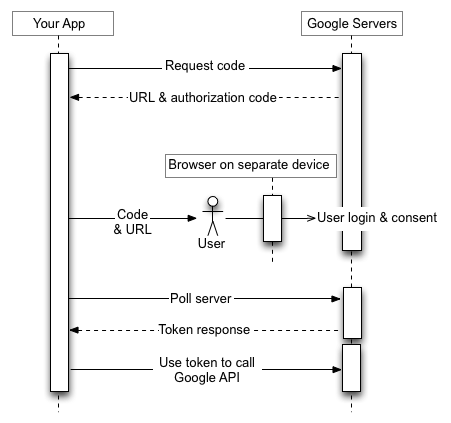
Development
Build and test with the usual npm run build, npm run test. For testing, you will have to initialize your own Firebase app and provider support.
Requirements
- Node.js and
npm - Dependencies (install with
npm install)
Todo
- [X] Convert to Typescript
- [X] Change package structure for easier import (currently
import { DeviceFlowUI } from 'FirebaseDeviceFlow/dist/FirebaseDeviceFlow';) - [X] Fix testing
- [ ] 'Slow down' error code handling?
- [ ] Add more providers?

FAQ
I'm getting X error, wtf is going on?
Make sure you've done the following:
- All per-provider setup (outlined above)