
@pepps233/mendr
v0.4.0
Published
Autonomous pull request review agent CLI.

Maintainers
 pepps233
Readme
mendr




mendr orchestrates your installed Codex or Claude Code CLIs as short-lived workers, running through their local CLIs on your existing subscriptions, so there are no API keys to collect or manage. Point it at a GitHub pull request, choose claude or codex, and it scans the PR for scoped issues; when it finds a problem, it launches a fix agent, commits and pushes the fix, then reviews the PR again, repeating until the PR is clean or the configured round cap is reached.
mendr is built on principles from the Loop Engineering paper: repeated discovery, handoff, verification, persistence, and scheduling. In practice, that means it:
- Treats the main loop as deterministic TypeScript orchestration, not another long-running LLM session.
- Launches a fresh one-shot review or fix agent for each step.
- Automates the review, fix, and validate cycle instead of leaving you to manually reprompt agents.
- Carries context through
report.md. - Writes review state to disk so
mendr lsandmendr view <id>can inspect in-flight work. - Posts one final PR summary comment instead of scattering review noise across the PR.
Every review and fix step starts a new agent process to isolate reviewer from fixer.
Claude Code sessions run through claude -p with JSON output and repository access through --add-dir.
By default, Claude Code uses claude-opus-4-8 with high effort.
Codex sessions run through codex exec with --sandbox workspace-write, -C <repo>, and final-message capture.
By default, Codex uses gpt-5.5 with xhigh effort.
The orchestrator never uses --continue, --resume, or a reused agent process.
This keeps each step isolated and releases memory when the child process exits.
Continuity comes from report.md, which is embedded in every subsequent review and fix prompt.
CLI
mendr <agent> <pr> [--rounds <n>] [--model <model>] [--effort <effort>]
mendr ls
mendr view <id>
mendr stop <id>
mendr kill <id>
mendr version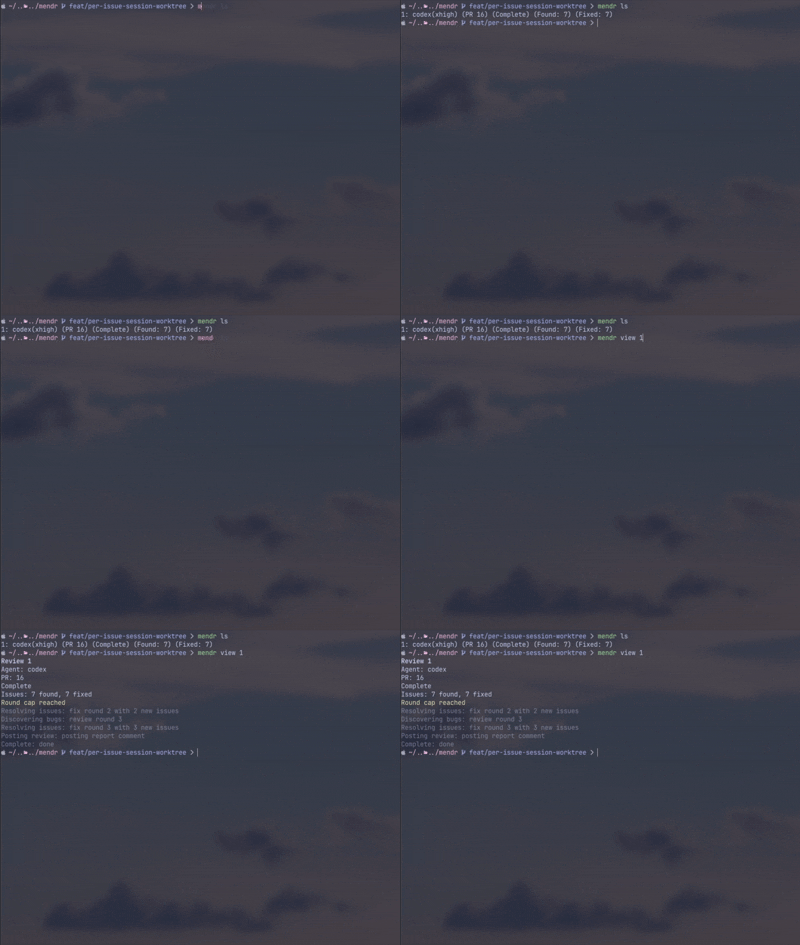
agent must be claude or codex.
pr may be a pull request number or a pull request URL.
--rounds and -r set the maximum review and fix iterations, with a default of 3.
--model and -m override the agent model for that review.
--effort and -e override the agent effort for that review.
Codex accepts low, medium, high, or xhigh.
Claude Code accepts low, medium, high, xhigh, or max.
Set MENDR_CODEX_MODEL, MENDR_CODEX_EFFORT, MENDR_CLAUDE_MODEL, or MENDR_CLAUDE_EFFORT to change unattended defaults.
Run mendr version to check the installed package version against the latest npm release.
When an interactive npm-installed mendr is behind the latest release, the first command for that installed/latest version pair prompts before continuing so you can upgrade with yes or no.
Example
mendr codex 42
mendr ls
mendr view swift-otter-3f9a
After the daemon starts, the original terminal can close.
The review continues in the background, and view follows the file-backed status stream.
Requirements
- Node.js
20or newer. - Git.
- GitHub CLI
gh, installed and authenticated. - One or both agent CLIs, depending on usage:
claudefor Claude Code.codexfor Codex.
mendr shells out to installed Codex or Claude Code CLIs and uses your existing subscriptions and local authentication. It does not require API keys, collect credentials, or manage model provider secrets.
Installation
npm install -g @pepps233/mendrAfter installation, run:
mendr --helpReport Format
The final pull request comment is generated from report.md.
The report starts with exactly one Mendr summary heading and groups resolved and unresolved issues under dedicated sections.
Each issue block includes a hidden fingerprint comment so same-title issues remain distinct.
## Summary by Mendr

### Resolved Issues

#### <issue found by review agent>
<!-- mendr-issue-fingerprint: <encoded issue fingerprint> -->
**Commit:** <commit sha>
<two sentences on how it was fixed>

### Unresolved Issues

#### <issue requiring follow-up>
<!-- mendr-issue-fingerprint: <encoded issue fingerprint> -->
<why Mendr could not safely record a fix>

### Round Cap

Reached after <round count> rounds with <open issue count> open issues:
- <open issue found by review agent>
When the round cap is reached or a fix fails, the report records that state instead of claiming success.
Development
Clone the repository and install dependencies:
npm ciRun the local checks:
npm run typecheck
npm test
npm run build
Contributing
Contributions are welcome, and changes should keep the orchestration model deterministic and testable. Before opening a pull request:
- Create a focused branch.
- Add or update tests for behavior changes.
- Run
npm run typecheck,npm test, andnpm run build. - Follow
.github/pull_request_template.md. - Include clear reasoning for CLI, daemon, agent-driver, state, or report-format changes.
Do not commit generated build output unless a maintainer explicitly asks for it. Do not edit generated files manually.
License
mendr is released under the MIT License. See LICENSE for details.