
@phoenix-plugin-registry/brackets-to-photoshop
v0.0.6
Published
Execute a JSX file in Photoshop using osascript


Readme
Brackets-to-Photoshop
Description
Brackets to Photoshop is an extension for Brackets that allows you to execute a JSX file in Photoshop.
Install
Search for Brackets-To-Photoshop in the Extension Manager.
Usage
This extension works on Brackets current document.
If your file is saved, the extension will execute the script using its local path, otherwise it will execute it through a temporary file.
Click on the Brackets to Photoshop button on your right sidebar, or hit the shortcut Cmd-Shift-P to execute your script.

Target Adobe Applications
Target specific Adobe applications and versions in your code by using ExtendScript's #target. Photoshop is the default application.
/* Photoshop */
#target photoshop           // Latest Photoshop version installed
#target photoshop-120       // Adobe Photoshop CC 2018
#target photoshop-110       // Adobe Photoshop CC 2017
#target photoshop-100       // Adobe Photoshop CC 2015.5
#target photoshop-90        // Adobe Photoshop CC 2015
#target photoshop-80        // Adobe Photoshop CC 2014
#target photoshop-70        // Adobe Photoshop CC
#target photoshop-60        // Adobe Photoshop CS6
#target photoshop-50        // Adobe Photoshop CS5

/* Illustrator */
#target illustrator         // Latest Illustrator version installed
#target illustrator-22      // Adobe Illustrator CC 2018
#target illustrator-21      // Adobe Illustrator CC 2017
#target illustrator-20      // Adobe Illustrator CC 2015.3
#target illustrator-19.2    // Adobe Illustrator CC 2015.2
#target illustrator-19.0    // Adobe Illustrator CC 2015
#target illustrator-18      // Adobe Illustrator CC 2014
#target illustrator-17      // Adobe Illustrator CC
#target illustrator-16      // Adobe Illustrator CS6
#target illustrator-15      // Adobe Illustrator CS5

/* After Effects */
#target aftereffects        // Latest After Effects version installed
#target aftereffects-15     // Adobe After Effects CC 2018
#target aftereffects-14     // Adobe After Effects CC 2017
#target aftereffects-13.8   // Adobe After Effects CC 2015.3
#target aftereffects-13.7   // Adobe After Effects CC 2015.2
#target aftereffects-13.6   // Adobe After Effects CC 2015.1
#target aftereffects-13.5   // Adobe After Effects CC 2015
#target aftereffects-13     // Adobe After Effects CC 2014
#target aftereffects-12     // Adobe After Effects CC
#target aftereffects-11     // Adobe After Effects CS6
#target aftereffects-10     // Adobe After Effects CS5

/* InDesign */
#target indesign            // Latest InDesign version installed
#target indesign-14         // Adobe InDesign CC 2018
#target indesign-13         // Adobe InDesign CC 2017
#target indesign-11.4       // Adobe InDesign CC 2015.4
#target indesign-11.2       // Adobe InDesign CC 2015.2
#target indesign-11.1       // Adobe InDesign CC 2015.1
#target indesign-11         // Adobe InDesign CC 2015
#target indesign-10         // Adobe InDesign CC 2014
#target indesign-9          // Adobe InDesign CC
#target indesign-8          // Adobe InDesign CS6
#target indesign-7          // Adobe InDesign CS5

/* Bridge */
#target bridge              // Latest Bridge version installed
Include external files
If your script file is saved, the extension will load your script path and execute it. This makes it easier to use ExtendScript's #include to load relative external files.
#include "~/Development/personal/descriptor-info/jsx/descriptor-info.jsx"If your file is not saved, the extension will execute your script through a temporary file, making it impossible to load external relative files using #include. Absolute paths will always work.
Polyfills
brackets-to-photoshop includes by default 3 JavaScript polyfills, which you can use in your code at any time.
- JSON.stringify
- JSON.parse
- Array.forEach
Log to the console
This extension has an internal module that recreates JavaScript's console module, including a way to log a JSON.stringify response.
You can use functions in your code such as:
console.log( 'Hello' );
// Returns: [node-log 4:16:02 PM] Br-Ps: [log: 16:16:2.649] Hello

console.info( 'Hello' );
// Returns: [node-log 4:16:23 PM] Br-Ps: [info: 16:16:23.823] Hello

console.error( 'Hello' );
// Returns: [node-log 4:16:37 PM] Br-Ps: [error: 16:16:37.985] Hello

console.stringify( { foo : 'bar' } );
// Returns: [node-log 4:16:50 PM] Br-Ps: [stringify: 16:16:50.185] {
    "foo": "bar"
}
This extension also allows the use of ExtendScript's native $.write and $.writeln functions to log to the console using JSON.stringify.
$.writeln( "Hello" );
// Returns: [node-log 4:20:34 PM] Br-Ps: [log: 16:20:34.337] "Hello"

$.write( "Hello" );
// Returns: [node-log 4:20:37 PM] Br-Ps: [log: 16:20:37.171] "Hello"
Anatomy-of-a-log
Console
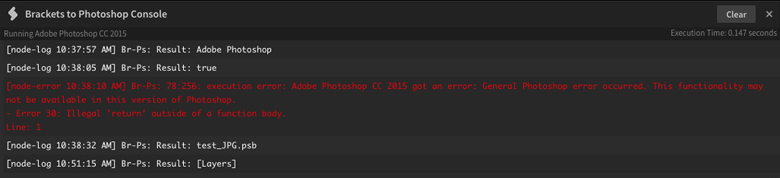
A console will show up at the bottom of your editor displaying any messages returned from the executed script. Errors will display in red.
The console includes a "Running Application" and an "Execution Time" stamp and a "Clear" button to clear the console. You can also copy the output from the console.
Known Limitations
- This extension uses Photoshop's AppleScript API, so it will only work for MacOS users at the moment.
- AppleScript has a hard time targeting specific versions of Illustrator, After Effects and Bridge.
CHANGELOG
License
MIT © Javier Aroche