
@picahq/ai
v3.0.2
Published
Pica AI SDK for Vercel AI SDK integration


Readme
Pica AI SDK
⚠️ DEPRECATED: This repository has been replaced by Pica ToolKit
Please use the new package instead:
npm i @picahq/toolkitNew Repository: https://github.com/picahq/toolkit
New Package: https://www.npmjs.com/package/@picahq/toolkitDocumentation: https://docs.picaos.com/toolkit

The Pica AI SDK is a TypeScript library for integrating Pica with Vercel's AI SDK.
For detailed instructions and examples, view the documentation.
Installation
npm install @picahq/aiSetup
- Create a new Pica account
- Create a Connection via the Pica Dashboard
- Create a Pica API key
- Set the API key as an environment variable:
PICA_SECRET_KEY=<your-api-key>
Configuration
The Pica SDK can be configured with the following options:
| Option | Type | Required | Default | Description |
|--------|------|----------|---------|-------------|
| serverUrl | String | No | https://api.picaos.com | URL for self-hosted Pica server |
| connectors | String[] | No | - | List of connector keys to filter by. Pass ["*"] to initialize all available connectors, or specific connector keys to filter. If empty, no connections will be initialized |
| actions | String[] | No | All actions | List of action ids to filter by |
| permissions | "read" | "write" | "admin" | No | "admin" | Permissions for the Pica client. "read" will only allow GET requests, "write" will allow POST/PUT/PATCH requests, and "admin" will allow all methods. |
| identity | String | No | None | Filter connections by specific identifier |
| identityType | "user" | "team" | "organization" | "project" | No | None | Filter connections by identity type |
| authkit | Boolean | No | false | If true, the SDK will use Authkit to connect to prompt the user to connect to a platform that they do not currently have access to |
| knowledgeAgent | Boolean | No | false | If true, the SDK will never execute actions, but will use Pica's knowledge to generate code. If true, use pica.intelligenceTool instead of pica.oneTool |
| knowledgeAgentConfig | Object | No | { includeEnvironmentVariables: true } | Configuration for the Knowledge Agent. If includeEnvironmentVariables is true, the SDK will return a reminder to include environment variables in the output |
| headers | Record<string, string> | No | - | Additional headers to send with all requests (e.g., cookies, custom authentication headers) |
Usage
The Pica AI SDK is designed to work seamlessly with Vercel AI SDK. Here's an example implementation with Next.js:
import { openai } from "@ai-sdk/openai";
import { convertToCoreMessages, streamText } from "ai";
import { Pica } from "@picahq/ai";

export async function POST(request: Request) {
  const { messages } = await request.json();

  const pica = new Pica(process.env.PICA_SECRET_KEY!, {
    connectors: ["*"],
  });

  const systemPrompt = await pica.generateSystemPrompt();

  const stream = streamText({
    model: openai("gpt-4.1"),
    system: systemPrompt,
    tools: { ...pica.oneTool },
    messages: convertToCoreMessages(messages),
    maxSteps: 10,
  });

  return stream.toDataStreamResponse();
}
⭐️ You can see a full Next.js demo of the Pica AI SDK in action here
Examples for streaming and creating an express server can be found in the examples directory.
🚦 What can Pica do?
Once you've installed the SDK and connected your platforms in the Pica dashboard, you can seamlessly build your own AI agents to automate your workflows.
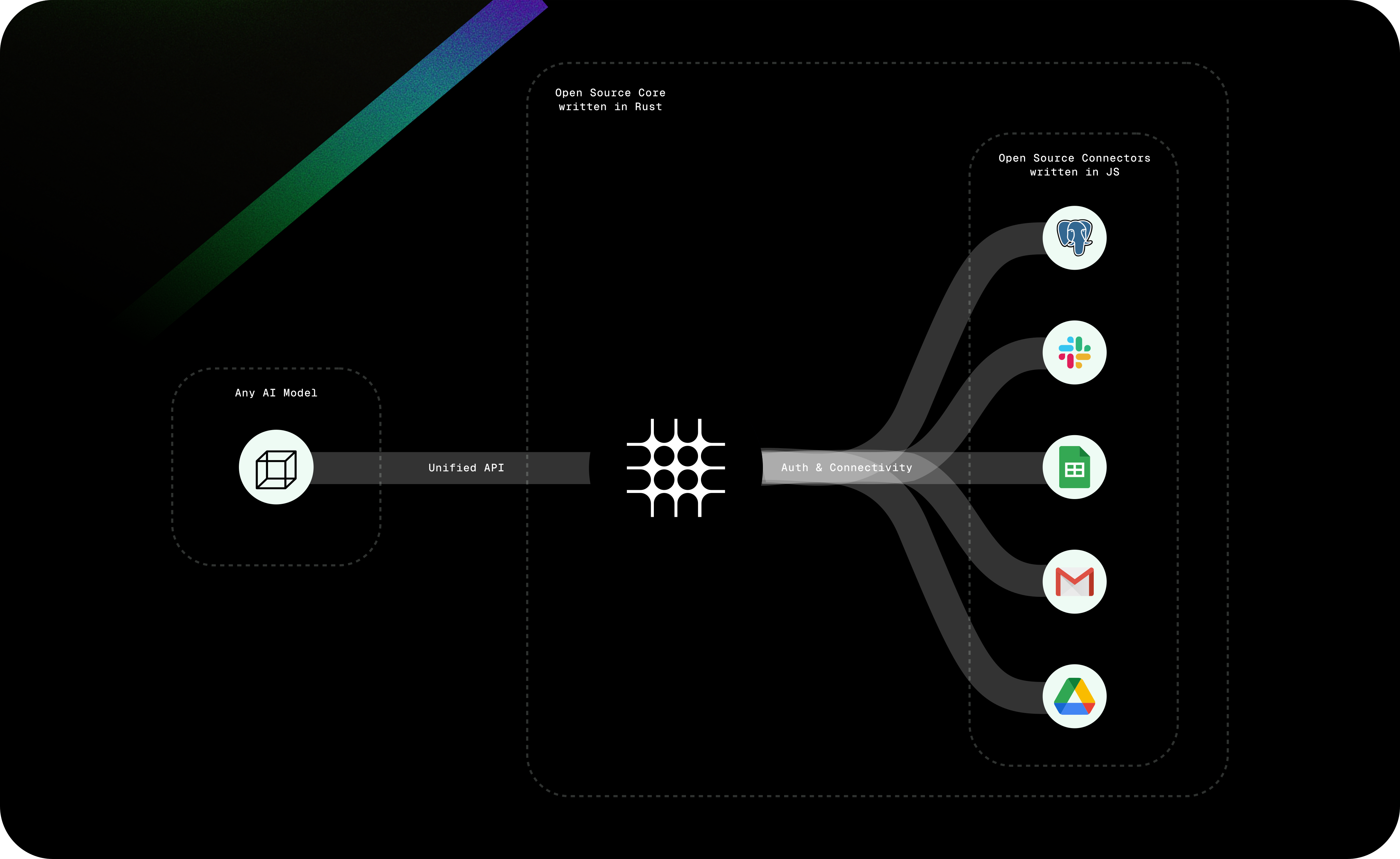
Here are some powerful examples of what you can build:
Communication & Productivity
- Send an email using Gmail to a colleague with a meeting summary
- Create a calendar event in Google Calendar for next Tuesday at 2pm
- Send a message in Slack to the #marketing channel with the latest campaign metrics
- Find documents in Google Drive related to Q3 planning
Data Access & Analysis
- List the top 10 customers from my PostgreSQL database
- Create a new sheet in Google Sheets with sales data
- Query Salesforce for opportunities closing this month
- Update a Notion database with project statuses
Business Operations
- Create a support ticket in Zendesk from customer feedback
- Process a refund for a customer order in Stripe
- Add a new lead to HubSpot from a website inquiry
- Generate an invoice in QuickBooks for a client project
AI & Content
- Generate an image with DALL-E based on product specifications
- Transcribe a meeting recording with ElevenLabs
- Research market trends using Tavily or SerpApi
- Analyze customer sentiment from support tickets
Got any cool examples? Open a PR and share them!
License
This project is licensed under the GPL-3.0 license. See the LICENSE file for details.