
@pinelab/vendure-plugin-admin-social-auth
v2.4.1
Published
Plugin to allow authentication for administrators with socials like Google
Downloads
291


Readme
Vendure Social Authentication for Administrators
Allow admins to login with social accounts like Google.
Note: This plugin (v2.0.0+) only works with the React Dashboard. For the Angular Admin UI, use v1.4.0.
The plugin setup allows for easy extension of other auth providers. Contributions welcome: Contact us via Discord or Github and we'll help you get started on contributing.
You will be able to login if an administrator with your email address already exists in Vendure. Roles and permissions are still handled in Vendure. This plugin disables the native authentication method, so you will only be able to login via Google.
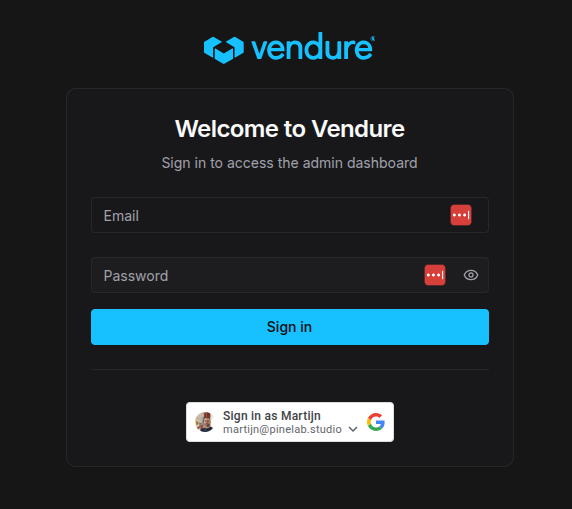
Set up Google login
First, you need to get your Google Client id using these steps: https://developers.google.com/identity/gsi/web/guides/get-google-api-clientid.
This should give you a client id that looks something like xxxxx.apps.googleusercontent.com
Install
google-auth-library:npm install google-auth-libraryIn your
vendure-config.ts, add the plugin:
import { AdminSocialAuthPlugin } from '@pinelab/vendure-plugin-admin-social-auth';

...
plugins: [
      AdminSocialAuthPlugin.init({
        google: {
          oAuthClientId: process.env.GOOGLE_OAUTH_CLIENT_ID!,
        },
      }),
]
Run
npx vite buildStart the server and navigate to
localhost:3000/dashboard/Login with your Google account
If an administrator exists with the same email address, you will be redirected to your dashboard.
Managing administrators
Administrators are managed via the default Vendure Admin UI. Just create an administrator with the same email address as the social account.
When an admin logs in with a social account for the first time, the social auth method will be added to the user.authenticationMethods.