
@pinelab/vendure-plugin-alerting
v1.1.0
Published
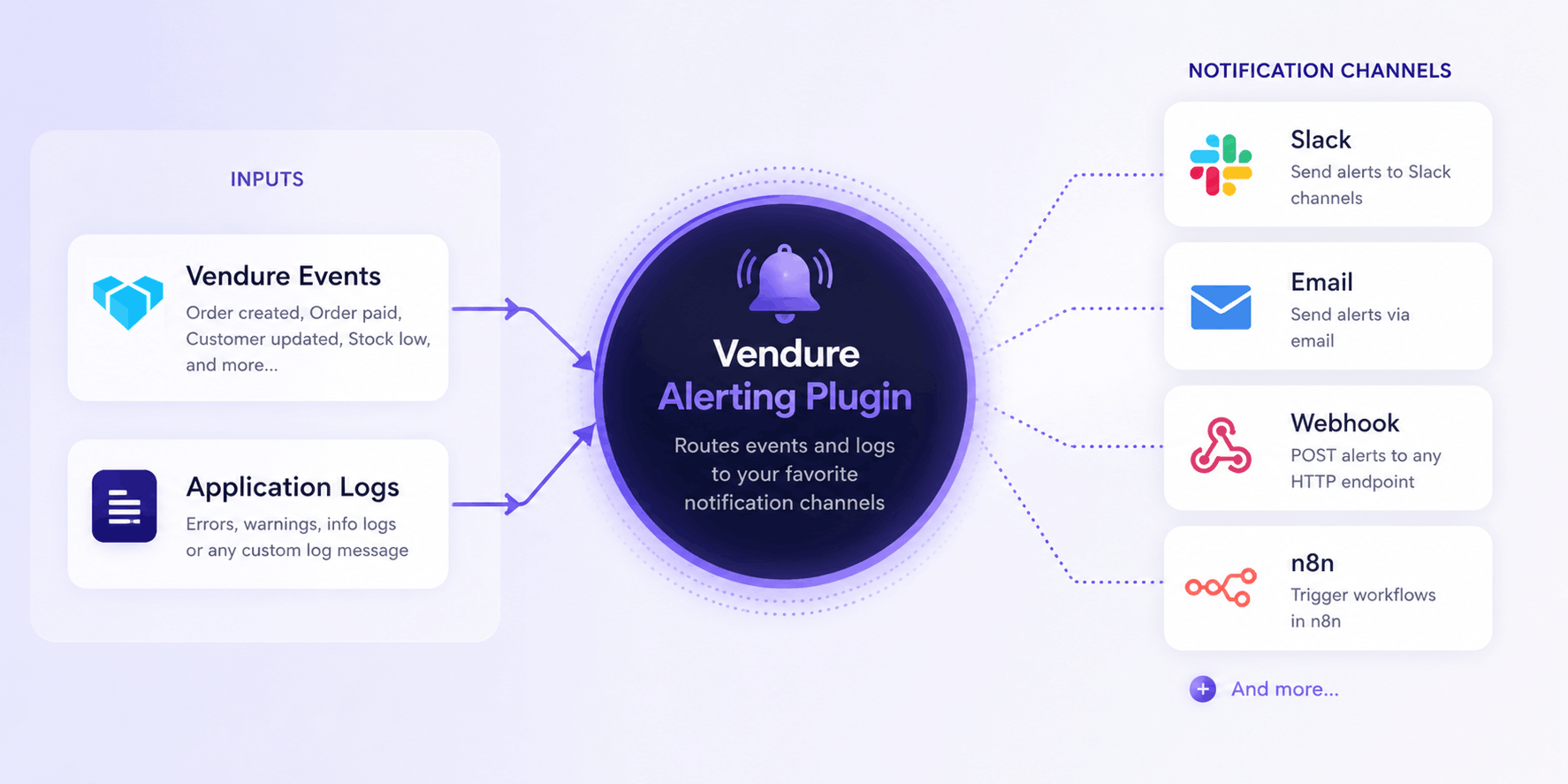
Vendure plugin for sending alerts based on events and log to various notifiers like Slack, email or N8N

Maintainers
 mbrug
mbrugReadme
Vendure Alerting Plugin
Send notifications based on Vendure events and log messages via configurable notifiers like webhooks, slack or N8N.
Getting started
import {
  AlertingPlugin,
  EventAlert,
  LogAlert,
  WebhookNotifier,
} from '@pinelab/vendure-plugin-alerting';
import {
  PaymentStateTransitionEvent,
  ProductEvent,
  ProductService,
} from '@vendure/core';

// Slack example. Get the webhook URL from your slack account: https://docs.slack.dev/messaging/sending-messages-using-incoming-webhooks/
const slack = new WebhookNotifier({
  name: 'slack',
  url: process.env.SLACK_WEBHOOK!,
});

const n8n = new WebhookNotifier({
  name: 'n8n',
  url: 'https://n8n.example.com/webhook/alert',
});

const plugins: VendurePlugin[] = [
  AlertingPlugin.init({
    alerts: [
      // Alert on order payment failure
      new EventAlert([slack, n8n])
        .on(PaymentStateTransitionEvent)
        .filter((e) => e.toState === 'Error') // Use this to decide when to alert
        .notify((e) => `Payment error for order "${e.order.code}"`), // Notifies via Slack and n8n

      // Async notify with RequestContext and Injector
      new EventAlert([slack])
        .on(ProductEvent)
        .notify(async (ctx, injector, event) => {
          const productService = injector.get(ProductService);
          const product = await productService.findOne(ctx, event.entity.id);
          return `Product updated: ${product?.name}`;
        }),

      // Alert on any error log from PaymentService
      new LogAlert([slack])
        .onLog('error', 'warn')
        .filter((log) => log.loggerCtx === 'PaymentService')
        .notify((log) => ({
          subject: `[${log.level}] ${log.loggerCtx}`,
          text: log.message,
        })),
    ],
    // Deduplicate identical notifications to prevent alert storms: Only notify every once per X ms
    deduplicationWindowMs: 60_000, // default
  }),
];
Email notifier
Send alerts as plain-text emails via Vendure's built-in NodemailerEmailSender. No templates are required — the alert subject and text are sent directly.
import { EmailNotifier } from '@pinelab/vendure-plugin-alerting';

const email = new EmailNotifier({
  name: 'email',
  from: '[email protected]',
  to: '[email protected]',
  transport: {
    type: 'smtp',
    host: 'smtp.example.com',
    port: 587,
    auth: {
      user: 'username',
      pass: 'password',
    },
  },
});

new LogAlert([email]).onLog('error').notify((log) => ({
  subject: `[${log.level}] ${log.loggerCtx}`,
  text: log.message,
}));
You can use any transport supported by the EmailPlugin, such as ses, sendmail, or file. You can also pass a custom EmailSender via the emailSender option.
Custom Notifiers
Implement the Notifier interface to create custom channels (e.g. SMS) and use custom metadata.
import { AlertMessage, Notifier } from '@pinelab/vendure-plugin-alerting';

// Example notifier that uses custom metadata
export class CustomNotifier implements Notifier {
  name = 'my-custom-notifier';

  notify({subject, text, metadata}: AlertMessage): Promise<void> {
    // This is where you would implement the logic to send the alert message to your desired destination.
    // With the given metadata you could send custom body or headers for example.
    const authorization = metadata.myHeaders.bearerToken
  }
}

// You would use this Notifier like this:
const customNotifier = new CustomNotifier();
new EventAlert([customNotifier])
  .on(PaymentStateTransitionEvent)
  .filter((e) => e.toState === 'Error')
  .notify((log) => ({
    subject: `My subject`,
    text: `my custom message`,
    metadata: {
      key: "you can pass anything you want to your custom notifier here"
      key2: "It is up to your notifier to use the metadata object"
    }
  })),
Deduplication
Identical alerts (same notifier + subject + text) fired within deduplicationWindowMs are dropped. This prevents alert storms when many events fire in rapid succession.
Retry
Alert delivery is backed by the Vendure JobQueue. If a notifier throws, the job is retried with the configured retry strategy.
Guidelines
notify()is executed in the main process before the alert is enqueued to the worker. Keep the function lightweight — do not run heavy or long-running logic insidenotify().- Be selective about the events and log levels you subscribe to. Listening to all
warnanderrorlogs can generate a high volume of alerts and put unnecessary load on your system.
License
MIT