
@pinelab/vendure-plugin-utm-tracker
v1.7.0
Published
Connect UTM parameters directly to your orders, to prevent double-attribution caused by silo'ed marketing platforms

Maintainers
 mbrug
mbrugReadme
Vendure UTM Tracker Plugin
This plugin aims to fix over attribution when you use multiple different marketing platforms, by connecting UTM parameters directly to orders.
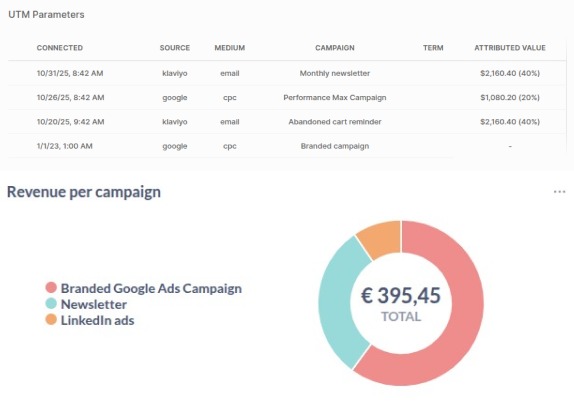
When using multiple marketing platforms, each platform has their own attribution model, and each doesn't know what the other already attributed. This can lead to over attribution, or double-attribution. This means your ROAS or ROI might look better than it actually is.
This plugin connects UTM parameters directly to orders, so that attribution can never exceed the actual value of an order. This might lead to slight under-attribution, but never to over attribution.
Getting started
- Add the plugin to your
vendure-config.ts
import {
  UTMTrackerPlugin,
  FirstClickAttribution,
  LastClickAttribution,
  LinearAttribution,
  UShapedAttribution,
  NoopAttribution,
} from '@pinelab/vendure-plugin-utm-tracker';

UTMTrackerPlugin.init({
  // Replace with new NoopAttribution() to collect tracking data without attribution.
  attributionModel: new FirstClickAttribution(),
  maxParametersPerOrder: 5, // The maximum number of UTM parameters that can be added to an order. If a customer adds more than this number, the oldest UTM parameters will be removed.
  maxAttributionAgeInDays: 10, // The maximum age of a UTM parameter to be attributed. If a UTM parameter is older than this number of days, it will not be attributed.
  getCampaignDisplayName: (ctx, utmParameters) => {
    // Allows you to set a custom display name for a campaign, based on the ctx and utm params.
    // Useful for example with Google Ads, where the campaign is the campaign ID, not the campaign name.
    if (utmParameters.campaign === '1234567890') {
      return `Campaign 1`;
    } else if (utmParameters.campaign === '1234567891') {
      return `Campaign 2`;
    } else {
      return utmParameters.campaign;
    }
  }
}),
Set attributionModel: new NoopAttribution() to retain tracking parameters without attributing order value. The attributed percentage and value remain null after order placement, and the UTM attribution table displays - for the attributed value.
- Generate and run a database migration for the plugin entities. Upgrading from a version before 1.7.0 requires an additive nullable
clidcolumn onutm_order_parameter; existing rows remain valid with a null client ID. Review the generated migration before running it.
The React order detail extension displays two tables. UTM attribution keeps the campaign display name and attributed value view. UTM Parameters shows the raw Connected, Source, Medium, Campaign, Term, Content, and Client ID values for every retained parameter set. Missing values display -. No Admin UI compilation step is needed, but this plugin doesn't include diagrams or charts. Use your own data visualization or BI tool for further analysis.
Enable UTM parameters in your marketing tools
Most platforms like Klaviyo or Google Ads allow you to automatically add UTM parameters to your campaigns. This is needed to extract the parameters on your storefront.
Storefront usage
To add parameters to an order, you can use the addUTMParametersToOrder mutation:
mutation addUTMParametersToOrder($inputs: [UTMParameterInput!]!) {
  addUTMParametersToOrder(inputs: $inputs)
}
Example variables:
{
  "inputs": [
    {
      "connectedAt": "2025-01-01T00:00:00.000Z",
      "source": "test-source1",
      "medium": "test-medium1",
      "campaign": "test-campaign1",
      "term": "test-term1",
      "content": "test-content1",
      "clid": "client-id-1"
    },
    {
      "connectedAt": "2025-01-02T00:00:00.000Z",
      "clid": "client-id-only"
    }
  ]
}
clid is optional and can be supplied with UTM values or by itself. connectedAt remains required for every parameter set.
Keep in mind that UTM parameters can only be added to an active order! On most page visits, an active order is not present yet, so you should save the parameters in a cookie or local storage, along with the connectedAt date, and add them to the order when the order is created. You should not create a new order for each page visit, because this drastically increase the amount of orders in your database (Most visitors will never create an order, so this is a waste of resources).
You should do something like this in your storefront:
import {storeUtmParameters,  clearUtmParameters} from './utm-util.js'; // See script below

async mounted() { // Or, `useEffect` in React
  const utmParameters = storeUtmParameters(window.location.search); // Store params in local storage on page load
  const activeOrder = await getActiveOrder(); // Or your equivalent of fetching the active order
  if (activeOrder && utmParameters) {
    await addUTMParametersToOrder(utmParameters); // The newly added mutation
    clearUtmParameters(); // Clear the parameters from local storage, so they are not added again later
  }
},
/**
* Local storage key for storing UTM parameters.
*/
const key = 'vendure_utm_parameters';
/**
* Parses the given path name, and saves the UTM parameters to the local storage.
* Does nothing if the path name doesn't contain any UTM parameters.
*
* Do not pass full url, but use window.location.search instead.
*/
export function storeUtmParameters(queryParams) {
const urlParams = new URLSearchParams(queryParams);
const storedParameters = localStorage.getItem(key);
const utmParameters = storedParameters ? JSON.parse(storedParameters) : [];
const hasTrackingParameters =
Array.from(urlParams.keys()).some((key) => key.startsWith('utm_')) ||
urlParams.has('clid');
if (!hasTrackingParameters) {
// Return existing parameters if no new ones are found. Or undefined if no parameters are stored.
return utmParameters.length > 0 ? utmParameters : undefined;
}
utmParameters.push({
connectedAt: new Date().toISOString(),
source: urlParams.get('utm_source') || undefined,
medium: urlParams.get('utm_medium') || undefined,
campaign: urlParams.get('utm_campaign') || undefined,
term: urlParams.get('utm_term') || undefined,
content: urlParams.get('utm_content') || undefined,
clid: urlParams.get('clid') || undefined,
});
localStorage.setItem(key, JSON.stringify(utmParameters));
return utmParameters;
}
/**
* Clears the UTM parameters from the local storage.
*/
export function clearUtmParameters() {
localStorage.removeItem(key);
}Insights and visualizations
This plugin doesn't include any visualization by default, but you can easily write your own insights with SQL. For example, this query will give you the total attributed revenue per source:
SELECT utm.utmSource, utm.utmMedium, utm.utmCampaign, utm.utmTerm, utm.utmContent, SUM(utm.attributedRevenue) AS totalAttributedRevenue
FROM utm_order_parameter utm
JOIN `order` o ON utm.orderId = o.id
WHERE o.orderPlacedAt IS NOT NULL
  AND o.state != 'Cancelled'
GROUP BY utm.utmSource;
You can use different GROUP BY clauses to get the total attributed revenue per medium, campaign, term, content, etc.