
@pingfan.ts/markdown-editor
v1.0.3
Published
基于 codemirror6 的 markdown 编辑器
Downloads
51

Maintainers
 yanthink
Readme
React Markdown Editor
基于 codemirror6 的 markdown 编辑器
特性
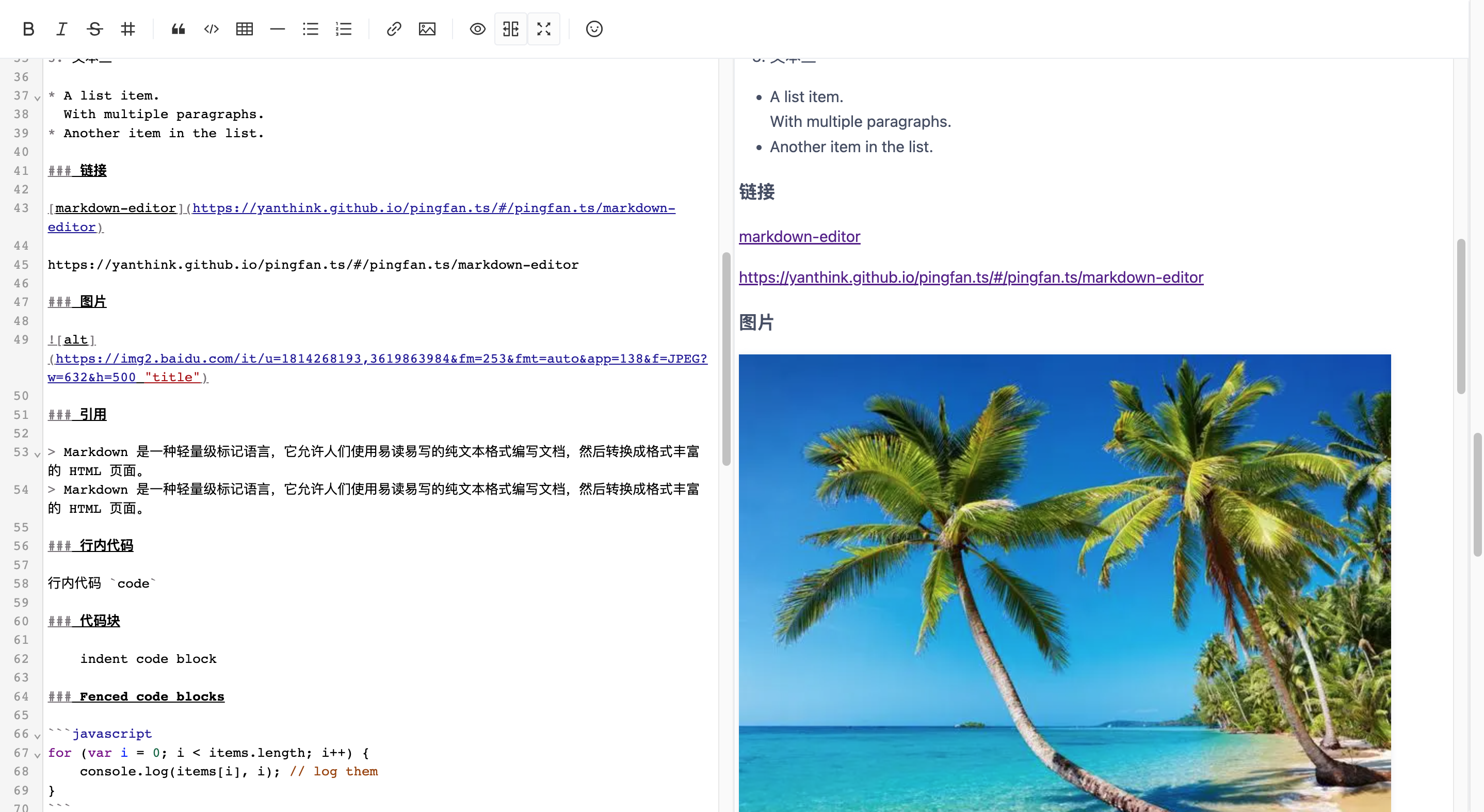
- [X] 支持编辑预览同步滚动(滚动时顶部绝对对齐预览内容),支持光标改变时滚动到光标位置(行对齐)
- [X] 支持粘贴和拖拽上传图片,可显示上传进度
- [X] 支持 emoji 表情
- [X] 插入链接和图片支持快速修改
url、alt、title等变量属性(tab 键可跳到下一变量,esc 退出修改) - [X] 预览采用 react-markdown 解析,支持语法高亮
- [X] 支持自定义预览渲染
- [X] 支持codemirror 扩展
安装
npm install -S @pingfan.ts/markdown-editor使用
import React, { useMemo, useRef, useState } from 'react';
import { EditorView, basicSetup } from '@codemirror/basic-setup';
import Editor, { EditorInstance } from '@pingfan.ts/markdown-editor';
import upload from '@pingfan.ts/markdown-editor/es/plugins/upload';
import scrollSync from '@pingfan.ts/markdown-editor/es/plugins/scroll-sync';
import markdown from './markdown.txt';

export default () => {
  const editorRef = useRef<EditorInstance | null>(null);
  const [value, setValue] = useState<string>(markdown);

  const extensions = useMemo(
    () => [
      basicSetup,
      EditorView.lineWrapping,
      upload({
        url: 'api/attachments/upload',
        allowedTypes: 'image/*',
        transform(res: any) {
          return { url: res.data.url };
        },
      }),
      scrollSync(editorRef),
    ],
    [],
  );

  return (
    <Editor
      ref={editorRef}
      height={300}
      value={value}
      onChange={setValue}
      extensions={extensions}
      storageKey="articles-create"
    />
  );
};
API
Editor
| 属性名 | 描述 | 类型 | 默认值 |
| --- | --- | --- | --- |
| toolbar | 工具条 | false | { buttons: ToolbarButton[]; } | -- |
| editorPreviewEnableFullScreen | 编辑预览启用全屏,一般和 height 搭配使用 | boolean | true |
| previewOptions | 预览选项 | PreviewOptions | -- |
| storageKey | 自动保存,下次初始化时可恢复上一次保存的内容 | string | -- |
| value | 编辑器内容 | string | -- |
| height | 高度 | number | string | -- |
| minHeight | 最小高度 | number | string | -- |
| maxHeight | 最大高度 | number | string | -- |
| extensions | codemirror 扩展 | Extension[] | -- |
| onChange | 内容变化时的回调 | (value: string) => void | -- |
| ref | -- | Ref<EditorInstance> | -- |
PreviewOptions
| 属性名 | 描述 | 类型 | 默认值 |
| --- | --- | --- | --- |
| render | 自定义渲染 | (markdown: string) => ReactNode | -- |
| interval | 刷新间隔 | number | 1000 |
| remarkPlugins | remark 插件 | PluggableList | -- |
| rehypePlugins | rehype 插件 | PluggableList | -- |
| markdownOptions | react-markdown 选项 | Partial<ReactMarkdownOptions> | -- |
EditorInstance
| 名称 | 说明 | 类型 |
| --- | --- | --- |
| getContainer | 获取编辑器容器DOM | () => HTMLDivElement | null |
| getEditorView | 获取 codemirror 实例 | () => EditorView | null |
| getToolbar | 获取 Toolbar 实例 | () => ToolbarInstance | null |
| getPreview | 获取 Preview 实例 | () => PreviewInstance | null |
| getDisplayMode | 获取显示模式 | () => { fullScreen: boolean; preview: boolean; editorPreview: boolean; } |
| toggleFullScreen | 全屏切换 | () => void |
| togglePreview | 预览切换 | () => void |
| toggleEditorPreview | 编辑预览切换 | () => void |
PreviewInstance
| 名称 | 说明 | 类型 |
| --- | --- | --- |
| getMarkdown | 获取 markdown 内容 | () => string |
| setMarkdown | 设置 markdown 内容 | (markdown: string) => void |
| debounceSetMarkdown | 消抖设置 markdown 内容 | (markdown: string) => void |
| setMarkdownOptions | 设置 react-markdown 选项 | (markdownOptions: Partial<ReactMarkdownOptions>) => void |
| getContainer | 获取预览容器DOM | () => HTMLDivElement | null |
| getHast | 获取hast | () => Hast |