
@pipedream/servicenow
v0.12.2
Published
Pipedream ServiceNow Components


Readme
Overview
The ServiceNow API lets developers access and manipulate records, manage workflows, and integrate with other services on its IT service management platform. These capabilities support automating tasks, syncing data across platforms, and boosting operational efficiencies.
Getting Started
Before using the ServiceNow REST API from a workflow, configure two OAuth apps in your ServiceNow instance. These apps will grant access tokens to your users and authenticate requests to its REST API.
Create an External Client OAuth App
First, sign into your ServiceNow Developer Portal account to create or access an instance.
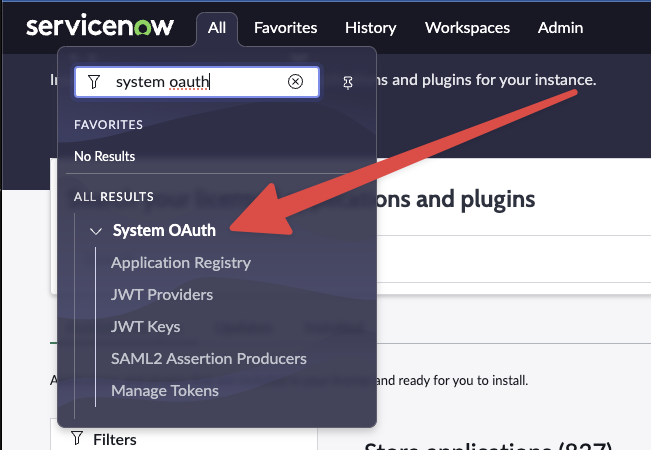
Go to System OAuth > Application Registry.
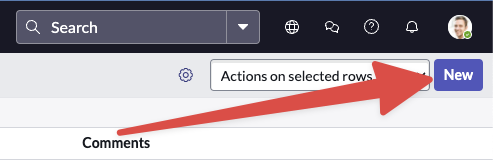
Create a new app by selecting New in the top right corner.
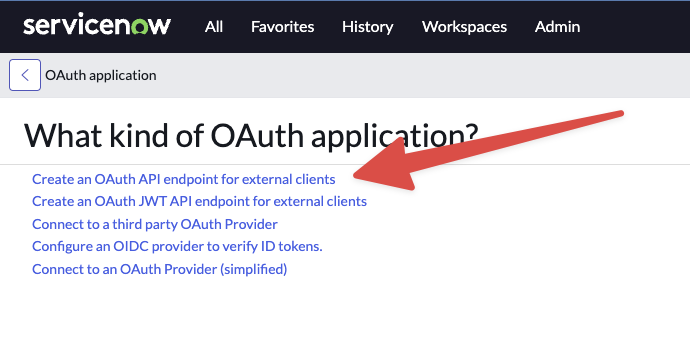
Choose Create an OAuth API endpoint for external clients:
Name your app, such as
Pipedream. Use the default settings but specify the Redirect URL:https://api.pipedream.com/connect/oauth/oa_g2oiqA/callback.Click Create. It will appear in the Application Registry once created.

Create the OAuth Validator app
Copy the client ID and secret from the
Pipedreamapp you created above.Go back to the System OAuth > Application Registry > New and select Connect to an OAuth Provider (simplified)
Name this app
Pipedream OAuth Validatorand add the previously copied client ID and secret.Set the grant type to Authorization Code and the Token URL to
oauth_token.do.Use the same Redirect URL as before.
Visit Pipedream's account page, and click Click Here to Connect An App. Search for ServiceNow and select it. Enter the client ID, client secret, and your instance name (e.g.,
dev98042fromhttps://dev98042.service-now.com/).Press Connect. A new window will prompt you to login to your ServiceNow instance, authorizing Pipedream's access to the ServiceNow REST API.
ServiceNow Authorization Reference
This ServiceNow doc outlines the flow you should implement.
Additional Guidance For Hardened or Mature Instances
The standard instructions may not apply perfectly to customized or hardened ServiceNow instances. If you face a 504 Gateway Time-out error or similar, consider these tips:
- Assign a dedicated role and service account for this integration.
- Ensure the role has ACLs configured for the
oauth_credentialtable and other necessary tables.
Example Use Cases
- Incident Management Automation: Automatically create incidents in ServiceNow from alerts in Datadog or New Relic.
- HR Onboarding Workflow: Trigger a Pipedream workflow to set up new employee accounts in ServiceNow from HR systems like Workday.
- Customer Support Ticket Sync: Keep customer support tickets synced between ServiceNow and CRM platforms like Salesforce.
Troubleshooting
If you encounter a 504 Gateway Time-out error, refer to the 'Additional Guidance For Hardened or Mature Instances' section for solutions.