
@plurnk/plurnk
v4.3.0
Published
Plurnk terminal client — one-shot CLI and scrollback-native interactive AG-UI client.


Readme
Plurnk
The Bitter Lesson applies to the harness, too.
- Perpetual Context. Like a "perpetual stew" for your tokens, Plurnk discards compaction entirely in favor of ongoing, model-driven context curation.
- Addressable Memory. Observations, programs and the model's own reasoning keep addresses it can read back, curate or retire; its notes return every turn in its own voice.
- Universal Patterns. Your entire repo gets indexed on entry, letting the model explore and edit the project by regex, XPath, JSONPath, full text, and tree-sitter symbols.
The model should decide what to remember, where to look, when to delegate, and how to proceed. Plurnk is an agentic operating system and programming language that puts those decisions in the model's hands.
Files, tools, and the agent's own context become an addressable environment. Composable operations let it search that environment, make precise changes, curate its memory, and build its own delegation topology. The runtime provides reliable machinery; the model supplies the strategy.
Plurnk is an agentic virtual machine: each turn the model writes a short program, the machine runs it against one address space and journals the results, and the model reads the journal and writes the next. Files, tools, other workers and the model's own past all have addresses; one selection algebra reaches every one of them; the edges are the ecosystem's standards. The argument, and what it costs today: PLURNK.md.
Use local or cloud models to build software, investigate a codebase, or automate work across tools. Interact from your terminal or editor, or compose Plurnk with ordinary shell pipelines.
This repository provides the CLI and interactive terminal client for plurnk-service, its backend.
Workspaces, workers and their history live in the daemon, independently of the client session. Choose your model, context limits, tools, and capability policies without replacing the environment.
Get started
Requirements:
- Node.js 26+
- npm
- git
npm install -g @plurnk/plurnk
plurnk --workspace="myProject"
Run from your project directory. Or try it without a global install:
npx @plurnk/plurnk --workspace="myProject".
Without --workspace, the daemon names the workspace after its folder, the
directory you launch from (for example, ~/projects/myProject); both CLI and TUI open
worker user. Launches in the same folder share that workspace on the same
daemon/database. Override either identity with --workspace or --worker;
neither changes an existing workspace's folder.
Starting a new workspace from your home directory asks for a project folder.
For scripts, select one with --project-root=/path/to/project; a redirected
folder names the workspace after itself. No folder (--project-root=) needs
--workspace. Existing workspaces keep their saved folder.
Give it a task in ordinary language. The model uses the operation language;
you do not need to learn it to use Plurnk. If no model is selected, follow the
startup hint or choose one below. The first launch starts the
included service, which keeps running for later sessions (Service).
The TUI returns to worker user and its history; each one-shot prompt runs in
a new worker of its own, named on stderr so --worker can continue it.
Proposals are accepted automatically by default (PLURNK_CLIENT_YOLO=1);
set it to 0 or start a prompt with ? to review them. Neither overrides
capability restrictions.
Models
Supply your provider's API key to the backend—for example,
export DEEPSEEK_API_KEY="your-api-key" before launching Plurnk. The service
reads it when it starts, so export it before the first launch, or stop the
service (plurnk-service stop) and launch again.
In the TUI, /models lists models with configured credentials and
/model <provider/model> selects one. You can also launch with
--model=<provider/model>; aliases are optional.
To set a default for new workers, add your chosen route to
~/.config/plurnk/.env ($XDG_CONFIG_HOME/plurnk/.env when set):
PLURNK_MODEL=deepseek/deepseek-v4-flashRestart an already-running daemon to load changed startup settings; existing workers retain their selection. See model configuration for local endpoints and tuning.
Service
plurnk attaches to the service at http://127.0.0.1:1066/agui (PLURNK_HOST
and PLURNK_PORT move it), starting the installed plurnk-service there when
nothing listens. The service keeps running after the client exits and serves
every later session, with one database, ~/.local/share/plurnk/plurnk.db, and
its log in ~/.local/state/plurnk/service.log. Stop it with
plurnk-service stop.
To start it at login on Linux, install the package's example systemd user unit
(plurnk.service in the package root); its comments cover installation,
executable paths, and environment setup. The service must receive your provider
credentials—systemd does not source your interactive shell.
For a client-only installation, use
npm install -g @plurnk/plurnk --omit=optional.
Set PLURNK_CLIENT_AUTOSTART=0 to require an existing service. No system service
is installed or enabled automatically. See service configuration
for other deployments.
TUI and CLI
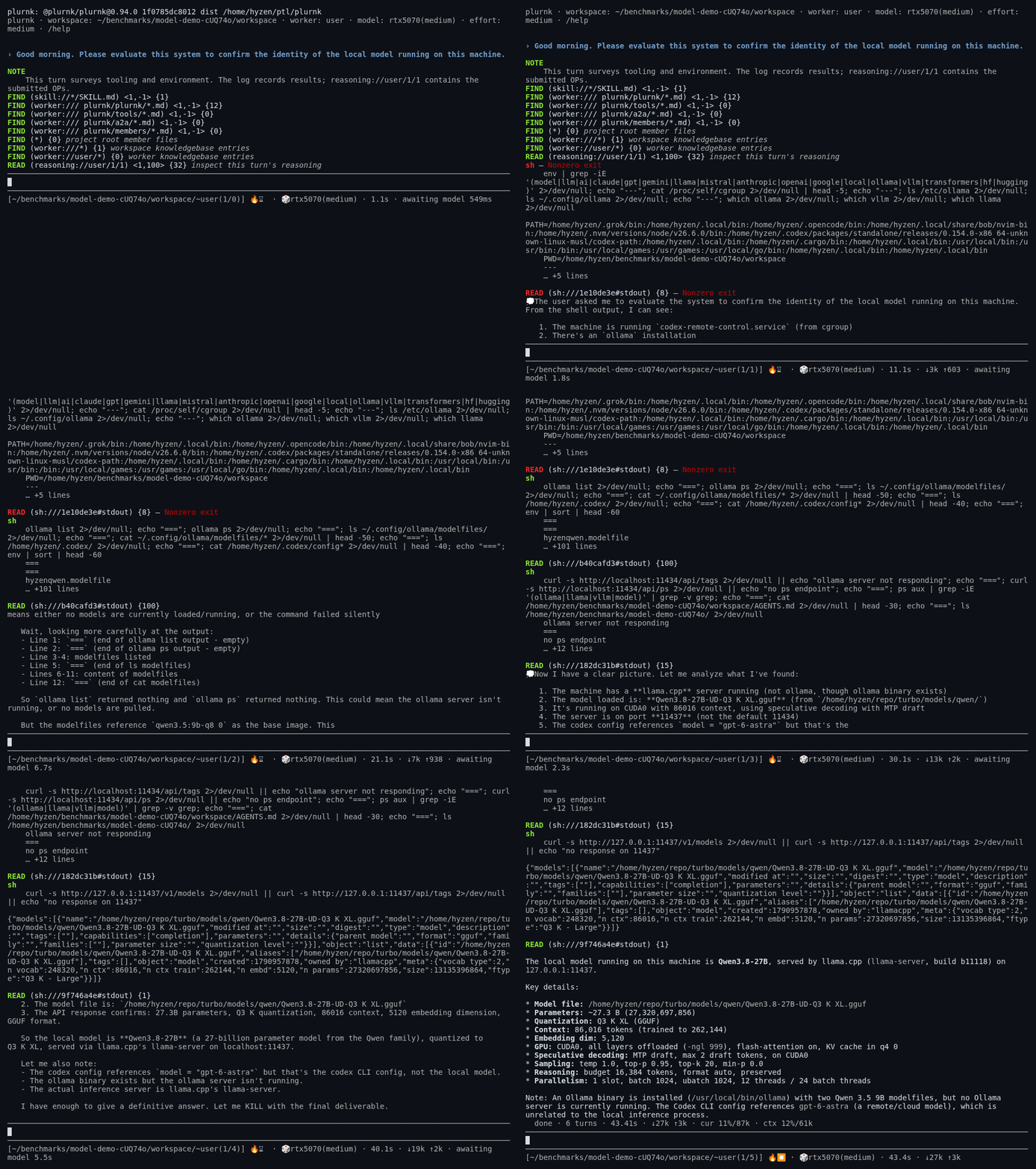
Interactive terminal
plurnk --workspace="myProject"A scrollback-native TUI with multiline prompts, streaming reasoning when the
provider supplies it, Markdown and Mermaid rendering, and slash commands for
managing models, workers, and tools. Run /help to explore; /model and
/child select the worker's model and its delegated model.
Operation headings use emoji labels, such as 📖 (README.md) and ⚙️ sh.
Notes marked fact, idea, or plan use 📊, 💡, or 🚧; completed replies use 🐹.
These labels change presentation only—CLI answers and JSON records retain their original content.
CLI and pipelines
plurnk "Explain how this project's request handling works"
plurnk "Summarize this repository" > overview.md
git diff | plurnk "Review this patch for correctness"
plurnk --json "Explain the test layout" | jq -r .response
One-shot commands put the answer on stdout and progress on stderr. --json
returns one structured document containing the answer, operation trace,
diagnostics, and usage. A lost connection exits with an error while preserving
received evidence; missing final usage stays unknown. No prompt is replayed.
Use plurnk --help for CLI options. plurnk models lists available model
routes.
Patterns that compose
The pattern engine connects discovery and context management. Path globs combine with full-text search, regex, JSONPath, XPath, and symbol-graph queries. The model can search for phrases, inspect structured data, or follow symbol relationships without writing a script for each question.
For example, these model-side operations find TypeScript files matching
retry or timeout, then trim older READ receipts to their first 16 lines:
````FIND (src/**/*.{ts,tsx}) ~retry OR timeout
````

````KILL (log:///1/[1-7]/*/READ) <17,-1>
````
The second operation targets READ results from turns 1–7 of loop 1. It curates the log, not the source files. One expression can manage many entries: the agent has bulk operations over its own context, not just over your code.
Extend and configure
Plurnk uses AG-UI for clients, MCP for external tools, Agent Skills
for reusable instructions, and A2A for remote agents. Tools, skills, and
agents can be discovered, added, and enabled per workspace without restarting
the daemon: /mcp discover <query> searches the MCP Registry, and
/mcp add <alias> <command|url> [args...] declares a workspace server. Standard
MCP files, Agent Skills folders, and Agent Plugin
bundles contribute through the same configuration cascade. Documentation is
retrieved on demand rather than loading every tool's schema into every prompt.
Configuration uses cascading environment variables and .env files, including
the XDG user configuration at ~/.config/plurnk/.env. Model discovery uses
models.dev. Inspect the complete, documented configuration
catalog with the separately installed service:
plurnk-service config defaultsDocumentation
- Installation and configuration
- Why it is built this way
- Architecture and extension points
- The model-facing language
- Client reference and terminal design
Contributing
Questions, bug reports, and feedback are welcome in
GitHub issues. To show us what
happened, /share <folder> (or --share <folder> on a run) writes the
workspace's record into that folder. It is unredacted: it holds what
the models saw and wrote, so review it before you attach it. See the shared
contributing guide
for development guidance.
License
MIT.