
@porscheofficial/porschedigital-technology-radar
v2.3.0
Published
Static site generator for building and publishing your own Technology Radar.

Maintainers
 patricebouillet
Readme
Technology Radar Generator
A static site generator for building and publishing your own technology radar. Define technologies as Markdown files, configure segments, rings, and branding via JSON, and deploy a fully static site to any hosting provider.


Live showcase · Project overview & quickstart · Upgrading from v1
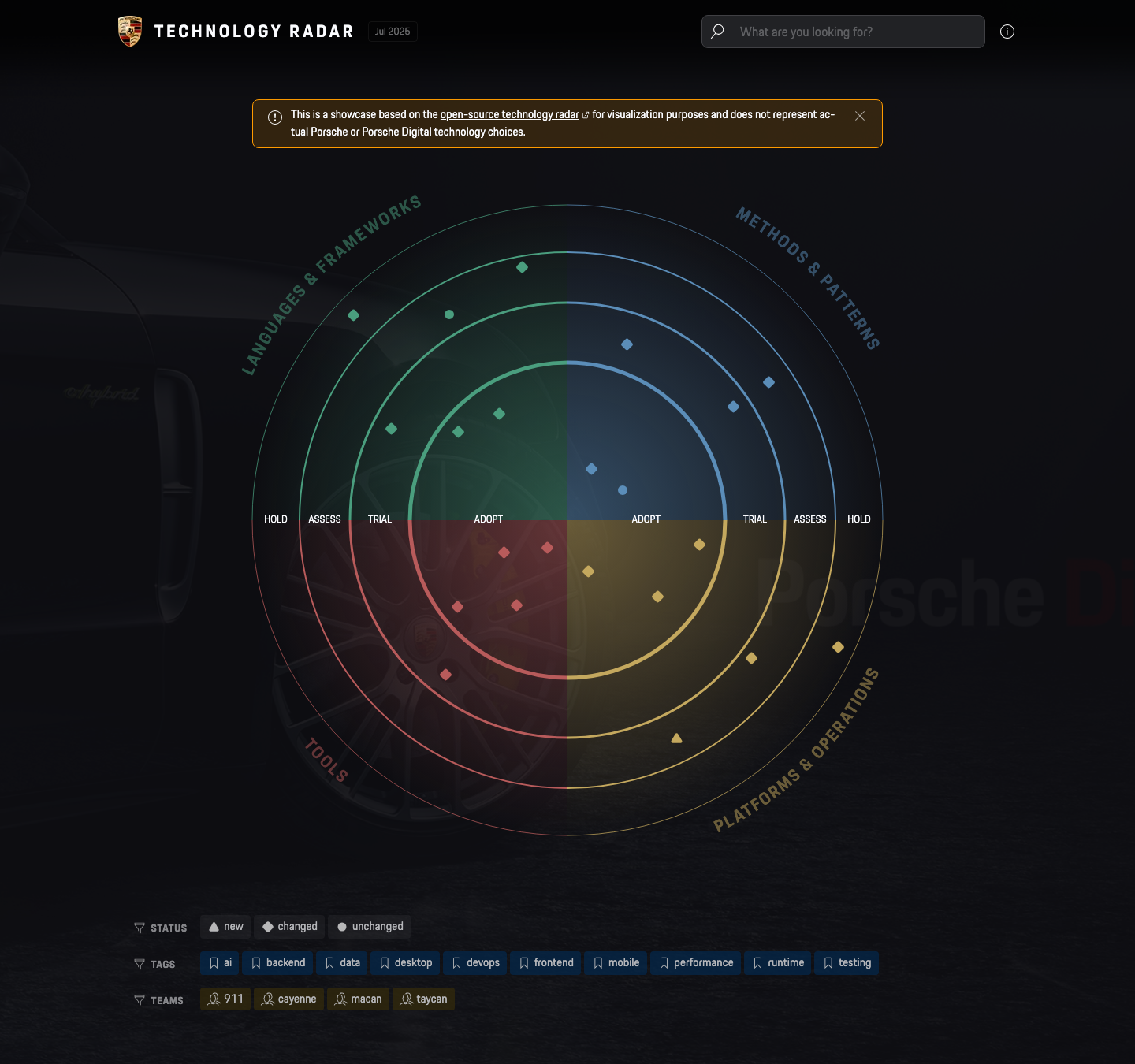
Screenshots
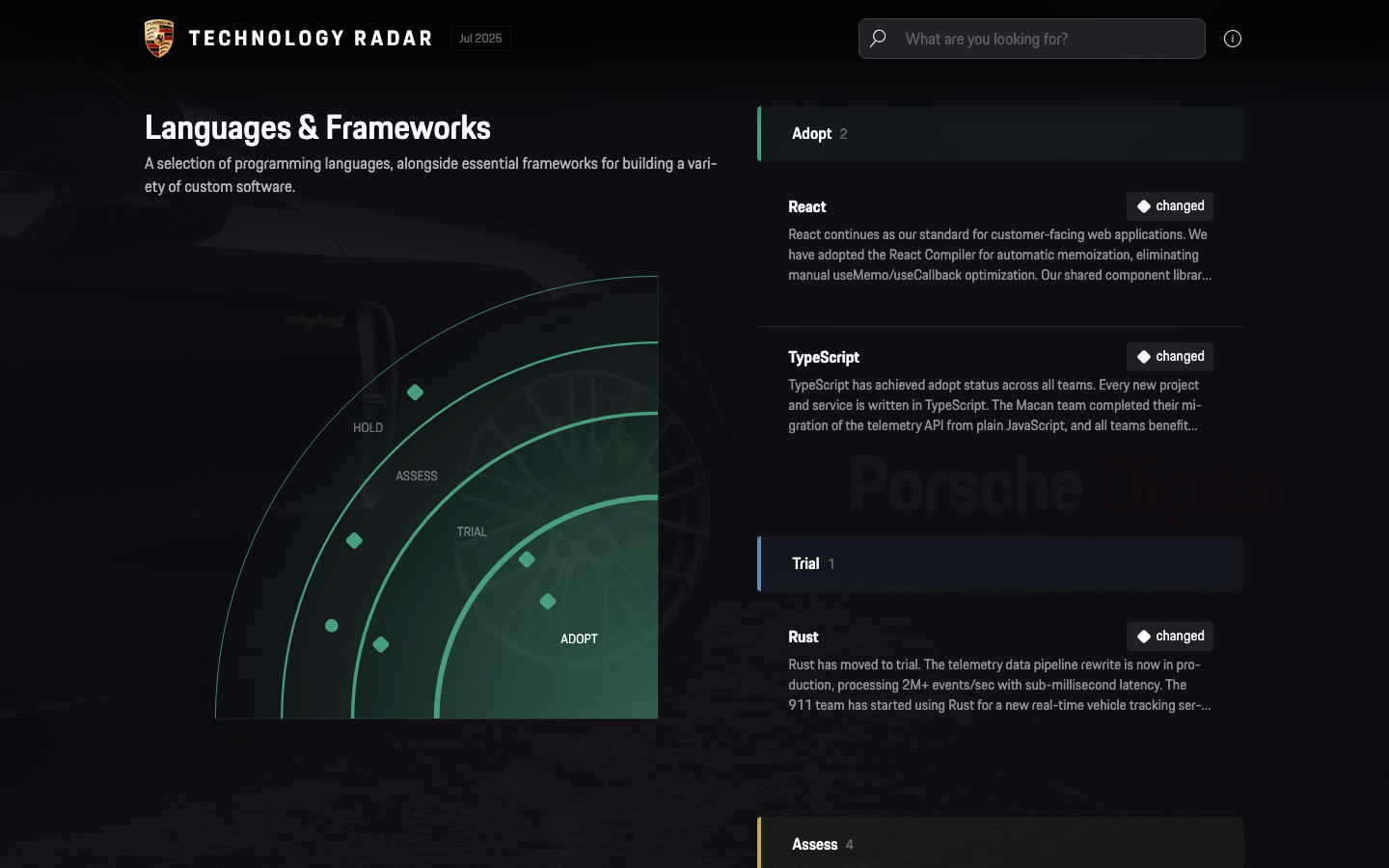
Segment Detail
Drill into a single segment with a zoomed mini-radar and a grouped technology list.
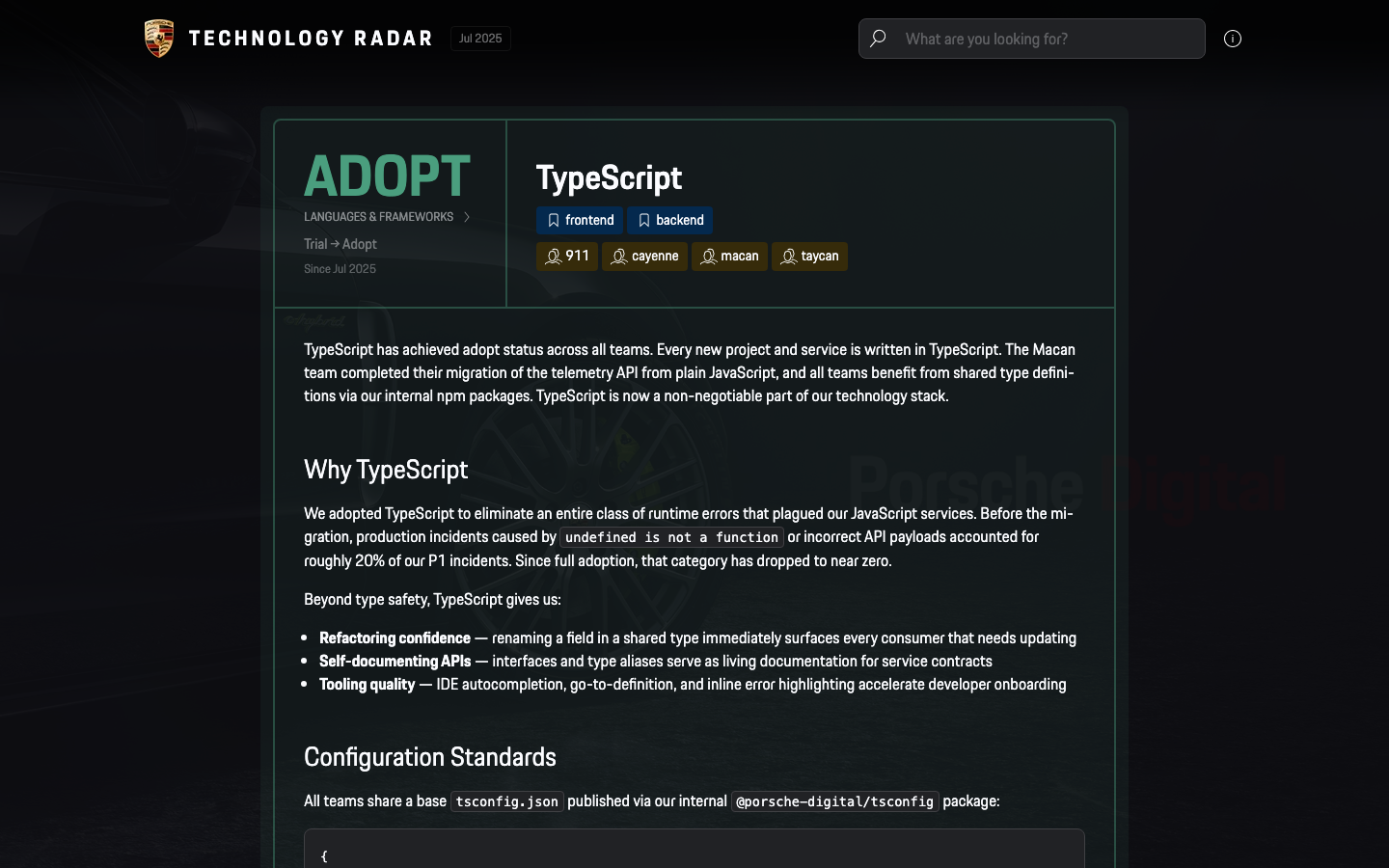
Technology Detail
Each technology has its own page with ring status, description, tags, teams, and full revision history.
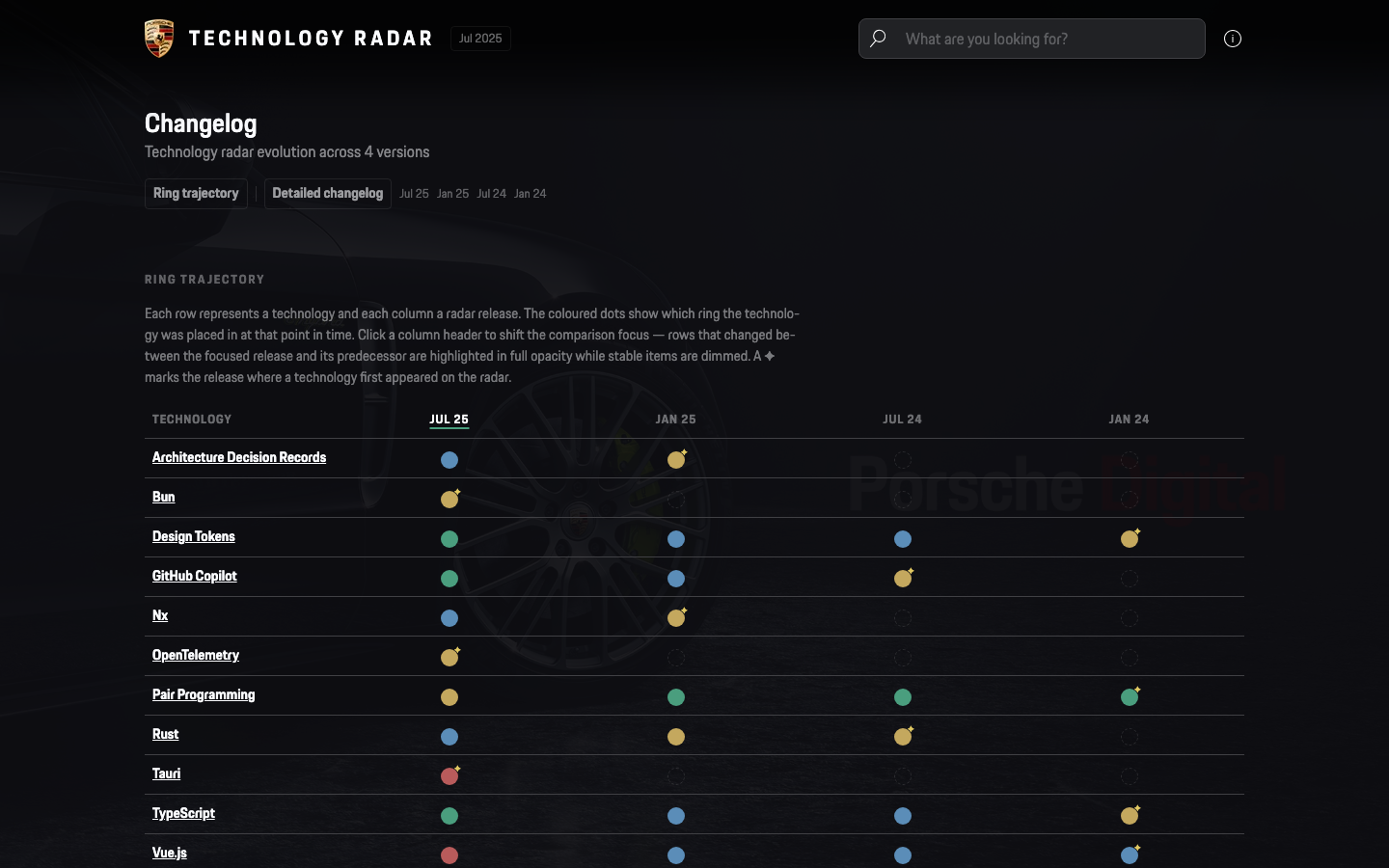
Changelog
Track how technology assessments evolved across releases with the trajectory matrix.
Mobile
Fully responsive — works on phones and tablets out of the box.
Quick Start
[!IMPORTANT] Prerequisites: Node.js 22+
1. Create a new project
mkdir my-technology-radar && cd my-technology-radar
npm init -y
2. Install the radar as a dependency
npm install @porscheofficial/porschedigital-technology-radar3. Initialize the project
Scaffolds starter files (radar/, config.json, about.md, public/, custom.scss, .gitignore) into your directory:
npx techradar init4. Customize
Edit the scaffolded files to match your organization:
config.json— branding, segments, rings, theme selection (see Configuration)themes/<id>/manifest.jsonc— colors, palettes, optional logos & background (see Themes)radar/— your technology items as Markdown (see Radar Items)about.md— content for the help & about pagepublic/— favicon, images, background imagecustom.scss— optional style overrides
5. Run
npx techradar dev     # Start dev server with file watching
npx techradar build   # Build static site → build/
npx techradar serve   # Start dev server without file watching
6. Deploy
After npx techradar build, the static site is in build/. Deploy it to GitHub Pages, Vercel, Netlify, or any static hosting provider.
my-technology-radar/
├── config.json          # Your configuration overrides
├── about.md             # Content for the help & about page
├── custom.scss          # Optional style overrides
├── public/
│   ├── favicon.ico      # Your favicon
│   └── images/          # Images referenced in radar items
├── radar/
│   ├── 2024-06-01/
│   │   ├── react.md
│   │   └── kubernetes.md
│   └── 2025-01-15/
│       ├── react.md     # Updated entry overwrites previous
│       └── deno.md
├── build/               # Generated static site (after build)
├── .techradar/          # Shadow build dir (auto-generated)
└── .gitignore           # Auto-generated with .techradar/, build/, node_modules/
The CLI automatically creates a .gitignore (or extends your existing one) with the entries needed to keep generated directories out of version control.
[!TIP] Only
config.json,about.md,custom.scss,public/, andradar/need your attention. Everything else is managed by the CLI.
⚙️ Configuration
All configuration lives in data/config.json. Any key you omit falls back to the defaults in data/config.default.json. You only need to set what you want to change.
| Key | Description | Default |
| ------------------- | -------------------------------------------------------------------------------------------------- | ------- |
| basePath | URL path prefix. Set to / for root hosting, or /techradar for a sub-path. | / |
| baseUrl | Full origin (scheme + host) where the radar is hosted, e.g. https://opensource.porsche.com. Used for sitemap.xml, canonical links, and Open Graph / Twitter meta tags. The runtime env var NEXT_PUBLIC_BASE_URL overrides this when set (useful for staging deploys). The basePath is appended automatically — do not include it here. | "" |
| editUrl | If set, shows an edit button on item pages. Supports {id} and {release} placeholders. Example: https://github.dev/org/repo/blob/main/data/radar/{release}/{id}.md | "https://github.dev/porscheofficial/porschedigital-technology-radar/blob/main/data/radar/{release}/{id}.md" |
| jsFile | Path in public/ or URL to a custom JavaScript file to include on every page. | "" |
| defaultTheme | Identifier of the theme applied on first visit. Must match the id of a theme in themes/<id>/manifest.jsonc. The initial mode comes from that manifest's default field; you may override it by pinning theme:light, theme:dark, or theme:system (e.g. "porsche:system" to follow the OS preference). Visitors can switch theme and mode at runtime via Spotlight, and the selection is persisted in localStorage. | "porsche" |
| imprint | URL to your legal information / imprint page. | "" |
| Key | Description | Default |
| ---------------- | --------------------------------------------- | ------- |
| showSearch | Show the search bar in the header. | true |
| showChart | Show the radar visualization on the homepage. | true |
| showTagFilter | Show the tag filter below the radar. | true |
| showProductFilter | Show the product filter below the radar. | false |
| showFilterOnSegmentPage | Show segment-page filters and allow filtering on the segment detail page. | false |
| showTeamFilter | Show the team filter below the radar. | true |
| showBlipChange | Show a directional arc on Changed blips indicating promotion (inward) or demotion (outward). | true |
| showDemoDisclaimer | Show the demo-data disclaimer banner on the homepage. | false |
| multiSelectFilters | Allow selecting multiple filters per dimension (OR semantics within, AND across). When false, each dimension allows only one active filter at a time. | true |
An array of segment objects (1 or more). The radar geometry adapts automatically — arc sweep is 360° / N, and labels follow the arcs. 3 to 6 is the comfortable range; beyond 6 the per-segment arc becomes too narrow for readable labels and the blips start to crowd.
Backward compatibility
Forks using quadrants: in data/config.json continue working but emit [deprecated] config key "quadrants" is renamed to "segments"... at build time. Migration: rename the key.
Markdown frontmatter quadrant: <slug> continues working but emits [deprecated] frontmatter key "quadrant" is renamed to "segment" in <file>. Migration: rename the field.
Both shims will be removed in a future major release. See ADR-0028.
| Key | Description |
| ------------- | ------------------------------------------------ |
| id | Identifier used in radar Markdown files and URLs |
| title | Display title of the segment |
| description | Shown on the homepage and segment detail page |
An array of ring objects (typically 4), ordered from innermost to outermost.
| Key | Description |
| ------------- | -------------------------------------------------------------- |
| id | Identifier used in radar Markdown files |
| title | Display title, shown as badge label |
| description | Optional description text |
| radius | Outer boundary of the ring as a fraction of the chart (0 to 1) |
| strokeWidth | Thickness of the ring's arc border in the SVG |
Flags mark items as new, changed, or default (unchanged). Each flag has a single key:
| Key | Description |
| ------- | --------------------------------------------------------------- |
| title | Display label for the flag (e.g. "New", "Changed", "Unchanged") |
| Key | Description | Default |
| ---------- | ------------------------------------------------------------------------ | ------- |
| size | Base size of the radar chart in pixels. Increase if you have many items. | 800 |
| blipSize | Radius of each blip dot in pixels | 12 |
An array of social link objects shown in the footer.
| Key | Description |
| ------ | ------------------------------------------------------------------------------------------------------------------ |
| href | URL to the social profile |
| icon | Icon name. Available: x, linkedin, facebook, instagram, youtube, xing, pinterest, github, gitlab |
| Key | Description | Default |
| ------------------- | --------------------------------------------------------- | --------------------------------------------------------------------------------------------------- |
| title | Radar title shown in the header and page titles | "Technology Radar" |
| tagline | Shared subtitle used in the default Open Graph image | "Track what to adopt, trial, assess, and hold." |
| imprint | Label for the imprint link in the footer | "Legal Information" |
| footer | Text shown in the footer | "A public demo of the open-source Technology Radar Generator by Porsche Digital. Spin up your own in one command." |
| notUpdated | Warning shown on items not updated in the last 3 releases | "This item was not updated in last three versions of the Radar." |
| hiddenFromRadar | Info shown on items hidden from the radar chart | "This technology is currently hidden from the radar chart." |
| searchPlaceholder | Placeholder text in the search input | "Search & actions" |
| searchPlaceholderLong | Longer placeholder shown inside the spotlight popup | "Search technologies, or type > to run an action…" |
| metaDescription | HTML meta description for SEO | "" |
Theming
The Radar now uses a folder-per-theme architecture where each theme declares the
supported modes inside themes/<theme>/manifest.jsonc. Consumer themes live at
the top of the project (sibling of radar/); built-in themes shipped with the
package are scaffolded there on npx techradar init.
supports: ["light", "dark"]enables the header sun/moon toggle and the SpotlightMode:actions.supports: ["dark"]orsupports: ["light"]creates a single-mode theme; mode controls stay hidden and the supported mode is forced.- Mode selection is persisted in
localStorageundertechradar-mode. - Theme selection is persisted in
localStorageundertechradar-theme.
Upgrading a v1 consumer project? Run npx techradar migrate for a read-only
diagnostic that lists every legacy key it finds (config.json, frontmatter,
theme manifests) and points each one at the matching fix. Re-run with
npx techradar migrate --apply to perform the safe mechanical rewrites
(quadrants → segments in config.json, quadrant: → segment: in
frontmatter); modified files are first mirrored into
.techradar-migrate-backup/<timestamp>/. Run
npx techradar migrate --extract-theme to interactively generate a theme
manifest from your legacy colors / backgroundImage / segments[].color /
rings[].color keys (strips them from config.json and inserts
defaultTheme for you). See MIGRATION.md
for the full v1 → v2 recipe (the colorScheme rewrite itself is manual; use
themes/.example/manifest.jsonc as the template).
Theme assets
A theme may carry its own header and footer logos via optional
headerLogoFile and footerLogoFile fields in manifest.jsonc. These fields can
either be a single path for every supported mode or a per-mode object like
{ "light": "logo-light.svg", "dark": "logo-dark.svg" }. Background images
follow the same pattern through background.image. Assets are resolved
relative to the theme folder and copied into public/themes/<theme>/ at build
time.
Built-in themes
| ID | Label | Supported Modes | Default |
|---|---|---|---|
| blueprint | Blueprint | light | light |
| matrix | Matrix | dark | dark |
| neutral | Neutral | light, dark | light |
| porsche | Porsche | light, dark | dark |
| porsche-heritage | Porsche Heritage | light, dark | light |
| solarized | Solarized | light, dark | light |
| synthwave | Synthwave | light, dark | dark |
Full example
{
  "basePath": "/techradar",
  "baseUrl": "https://techradar.acme.io",
  "editUrl": "https://github.dev/acme/techradar/blob/main/radar/{release}/{id}.md",
  "defaultTheme": "acme",
  "imprint": "https://acme.io/legal",
  "toggles": {
    "showSearch": true,
    "showChart": true,
    "showTagFilter": true,
    "showTeamFilter": false,
    "showBlipChange": true,
    "multiSelectFilters": true
  },
  "segments": [
    {
      "id": "languages-and-frameworks",
      "title": "Languages & Frameworks",
      "description": "Programming languages and application frameworks used across our stack."
    },
    {
      "id": "infrastructure",
      "title": "Infrastructure",
      "description": "Cloud platforms, orchestration, and infrastructure-as-code tools."
    },
    {
      "id": "data-and-ai",
      "title": "Data & AI",
      "description": "Data pipelines, storage, analytics, and machine learning frameworks."
    },
    {
      "id": "developer-experience",
      "title": "Developer Experience",
      "description": "Tools and practices that improve developer productivity and satisfaction."
    }
  ],
  "rings": [
    {
      "id": "adopt",
      "title": "Adopt",
      "description": "Proven in production. Use by default for new projects.",
      "radius": 0.5,
      "strokeWidth": 5
    },
    {
      "id": "trial",
      "title": "Trial",
      "description": "Worth pursuing. Use in non-critical projects to build experience.",
      "radius": 0.69,
      "strokeWidth": 3
    },
    {
      "id": "assess",
      "title": "Assess",
      "description": "Interesting. Explore in spikes or proof-of-concepts.",
      "radius": 0.85,
      "strokeWidth": 2
    },
    {
      "id": "hold",
      "title": "Hold",
      "description": "Do not start new work with this. Migrate away when practical.",
      "radius": 1,
      "strokeWidth": 0.75
    }
  ],
  "flags": {
    "new": { "title": "New" },
    "changed": { "title": "Changed" },
    "default": { "title": "Unchanged" }
  },
  "chart": {
    "size": 900,
    "blipSize": 14
  },
  "social": [
    { "href": "https://github.com/acme", "icon": "github" },
    { "href": "https://linkedin.com/company/acme", "icon": "linkedin" }
  ],
  "labels": {
    "title": "ACME Tech Radar",
    "tagline": "Track what to adopt, trial, assess, and hold.",
    "imprint": "Legal Notice",
    "footer": "Built with the Technology Radar Generator.",
    "notUpdated": "This item has not been reviewed in the last three releases.",
    "hiddenFromRadar": "This technology is hidden from the radar chart.",
    "searchPlaceholder": "Search technologies…",
    "metaDescription": "ACME's technology radar — tracking what we adopt, trial, assess, and hold."
  }
}
Radar Items
Radar items are Markdown files organized by release date under radar/.
radar/
├── 2024-06-01/
│   ├── react.md
│   └── kubernetes.md
└── 2025-01-15/
│   ├── react.md
│   └── deno.md
Each file has a YAML front-matter header followed by Markdown content:
---
title: "React"
ring: adopt
segment: languages-and-frameworks
tags:
  - frontend
  - javascript
products:
  - v2
teams:
  - web-platform
  - mobile
links:
  - url: https://react.dev
    name: Official Docs
  - url: https://github.com/facebook/react
---

Description of the technology, why it was adopted, and any relevant context.
Supports full **Markdown** formatting.
Front-matter attributes
| Attribute | Required | Description |
| ---------- | -------- | ------------------------------------------------------------------------------------------------------- |
| title | Yes | Name of the technology |
| ring | Yes | Ring placement. Must match one of the id values in config.rings. |
| segment | Yes | Segment assignment. Must match one of the id values in config.segments. |
| summary | No | Custom summary used for meta descriptions and link previews. Falls back to the first 160 characters of the item body. |
| ogImage | No | Custom Open Graph image. Use a relative path under public/ (for example /images/react-card.png) or a full https://... URL. |
| tags | No | List of tags for filtering. |
| products | No | List of products for filtering, for example v2 or v3. |
| teams | No | List of teams currently using this technology. |
| links | No | List of external links. Each entry has a url (required) and optional name. Shown on the detail page. |
| featured | No | Set to false to hide from the radar chart while keeping the item in the overview. Defaults to true. |
Versioning
The filename (without .md) serves as the item identifier. When the same filename appears in a newer release folder, the newer entry overwrites the previous one — attributes are merged and a new history entry is created.
Images
Place images in public/images/ and reference them in Markdown:
Open Graph images
The build generates rich Open Graph / Twitter Card images for link previews.
pnpm run build:ogcreates a shared default card atpublic/og/default.png.- Every item detail page also gets a deterministic 1200×630 PNG at
public/og/<segment>/<id>.png. - Generation is content-hash cached, so unchanged cards are skipped on later builds.
To override the generated image for a single item, set ogImage in front-matter:
ogImage: /images/custom-card.pngRelative paths must point to an existing asset under public/. You can also use a full external URL:
ogImage: https://cdn.example.com/cards/react.pngWhen ogImage is omitted, the generator builds the per-item card automatically. When summary is omitted, the site derives the preview text from the rendered item body.
Cross-linking blips
Use wiki-link syntax to link between radar items. The build resolves each link to the correct URL based on the item's segment:
We use [[typescript]] alongside [[react]] for our frontend stack.
See also [[kubernetes|our K8s setup]] for deployment details.
| Syntax | Rendered as |
| --- | --- |
| [[item-id]] | Link using the item's title as label |
| [[item-id\|custom label]] | Link using a custom label |
The item-id is the Markdown filename without the .md extension (e.g., typescript.md → typescript).
Unresolved wiki-links (referencing a non-existent item) are rendered as plain text with a build warning.
[!WARNING] In strict mode (
--strict), unresolved wiki-links cause the build to fail.
Strict mode
Pass --strict to turn warnings into errors during the data build step.
Development
pnpm run dev # Dev server (portless)See AGENTS.md for development rules, constraints, and context.
Checks & Harness
This project enforces architectural and clean-code invariants automatically.
See docs/HARNESS.md for the full harness suite.