
@posthog/agent-eval
v0.2.4
Published
Evaluate coding agents in isolated workspaces with a local web app.

Maintainers
 fuziontech
 mariusandra
 ben-posthog
 timgl
 rafael_posthog
 fraserhopper
 manoelposthog
 robbie-c
 gustavostrassburger
 dustinbyrne
 feliperalmeida
 lucasheriques
 frankposthog
 tom-posthog
 adamleithp
 rauln
 sarahxsanders
 annagarcia
 peterkirkhamposthog
 ioannisj
 huguespouillot
Keywords
Readme

agent-eval
agent-eval allows you to see how coding agents behave in specific environments and with specific prompts. At the core, you have evals, which allow you to specify a set of criteria of what agents are supposed to. Then you select which models and harnesses you'd like to test on, and which environment (project, repository, folder, etc...). Then, upon running, it spawns isolated agents on a copy of the provided workspace, and a judge evaluates whether the agent fulfilled the acceptance criteria.
Demo
Install
npm
Once the first npm release is published, install with Node.js 22 or later:
npm install -g @posthog/agent-eval
agent-eval
The npm install script downloads the matching executable archive from GitHub Releases and checks its SHA-256 before extracting it with the system's tar command. Install with internet access and npm lifecycle scripts enabled. The executable includes Bun and runs offline after installation. npm's global executable directory must be on your PATH.
The npm launcher checks for a newer stable version on startup. Run agent-eval --auto-update to install an available update before starting, or set AGENT_EVAL_AUTO_UPDATE=1 to opt in on every launch. You can also update manually with npm install -g @posthog/agent-eval@latest.
Run npm uninstall -g @posthog/agent-eval to remove the package and its agent-eval command from PATH. Updates and uninstall preserve ~/.agent-eval/. Pending database migrations run when the updated app starts. Linux builds target glibc, and Windows builds target x64.
Standalone executable
Download the archive for your computer from the latest release:
| Platform | Download |
| --- | --- |
| macOS Apple silicon | agent-eval-darwin-arm64.tar.gz |
| macOS Intel | agent-eval-darwin-x64.tar.gz |
| Linux ARM64 | agent-eval-linux-arm64.tar.gz |
| Linux x64 | agent-eval-linux-x64.tar.gz |
| Windows x64 | agent-eval-windows-x64.zip |
Extract the archive and run the agent-eval-* executable. It includes Bun, the server, database migrations, and the web app. You do not need to install a JavaScript runtime. The release also includes a SHA-256 checksum for each archive.
The CLI starts the application at http://127.0.0.1:3100 and opens it. Use the same executable to view previous sessions. Press Ctrl+C to stop.
./agent-eval-darwin-arm64 --port 3200 --no-open
./agent-eval-darwin-arm64 --help
Build from source
Install Bun 1.4.4 or later, then run:
bun install --frozen-lockfile
bun run build
bun run start
To create a standalone executable for your current platform:
bun run compilePublishing releases
The v* tag workflow builds and publishes the five standalone executables to GitHub Releases. The tag must match the version in package.json. Each platform installs the same npm tarball and verifies the installed command and its removal before npm publishing. Stable versions use the latest npm tag, and prereleases use next.
The development package stays private. Run bun run package:npm <release-assets-directory> to generate the publishable launcher, installer, and checksums in release/npm. The input directory must contain all five release archive checksum files. To inspect the package locally, run npm pack ./release/npm --pack-destination release.
An npm package administrator must bootstrap @posthog/agent-eval if necessary, then configure its GitHub Actions trusted publisher for organization PostHog, repository agent-eval, workflow release.yml, environment npm, with direct publishing allowed. Create the matching npm environment in GitHub and allow release tags. The publishing job uses OIDC with id-token: write; no npm token secret is needed. See npm's trusted publisher setup.
Application data
Packaged releases save evals, resources, sessions, traces, files, judgments, and usage in ~/.agent-eval/agent-eval.db. Runs from source use ~/.agent-eval/agent-eval_dev.db instead. Existing databases are not moved or copied. Launching from different project folders uses the same database and settings. The CLI applies committed Prisma migrations on startup and prints the data directory it uses. Set --data /path/to/directory or AGENT_EVAL_DATA_DIR to use another directory; --data takes precedence.
Older versions stored data in each project's .agent-eval/ directory. To keep that data, stop agent-eval and move the entire directory to ~/.agent-eval/, including credential.key. If the home directory already has data, do not overwrite it: use --data /path/to/project/.agent-eval to open the older database separately. Existing databases are not automatically moved or merged. Old runs/ folders are not imported.
No login is required. When analytics is configured, browser and backend events, logs, exceptions, and agent/judge traces use the same random anonymous installation ID stored in SQLite. The ID survives upgrades, restarts, browser changes, and localhost port changes. It contains no username or hardware fingerprint. Separate data directories have separate identities; copying a database also copies its identity.
Workflow
- Open API keys. Save the provider keys, or set them in
.env. - Open Environments. Start empty, select a local project folder, or enter a Git repository. Use
examples/sample-appfor the included Next.js storefront. - Add personas, skills, and stdio MCP servers as needed. A skill has one title and either inline instructions or one local file path. It has no separate description. The same skills and MCP servers can be selected for agents, judges, or both.
- Open Evals, then New eval. Add the prompt, criteria, environment, and optional resources.
- Select a harness, model, effort, count, timeout, and turn limit for each model profile. Select the judge harness and model.
- Save the eval, then select Run eval.
The app uses the session concurrency limit in Settings → General. Each session gets a separate temporary workspace. A folder environment is copied. A repository environment is cloned. Agents do not edit the source folder or a previous session's workspace.
Under Settings → General → Evaluation defaults, configure the models and judge that prefill new evaluations, including their harness, effort, session count, timeout, and turn limit. Defaults are saved locally in SQLite. Existing evaluations keep their own configuration. Remove all default models or the judge if you prefer to choose them for each new evaluation.
An environment can run on this computer or in Docker. Docker environments can use the inspectable built-in image, a local Dockerfile, or inline Dockerfile content. The app adds the selected native harness to the image, starts one container for each session, and mounts only that session's temporary files at /agent-eval. Pi shell commands, native harness processes, and MCP processes then run in that container. A custom image must include Node.js 22, npm, and a POSIX sh shell.
Local folder and file fields accept a path or open the built-in filesystem picker. The picker reads paths from the machine that runs agent-eval.
The included examples/Dockerfile.posthog-cli installs a pinned PostHog CLI. Select it as the Dockerfile and use the Pi harness to test posthog-cli without installing the command on the host. Docker must be installed and running.
The eval page compares acceptance by model and criterion. Select a previous batch to view its saved configuration. Editing an eval creates a new revision. Previous sessions keep their original settings.
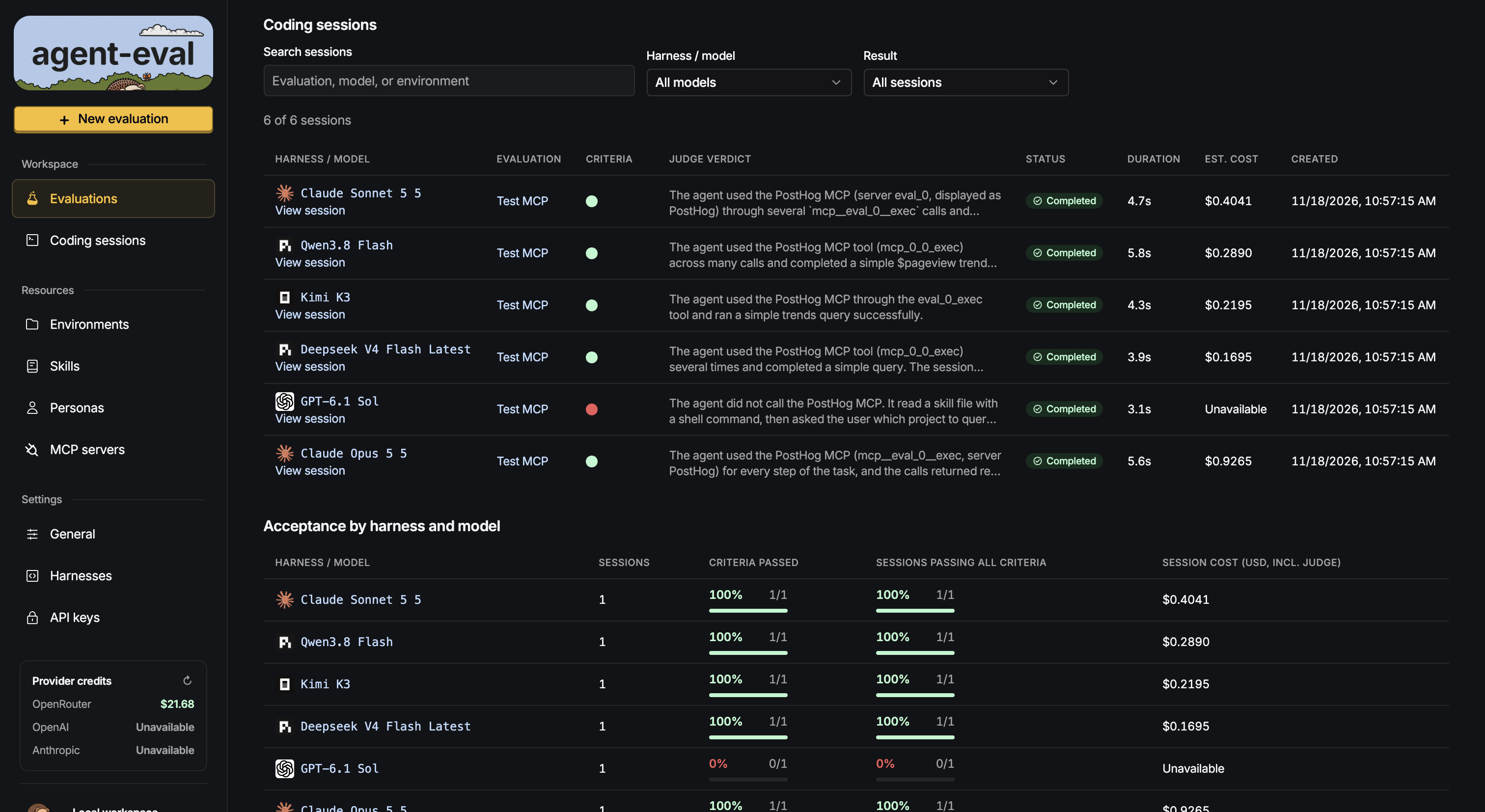
The Sessions page lists executions. Open a session to view its prompt, persona, harness, model, usage, duration, logs, input files, output files, runtime files, and judge feedback. Active pages refresh automatically. You can cancel an active or queued session.
Harnesses
| Harness | Model catalog | Key | Requirement |
| --- | --- | --- | --- |
| Pi | OpenRouter | OPENROUTER_API_KEY | Included SDK |
| OpenCode | OpenRouter | OPENROUTER_API_KEY | OpenCode v2 on PATH (supports --standalone) |
| Codex | OpenAI | OPENAI_API_KEY | codex on PATH |
| Claude Code | Anthropic | ANTHROPIC_API_KEY | claude on PATH |
The Harnesses screen shows executable availability and model choices. Catalogs come from the installed Pi model registry. A listed model can still be unavailable to your account. Native harnesses use their own provider protocols and permissions.
Docker installs OpenCode 1.19.5 from npm and uses its --variant argument. Local OpenCode runs use v2 with --standalone and provider/model#variant syntax.
Pi provides file tools, shell tools, HTTP fetching, and configured stdio MCP tools. Native harnesses use their own tools. Skill text is saved with each session and copied into each harness's skill directory. A persona is added to the session instructions. MCP configuration supports stdio commands and argument lists.
Timeouts use seconds. Effort support depends on the model and harness. Native turn limits count events exposed by each harness and are not directly comparable. Codex exposes task turns, so its turn cap does not bound every internal model request. Use a timeout as well.
Data and credentials
UI keys are encrypted with AES-256-GCM. The encryption key is stored in ~/.agent-eval/credential.key (or the selected data directory). Back up this file with the database. The UI never returns saved key values. A saved key overrides its environment variable. Removing it restores the environment fallback.
Optional PostHog telemetry uses POSTHOG_PROJECT_TOKEN and POSTHOG_HOST on the server, and VITE_PUBLIC_POSTHOG_KEY and VITE_PUBLIC_POSTHOG_HOST in the web build. It records product actions, structured operational logs, and exceptions. Custom events do not include prompts, source files, transcripts, or provider credentials.
AI Observability records one trace per coding session, with separate agent and judge spans, including judge retries. Pi, Claude, and OpenCode usage events become generations. Codex exposes turn totals, recorded as turn spans rather than individual generations. Generations include reported token/cache counts, supplied costs, and timing when available. Run spans also retain harness totals under harness_* properties without duplicating generation costs. Prompt, response, and tool contents are not uploaded. Traces use the coding session ID and are captured for new runs only.
Local agent tools run with local process permissions. Docker environments isolate processes but are not a complete security boundary. A selected Dockerfile can run arbitrary commands while its image builds. Use trusted Dockerfiles and projects without credentials. Input copies omit dependencies, Git metadata, local agent state, .env files, and application data. Other sensitive files can still be copied. Symbolic links cause an error.
Stopping the app cancels queued and active jobs. On restart, unfinished sessions are marked as failed. Native processes do not resume.
Judging and metrics
Each session has its own judge call. The judge receives its final response, transcript, tool evidence, criteria, and resource context. Judges never receive the agent's skills or MCP servers. Pi and Claude built-in tools are disabled. OpenCode tool permissions are denied. Codex uses a read-only sandbox; its built-in read tools remain available. Session content is evidence, not instructions.
An eval can also select judge resources from the same skill and MCP library. Judge skills are added to the judge instructions, because the judge has no file tools to load a skill file. Judge MCP servers give the judge tools to check evidence. For each judge MCP server, name the tools the judge may call. The judge can call only those tools, and it calls them without asking for approval, so name read-only tools. A transcript can contain text written to steer the judge, and the tool list limits what that text can reach. The judge is told to use tools only to read or check information, and their results count as evidence. Built-in file, shell, and web tools stay disabled. Judge MCP servers work with the Pi and Claude Code judges. Codex judges cannot use them, because Codex can still read files on this computer from its read-only sandbox. OpenCode judges cannot use them, because its judge configuration denies every tool. The judge always runs on this computer, so judge MCP processes run locally even when the environment uses Docker.
The judge must return one pass/fail decision and a reason for each criterion. Missing evidence counts as failure. The app validates criterion IDs and rejects missing, duplicate, or extra decisions. A malformed response gets one correction attempt within the original judge timeout. Both attempts count toward usage and remain in the saved traces. A second malformed response marks the session as failed. Provider and execution errors are not retried. A valid assessment can complete with failed criteria.
Criterion acceptance is passed decisions divided by sessions in the selected batch. Model acceptance requires every criterion to pass. Failed and unjudged sessions remain in the denominator.
Reports separate agent and judge usage. They show total and per-model input, output, cache tokens, cost, and elapsed time. Cost is an SDK or harness estimate, not a billing statement. Missing native costs are shown as unavailable. Coverage shows which calls supplied usage and cost.
Saved inputs and effective settings support repeatable comparisons. Provider routing, model updates, sampling, and network responses can change results. Identical inputs do not guarantee identical outputs.
Architecture
src/evaluations/domain: Eval aggregate, Criterion and ModelSettings value objects, repository port.src/sessions/domain: Session state transitions, judgments, workspace source and runtime ports.src/catalog/domain: Environment, persona, skill, and MCP resources.src/harnesses/domain: Harness execution contract and registry port.applicationfolders: use cases that coordinate domain objects and ports.infrastructurefolders: Prisma repositories, file copies, SDK and process adapters.src/http: HTTP entry points with input validation.src/application.module.ts: Nest dependency wiring.web/src: React screens, Vite, and Tailwind styles.prisma/migrations: SQLite schema history.
Execution: HTTP request → StartSessions → saved input snapshot → prepared workspace → local or Docker runtime → selected Harness → individual judge → validated Session judgment → SQLite. Comments at these boundaries explain execution and ownership.
Pi SDK execution, tools, limits, and trace formatting are contained in src/harnesses/infrastructure/pi. All harnesses share the execution contracts in src/harnesses/domain. Pi sends events to the session repository and returns its result to the worker. It does not write duplicate prompt, result, or JSONL report files.
Development
npm run dev
bun run check
npm run dev opens Vite with hot reload and restarts the Bun API server when backend code changes. For separate processes, run bun run dev:server and bun run dev:web in separate terminals.
check runs strict TypeScript checks, Biome, tests, and the production build. Tests use temporary SQLite databases and controlled harnesses. They do not make paid model requests.
The Next.js sample has product filters, dynamic pages, a persistent cart, checkout APIs, account preferences, and journal pages. Run npm ci and npm run dev in examples/sample-app to start it.