
@power-seo/analytics
v1.0.19
Published
Analytics data processing: merge GSC data with audit results, trend analysis, ranking insights
Downloads
614

Maintainers
 ccbd.dev
Readme
@power-seo/analytics
Merge Google Search Console data with audit results, compute Pearson correlation, analyze trends, detect anomalies, and build dashboard-ready aggregated outputs.





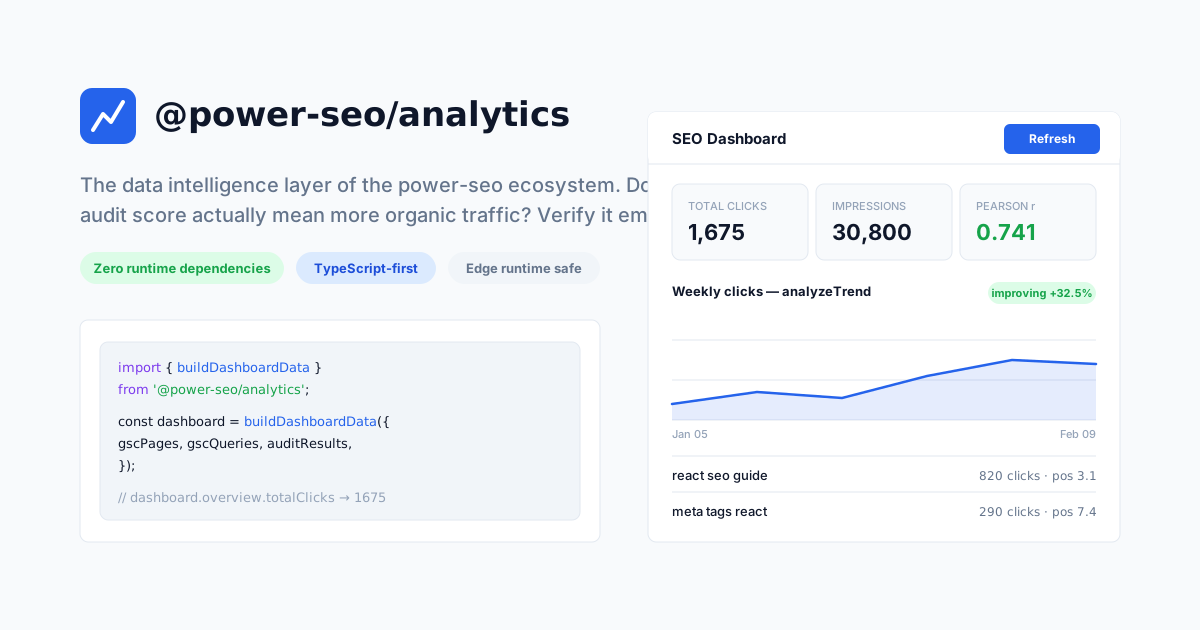
@power-seo/analytics is the data-intelligence layer of the power-seo ecosystem: a TypeScript library that merges Google Search Console performance data (clicks, impressions, CTR, position) with @power-seo/audit results, keyed on normalized URLs. It is built for developers who assemble SEO dashboards and reports and want to answer one question empirically: does improving a page's audit score correlate with more organic traffic? correlateScoreAndTraffic computes the Pearson correlation coefficient between audit scores and clicks across your own pages, so you measure the relationship instead of assuming it.
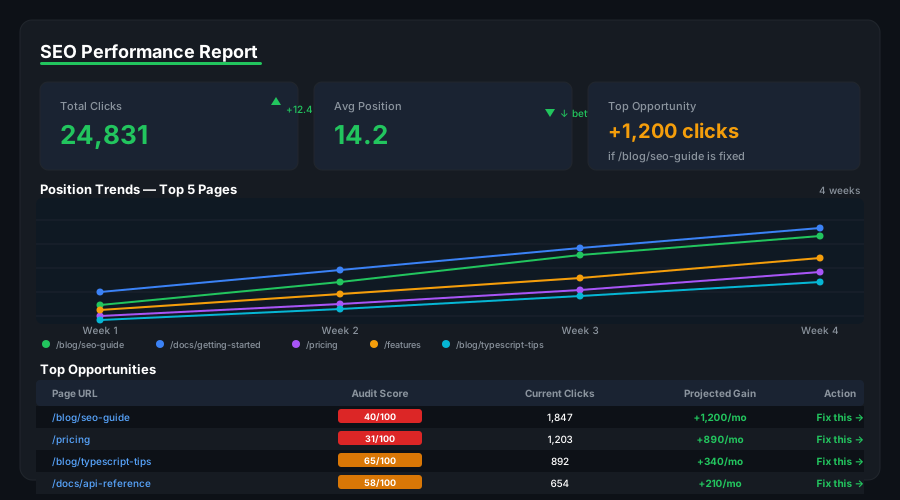
Beyond correlation, the package covers the full reporting pipeline: analyzeTrend classifies any time series as improving, declining, or stable via linear regression; buildTrendLines turns audit history into per-category trend analyses; detectAnomalies flags points beyond a standard-deviation threshold; analyzeQueryRankings groups queries into the position buckets SEO professionals think in (1–3, 4–10, 11–20, 21–100) and surfaces striking-distance keywords; trackPositionChanges diffs two ranking snapshots; and buildDashboardData aggregates everything into a single object any charting library can consume.
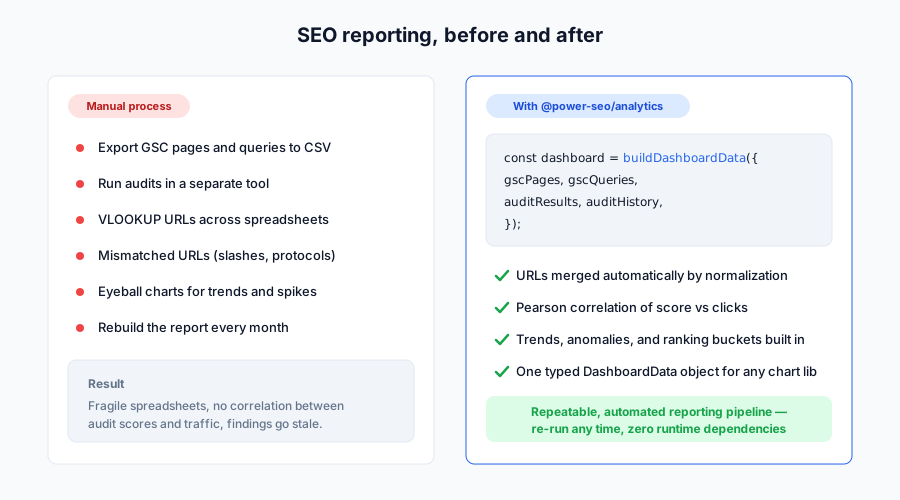
Why @power-seo/analytics?
| | Without | With |
| ----------------------- | --------------------- | ------------------------------------------------------- |
| GSC + audit correlation | ❌ Two separate tools | ✅ Merged by normalized URL with Pearson correlation |
| Trend analysis | ❌ Manual spreadsheet | ✅ Linear-regression direction + % change in one call |
| Anomaly detection | ❌ Manual review | ✅ Standard-deviation spike/drop flagging |
| Ranking tiers | ❌ Raw position data | ✅ Buckets 1–3, 4–10, 11–20, 21–100 + striking distance |
| Position tracking | ❌ Manual comparison | ✅ Before/after diff with trackPositionChanges |
| Dashboard output | ❌ Build from scratch | ✅ Structured DashboardData for any chart library |
| TypeScript support | ❌ Untyped data | ✅ Full type coverage for every data structure |
The payoff is prioritization. correlateScoreAndTraffic returns topOpportunities — up to ten pages ranked by clicks-to-score ratio — so the pages with the most traffic and the weakest audits rise to the top of your backlog, and mergeGscWithAudit attaches plain-language opportunity notes (for example, a page with more than 50 clicks but an audit score below 70, or more than 100 impressions stuck beyond position 10).
Features
- GSC + audit data merge —
mergeGscWithAuditjoins Search Console page metrics with@power-seo/auditresults by normalized URL, producingPageInsightobjects that carry both dimensions plus generated opportunity notes - Pearson correlation —
correlateScoreAndTrafficcomputes the Pearson correlation coefficient (rounded to 3 decimals) between audit scores and clicks, and returns the top 10 high-traffic / low-score opportunity pages - Trend direction analysis —
analyzeTrendfits a linear regression to a time series and classifies it as'improving','declining', or'stable'(slope within ±2% of the series mean counts as stable), with percentage change from first to last point - Audit history trend lines —
buildTrendLinesconvertsAuditSnapshot[]into aRecord<string, TrendAnalysis>with anoveralltrend plus one trend per audit category (meta,content,structure,performance) - Anomaly detection —
detectAnomaliesreturns the points that deviate from the series mean by more than a configurable multiple of the standard deviation (default2) - Position bucket analysis —
analyzeQueryRankingsgroups queries into four SERP tiers (1–3, 4–10, 11–20, 21–100) and lists striking-distance queries (positions 4–20) sorted by impressions descending - Position change tracking —
trackPositionChangescompares two ranking snapshots and reports position and impression deltas per query; positivechangemeans the query moved up - Dashboard aggregation —
buildDashboardDatareturns overview totals, top 10 pages and top 10 queries by clicks, per-category trend lines, and up to 20 deduplicated issues - Zero third-party runtime dependencies — depends only on
@power-seo/coreand@power-seo/audit; pure computation, no API calls - Type-safe throughout — complete TypeScript types for all inputs and outputs
Comparison
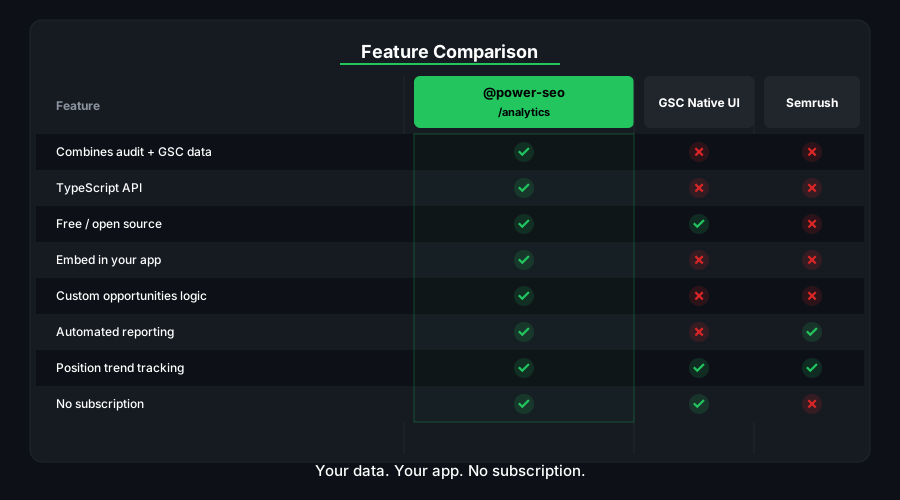
| Feature | @power-seo/analytics | Looker Studio | GA4 | Custom scripts | | ------------------------------- | :------------------: | :-----------: | :-----: | :------------: | | GSC + audit data merge | ✅ | ❌ | ❌ | Manual | | Pearson correlation | ✅ | ❌ | ❌ | Manual | | Trend direction analysis | ✅ | Partial | Partial | Manual | | Anomaly detection | ✅ | ❌ | Partial | Manual | | Position change tracking | ✅ | ❌ | ❌ | Manual | | Ranking bucket grouping | ✅ | ❌ | ❌ | Manual | | Dashboard-ready output | ✅ | ✅ | Partial | Manual | | Runs in your codebase (no SaaS) | ✅ | ❌ | ❌ | ✅ | | TypeScript-first | ✅ | ❌ | ❌ | — |
Installation
npm install @power-seo/analyticsyarn add @power-seo/analyticspnpm add @power-seo/analyticsRequires Node.js ≥ 18. Ships dual ESM + CJS with bundled type declarations. Pair it with @power-seo/search-console to fetch GSC data and @power-seo/audit to produce audit results.
Usage
How do I build an SEO dashboard from Search Console data?
Pass your GSC page and query rows to buildDashboardData. It returns overview totals (clicks, impressions, average CTR, average position), the top 10 pages and queries by clicks, trend lines from audit history, and a deduplicated issue list. All input arrays are optional — start with just GSC data and add audit results later.
import { buildDashboardData } from '@power-seo/analytics';

const dashboard = buildDashboardData({
  gscPages: [
    { url: '/blog/react-seo', clicks: 1240, impressions: 18500, ctr: 0.067, position: 4.2 },
    { url: '/blog/meta-tags', clicks: 380, impressions: 9200, ctr: 0.041, position: 8.7 },
    { url: '/blog/seo-audit', clicks: 55, impressions: 3100, ctr: 0.018, position: 19.1 },
  ],
  gscQueries: [
    { query: 'react seo guide', clicks: 820, impressions: 9400, ctr: 0.087, position: 3.1 },
    { query: 'meta tags react', clicks: 290, impressions: 5800, ctr: 0.05, position: 7.4 },
  ],
});

console.log(dashboard.overview.totalClicks); // 1675
console.log(dashboard.overview.totalImpressions); // 30800
console.log(dashboard.overview.averagePosition); // 10.7 (rounded to 1 decimal)
console.log(dashboard.topPages[0]?.url); // '/blog/react-seo'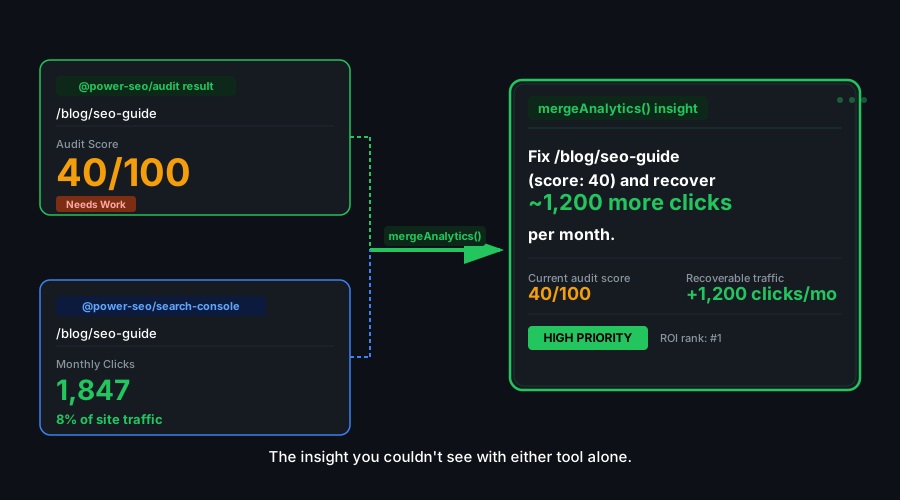
How do I merge Google Search Console data with SEO audit results?
mergeGscWithAudit builds the union of URLs from both datasets — pages present in only one set are still included, with the missing dimension left undefined. URLs are normalized with normalizeUrl from @power-seo/core (default ports removed, trailing slashes stripped, duplicate slashes collapsed), so use absolute URLs on both sides for reliable matching. Each PageInsight also gets generated opportunity notes, including up to three audit recommendations.
import { mergeGscWithAudit } from '@power-seo/analytics';
import type { GscPageData, PageInsight } from '@power-seo/analytics';

const gscPages: GscPageData[] = [
  {
    url: 'https://example.com/blog/post-1',
    clicks: 850,
    impressions: 12000,
    ctr: 0.071,
    position: 5.3,
  },
  {
    url: 'https://example.com/blog/post-2',
    clicks: 220,
    impressions: 6500,
    ctr: 0.034,
    position: 12.1,
  },
];

// Audit results come straight from @power-seo/audit's auditPage()
// (shape: { url, score, categories: Record<AuditCategory, CategoryResult>, recommendations })
const auditResults = [
  {
    url: 'https://example.com/blog/post-1',
    score: 91,
    categories: {
      meta: { score: 95, passed: 6, warnings: 0, errors: 0 },
      content: { score: 90, passed: 5, warnings: 1, errors: 0 },
      structure: { score: 88, passed: 4, warnings: 1, errors: 0 },
      performance: { score: 92, passed: 3, warnings: 0, errors: 0 },
    },
    recommendations: [],
  },
  {
    url: 'https://example.com/blog/post-2',
    score: 63,
    categories: {
      meta: { score: 60, passed: 3, warnings: 2, errors: 1 },
      content: { score: 55, passed: 2, warnings: 2, errors: 1 },
      structure: { score: 70, passed: 4, warnings: 1, errors: 0 },
      performance: { score: 68, passed: 2, warnings: 1, errors: 0 },
    },
    recommendations: ['Improve meta description', 'Add more internal links'],
  },
];

const insights: PageInsight[] = mergeGscWithAudit(gscPages, auditResults);

for (const { url, gscMetrics, auditScore, opportunities } of insights) {
  console.log(
    `${url}: ${gscMetrics?.clicks ?? 0} clicks @ pos ${gscMetrics?.position ?? '-'}, score=${auditScore ?? 'N/A'}`,
  );
  opportunities.forEach((o) => console.log(`  → ${o}`));
}
Does a higher SEO audit score correlate with more organic traffic?
correlateScoreAndTraffic computes the Pearson correlation coefficient between audit scores and clicks across all insights that have both dimensions. It needs at least two such pages; otherwise it returns { correlation: 0, topOpportunities: [] }. The coefficient is rounded to three decimals. topOpportunities ranks up to ten pages by clicks-to-score ratio — your highest-leverage fixes.
import { mergeGscWithAudit, correlateScoreAndTraffic } from '@power-seo/analytics';

const insights = mergeGscWithAudit(gscPages, auditResults);
const result = correlateScoreAndTraffic(insights);

console.log(`Pearson r: ${result.correlation}`); // e.g. 0.741

if (result.correlation > 0.5) {
  console.log('Strong positive relationship: better audit scores align with more traffic');
}

// High traffic, low score — fix these first
console.log(
  'Quick wins:',
  result.topOpportunities.map((p) => p.url),
);
How do I detect whether my SEO metrics are trending up or down?
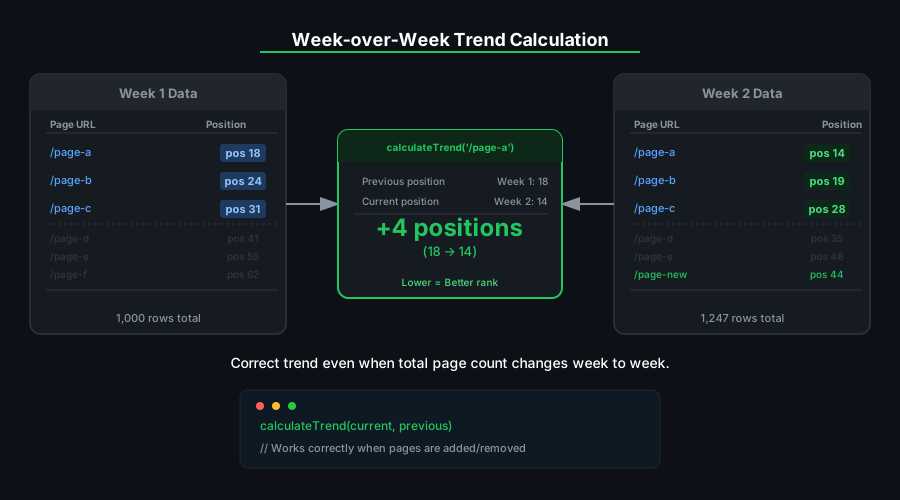
analyzeTrend fits a linear regression over the series and compares the slope to a stability band of ±2% of the series mean: above it is 'improving', below it is 'declining', within it is 'stable'. change is the percentage difference between the first and last values, rounded to two decimals. buildTrendLines applies the same analysis to audit history, producing an overall trend plus one per audit category.
import { analyzeTrend, buildTrendLines } from '@power-seo/analytics';
import type { TrendPoint, TrendAnalysis, AuditSnapshot } from '@power-seo/analytics';

const weeklyClicks: TrendPoint[] = [
  { date: '2026-01-05', value: 1200 },
  { date: '2026-01-12', value: 1350 },
  { date: '2026-01-19', value: 1280 },
  { date: '2026-01-26', value: 1480 },
  { date: '2026-02-02', value: 1620 },
  { date: '2026-02-09', value: 1590 },
];

const trend: TrendAnalysis = analyzeTrend(weeklyClicks, 'clicks');
console.log(trend.trend); // 'improving'
console.log(trend.change); // 32.5 (% change first → last)
console.log(trend.metric); // 'clicks'

// Trend lines from audit history — categories use numeric scores per AuditCategory
const auditSnapshots: AuditSnapshot[] = [
  {
    date: '2026-01-01',
    url: 'https://example.com/page',
    score: 75,
    categories: { meta: 80, content: 72, structure: 78, performance: 70 },
  },
  // more snapshots...
];
const trendLines = buildTrendLines(auditSnapshots);
// { overall, meta, content, structure, performance } — each a TrendAnalysis
How do I detect anomalies in Search Console traffic?
detectAnomalies returns every point whose distance from the series mean exceeds threshold standard deviations (default 2). It needs at least three points and returns an empty array when the series is flat. Because one extreme spike inflates the standard deviation, a moderate drop in the same window may stay inside 2σ — lower the threshold when you want more sensitive detection.
import { detectAnomalies } from '@power-seo/analytics';
import type { TrendPoint } from '@power-seo/analytics';

const dailyImpressions: TrendPoint[] = [
  { date: '2026-02-01', value: 8500 },
  { date: '2026-02-02', value: 8900 },
  { date: '2026-02-03', value: 8700 },
  { date: '2026-02-04', value: 8600 },
  { date: '2026-02-05', value: 24800 }, // spike — content went viral?
  { date: '2026-02-06', value: 9100 },
  { date: '2026-02-07', value: 2100 }, // drop — server issue?
  { date: '2026-02-08', value: 8800 },
];

detectAnomalies(dailyImpressions); // default threshold 2
// [{ date: '2026-02-05', value: 24800 }] — only the spike exceeds 2σ

detectAnomalies(dailyImpressions, 1.2); // more sensitive
// [{ date: '2026-02-05', value: 24800 }, { date: '2026-02-07', value: 2100 }]
How do I group queries into SERP ranking buckets?
analyzeQueryRankings sorts your queries into four position tiers — 1–3 (top spots), 4–10 (rest of page one), 11–20 (page two), 21–100 (deep pages) — and extracts strikingDistance: all queries at positions 4–20, sorted by impressions descending. These are the classic quick-win targets, close enough to page one that on-page improvements can move them.
import { analyzeQueryRankings } from '@power-seo/analytics';
import type { GscQueryData, RankingAnalysis } from '@power-seo/analytics';

const queries: GscQueryData[] = [
  { query: 'react seo', clicks: 820, impressions: 9400, ctr: 0.087, position: 2.1 },
  { query: 'seo audit tool', clicks: 340, impressions: 6200, ctr: 0.055, position: 6.8 },
  { query: 'meta tags guide', clicks: 180, impressions: 4800, ctr: 0.038, position: 14.3 },
  { query: 'sitemap generator', clicks: 30, impressions: 2100, ctr: 0.014, position: 28.7 },
  { query: 'seo typescript', clicks: 5, impressions: 1200, ctr: 0.004, position: 67.2 },
];

const analysis: RankingAnalysis = analyzeQueryRankings(queries);

analysis.buckets.forEach((bucket) => {
  console.log(`Position ${bucket.range}: ${bucket.count} queries`);
});
// Position 1-3: 1 · Position 4-10: 1 · Position 11-20: 1 · Position 21-100: 2

const quickWins = analysis.strikingDistance.filter((q) => q.impressions > 2000);
console.log(
  'Quick-win queries:',
  quickWins.map((q) => q.query),
);
// ['seo audit tool', 'meta tags guide']
How do I track keyword position changes between two periods?
trackPositionChanges compares a current snapshot against a previous one, keyed by query string. Only queries present in both snapshots are reported; change is previousPosition - currentPosition, so a positive value means the query moved up the SERP. impressionChange reports the impression delta over the same window.
import { trackPositionChanges } from '@power-seo/analytics';
import type { GscQueryData, PositionChange } from '@power-seo/analytics';

const previousSnapshot: GscQueryData[] = [
  { query: 'react seo guide', clicks: 320, impressions: 8200, ctr: 0.039, position: 8.4 },
  { query: 'seo audit', clicks: 45, impressions: 1900, ctr: 0.024, position: 22.0 },
];

const currentSnapshot: GscQueryData[] = [
  { query: 'react seo guide', clicks: 580, impressions: 9800, ctr: 0.059, position: 5.1 },
  { query: 'seo audit', clicks: 88, impressions: 2200, ctr: 0.04, position: 14.3 },
  { query: 'seo typescript', clicks: 12, impressions: 800, ctr: 0.015, position: 31.0 }, // new — not reported
];

const changes: PositionChange[] = trackPositionChanges(currentSnapshot, previousSnapshot);
changes.forEach(({ query, previousPosition, currentPosition, change }) => {
  const direction = change > 0 ? '↑' : change < 0 ? '↓' : '→';
  console.log(`${direction} "${query}": ${previousPosition} → ${currentPosition}`);
});
// ↑ "react seo guide": 8.4 → 5.1
// ↑ "seo audit": 22 → 14.3
How do I feed the dashboard output into a chart library?
DashboardData is plain serializable data: pass overview to stat cards, topPages/topQueries to tables, and each trendLines entry's points array ({ date, value }[]) directly to Recharts, Chart.js, or any other charting library.
import { buildDashboardData } from '@power-seo/analytics';
import type { DashboardData } from '@power-seo/analytics';

const dashboard: DashboardData = buildDashboardData({
  gscPages: allGscPages,
  gscQueries: allGscQueries,
  auditResults: allAuditResults, // from @power-seo/audit
  auditHistory: allAuditSnapshots,
});

// Overview metrics
const {
  totalClicks,
  totalImpressions,
  averageCtr,
  averagePosition,
  averageAuditScore,
  totalPages,
} = dashboard.overview;

// Top 10 pages and queries by clicks
dashboard.topPages.forEach(({ url, clicks }) => console.log(`${url}: ${clicks} clicks`));
dashboard.topQueries.forEach(({ query, clicks, position }) =>
  console.log(`"${query}": ${clicks} clicks @ position ${position.toFixed(1)}`),
);

// Record<string, TrendAnalysis> — 'overall' plus one entry per audit category
const overallTrend = dashboard.trendLines['overall'];
// overallTrend?.points is chart-ready: [{ date, value }, ...]

// Up to 20 deduplicated audit recommendations
dashboard.issues.forEach((issue) => console.log(`Issue: ${issue}`));
API Reference
mergeGscWithAudit(gscData, auditResults)
| Parameter | Type | Default | Description |
| -------------- | ------------------------------------------------------------------------------------------------ | -------- | ------------------------------------------- |
| gscData | GscPageData[] | required | Google Search Console page performance rows |
| auditResults | { url; score; categories: Record<AuditCategory, CategoryResult>; recommendations: string[] }[] | required | Audit results, e.g. from @power-seo/audit |
Returns PageInsight[] — one record per URL in the union of both sets, matched on normalized URLs, with generated opportunities strings.
Opportunity heuristics (from source):
| Condition | Opportunity generated | | ----------------------------------- | ----------------------------------------- | | clicks > 50 and audit score < 70 | High-traffic page with low audit score | | position > 10 and impressions > 100 | Page-one potential from striking distance | | audit recommendations exist | First 3 recommendations attached | | GSC data but no audit | Prompt to run an audit | | Audit score < 50 and no GSC data | Improve-or-remove suggestion |
correlateScoreAndTraffic(insights)
| Parameter | Type | Default | Description |
| ---------- | --------------- | -------- | ----------------------------------------------------- |
| insights | PageInsight[] | required | Merged insights with both audit score and GSC metrics |
Returns { correlation: number; topOpportunities: PageInsight[] } — Pearson coefficient rounded to 3 decimals, plus up to 10 pages ranked by clicks-to-score ratio. Requires at least 2 pages with both dimensions; otherwise returns { correlation: 0, topOpportunities: [] }.
analyzeTrend(points, metric?)
| Parameter | Type | Default | Description |
| --------- | -------------- | --------- | ------------------------------------ |
| points | TrendPoint[] | required | Time-ordered { date, value } array |
| metric | string | 'value' | Metric name echoed into the result |
Returns TrendAnalysis: { metric, trend, change, points }. Direction comes from the linear-regression slope — 'stable' when the slope is within ±2% of the series mean; change is the first-to-last percentage difference rounded to 2 decimals. Fewer than 2 points always yields 'stable' with change: 0.
buildTrendLines(snapshots)
| Parameter | Type | Default | Description |
| ----------- | ----------------- | -------- | -------------------------------------------- |
| snapshots | AuditSnapshot[] | required | Dated audit scores with per-category numbers |
Returns Record<string, TrendAnalysis> — an overall trend from score, plus one trend per audit category key (meta, content, structure, performance). Snapshots are sorted by date internally before analysis.
detectAnomalies(points, threshold?)
| Parameter | Type | Default | Description |
| ----------- | -------------- | -------- | ----------------------------- |
| points | TrendPoint[] | required | Time-ordered data points |
| threshold | number | 2 | Standard-deviation multiplier |
Returns TrendPoint[] — the points whose absolute deviation from the mean exceeds threshold × stdDev. Returns [] for fewer than 3 points or a zero standard deviation. Compare each returned value against the mean to classify it as a spike or a drop.
analyzeQueryRankings(queries)
| Parameter | Type | Default | Description |
| --------- | ---------------- | -------- | ----------------------------------- |
| queries | GscQueryData[] | required | GSC query rows with position values |
Returns RankingAnalysis: { totalQueries, buckets, strikingDistance }. Buckets are fixed at 1–3, 4–10, 11–20, 21–100 and always present (with count: 0 for empty input). strikingDistance contains queries at positions 4–20 sorted by impressions descending.
trackPositionChanges(current, previous)
| Parameter | Type | Default | Description |
| ---------- | ---------------- | -------- | -------------------------------- |
| current | GscQueryData[] | required | Snapshot from the later period |
| previous | GscQueryData[] | required | Snapshot from the earlier period |
Returns PositionChange[] for queries present in both snapshots. change = previousPosition - currentPosition, so positive means improvement; impressionChange = current - previous impressions.
buildDashboardData(input)
| Parameter | Type | Default | Description |
| -------------------- | ------------------ | ------- | ------------------------------------------------------- |
| input.gscPages | GscPageData[] | [] | GSC page performance rows |
| input.gscQueries | GscQueryData[] | [] | GSC query performance rows |
| input.auditResults | audit result array | [] | Audit results for score averaging and issue aggregation |
| input.auditHistory | AuditSnapshot[] | [] | Dated snapshots for trend lines |
Returns DashboardData. Rounding and limits (from source):
| Fact | Value |
| ---------------------------- | ------------------------------------------- |
| averageCtr rounding | 4 decimal places |
| averagePosition rounding | 1 decimal place |
| averageAuditScore rounding | nearest integer |
| topPages / topQueries | top 10 each, sorted by clicks descending |
| issues | deduplicated, capped at 20 |
| totalPages | max(gscPages.length, auditResults.length) |
Types
import type {
  GscPageData, // { url, clicks, impressions, ctr, position, date? }
  GscQueryData, // { query, clicks, impressions, ctr, position, date? }
  AuditSnapshot, // { date, url, score, categories: Record<AuditCategory, number> }
  TrendPoint, // { date: string; value: number }
  TrendDirection, // 'improving' | 'declining' | 'stable'
  TrendAnalysis, // { metric, trend, change, points }
  PageInsight, // { url, gscMetrics?, auditScore?, auditCategories?, opportunities }
  RankingBucket, // { range: string; count: number; queries: GscQueryData[] }
  RankingAnalysis, // { totalQueries, buckets, strikingDistance }
  PositionChange, // { query, previousPosition, currentPosition, change, impressionChange }
  DashboardInput, // { gscPages?, gscQueries?, auditResults?, auditHistory? }
  DashboardOverview, // { totalClicks, totalImpressions, averageCtr, averagePosition, averageAuditScore, totalPages }
  DashboardData, // { overview, topPages, topQueries, trendLines: Record<string, TrendAnalysis>, issues }
  AuditCategory, // 'meta' | 'content' | 'structure' | 'performance' (re-exported from @power-seo/audit)
  CategoryResult, // { score, passed, warnings, errors } (re-exported from @power-seo/audit)
  PageAuditResult, // re-exported from @power-seo/audit
} from '@power-seo/analytics';
Use Cases
- SEO dashboards — feed
buildDashboardDataoutput directly into Recharts, Chart.js, or any admin UI - Monthly reporting — run
correlateScoreAndTrafficto show stakeholders how audit work relates to traffic on your own data - Quick-win identification — use
strikingDistance(positions 4–20 by impressions) to prioritize content updates - Algorithm update monitoring — run
detectAnomaliesover daily impressions to flag drops aligned with Google updates - Site migration tracking — compare pre- and post-migration snapshots with
trackPositionChanges - CI-driven SEO regression checks — store
AuditSnapshots per deploy and fail builds whenbuildTrendLinesreports a declining category
Architecture Overview
- Pure TypeScript — no compiled binary, no native modules
- Workspace-only dependencies — depends solely on
@power-seo/core(URL normalization) and@power-seo/audit(shared audit types) - Framework-agnostic — works in any JavaScript environment: Next.js, Remix, Node.js, Edge
- SSR compatible — no browser-specific APIs; safe for server-side or CLI usage
- Edge runtime safe — no Node.js-specific APIs; runs in Cloudflare Workers, Vercel Edge
- Tree-shakeable —
"sideEffects": falsewith named exports per function - Dual ESM + CJS — ships both formats via tsup for any bundler or
require()usage
Supply Chain Security
- Published to npm with provenance attestation — every release is built and signed by the verified
github.com/CyberCraftBD/power-seoGitHub Actions workflow, so you can trace each tarball back to its exact source commit - Zero third-party runtime dependencies — packages depend only on other
@power-seopackages, nothing else gets pulled in - No network access at runtime — pure computation on the inputs you pass; nothing is fetched, phoned home, or telemetered
- No install scripts (
postinstall,preinstall) - No
evalor dynamic code execution - Safe for SSR, Edge, and server environments
The @power-seo Ecosystem
All 17 packages are independently installable — use only what you need.
| Package | Install | Description |
| ------------------------------------------------------------------------------------------ | ----------------------------------- | ---------------------------------------------------------------------------------- |
| @power-seo/ai | npm i @power-seo/ai | LLM-agnostic prompt templates and response parsers for AI-assisted SEO |
| @power-seo/analytics | npm i @power-seo/analytics | Merge Search Console data with audit results — trends and ranking insights |
| @power-seo/audit | npm i @power-seo/audit | SEO site health auditing with meta, content, structure, and performance rules |
| @power-seo/content-analysis | npm i @power-seo/content-analysis | Yoast-style SEO content analysis engine with scoring, checks, and React components |
| @power-seo/core | npm i @power-seo/core | Framework-agnostic SEO analysis engines, types, validators, and utilities |
| @power-seo/images | npm i @power-seo/images | Image SEO analysis — alt text quality, lazy loading, formats, image sitemaps |
| @power-seo/integrations | npm i @power-seo/integrations | Semrush and Ahrefs API clients with a shared rate-limited HTTP client |
| @power-seo/links | npm i @power-seo/links | Internal link graph analysis — orphan detection, suggestions, equity scoring |
| @power-seo/meta | npm i @power-seo/meta | SSR meta tag helpers for Next.js App Router, Remix v2, and generic SSR |
| @power-seo/preview | npm i @power-seo/preview | SERP, Open Graph, and Twitter Card preview generators with React components |
| @power-seo/react | npm i @power-seo/react | React SEO components — meta tags, Open Graph, Twitter Card, breadcrumbs |
| @power-seo/readability | npm i @power-seo/readability | Readability scoring — Flesch-Kincaid, Gunning Fog, Coleman-Liau, ARI |
| @power-seo/redirects | npm i @power-seo/redirects | Redirect rule engine with Next.js, Remix, and Express adapters |
| @power-seo/schema | npm i @power-seo/schema | Type-safe JSON-LD structured data — 23 schema.org builders plus React components |
| @power-seo/search-console | npm i @power-seo/search-console | Google Search Console API client — OAuth2, service accounts, rate limiting, retry |
| @power-seo/sitemap | npm i @power-seo/sitemap | XML sitemap generation, streaming, and validation with image, video, news support |
| @power-seo/tracking | npm i @power-seo/tracking | Analytics script builders with consent management and React components |
Keywords
seo analytics, google search console, gsc data merge, seo audit correlation, pearson correlation, seo trend analysis, anomaly detection, keyword position tracking, ranking buckets, striking distance keywords, seo dashboard, click-through rate, impressions, seo reporting, typescript seo, seo data pipeline, position changes, organic traffic analysis, nextjs seo, seo insights
About CyberCraft Bangladesh
CyberCraft Bangladesh is a Bangladesh-based enterprise-grade software development and Full Stack SEO service provider company specializing in ERP system development, AI-powered SaaS and business applications, full-stack SEO services, custom website development, and scalable eCommerce platforms. We design and develop intelligent, automation-driven SaaS and enterprise solutions that help startups, SMEs, NGOs, educational institutes, and large organizations streamline operations, enhance digital visibility, and accelerate growth through modern cloud-native technologies.




© 2026 CyberCraft Bangladesh · Released under the MIT License