
@power-seo/audit
v1.0.17
Published
SEO site health auditing with meta, content, structure, and performance rules
Downloads
564

Maintainers
 ccbd.dev
Readme
@power-seo/audit

Programmatic SEO auditing with 0–100 scoring across four rule categories: meta tags, content quality, document structure, and performance.





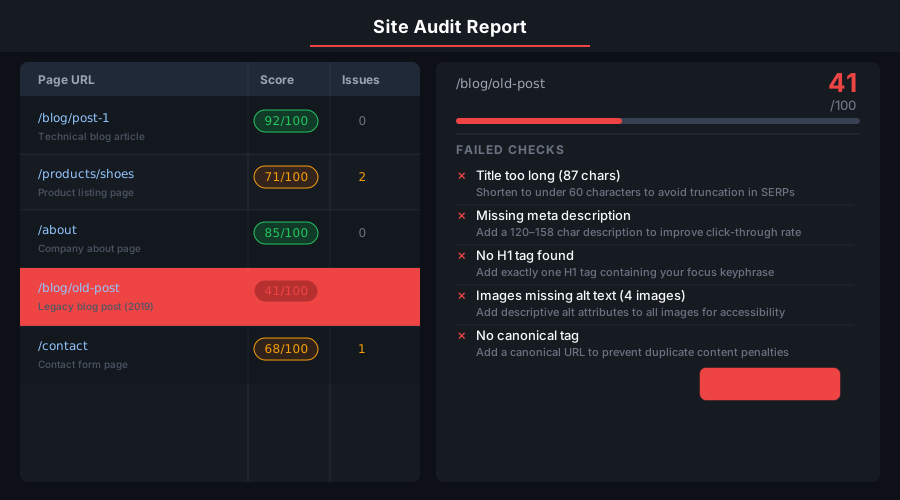
@power-seo/audit is a TypeScript SEO audit engine for developers who need scored, actionable page and site audits inside their own code — build scripts, CI pipelines, CMS publish hooks, or dashboards. A single call to auditPage() returns a weighted 0–100 score, per-category breakdowns, and a flat rule list where every finding carries a severity (error, warning, info, pass) and a human-readable description. auditSite() aggregates the same audit across many pages into an average score, category summary, and top recurring issues.

The four rule sets are also exported individually — runMetaRules, runContentRules, runStructureRules, runPerformanceRules — so you can run only the checks you need. Content rules internally reuse @power-seo/content-analysis and @power-seo/readability; structure rules validate JSON-LD with @power-seo/schema.
No third-party dependencies, no network calls — the only runtime dependencies are other
@power-seopackages, and every audit is local, synchronous computation.
Why @power-seo/audit?
| | Without | With |
| ------------------ | ------------------ | --------------------------------------------------- |
| Meta tag audit | ❌ Manual checking | ✅ 0–100 scored across 4 rule categories |
| Site-wide audit | ❌ Page-by-page | ✅ auditSite() — aggregate + per-page results |
| Rule granularity | ❌ Pass/fail only | ✅ error / warning / info / pass severity |
| Content analysis | ❌ Eye-check | ✅ Word count, keyphrase density, readability |
| CI integration | ❌ Manual review | ✅ Node.js script with configurable score threshold |
| Framework support | ❌ WordPress-only | ✅ Framework-agnostic, runs anywhere |
| TypeScript support | ❌ Untyped | ✅ Full type coverage for all inputs and results |

Features
- Single-page audit —
auditPage(input)returns a weighted 0–100 score plus acategoriesobject with individual scores for meta, content, structure, and performance - Site-wide audit —
auditSite(input)audits an array of pages and returns the average score, a per-category summary, top issues ranked by frequency, and every per-page result - Meta rules — title presence and length (min 50 characters, 580px SERP width cap), meta description presence and length (120–160 characters, 920px cap), canonical presence,
noindexdetection, Open Graph completeness (og:title,og:description,og:image) - Content rules — full Yoast-style content analysis and readability scoring when
contentis provided; word-count (minimum 300 words) and keyphrase-density (0.5–2.5% recommended range) checks when onlywordCount/keywordDensityproxies are available - Structure rules — canonical URL format and self-reference validation, JSON-LD schema presence and field-level validation via
@power-seo/schema, H1 presence, heading hierarchy (no skipped levels), HTTPS check - Performance rules — response time thresholds (warning above 1000ms, error above 3000ms), content size (warning above 100KB), image count (warning above 50), missing image alt text, HTTP status code classification (3xx warning, 4xx/5xx error)
- Four severity levels —
error(critical issues),warning(sub-optimal practices),info(advisories such as an intentionalnoindex),pass(checks that passed) - Category-level scores — each category produces its own 0–100 score so you can prioritize the weakest area first
- Composable rule sets — call individual rule runners for selective auditing without the full pipeline
- Type-safe throughout — complete TypeScript types for inputs, results, rules, categories, and severities
Comparison
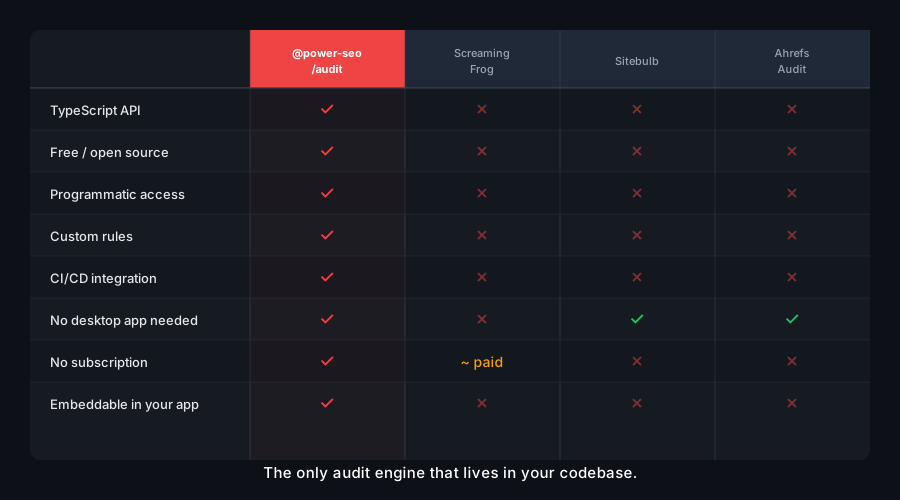
| Feature | @power-seo/audit | Screaming Frog | Lighthouse | next-seo | Ahrefs Site Audit | | -------------------------------- | :--------------: | :------------: | :--------: | :------: | :---------------: | | Programmatic npm API | ✅ | ❌ | Partial | ❌ | ❌ | | 4 SEO rule categories | ✅ | Partial | Partial | ❌ | Partial | | 0–100 scored output | ✅ | ❌ | ✅ | ❌ | ✅ | | Site-wide aggregation | ✅ | ✅ | ❌ | ❌ | ✅ | | Runs offline, no crawler service | ✅ | ❌ | Partial | ✅ | ❌ | | TypeScript-first | ✅ | ❌ | ❌ | Partial | ❌ | | Tree-shakeable library | ✅ | ❌ | ❌ | ❌ | ❌ |
Installation
npm install @power-seo/audityarn add @power-seo/auditpnpm add @power-seo/auditUsage
How do I audit a single page for SEO issues?
Call auditPage() with a PageAuditInput object. Only url is required — every other field is optional, and rules that lack their input are simply skipped (for example, performance timing rules only run when responseTime is provided). The result contains the weighted overall score, per-category CategoryResult objects, the flat rules array, and recommendations (the descriptions of every error and warning).
import { auditPage } from '@power-seo/audit';
import type { PageAuditInput, PageAuditResult } from '@power-seo/audit';

const input: PageAuditInput = {
  url: 'https://example.com/blog/react-seo-guide',
  title: 'React SEO Guide — Best Practices for Modern Applications',
  metaDescription:
    'Learn how to optimize React applications for search engines with meta tags, structured data, and Core Web Vitals improvements.',
  canonical: 'https://example.com/blog/react-seo-guide',
  robots: 'index, follow',
  openGraph: {
    title: 'React SEO Guide',
    description: 'Optimize React apps for search engines.',
    image: 'https://example.com/images/react-seo-og.jpg',
  },
  content: '<h1>React SEO Guide</h1><p>Search engine optimization for React apps...</p>',
  headings: ['h1:React SEO Guide', 'h2:Why SEO Matters for React', 'h2:Meta Tags in React'],
  images: [{ src: '/hero.webp', alt: 'React SEO guide illustration' }],
  internalLinks: ['/blog', '/docs/meta-tags'],
  externalLinks: ['https://developers.google.com/search'],
  focusKeyphrase: 'react seo',
};

const result: PageAuditResult = auditPage(input);

console.log(result.score); // weighted 0-100 score, e.g. 84
console.log(result.categories.meta);
// { score: 100, passed: 6, warnings: 0, errors: 0 }
console.log(result.rules[0]);
// { id: 'meta-title-length', category: 'meta', title: 'Title length',
//   description: '...', severity: 'pass' }

// Filter findings by severity
const errors = result.rules.filter((r) => r.severity === 'error');
const warnings = result.rules.filter((r) => r.severity === 'warning');
console.log(`Score: ${result.score}/100 — ${errors.length} errors, ${warnings.length} warnings`);
How is the overall SEO audit score calculated?
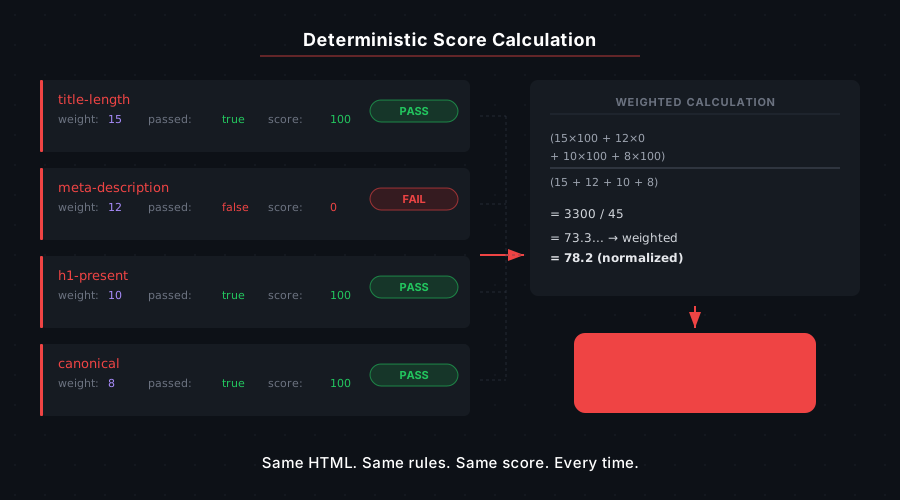
Each category scores round(passed / (passed + warnings + errors) * 100) — info findings never affect the score, and a category with no applicable rules scores 100. The overall page score is the weighted sum of the four category scores using fixed weights:
| Category | Weight | What it covers |
| ------------- | :----: | ------------------------------------------------------------ |
| meta | 0.30 | Title, meta description, canonical, robots, Open Graph |
| content | 0.30 | Content analysis, readability, word count, keyphrase density |
| structure | 0.25 | Canonical format, JSON-LD schema, headings, HTTPS |
| performance | 0.15 | Response time, content size, images, HTTP status |
How do I run a site-wide SEO audit across many pages?
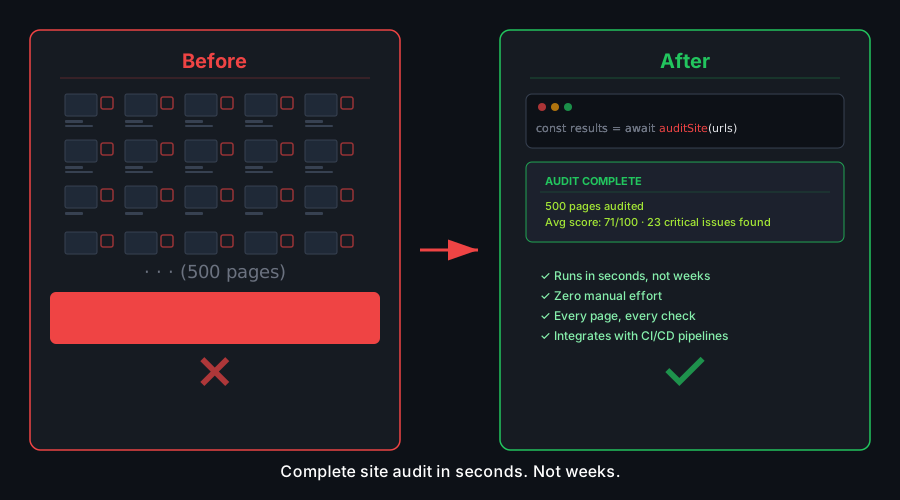
Pass an array of PageAuditInput objects to auditSite(). It audits every page with auditPage(), averages the scores, aggregates pass/warning/error counts per category into summary, and deduplicates recurring errors and warnings into topIssues, sorted by how many pages each issue appears on. pass and info findings are excluded from topIssues.
import { auditSite } from '@power-seo/audit';
import type { SiteAuditInput, SiteAuditResult } from '@power-seo/audit';

const siteInput: SiteAuditInput = {
  pages: [page1Input, page2Input, page3Input],
};

const report: SiteAuditResult = auditSite(siteInput);

console.log(`Average score: ${report.score}/100`);
console.log(`Pages audited: ${report.totalPages}`);

console.log('Top issues across site:');
report.topIssues.forEach(({ id, title, severity }) => {
  console.log(`  ${id} (${title}) [${severity}]`);
});

// Access individual page results
report.pageResults.forEach(({ url, score, rules }) => {
  const issues = rules.filter((r) => r.severity === 'error' || r.severity === 'warning');
  console.log(`${url}: ${score}/100 (${issues.length} issues)`);
});
Can I run only one rule category?
Yes. Each of the four rule runners is a standalone export that takes the same PageAuditInput and returns AuditRule[]. Use them when you only care about one dimension — for example, checking meta tags in a CMS publish hook without paying for content analysis.
import {
  runMetaRules,
  runContentRules,
  runStructureRules,
  runPerformanceRules,
} from '@power-seo/audit';
import type { PageAuditInput } from '@power-seo/audit';

const input: PageAuditInput = {
  /* ... */
};

// Meta checks — title, description, canonical, robots, Open Graph
const metaRules = runMetaRules(input);
const passes = metaRules.filter((r) => r.severity === 'pass');
const errors = metaRules.filter((r) => r.severity === 'error');
console.log(`Meta: ${passes.length} passed, ${errors.length} errors`);
metaRules.forEach((r) => console.log(`  [${r.severity}] ${r.title}: ${r.description}`));

// Content checks — content analysis, readability, word count, keyphrase density
const contentRules = runContentRules(input);

// Structure checks — canonical format, JSON-LD schema, headings, HTTPS
const structureRules = runStructureRules(input);

// Performance checks — response time, content size, image alt text, status code
const perfRules = runPerformanceRules(input);
How do I group and prioritize audit findings?
Rule results are plain objects, so ordinary array operations cover dashboard needs: group by category, sort by severity, or gate on score.
import { auditPage } from '@power-seo/audit';
import type { AuditSeverity } from '@power-seo/audit';

const result = auditPage(input);

// Group rules by category
const byCategory = result.rules.reduce(
  (acc, rule) => {
    acc[rule.category] = acc[rule.category] ?? [];
    acc[rule.category]!.push(rule);
    return acc;
  },
  {} as Record<string, typeof result.rules>,
);

// Priority order: errors first, then warnings, then info, then pass
const prioritized = [...result.rules].sort((a, b) => {
  const order: Record<AuditSeverity, number> = { error: 0, warning: 1, info: 2, pass: 3 };
  return order[a.severity] - order[b.severity];
});

// Enforce a minimum score
const MINIMUM_SCORE = 70;
if (result.score < MINIMUM_SCORE) {
  throw new Error(`SEO audit failed: score ${result.score} is below minimum ${MINIMUM_SCORE}`);
}
How do I use SEO audit scores as a CI/CD quality gate?
Run auditSite() in a Node.js script during your build and exit non-zero when the average score falls below a threshold or any page has critical errors. Because the audit is synchronous local computation with no network access, it adds negligible time to a pipeline and never flakes on external services.
// scripts/seo-audit.ts
import { auditSite } from '@power-seo/audit';
import { pages } from './test-pages.js';

const report = auditSite({ pages });

const SCORE_THRESHOLD = 75;
const ALLOWED_ERRORS = 0;

const totalErrors = report.pageResults.flatMap((p) =>
  p.rules.filter((r) => r.severity === 'error'),
).length;

if (report.score < SCORE_THRESHOLD || totalErrors > ALLOWED_ERRORS) {
  console.error(`SEO audit FAILED`);
  console.error(`  Average score: ${report.score} (min: ${SCORE_THRESHOLD})`);
  console.error(`  Critical errors: ${totalErrors} (max: ${ALLOWED_ERRORS})`);
  process.exit(1);
}

console.log(`SEO audit PASSED — average score: ${report.score}/100`);
API Reference
auditPage(input: PageAuditInput): PageAuditResult
| Parameter | Type | Required | Description |
| ----------------------- | ----------------------------------------------------- | -------- | --------------------------------------------------------------- |
| input.url | string | ✅ | URL of the page being audited (also drives the HTTPS check) |
| input.title | string | — | Page <title> tag content |
| input.metaDescription | string | — | Content of the meta[name="description"] tag |
| input.canonical | string | — | Canonical URL from link[rel="canonical"] |
| input.robots | string | — | Content of meta[name="robots"] tag (e.g. 'index, follow') |
| input.openGraph | { title?, description?, image? } | — | Open Graph tag values; OG rules run only when this is set |
| input.content | string | — | Full HTML/text content of the page body |
| input.headings | string[] | — | Headings as 'h1:text' / 'h2:text' strings |
| input.images | Array<{ src: string; alt?: string; size?: number }> | — | Images extracted from the page |
| input.internalLinks | string[] | — | Internal link href values found on the page |
| input.externalLinks | string[] | — | External link href values found on the page |
| input.schema | SchemaBase[] | — | JSON-LD schema objects present on the page |
| input.focusKeyphrase | string | — | Focus keyphrase for content analysis |
| input.wordCount | number | — | Word count proxy — used when content is not provided |
| input.keywordDensity | number | — | Keyphrase density % proxy — used when content is not provided |
| input.statusCode | number | — | HTTP status code of the page |
| input.responseTime | number | — | Page response time in milliseconds |
| input.contentLength | number | — | Content length in bytes |
Returns PageAuditResult:
| Property | Type | Description |
| ----------------- | --------------------------------------- | ---------------------------------------------------- |
| url | string | The audited page URL |
| score | number | Overall weighted score 0–100 |
| categories | Record<AuditCategory, CategoryResult> | Per-category { score, passed, warnings, errors } |
| rules | AuditRule[] | Flat array of all rule results across all categories |
| recommendations | string[] | Descriptions of every error and warning finding |
auditSite(input: SiteAuditInput): SiteAuditResult
| Parameter | Type | Required | Description |
| ---------------- | ------------------ | -------- | ------------------------------------------------------------------- |
| input.pages | PageAuditInput[] | ✅ | Array of page audit inputs to evaluate |
| input.hostname | string | — | Optional site hostname for report context (does not affect scoring) |
Returns SiteAuditResult:
| Property | Type | Description |
| ------------- | --------------------------------------- | ---------------------------------------------------------------------- |
| score | number | Mean page score across all pages (0–100; 0 for an empty array) |
| totalPages | number | Total number of pages audited |
| pageResults | PageAuditResult[] | Individual page audit results |
| topIssues | AuditRule[] | Recurring errors/warnings deduplicated by rule id, most frequent first |
| summary | Record<AuditCategory, CategoryResult> | Aggregated category counts and scores across all pages |
runMetaRules(input) / runContentRules(input) / runStructureRules(input) / runPerformanceRules(input)
Each rule runner accepts a PageAuditInput and returns AuditRule[]:
| Property | Type | Description |
| ------------- | --------------- | ----------------------------------------------------------- |
| id | string | Unique rule identifier (e.g. 'meta-title-length') |
| category | AuditCategory | 'meta' | 'content' | 'structure' | 'performance' |
| title | string | Short human-readable rule name |
| description | string | Detailed description of the finding |
| severity | AuditSeverity | 'error' | 'warning' | 'info' | 'pass' |
Key thresholds applied by the rule runners (all verifiable in source):
| Check | Pass | Warning | Error |
| ------------------------- | ---------------------- | ---------------------- | ------------------- |
| Title length | ≥ 50 chars, ≤ 580px | Too short or truncated | Title missing |
| Meta description | 120–160 chars, ≤ 920px | Too short or truncated | Description missing |
| Word count (proxy) | ≥ 300 words | 1–299 words | 0 words |
| Keyphrase density (proxy) | 0.5–2.5% | Outside range | — |
| Response time | ≤ 1000ms | 1001–3000ms | > 3000ms |
| Content size | ≤ 100KB | > 100KB | — |
| Image count | ≤ 50 | > 50 | — |
| HTTP status | 2xx | 3xx | 4xx / 5xx |
| HTTPS | https:// URL | — | http:// URL |
Types
import type {
  AuditCategory, // 'meta' | 'content' | 'structure' | 'performance'
  AuditSeverity, // 'error' | 'warning' | 'info' | 'pass'
  AuditRule, // { id, category, title, description, severity }
  PageAuditInput, // Full page input object (see auditPage parameters above)
  PageAuditResult, // { url, score, categories, rules, recommendations }
  CategoryResult, // { score: number; passed: number; warnings: number; errors: number }
  SiteAuditInput, // { pages: PageAuditInput[]; hostname?: string }
  SiteAuditResult, // { score, totalPages, pageResults, topIssues, summary }
} from '@power-seo/audit';
Use Cases
- Headless CMS — score pages before publish; block publication if score drops below threshold
- Next.js / Remix apps — run server-side audits per route and expose scores in admin dashboards
- CI/CD quality gates — block deploys when audit scores fall below a configurable threshold
- SaaS platforms — provide per-client SEO health scores across all managed pages
- Reporting tools — generate structured audit reports for agencies delivering SEO as a service
Architecture Overview
- Pure TypeScript — no compiled binary, no native modules
- Composed from @power-seo engines — content and readability scoring come from
@power-seo/content-analysisand@power-seo/readability; JSON-LD validation from@power-seo/schema; meta validators and constants from@power-seo/core - Synchronous, local computation — no crawling, no HTTP; you supply the extracted page data, it returns the verdict
- Framework-agnostic — works in Next.js, Remix, Vite, Express, Edge runtimes, or CI scripts
- SSR and Edge safe — no browser- or Node-specific APIs; runs in Cloudflare Workers, Vercel Edge, Deno
- Tree-shakeable —
"sideEffects": falsewith named exports per rule runner - Dual ESM + CJS — ships both formats via tsup for any bundler or
require()usage
Supply Chain Security
- Published to npm with provenance attestation — every release is built and signed by the verified
github.com/CyberCraftBD/power-seoGitHub Actions workflow, so you can trace each tarball back to its exact source commit - Zero third-party runtime dependencies — packages depend only on other
@power-seopackages, nothing else gets pulled in - No network access at runtime — pure computation on the inputs you pass; nothing is fetched, phoned home, or telemetered
- No install scripts (
postinstall,preinstall) - No
evalor dynamic code execution - Safe for SSR, Edge, and server environments
The @power-seo Ecosystem
All 17 packages are independently installable — use only what you need.
| Package | Install | Description |
| ------------------------------------------------------------------------------------------ | ----------------------------------- | ---------------------------------------------------------------------------------- |
| @power-seo/ai | npm i @power-seo/ai | LLM-agnostic prompt templates and response parsers for AI-assisted SEO |
| @power-seo/analytics | npm i @power-seo/analytics | Merge Search Console data with audit results — trends and ranking insights |
| @power-seo/audit | npm i @power-seo/audit | SEO site health auditing with meta, content, structure, and performance rules |
| @power-seo/content-analysis | npm i @power-seo/content-analysis | Yoast-style SEO content analysis engine with scoring, checks, and React components |
| @power-seo/core | npm i @power-seo/core | Framework-agnostic SEO analysis engines, types, validators, and utilities |
| @power-seo/images | npm i @power-seo/images | Image SEO analysis — alt text quality, lazy loading, formats, image sitemaps |
| @power-seo/integrations | npm i @power-seo/integrations | Semrush and Ahrefs API clients with a shared rate-limited HTTP client |
| @power-seo/links | npm i @power-seo/links | Internal link graph analysis — orphan detection, suggestions, equity scoring |
| @power-seo/meta | npm i @power-seo/meta | SSR meta tag helpers for Next.js App Router, Remix v2, and generic SSR |
| @power-seo/preview | npm i @power-seo/preview | SERP, Open Graph, and Twitter Card preview generators with React components |
| @power-seo/react | npm i @power-seo/react | React SEO components — meta tags, Open Graph, Twitter Card, breadcrumbs |
| @power-seo/readability | npm i @power-seo/readability | Readability scoring — Flesch-Kincaid, Gunning Fog, Coleman-Liau, ARI |
| @power-seo/redirects | npm i @power-seo/redirects | Redirect rule engine with Next.js, Remix, and Express adapters |
| @power-seo/schema | npm i @power-seo/schema | Type-safe JSON-LD structured data — 23 schema.org builders plus React components |
| @power-seo/search-console | npm i @power-seo/search-console | Google Search Console API client — OAuth2, service accounts, rate limiting, retry |
| @power-seo/sitemap | npm i @power-seo/sitemap | XML sitemap generation, streaming, and validation with image, video, news support |
| @power-seo/tracking | npm i @power-seo/tracking | Analytics script builders with consent management and React components |
Keywords
seo audit, site health, page audit, seo score, meta audit, content audit, heading audit, image alt, structured data, seo rules, ci seo, nextjs seo, headless cms, programmatic seo, seo report, seo quality gate, typescript seo, seo audit engine, site audit
About CyberCraft Bangladesh
CyberCraft Bangladesh is a Bangladesh-based enterprise-grade software development and Full Stack SEO service provider company specializing in ERP system development, AI-powered SaaS and business applications, full-stack SEO services, custom website development, and scalable eCommerce platforms. We design and develop intelligent, automation-driven SaaS and enterprise solutions that help startups, SMEs, NGOs, educational institutes, and large organizations streamline operations, enhance digital visibility, and accelerate growth through modern cloud-native technologies.




© 2026 CyberCraft Bangladesh · Released under the MIT License