
@power-seo/content-analysis
v1.0.19
Published
Yoast-style SEO content analysis engine with scoring, checks, and React components

Maintainers
 ccbd.dev
Keywords
Readme
@power-seo/content-analysis
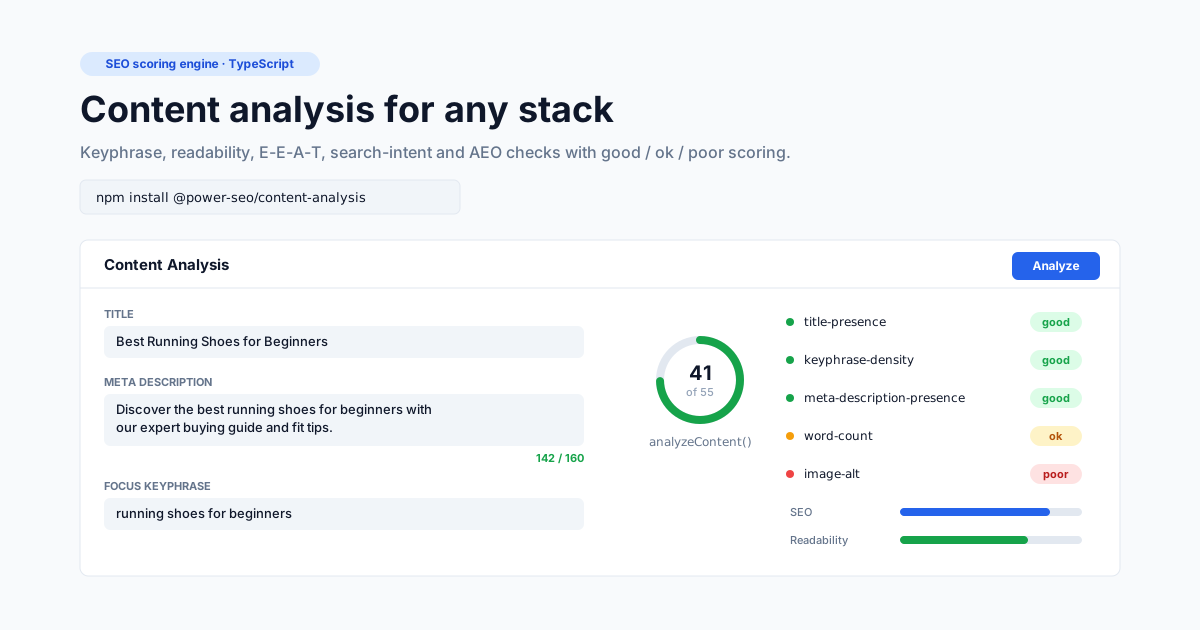
Keyword-focused content analysis with scoring, E-E-A-T, search intent, and AEO checks — like Yoast SEO, but as a standalone TypeScript library that works anywhere.





@power-seo/content-analysis is a TypeScript SEO content analysis engine that scores a page — title, meta description, body HTML, focus keyphrase, images, and links — against 99 built-in checks and returns structured good / ok / poor / na results with actionable recommendations. It is built for developers who need Yoast-style analysis outside WordPress: in a headless CMS, a React editor, a Next.js or Remix app, or a CI content quality gate. Every check is individually importable and disableable, and optional React components render the score panel and check list for you.
Why @power-seo/content-analysis?
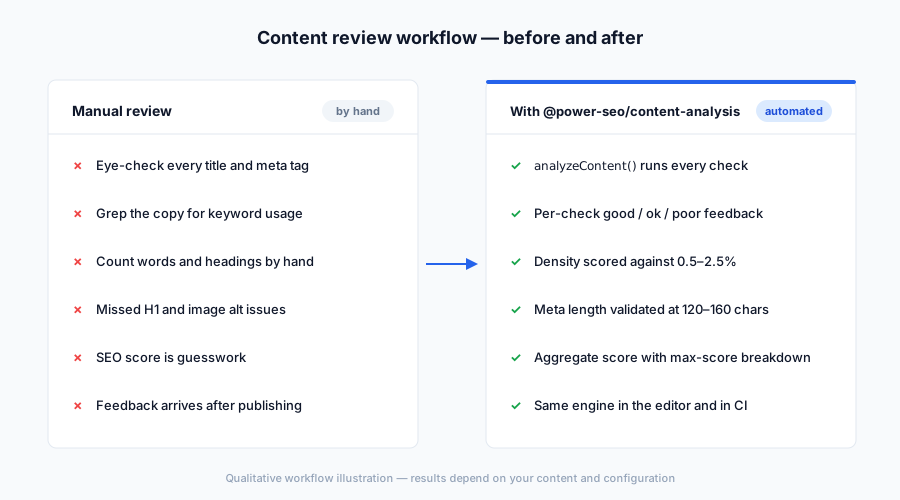
| | Without | With |
| ----------------- | -------------------------- | ------------------------------------------------------- |
| Keyphrase check | ❌ Manual grep | ✅ Density (0.5–2.5%) + distribution scoring |
| Title validation | ❌ Eye-check only | ✅ Presence, length (50–60 chars), keyphrase match |
| Meta description | ❌ Unchecked | ✅ Length (120–160 chars) + keyphrase |
| Heading structure | ❌ Missed or duplicate H1s | ✅ H1 hierarchy + keyphrase in subheadings |
| E-E-A-T signals | ❌ Invisible | ✅ 23 checks: author schema, sourcing, YMYL, disclosure |
| Search intent | ❌ Guesswork | ✅ 27 checks: classification, alignment, SERP features |
| Answer engines | ❌ Ignored | ✅ 8 AEO checks: direct answers, FAQ, fact density |
| Aggregate score | ❌ Gut feeling | ✅ score / maxScore with per-check breakdown |
| Where it runs | ❌ WordPress-only plugins | ✅ Next.js, Remix, Vite, Node.js, Edge, CI |
Features
- 99 built-in checks across five categories: on-page SEO (31), E-E-A-T (23), extended content quality (10), search intent (27), and answer engine optimization (8)
- Keyphrase analysis — density (optimal 0.5–2.5%), distribution, introduction, slug, title position, secondary keyphrases, and markup placement
- Title and meta checks — presence, recommended length (title 50–60 chars, meta description 120–160 chars), and keyphrase inclusion
- E-E-A-T scoring — experience depth, original research, author schema, expert sourcing, editorial review, source quality, YMYL compliance, conflict disclosure, and correction/privacy policies
- Search intent analysis — classifies informational, transactional, commercial, and navigational intent, then verifies title, meta, headings, opening, CTA, and format alignment
- AEO checks — direct answers, FAQ sections, TL;DR summaries, fact density, concise answers, structured data hints, citation readiness, and entity coverage
- Structure and readability — H1 hierarchy, subheading distribution, paragraph and sentence length, transition words, word complexity, inclusive language
nastatus handling — checks that don't apply (e.g. keyphrase checks with no keyphrase set) are excluded from bothscoreandmaxScore, so scores stay fair- Per-check disable config — skip any check by ID via
disabledChecks - React components — pre-built
ScorePanel,CheckList, andContentAnalyzerfrom the/reactentry point - Framework-agnostic and tree-shakeable — named exports per check,
"sideEffects": false, dual ESM + CJS
Comparison
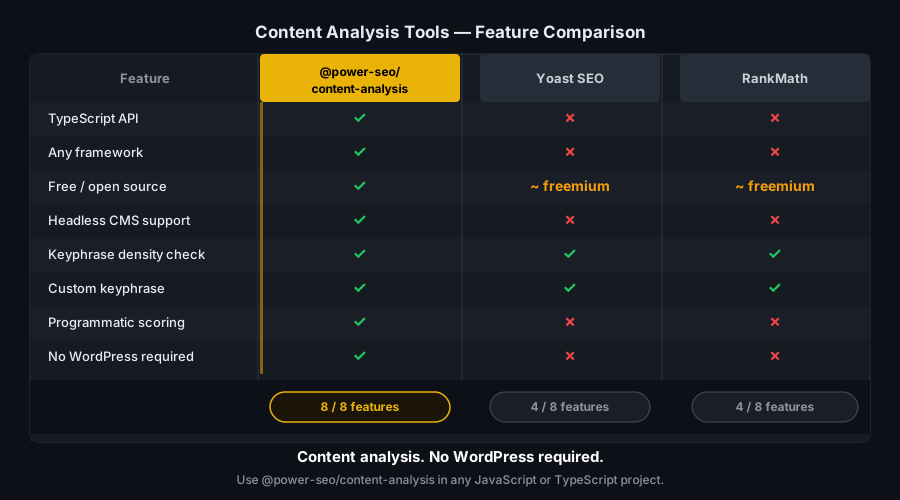
| Feature | @power-seo/content-analysis | Yoast SEO | next-seo | react-helmet | | -------------------------------- | :-------------------------: | :-------: | :------: | :----------: | | Keyphrase density + distribution | ✅ | ✅ | ❌ | ❌ | | Title + meta validation | ✅ | ✅ | ❌ | ❌ | | E-E-A-T checks | ✅ | ❌ | ❌ | ❌ | | Search intent analysis | ✅ | ❌ | ❌ | ❌ | | AEO / answer engine checks | ✅ | ❌ | ❌ | ❌ | | Aggregate SEO score | ✅ | ✅ | ❌ | ❌ | | Per-check disable config | ✅ | ❌ | ❌ | ❌ | | Works outside WordPress | ✅ | ❌ | ✅ | ✅ | | TypeScript-first | ✅ | ❌ | Partial | ❌ | | React UI components | ✅ | ✅ | ❌ | ❌ | | CI / Node.js usage | ✅ | ❌ | ❌ | ❌ |
Installation
npm install @power-seo/content-analysisyarn add @power-seo/content-analysispnpm add @power-seo/content-analysis@power-seo/core is the only dependency and is installed automatically. React is an optional peer dependency, needed only for the /react entry point.
Usage
How do I score content for SEO in TypeScript?
Call analyzeContent() with your page data. It runs all 99 checks and returns a ContentAnalysisOutput with an aggregate score, the maxScore for the checks that applied, per-check results, and plain-language recommendations from every check that scored ok or poor. Checks that don't apply to your input (for example, keyphrase checks when no focusKeyphrase is set) return status na and are excluded from both totals.
import { analyzeContent } from '@power-seo/content-analysis';

const output = analyzeContent({
  title: 'Best Running Shoes for Beginners',
  metaDescription: 'Discover the best running shoes for beginners with our expert guide.',
  focusKeyphrase: 'running shoes for beginners',
  content: '<h1>Best Running Shoes</h1><p>Finding the right running shoes...</p>',
});

console.log(output.score); // points earned across applicable checks
console.log(output.maxScore); // maximum possible for applicable checks
console.log(output.recommendations); // ['The content is 12 words, which is below...', ...]
console.log(output.results[0]);
// { id: 'title-presence', title: 'SEO title', description: '...', status: 'good', score: 5, maxScore: 5 }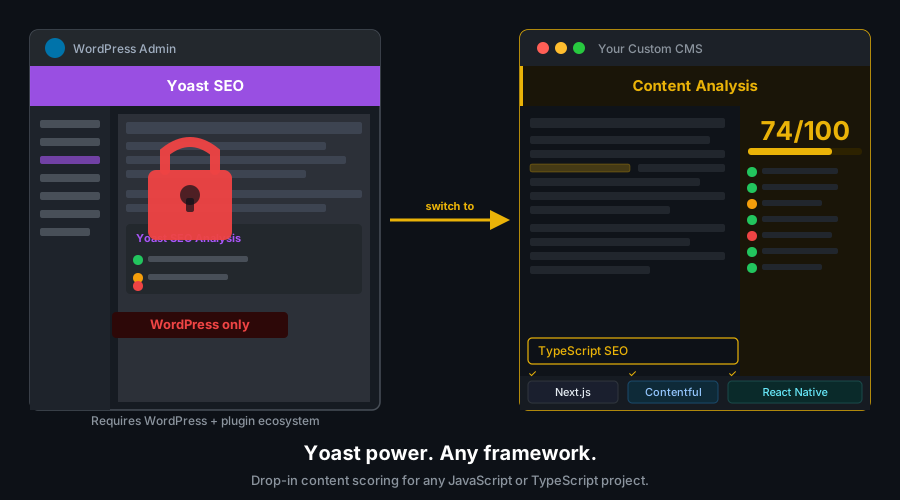
How do I run a single SEO check instead of the full analysis?
Every check function is exported individually — 91 functions in total — so you can import only what you need and keep your bundle small. Each function takes the same ContentAnalysisInput and returns either a single AnalysisResult or an array of them (functions that evaluate several related aspects, like checkTitle, return arrays).
import { checkTitle, checkWordCount, checkAeoDirectAnswer } from '@power-seo/content-analysis';

const titleResults = checkTitle({
  content: '',
  title: 'React SEO Guide',
  focusKeyphrase: 'react seo',
});
// [
//   { id: 'title-presence', title: 'SEO title', status: 'ok', score: 3, maxScore: 5, ... },
//   { id: 'title-keyphrase', title: 'Keyphrase in title', status: 'good', score: 5, maxScore: 5, ... }
// ]

const wcResult = checkWordCount({ content: shortHtml });
// { id: 'word-count', title: 'Word count', description: 'The content is 180 words...', status: 'poor', score: 1, maxScore: 10 }
How do I disable specific checks?
Pass disabledChecks in the options argument. Disabled checks are filtered from output.results and excluded from the score / maxScore totals. Invalid IDs are silently ignored. The options object also accepts now, a reference Date used by the content-freshness check — inject a fixed date for deterministic tests.
import { analyzeContent } from '@power-seo/content-analysis';

const output = analyzeContent(input, {
  disabledChecks: ['image-alt', 'image-keyphrase', 'external-links'],
  now: new Date('2026-01-01'),
});
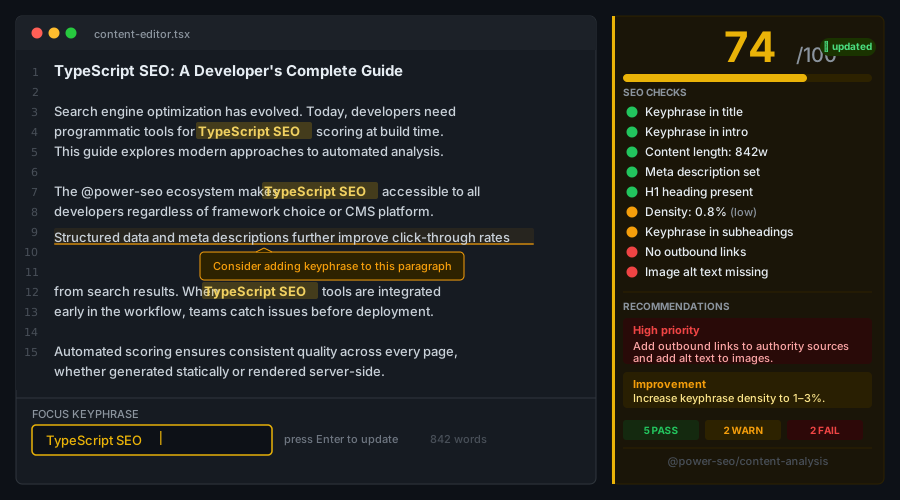
How do I build a Yoast-style editor panel in React?
Import from the /react entry point. ContentAnalyzer is an all-in-one component that runs the analysis and renders a score bar plus a check list. ScorePanel and CheckList are also exported separately for custom layouts. The score bar shows green at ≥70%, amber at ≥40%, and red below that.
import { ContentAnalyzer, ScorePanel, CheckList } from '@power-seo/content-analysis/react';
import { analyzeContent } from '@power-seo/content-analysis';
import type { ContentAnalysisInput } from '@power-seo/content-analysis';

// All-in-one component
function Editor({ input }: { input: ContentAnalysisInput }) {
  return <ContentAnalyzer input={input} />;
}

// Or compose individually
function SeoPanel({ input }: { input: ContentAnalysisInput }) {
  const output = analyzeContent(input);
  return (
    <>
      <ScorePanel score={output.score} maxScore={output.maxScore} />
      <CheckList results={output.results} />
    </>
  );
}
How do I block a deploy when SEO checks fail?
Run the analysis in a Node.js script during CI and exit non-zero when any check reports poor. Because the library has no network access and no browser dependency, this runs in any pipeline without extra setup.
import { analyzeContent } from '@power-seo/content-analysis';

const output = analyzeContent({ title, metaDescription, focusKeyphrase, content });

const failures = output.results.filter((r) => r.status === 'poor');

if (failures.length > 0) {
  console.error('SEO checks failed:');
  failures.forEach((r) => console.error(' ✗', r.description));
  process.exit(1);
}
Which checks work for non-English content?
Structural checks — heading hierarchy, internal/external links, media counts, word counts, canonical URL, and schema/date metadata — are language-agnostic and reliable for any language. Linguistic checks — transition words, E-E-A-T phrase detection (e.g. "I tested", "editor's note"), search intent modifiers, and syllable-based readability — are built on hardcoded English word lists and produce unreliable results for non-English content. When analyzing non-English pages, disable the linguistic checks via disabledChecks and rely on the structural scores.
API Reference
Entry Points
| Import | Description |
| ----------------------------------- | -------------------------------------------- |
| @power-seo/content-analysis | Core analyzer and individual check functions |
| @power-seo/content-analysis/react | React components for analysis UI |
analyzeContent()
function analyzeContent(
  input: ContentAnalysisInput,
  options?: AnalyzeOptions,
): ContentAnalysisOutput;
AnalyzeOptions extends AnalysisConfig (disabledChecks?: CheckId[]) with now?: Date, the reference date for freshness calculations.
ContentAnalysisInput
| Prop | Type | Required | Description |
| --------------------- | -------------------------------------- | -------- | -------------------------------------------------- |
| content | string | ✅ | Body HTML string |
| title | string | — | Page <title> content |
| metaDescription | string | — | Meta description content |
| focusKeyphrase | string | — | Focus keyphrase to analyze against |
| secondaryKeyphrases | string[] | — | Additional keyphrases for the secondary check |
| slug | string | — | URL slug (keyphrase-in-slug and URL-length checks) |
| canonicalUrl | string | — | Canonical URL for the canonical check |
| siteUrl | string | — | Site origin used to classify links |
| locale | string | — | Content locale hint |
| images | Array<{ src: string; alt?: string }> | — | Images found on the page |
| internalLinks | string[] | — | Internal link URLs |
| externalLinks | string[] | — | External link URLs |
| author | AuthorInfo | — | Author metadata for E-E-A-T checks |
| publishDate | string \| Date | — | Publish date (content-freshness check) |
| modifiedDate | string \| Date | — | Last-modified date (content-freshness check) |
| contentCategory | string | — | Category hint for YMYL classification |
| isSponsored | boolean | — | Sponsored-content flag (disclosure checks) |
| hasAffiliateLinks | boolean | — | Affiliate-link flag (disclosure checks) |
Additional optional E-E-A-T and linking fields: editorialReviewer, correctionPolicyUrl, privacyPolicyUrl, previouslyUsedKeyphrases, inboundInternalLinkCount, isPillarContent.
ContentAnalysisOutput
| Field | Type | Description |
| ----------------- | ------------------ | -------------------------------------------------------- |
| score | number | Sum of scores for applicable (non-na) checks |
| maxScore | number | Maximum possible score for applicable checks |
| results | AnalysisResult[] | Per-check results, including na entries |
| recommendations | string[] | Descriptions from every check with ok or poor status |
Check Categories
| Category | Checks | Examples |
| -------------------------- | :----: | ----------------------------------------------------------------------------- |
| On-page SEO | 31 | title-presence, keyphrase-density, heading-structure, word-count |
| E-E-A-T | 23 | eeat-author-schema, eeat-source-quality, eeat-ymyl-compliance |
| Extended content quality | 10 | single-h1, inclusive-language, content-freshness, headline-analyzer |
| Search intent | 27 | intent-keyword-classification, intent-title-match, intent-cta-alignment |
| Answer engine optimization | 8 | aeo-direct-answer, aeo-faq-section, aeo-fact-density |
Core Check Functions and Thresholds
| Function | Check ID(s) | Threshold |
| ----------------------------- | --------------------------------------------------------- | ----------------------------------------------------------------- |
| checkTitle(input) | title-presence, title-keyphrase | Title present; recommended length 50–60 chars; keyphrase in title |
| checkMetaDescription(input) | meta-description-presence, meta-description-keyphrase | Present; recommended length 120–160 chars; keyphrase included |
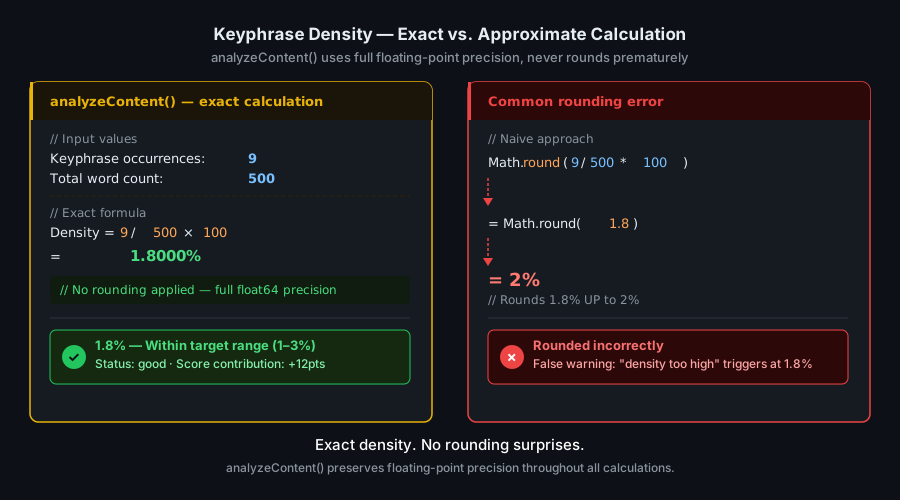
| checkKeyphraseUsage(input) | keyphrase-density, keyphrase-distribution | Density 0.5–2.5% (optimal 1.5%); occurrence in key areas |
| checkHeadings(input) | heading-structure, heading-keyphrase | H1 presence, hierarchy, keyphrase in subheadings |
| checkWordCount(input) | word-count | Minimum 300 words; good at 1,000+ (maxScore 10) |
| checkImages(input) | image-alt, image-keyphrase | Alt text present; keyphrase in at least one alt |
| checkLinks(input) | internal-links, external-links | Internal and external link presence |
Every remaining check follows the same pattern: checkX(input) returns an AnalysisResult (or array) whose id matches the corresponding CheckId. The full list of 91 functions is in the package's src/index.ts.
Note: There is no separate
title-lengthcheck ID. Title length is validated insidetitle-presence— a title outside the recommended range returnsstatus: 'ok'rather than'good'. Keyphrase-dependent checks returnstatus: 'na'when nofocusKeyphraseis set.
React Components
| Component | Props | Description |
| ----------------- | --------------------------------------------------------------------- | -------------------------------------------------- |
| ContentAnalyzer | { input: ContentAnalysisInput; config?: AnalysisConfig; children? } | Runs analysis and renders score panel + check list |
| ScorePanel | { score: number; maxScore: number } | Colored score bar (green ≥70%, amber ≥40%, red) |
| CheckList | { results: AnalysisResult[] } | Status-icon list of per-check results |
Types
| Type | Description |
| ----------------------- | ------------------------------------------------------------------------ |
| CheckId | Union of all 99 built-in check IDs |
| AnalysisConfig | { disabledChecks?: CheckId[] } |
| AnalyzeOptions | AnalysisConfig + { now?: Date } |
| AnalysisStatus | 'good' \| 'ok' \| 'poor' \| 'na' |
| ContentAnalysisInput | Input shape for analyzeContent() |
| ContentAnalysisOutput | Output shape from analyzeContent() |
| AnalysisResult | Single check result with id, title, description, status, score, maxScore |
Use Cases
- Headless CMS — score content as editors write, before publishing
- Next.js / Remix apps — run analysis server-side per route and expose scores in admin dashboards
- SaaS landing pages — enforce SEO quality programmatically across all marketing pages
- eCommerce product pages — validate product titles, descriptions, and image alt text at scale
- Blog platforms — provide real-time Yoast-style feedback in the post editor
- YMYL publishers — surface E-E-A-T gaps (missing author schema, sourcing, disclosures) before review
- CI/CD content gates — block deploys when SEO checks fail
Architecture Overview
- Pure TypeScript — no compiled binary, no native modules
- Single workspace dependency — depends only on
@power-seo/core; no third-party runtime packages - ReDoS-safe parsing — HTML stripping, heading scanning, and keyword extraction use index-based string scanning from
@power-seo/coreinstead of backtracking regexes - SSR compatible — safe in Next.js Server Components, Remix loaders, or Express handlers
- Edge runtime safe — no Node.js-specific APIs; runs in Cloudflare Workers, Vercel Edge, Deno
- Tree-shakeable —
"sideEffects": falsewith named exports per check function - Dual ESM + CJS — ships both formats for any bundler or
require()usage - Composable with the ecosystem — pair with
@power-seo/readabilityfor readability formulas or@power-seo/auditfor site-wide auditing
Supply Chain Security
- Published to npm with provenance attestation — every release is built and signed by the verified
github.com/CyberCraftBD/power-seoGitHub Actions workflow, so you can trace each tarball back to its exact source commit - Zero third-party runtime dependencies — packages depend only on other
@power-seopackages, nothing else gets pulled in - No network access at runtime — pure computation on the inputs you pass; nothing is fetched, phoned home, or telemetered
- No install scripts (
postinstall,preinstall) - No
evalor dynamic code execution - Safe for SSR, Edge, and server environments
The @power-seo Ecosystem
All 17 packages are independently installable — use only what you need.
| Package | Install | Description |
| ------------------------------------------------------------------------------------------ | ----------------------------------- | ---------------------------------------------------------------------------------- |
| @power-seo/ai | npm i @power-seo/ai | LLM-agnostic prompt templates and response parsers for AI-assisted SEO |
| @power-seo/analytics | npm i @power-seo/analytics | Merge Search Console data with audit results — trends and ranking insights |
| @power-seo/audit | npm i @power-seo/audit | SEO site health auditing with meta, content, structure, and performance rules |
| @power-seo/content-analysis | npm i @power-seo/content-analysis | Yoast-style SEO content analysis engine with scoring, checks, and React components |
| @power-seo/core | npm i @power-seo/core | Framework-agnostic SEO analysis engines, types, validators, and utilities |
| @power-seo/images | npm i @power-seo/images | Image SEO analysis — alt text quality, lazy loading, formats, image sitemaps |
| @power-seo/integrations | npm i @power-seo/integrations | Semrush and Ahrefs API clients with a shared rate-limited HTTP client |
| @power-seo/links | npm i @power-seo/links | Internal link graph analysis — orphan detection, suggestions, equity scoring |
| @power-seo/meta | npm i @power-seo/meta | SSR meta tag helpers for Next.js App Router, Remix v2, and generic SSR |
| @power-seo/preview | npm i @power-seo/preview | SERP, Open Graph, and Twitter Card preview generators with React components |
| @power-seo/react | npm i @power-seo/react | React SEO components — meta tags, Open Graph, Twitter Card, breadcrumbs |
| @power-seo/readability | npm i @power-seo/readability | Readability scoring — Flesch-Kincaid, Gunning Fog, Coleman-Liau, ARI |
| @power-seo/redirects | npm i @power-seo/redirects | Redirect rule engine with Next.js, Remix, and Express adapters |
| @power-seo/schema | npm i @power-seo/schema | Type-safe JSON-LD structured data — 23 schema.org builders plus React components |
| @power-seo/search-console | npm i @power-seo/search-console | Google Search Console API client — OAuth2, service accounts, rate limiting, retry |
| @power-seo/sitemap | npm i @power-seo/sitemap | XML sitemap generation, streaming, and validation with image, video, news support |
| @power-seo/tracking | npm i @power-seo/tracking | Analytics script builders with consent management and React components |
Keywords
seo-content-analysis, yoast-seo-alternative, keyword-density-checker, focus-keyphrase, react-seo, nextjs-seo, meta-description-validator, heading-seo-checker, content-quality-gate, headless-cms-seo, programmatic-seo, keyphrase-density, seo-audit, typescript-seo, content-seo-automation, react-editor-seo, ci-seo, edge-runtime-seo, seo-scoring, content-analysis
About CyberCraft Bangladesh
CyberCraft Bangladesh is a Bangladesh-based enterprise-grade software development and Full Stack SEO service provider company specializing in ERP system development, AI-powered SaaS and business applications, full-stack SEO services, custom website development, and scalable eCommerce platforms. We design and develop intelligent, automation-driven SaaS and enterprise solutions that help startups, SMEs, NGOs, educational institutes, and large organizations streamline operations, enhance digital visibility, and accelerate growth through modern cloud-native technologies.




© 2026 CyberCraft Bangladesh · Released under the MIT License