
@power-seo/preview
v1.0.19
Published
SERP, Open Graph, and Twitter Card preview generators with React components

Maintainers
 ccbd.dev
Readme
@power-seo/preview






Pixel-accurate SERP, Open Graph, and Twitter/X Card preview generators for TypeScript — compute exactly how a page appears in Google results and social shares, no headless browser or canvas required.
@power-seo/preview is a framework-agnostic TypeScript library that turns a title, meta description, URL, and optional social image into structured preview data: pixel-truncated SERP snippets, Google-style breadcrumb URLs, and Open Graph / Twitter Card image validation. It is built for CMS authors, SEO pipelines, and CI content gates that need to know how a page will render in search and social feeds before it ships. Provide plain inputs, get back plain data objects — run it in a Next.js Server Component, a Remix loader, an Edge function, or a React editor sidebar.
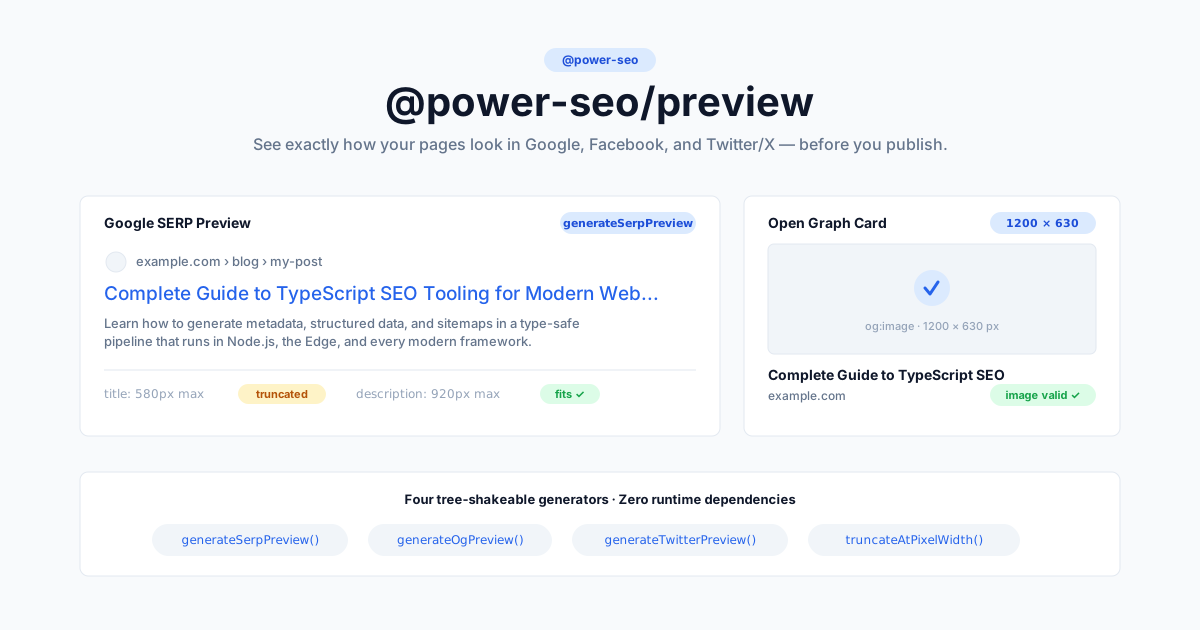
Zero third-party runtime dependencies — only
@power-seo/core, and React as an optional peer for the/reactcomponents.
Why @power-seo/preview?
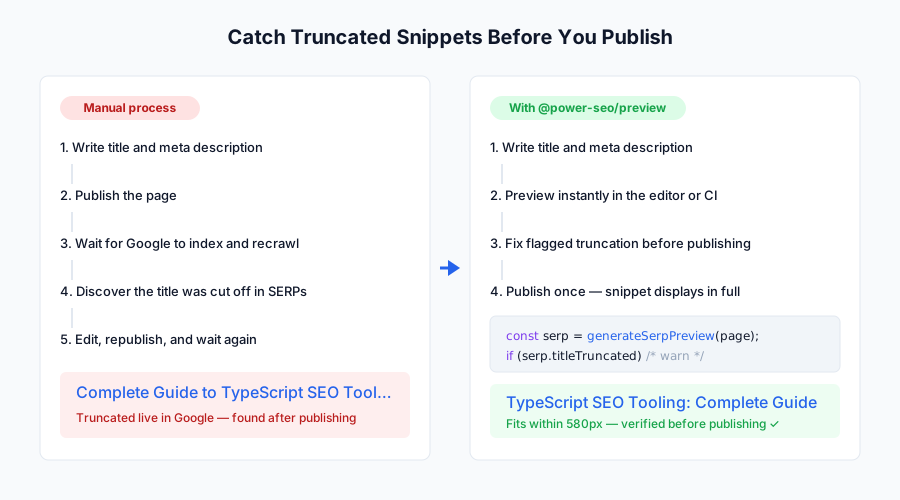
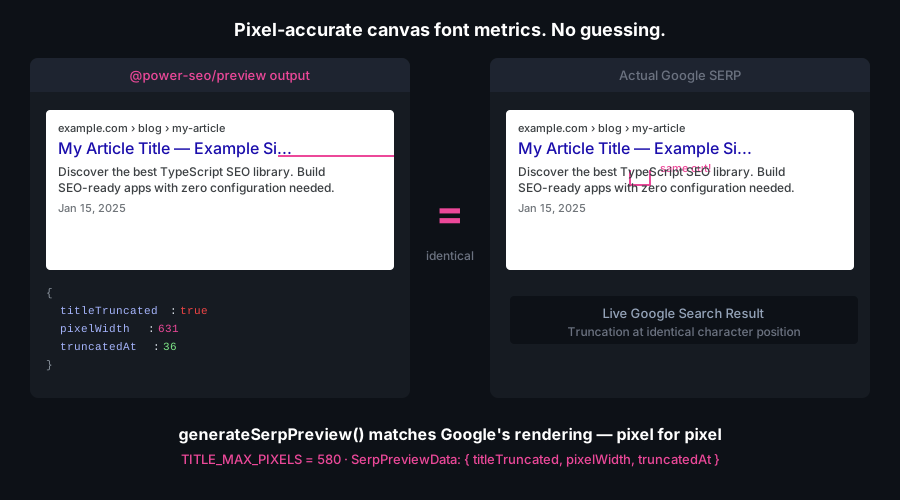
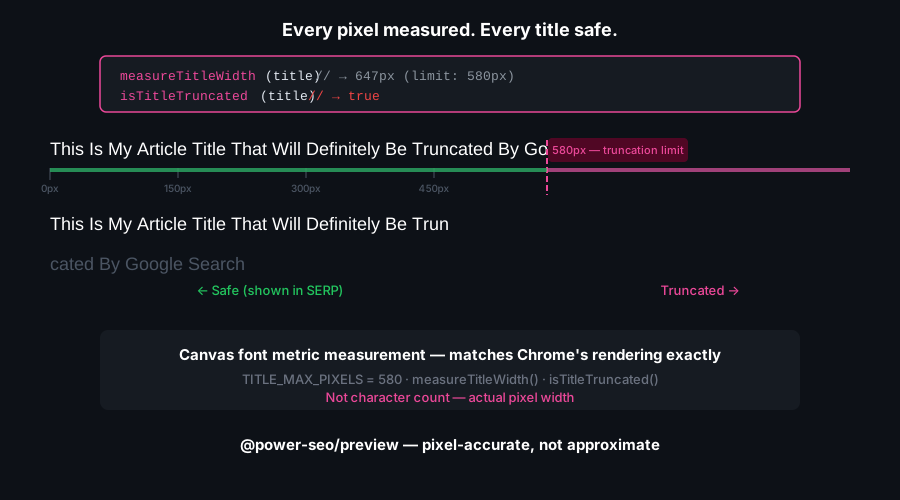
Character counting lies about search results. Google truncates titles and descriptions by rendered pixel width, so a 60-character title of narrow letters fits while a 55-character title of wide letters gets cut. This package uses per-character width tables to compute truncation the way Google actually does it, then validates your Open Graph and Twitter images against each platform's real dimension rules — all as pure computation with no browser in the loop.
| | Without | With @power-seo/preview |
| ---------------------- | ---------------------------------------- | -------------------------------------------------------------------- |
| SERP title truncation | Guesswork from character count | Pixel-accurate truncation at 580px |
| Description truncation | Unchecked, silently cut in results | Pixel-accurate truncation at 920px |
| OG image validation | Silent drop or crop by Facebook/LinkedIn | Dimension check with pass/fail and a recommended-size message |
| Twitter/X Card preview | Manual spec lookup per card type | summary + summary_large_image with image validation |
| Breadcrumb URL | Unknown until you publish | Google-style example.com › blog › post |
| React preview UI | Build the cards from scratch | Drop-in SerpPreview, OgPreview, TwitterPreview, PreviewPanel |
| Runtime | Browser-only SEO tools | Next.js, Remix, Node.js, Edge — any JS environment |
Features
- Pixel-accurate SERP truncation —
generateSerpPreview()truncates the title at 580px and the description at 920px using character-width lookup tables, not character counts - Site title composition — an optional
siteTitleis appended as"title - siteTitle"before truncation, matching Google's display format - Google breadcrumb URL — formats
https://example.com/blog/my-postasexample.com › blog › my-post, strippingwww.and query strings - Open Graph image validation —
generateOgPreview()flags images below the 200×200 minimum as invalid and warns when they deviate from the recommended 1200×630 - Twitter/X Card support —
generateTwitterPreview()validates images against per-card-type minimums (summary144×144,summary_large_image800×418) and extracts the@handledomain - Low-level truncation primitive —
truncateAtPixelWidth(text, maxPixels)truncates any string at any pixel budget, independent of the generators - Structured typed output — returns plain data objects ready for any renderer; no HTML, no DOM required
- React UI components — pre-built
SerpPreview,OgPreview,TwitterPreview, andPreviewPanelfrom the/reactsubpath - Tree-shakeable — import only the generators you use;
"sideEffects": false - Zero third-party runtime dependencies — pure computation, no canvas, no browser
Comparison
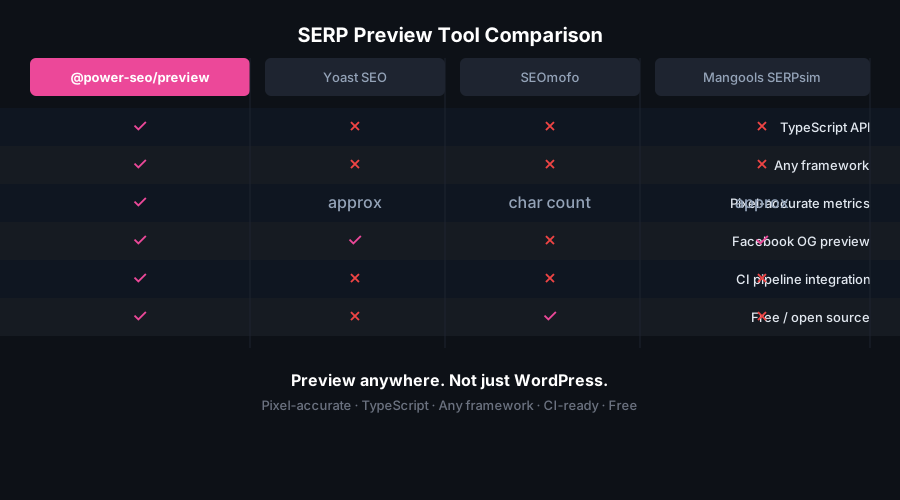
| Feature | @power-seo/preview | Yoast SEO | next-seo | react-helmet | seo-analyzer | | --------------------------------- | :----------------: | :---------------: | :------: | :----------: | :----------: | | Pixel-accurate SERP truncation | ✅ | ✅ (browser only) | ❌ | ❌ | ❌ | | Description pixel truncation | ✅ | ✅ (browser only) | ❌ | ❌ | ❌ | | Google breadcrumb URL format | ✅ | ✅ | ❌ | ❌ | ❌ | | Open Graph image validation | ✅ | ❌ | ❌ | ❌ | ❌ | | Twitter/X Card preview | ✅ | ❌ | ❌ | ❌ | ❌ | | React preview components | ✅ | ✅ | ❌ | ❌ | ❌ | | Works outside WordPress | ✅ | ❌ | ✅ | ✅ | ✅ | | Edge runtime safe | ✅ | ❌ | ✅ | ✅ | ❌ | | Structured data output (not HTML) | ✅ | ❌ | ❌ | ❌ | ❌ | | Tree-shakeable | ✅ | ❌ | Partial | ❌ | ❌ |
Installation
npm install @power-seo/previewyarn add @power-seo/previewpnpm add @power-seo/previewReact is an optional peer dependency (^18 || ^19) and only needed if you import from @power-seo/preview/react.
Usage
How do I generate a Google SERP preview?
Call generateSerpPreview(input) with a title, description, and url. It returns the display title (with pixel truncation applied at 580px), a breadcrumb displayUrl, the description truncated at 920px, boolean truncation flags, and full ValidationResult objects from @power-seo/core. Pass an optional siteTitle to append "title - siteTitle" before truncation, exactly as Google composes branded titles.
import { generateSerpPreview } from '@power-seo/preview';

const serp = generateSerpPreview({
  title: 'How to Add SEO to React Apps',
  description: 'Learn how to add meta tags, Open Graph, and JSON-LD to any React application.',
  url: 'https://example.com/blog/react-seo',
  siteTitle: 'My Blog', // optional — appended as "title - siteTitle"
});

serp.title; // 'How to Add SEO to React Apps - My Blog' (truncated at 580px if too long)
serp.displayUrl; // 'example.com › blog › react-seo'
serp.description; // display description (truncated at 920px if too long)
serp.titleTruncated; // false
serp.titleValidation; // { valid, severity, message, charCount?, pixelWidth? }
How do I validate an Open Graph image?
generateOgPreview(input) returns a structured card object for Facebook, LinkedIn, and other OG platforms. When you pass an image with width and height, it validates the dimensions: images smaller than 200×200 are marked valid: false, and images that pass the minimum but differ from the recommended 1200×630 stay valid: true with an advisory message. An exact 1200×630 image returns valid: true with no message.
import { generateOgPreview } from '@power-seo/preview';

const og = generateOgPreview({
  title: 'React SEO Guide',
  description: 'Complete guide to adding SEO in React apps.',
  url: 'https://example.com/react-seo',
  siteName: 'Dev Blog',
  image: { url: 'https://example.com/og.jpg', width: 1200, height: 630 },
});

og.image?.valid; // true
og.image?.message; // undefined (exact recommended size)

// A smaller-but-valid image gets an advisory message:
const small = generateOgPreview({
  title: 'React SEO Guide',
  description: 'Complete guide.',
  url: 'https://example.com/react-seo',
  image: { url: 'https://example.com/og.jpg', width: 800, height: 400 },
});

small.image?.valid; // true (above the 200x200 minimum)
small.image?.message; // 'Image is 800x400px. Recommended size is 1200x630px.'
How do I generate a Twitter/X Card preview?
generateTwitterPreview(input) handles both summary and summary_large_image card types, each with its own minimum image size. summary requires 144×144, summary_large_image requires 800×418; images below the minimum are flagged valid: false. The site handle ('@myblog') is stripped of its leading @ and returned as domain.
import { generateTwitterPreview } from '@power-seo/preview';

const twitter = generateTwitterPreview({
  cardType: 'summary_large_image',
  title: 'React SEO Guide',
  description: 'Everything you need to add SEO to any React application.',
  image: { url: 'https://example.com/twitter.jpg', width: 1200, height: 628 },
  site: '@myblog',
});

twitter.cardType; // 'summary_large_image'
twitter.domain; // 'myblog'
twitter.image?.valid; // true (1200x628 exceeds the 800x418 minimum)
How do I truncate a string at an exact pixel width?
truncateAtPixelWidth(text, maxPixels) is the standalone primitive the SERP generator builds on. It walks the string using Google's per-character width table (falling back to a 6.67px default for unlisted characters), appends ... when it overflows, and reports whether truncation happened. Use it for CTAs, ad copy, or any width-constrained UI label.
import { truncateAtPixelWidth } from '@power-seo/preview';

const result = truncateAtPixelWidth(
  'Buy Premium Running Shoes Online — Free Shipping Worldwide',
  580,
);

result.text; // 'Buy Premium Running Shoes Online — Free Shippi...'
result.truncated; // true
How do I render live preview cards in React?
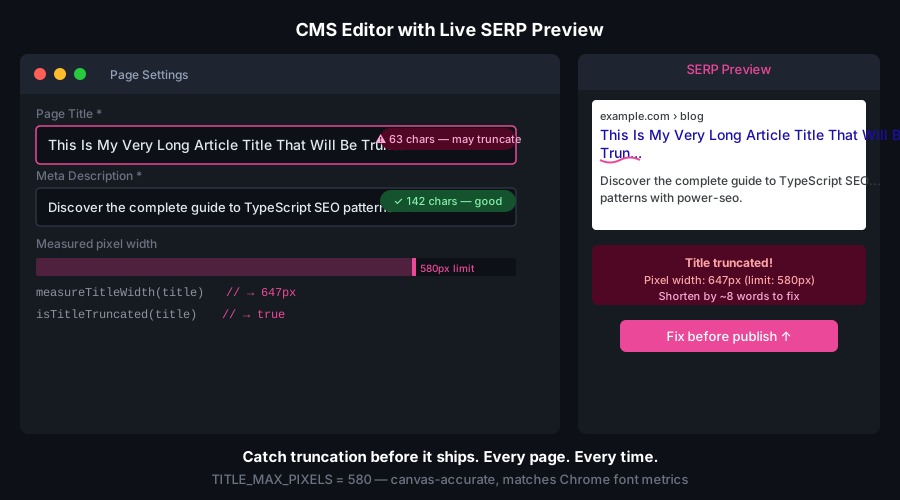
Import from the /react subpath. PreviewPanel renders a tabbed Google / Facebook / Twitter-X container in one component; SerpPreview, OgPreview, and TwitterPreview render each card individually. All are client-safe and recompute with useMemo as props change — ideal for a CMS editor sidebar.
import { SerpPreview, OgPreview, TwitterPreview, PreviewPanel } from '@power-seo/preview/react';

function EditorSidebar() {
  return (
    <PreviewPanel
      title="How to Add SEO to React Apps"
      description="Learn meta tags, Open Graph, and JSON-LD for React."
      url="https://example.com/blog/react-seo"
      siteTitle="My Blog"
      siteName="My Blog"
      image={{ url: 'https://example.com/og.jpg', width: 1200, height: 630 }}
      twitterCardType="summary_large_image"
      twitterSite="@myblog"
    />
  );
}

function SerpCard() {
  return (
    <SerpPreview
      title="How to Add SEO to React Apps"
      description="Learn meta tags, Open Graph, and JSON-LD for React."
      url="https://example.com/blog/react-seo"
      siteTitle="My Blog"
    />
  );
}
How do I fail a CI build on a truncated title or bad OG image?
Run the generators in a Node.js script and exit non-zero when a title truncates or an OG image is invalid. Because the package has no network access and no browser dependency, it runs in a bare CI runner in milliseconds.
import { generateSerpPreview, generateOgPreview } from '@power-seo/preview';

const serp = generateSerpPreview({ title, description, url, siteTitle });
const og = generateOgPreview({ title, description, url, image });

if (serp.titleTruncated) {
  console.error('SERP title exceeds 580px — it will be cut off in Google results');
  process.exit(1);
}

if (og.image && !og.image.valid) {
  console.error('OG image invalid:', og.image.message);
  process.exit(1);
}
API Reference
Entry points
| Import | Description |
| -------------------------- | ----------------------------------------------- |
| @power-seo/preview | Preview generators and the truncation primitive |
| @power-seo/preview/react | React components for preview UI |
generateSerpPreview(input)
function generateSerpPreview(input: SerpPreviewInput): SerpPreviewData;SerpPreviewInput
| Prop | Type | Required | Description |
| ------------- | -------- | :------: | -------------------------------------------------------------- |
| title | string | ✅ | Page title |
| description | string | ✅ | Meta description |
| url | string | ✅ | Canonical page URL |
| siteTitle | string | — | Site name, appended as "title - siteTitle" before truncation |
SerpPreviewData
| Field | Type | Description |
| ----------------------- | ------------------ | ---------------------------------------------------------- |
| title | string | Display title, truncated at 580px if needed |
| displayUrl | string | Breadcrumb path, e.g. example.com › blog › post |
| description | string | Display description, truncated at 920px if needed |
| titleTruncated | boolean | Whether the title was truncated |
| descriptionTruncated | boolean | Whether the description was truncated |
| titleValidation | ValidationResult | Title length/pixel validation from @power-seo/core |
| descriptionValidation | ValidationResult | Description length/pixel validation from @power-seo/core |
generateOgPreview(input)
function generateOgPreview(input: OgPreviewInput): OgPreviewData;OgPreviewInput
| Prop | Type | Required | Description |
| ------------- | -------------------------------------------------- | :------: | ------------------------------- |
| title | string | ✅ | OG title |
| description | string | ✅ | OG description |
| url | string | ✅ | Canonical URL |
| image | { url: string; width?: number; height?: number } | — | OG image (recommended 1200×630) |
| siteName | string | — | Site name displayed on the card |
OgPreviewData returns { title, description, url, siteName?, image? }, where image is an OgImageValidation.
OgImageValidation
| Field | Type | Description |
| --------- | --------- | ------------------------------------------------------------- |
| url | string | Image URL |
| width | number? | Image width in pixels |
| height | number? | Image height in pixels |
| valid | boolean | false below the 200×200 minimum; otherwise true |
| message | string? | Advisory when the image differs from the recommended 1200×630 |
generateTwitterPreview(input)
function generateTwitterPreview(input: TwitterPreviewInput): TwitterPreviewData;TwitterPreviewInput
| Prop | Type | Required | Description |
| ------------- | -------------------------------------------------- | :------: | -------------------------------------- |
| cardType | TwitterCardType | ✅ | 'summary' or 'summary_large_image' |
| title | string | ✅ | Card title |
| description | string | ✅ | Card description |
| image | { url: string; width?: number; height?: number } | — | Card image |
| site | string | — | Twitter/X @handle of the site |
TwitterPreviewData returns { cardType, title, description, image?, domain? }, where image is a TwitterImageValidation and domain is the site handle without its leading @.
TwitterImageValidation
| Field | Type | Description |
| --------- | --------- | ----------------------------------------------------------------- |
| url | string | Image URL |
| width | number? | Image width in pixels |
| height | number? | Image height in pixels |
| valid | boolean | false below the card minimum (summary 144×144, large 800×418) |
| message | string? | Advisory when the image is below the recommended minimum |
truncateAtPixelWidth(text, maxPixels)
function truncateAtPixelWidth(text: string, maxPixels: number): TruncateResult;Returns { text: string; truncated: boolean }. Appends ... (accounting for the ellipsis pixel cost) when the input exceeds maxPixels.
React components
Import from @power-seo/preview/react.
| Component | Props |
| ---------------- | ---------------------------------------------------------------------------------------------------------------------------------------- |
| SerpPreview | title, description, url, siteTitle? |
| OgPreview | title, description, url, image?, siteName? |
| TwitterPreview | cardType, title, description, image?, site? |
| PreviewPanel | title, description, url, image?, siteName?, siteTitle?, twitterSite?, twitterCardType? (default 'summary_large_image') |
Types
| Type | Description |
| ------------------------ | ---------------------------------------------------------------------------------- |
| SerpPreviewInput | Input shape for generateSerpPreview() |
| SerpPreviewData | Output shape from generateSerpPreview() |
| OgPreviewInput | Input shape for generateOgPreview() |
| OgPreviewData | Output shape from generateOgPreview() |
| OgImageValidation | Image validation result on OgPreviewData.image |
| TwitterPreviewInput | Input shape for generateTwitterPreview() |
| TwitterPreviewData | Output shape from generateTwitterPreview() |
| TwitterImageValidation | Image validation result on TwitterPreviewData.image |
| TruncateResult | Output shape from truncateAtPixelWidth() |
| TwitterCardType | 'summary' \| 'summary_large_image' \| 'app' \| 'player' (from @power-seo/core) |
| ValidationResult | Title/description validation result (from @power-seo/core) |
Use Cases
- CMS live preview panels — show authors the Google and social cards before publishing
- SEO auditing pipelines — detect truncated titles and invalid OG images at build time
- Programmatic SEO sites — validate auto-generated titles across thousands of pages at once
- Social media schedulers — check OG and Twitter image dimensions before queuing posts
- SaaS marketing dashboards — render SERP and social previews for every page in a project
- Blog platforms — live-preview the meta description as editors type
- eCommerce product pages — ensure product images meet OG and Twitter card requirements
- CI content quality gates — fail builds when titles truncate or images are too small
Architecture Overview
- Pure TypeScript — no compiled binary, no native modules, no canvas
- Character-width pixel model — truncation uses per-character width tables (with a
6.67pxdefault) matching Google's SERP font metrics, not character counts - Structured output — generators return plain data objects, so any renderer or serializer can consume them
- SSR compatible — safe in Next.js Server Components, Remix loaders, and Express handlers
- Edge runtime safe — no
fs, nocanvas, no Node-specific APIs; runs on Cloudflare Workers, Vercel Edge, and Deno - Tree-shakeable —
"sideEffects": falsewith a named export per generator - Dual ESM + CJS — ships both formats via tsup for any bundler or
require() - React optional — React is an optional peer dependency; the
/reactsubpath is only pulled in when you import it
Supply Chain Security
- Published to npm with provenance attestation — every release is built and signed by the verified
github.com/CyberCraftBD/power-seoGitHub Actions workflow, so you can trace each tarball back to its exact source commit - Zero third-party runtime dependencies — packages depend only on other
@power-seopackages, nothing else gets pulled in - No network access at runtime — pure computation on the inputs you pass; nothing is fetched, phoned home, or telemetered
- No install scripts (
postinstall,preinstall) - No
evalor dynamic code execution - Safe for SSR, Edge, and server environments
The @power-seo Ecosystem
All 17 packages are independently installable — use only what you need.
| Package | Install | Description |
| ------------------------------------------------------------------------------------------ | ----------------------------------- | ---------------------------------------------------------------------------------- |
| @power-seo/ai | npm i @power-seo/ai | LLM-agnostic prompt templates and response parsers for AI-assisted SEO |
| @power-seo/analytics | npm i @power-seo/analytics | Merge Search Console data with audit results — trends and ranking insights |
| @power-seo/audit | npm i @power-seo/audit | SEO site health auditing with meta, content, structure, and performance rules |
| @power-seo/content-analysis | npm i @power-seo/content-analysis | Yoast-style SEO content analysis engine with scoring, checks, and React components |
| @power-seo/core | npm i @power-seo/core | Framework-agnostic SEO analysis engines, types, validators, and utilities |
| @power-seo/images | npm i @power-seo/images | Image SEO analysis — alt text quality, lazy loading, formats, image sitemaps |
| @power-seo/integrations | npm i @power-seo/integrations | Semrush and Ahrefs API clients with a shared rate-limited HTTP client |
| @power-seo/links | npm i @power-seo/links | Internal link graph analysis — orphan detection, suggestions, equity scoring |
| @power-seo/meta | npm i @power-seo/meta | SSR meta tag helpers for Next.js App Router, Remix v2, and generic SSR |
| @power-seo/preview | npm i @power-seo/preview | SERP, Open Graph, and Twitter Card preview generators with React components |
| @power-seo/react | npm i @power-seo/react | React SEO components — meta tags, Open Graph, Twitter Card, breadcrumbs |
| @power-seo/readability | npm i @power-seo/readability | Readability scoring — Flesch-Kincaid, Gunning Fog, Coleman-Liau, ARI |
| @power-seo/redirects | npm i @power-seo/redirects | Redirect rule engine with Next.js, Remix, and Express adapters |
| @power-seo/schema | npm i @power-seo/schema | Type-safe JSON-LD structured data — 23 schema.org builders plus React components |
| @power-seo/search-console | npm i @power-seo/search-console | Google Search Console API client — OAuth2, service accounts, rate limiting, retry |
| @power-seo/sitemap | npm i @power-seo/sitemap | XML sitemap generation, streaming, and validation with image, video, news support |
| @power-seo/tracking | npm i @power-seo/tracking | Analytics script builders with consent management and React components |
Keywords
seo, serp preview, serp snippet, pixel truncation, title truncation, meta description truncation, open graph preview, og image validation, twitter card, x card, social preview, meta preview, seo tooling, nextjs seo, react seo, cms preview, edge runtime, typescript
About CyberCraft Bangladesh
CyberCraft Bangladesh is a Bangladesh-based enterprise-grade software development and Full Stack SEO service provider company specializing in ERP system development, AI-powered SaaS and business applications, full-stack SEO services, custom website development, and scalable eCommerce platforms. We design and develop intelligent, automation-driven SaaS and enterprise solutions that help startups, SMEs, NGOs, educational institutes, and large organizations streamline operations, enhance digital visibility, and accelerate growth through modern cloud-native technologies.




© 2026 CyberCraft Bangladesh · Released under the MIT License