
@power-seo/react
v1.0.17
Published
Framework-agnostic React SEO components — meta tags, Open Graph, Twitter Card, breadcrumbs, and more

Maintainers
 ccbd.dev
Readme
@power-seo/react






Declarative React SEO components for title templates, Open Graph, Twitter Cards, canonical URLs, robots directives, hreflang, and breadcrumbs with JSON-LD.
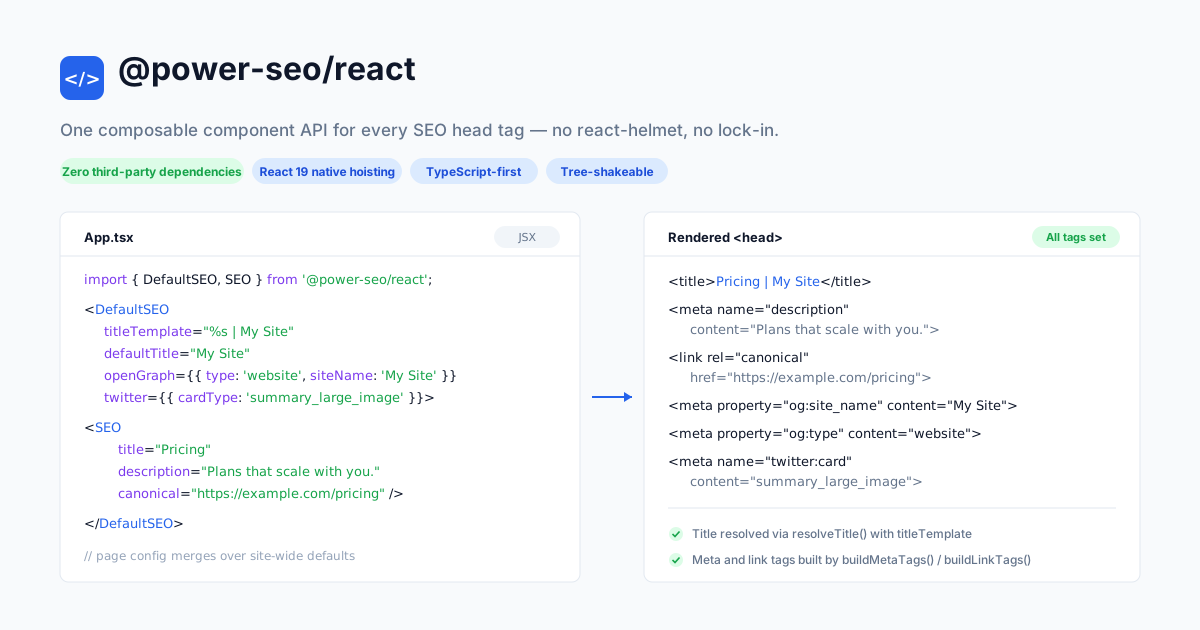
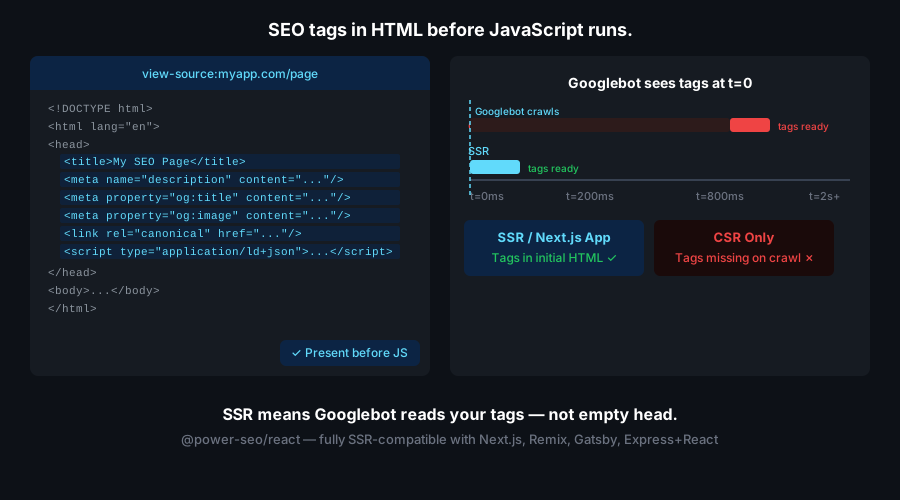
@power-seo/react is a set of typed React components that manage <head> SEO tags declaratively. It renders <title>, <meta>, and <link> elements directly to the DOM — with no react-helmet or react-helmet-async dependency — for teams building React SPAs, Vite, Gatsby, and Next.js Pages Router sites. Its only peers are react and @power-seo/core.
Why @power-seo/react?
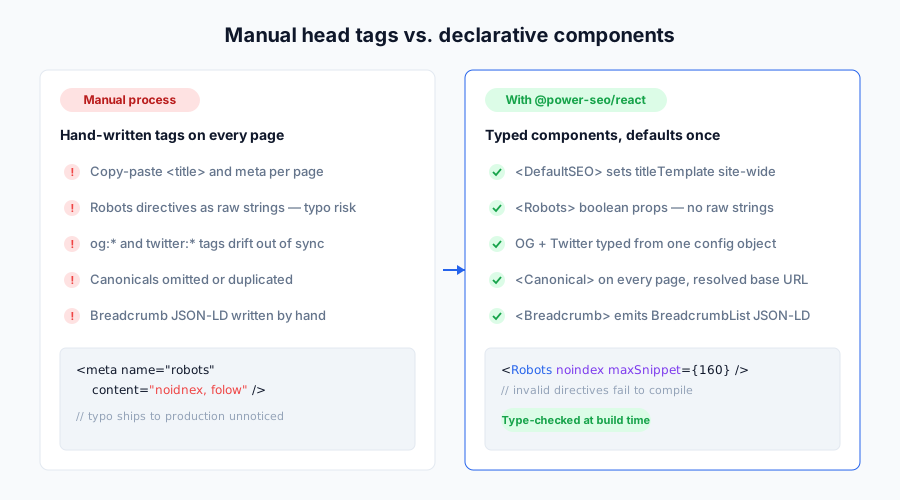
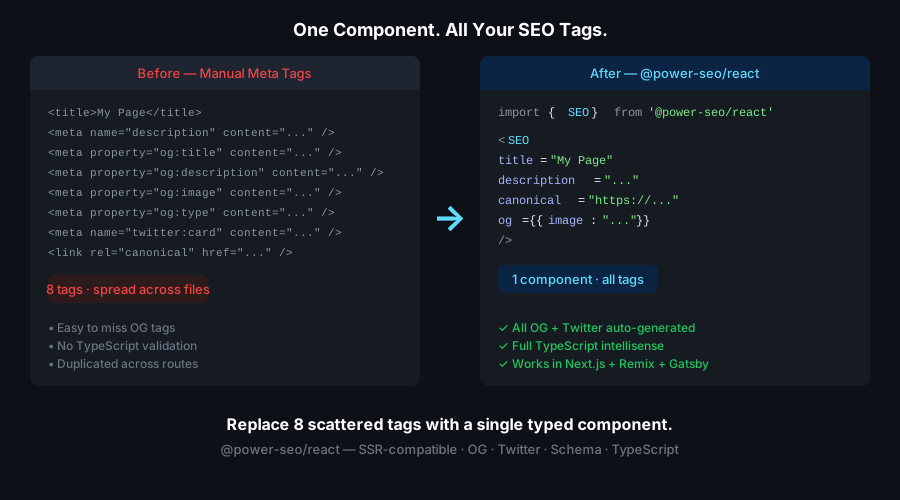
Hand-written meta tags drift out of sync page to page: a missing og:image here, a typo in a robots string there, a canonical URL that never got set. @power-seo/react replaces raw strings with typed props, so a wrong Open Graph type or an invalid robots directive is a compile error instead of a silent SEO regression in production.
| | Without | With |
| ----------------- | ----------------------------------- | ------------------------------------------------------ |
| Title management | Ad-hoc <title> tags per page | <DefaultSEO> enforces a site-wide title template |
| Open Graph | Missing or inconsistent og:* tags | Typed <OpenGraph> and <SEO openGraph={...}> |
| Twitter Cards | Hand-coded twitter:* strings | Typed <TwitterCard> with all four card types |
| Robots directives | Raw content strings with typos | Boolean and enum props — no raw string errors |
| Canonical URLs | Omitted or duplicated | <Canonical> and <SEO canonical={...}> |
| Hreflang | Manual <link> tags per locale | <Hreflang> renders all alternates plus x-default |
| Breadcrumbs | HTML nav only, no structured data | <Breadcrumb> renders nav plus BreadcrumbList JSON-LD |
| Framework support | Locked to next-seo or react-helmet | Next.js Pages Router, Vite, Gatsby, React 18/19 |
Features
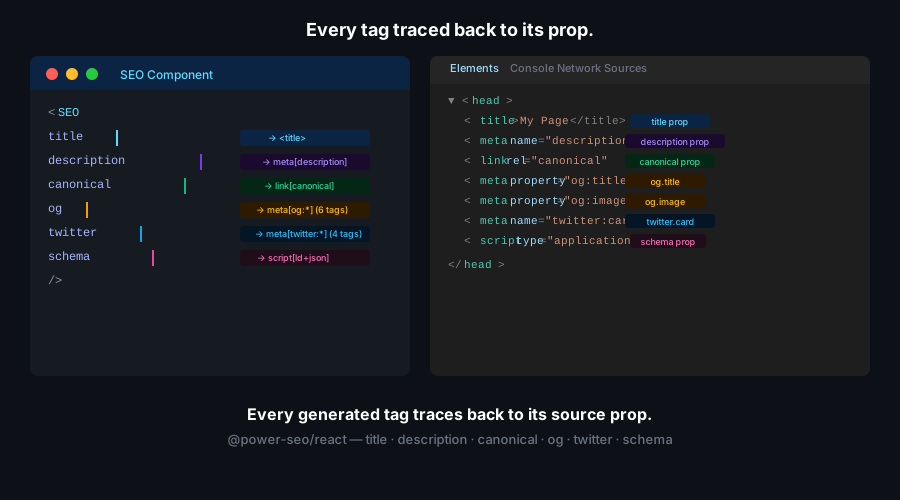
<SEO>all-in-one component — renders title, meta description, canonical, robots, Open Graph, and Twitter Card from a single component, merging against<DefaultSEO>context.<DefaultSEO>context-based defaults — set a site-wide title template, default OG image, and global robots directives at the app root; pages override selectively.<Robots>full directive support —index,follow,noarchive,nosnippet,noimageindex,notranslate,max-snippet,max-image-preview,max-video-preview, andunavailable_after.<OpenGraph>all OG properties —og:title,og:description,og:type,og:url, images with width/height/alt,og:site_name,og:locale, andog:article:*fields.<TwitterCard>all card types —summary,summary_large_image,app, andplayer, with site, creator, title, description, and image.<Canonical>link tag — renders<link rel="canonical">with optional base-URL resolution and trailing-slash control.<Hreflang>i18n alternate links — renders<link rel="alternate" hreflang="...">tags includingx-default.<Breadcrumb>with JSON-LD — renders visible breadcrumb navigation plus an embeddedapplication/ld+jsonBreadcrumbList script, XSS-escaped viaserializeJsonLd.renderMetaTags/renderLinkTagsutilities — convert@power-seo/coretag arrays into React elements.- React 19 native hoisting —
<title>,<meta>, and<link>tags hoist to<head>automatically in React 19; wrap with a framework Head component in React 18. - TypeScript-first — full
.d.tsdeclarations; every prop is typed. - Tree-shakeable —
"sideEffects": falsewith named exports per component.
Comparison
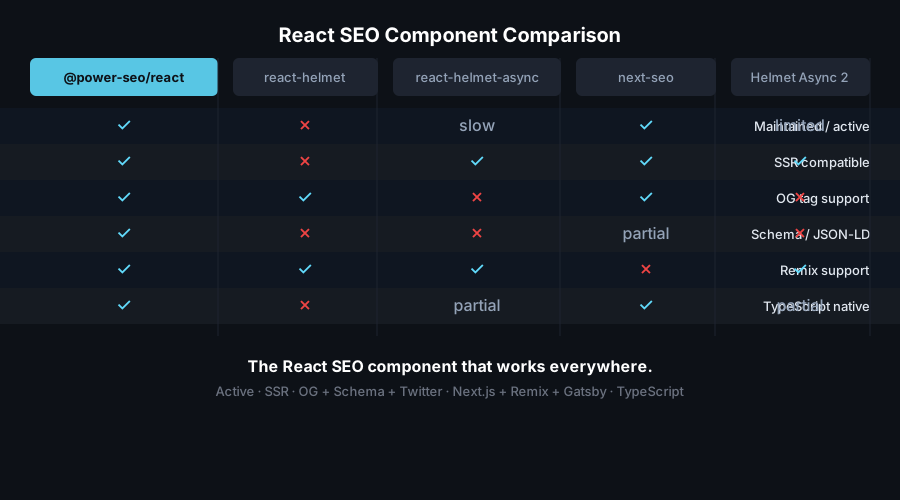
| Feature | @power-seo/react | next-seo | react-helmet | react-helmet-async |
| ----------------------------------- | :--------------: | :------: | :----------: | :----------------: |
| Typed robots directives | ✅ | ✅ | ❌ | ❌ |
| DefaultSEO context pattern | ✅ | ✅ | ❌ | ❌ |
| Hreflang support | ✅ | ✅ | ❌ | ❌ |
| Breadcrumb with JSON-LD | ✅ | ✅ | ❌ | ❌ |
| max-snippet / max-image-preview | ✅ | ✅ | ❌ | ❌ |
| No third-party runtime deps | ✅ | ❌ | ❌ | ❌ |
| React 19 native head hoisting | ✅ | ❌ | ❌ | ❌ |
| TypeScript-first API | ✅ | ✅ | ⚠️ | ⚠️ |
| Tree-shakeable | ✅ | Partial | ❌ | ❌ |
| Works in Vite / Gatsby / SPAs | ✅ | ❌ | ✅ | ✅ |
Installation
npm install @power-seo/react @power-seo/coreyarn add @power-seo/react @power-seo/corepnpm add @power-seo/react @power-seo/corereact and react-dom are peer dependencies (^18.0.0 || ^19.0.0). Node >=18 is required.
Usage
How do I set site-wide SEO defaults in React?
Place <DefaultSEO> once at your app root. It stores the config in React context so every nested <SEO> component merges against it, and it also renders the default <title> and meta tags itself. Set the title template, a default OG image, and global Twitter defaults once; individual pages only override the props that differ.
import { DefaultSEO } from '@power-seo/react';

function App({ children }) {
  return (
    <DefaultSEO
      titleTemplate="%s | Acme Corp"
      defaultTitle="Acme Corp"
      description="Enterprise software built for scale."
      openGraph={{
        type: 'website',
        siteName: 'Acme Corp',
        images: [{ url: 'https://acme.com/og-default.jpg', width: 1200, height: 630 }],
      }}
      twitter={{ site: '@acmecorp', cardType: 'summary_large_image' }}
    >
      {children}
    </DefaultSEO>
  );
}
How do I set per-page SEO in React?
Render <SEO> inside any page. It reads the <DefaultSEO> context and merges the two configs — page props win, and titleTemplate is inherited. Given a page title of "Wireless Router" and the template above, the resolved <title> is Wireless Router | Acme Corp. Only provide the props that differ from the site defaults.
import { SEO } from '@power-seo/react';

function ProductPage({ product }) {
  return (
    <>
      <SEO
        title={product.name}
        description={product.summary}
        canonical={`https://acme.com/products/${product.slug}`}
        openGraph={{
          type: 'website',
          images: [{ url: product.image, width: 1200, height: 630, alt: product.name }],
        }}
      />
      <main>{/* page content */}</main>
    </>
  );
}
How do I add robots directives to a page?
Use the <Robots> component, or pass a robots object (or the noindex / nofollow shorthands) to <SEO>. Props map directly to directive tokens and are joined in a fixed order: index/follow first, then flags, then max-*, then unavailable_after.
import { Robots } from '@power-seo/react';

// Noindex a staging page
<Robots index={false} follow={true} />
// → <meta name="robots" content="noindex, follow" />

// Advanced directives
<Robots
  index={true}
  follow={true}
  maxSnippet={150}
  maxImagePreview="large"
  unavailableAfter="2026-12-31T00:00:00Z"
/>
// → <meta name="robots" content="index, follow, max-snippet:150, max-image-preview:large, unavailable_after:2026-12-31T00:00:00Z" />
Need the raw string outside a component? Use buildRobotsContent from @power-seo/core:
import { buildRobotsContent } from '@power-seo/core';

buildRobotsContent({ index: false, follow: true, maxSnippet: 150 });
// → "noindex, follow, max-snippet:150"
How do I render Open Graph tags in React?
Use <OpenGraph> for standalone og:* tags, or pass an openGraph object to <SEO>. Article metadata (publishedTime, authors, tags) maps to og:article:* tags automatically.
import { OpenGraph } from '@power-seo/react';

<OpenGraph
  type="article"
  title="How to Build a React SEO Pipeline"
  description="A step-by-step guide to SEO in React applications."
  url="https://example.com/blog/react-seo"
  images={[
    { url: 'https://example.com/react-seo-og.jpg', width: 1200, height: 630, alt: 'React SEO' },
  ]}
  article={{
    publishedTime: '2026-01-15T00:00:00Z',
    authors: ['https://example.com/author/jane'],
    tags: ['react', 'seo', 'typescript'],
  }}
/>;
How do I add Twitter/X Card tags?
Use <TwitterCard> standalone, or pass a twitter object to <SEO>. The card variant is set via cardType (not card).
import { TwitterCard } from '@power-seo/react';

<TwitterCard
  cardType="summary_large_image"
  site="@mysite"
  creator="@author"
  title="How to Build a React SEO Pipeline"
  description="A step-by-step guide to SEO in React applications."
  image="https://example.com/twitter-card.jpg"
  imageAlt="React SEO guide"
/>;
Canonical URLs
import { Canonical } from '@power-seo/react';

// Absolute URL
<Canonical url="https://example.com/blog/react-seo" />

// Resolve a relative path against a base URL
<Canonical url="/blog/react-seo" baseUrl="https://example.com" />
Hreflang for multi-language sites
Each alternate is { hrefLang, href }. Pass xDefault to emit an x-default link tag.
import { Hreflang } from '@power-seo/react';

<Hreflang
  alternates={[
    { hrefLang: 'en', href: 'https://example.com/en/page' },
    { hrefLang: 'fr', href: 'https://example.com/fr/page' },
    { hrefLang: 'de', href: 'https://example.com/de/page' },
  ]}
  xDefault="https://example.com/en/page"
/>;
Breadcrumb navigation with JSON-LD
<Breadcrumb> renders a visible <nav><ol> element and, by default, an embedded application/ld+json BreadcrumbList script for Google rich results. Labels are serialized through the XSS-safe serializeJsonLd, so a value like </script> cannot break out of the tag.
import { Breadcrumb } from '@power-seo/react';

<Breadcrumb
  items={[{ name: 'Home', url: '/' }, { name: 'Blog', url: '/blog' }, { name: 'React SEO Guide' }]}
  separator=" › "
  className="breadcrumb-nav"
  linkClassName="breadcrumb-link"
  activeClassName="breadcrumb-active"
  includeJsonLd={true}
/>;
The last item is rendered as the current page (aria-current="page") with no link, even if it has a url.
Noindexing an entire environment
Apply robots defaults at the root and every page inherits them.
<DefaultSEO robots={{ index: false, follow: false }} defaultTitle="Staging">
  {children}
</DefaultSEO>
Rendering tag arrays from @power-seo/core
If you build MetaTag[] / LinkTag[] arrays with core utilities directly, convert them to React elements with these helpers.
import { buildMetaTags, buildLinkTags } from '@power-seo/core';
import { renderMetaTags, renderLinkTags } from '@power-seo/react';

const metaTags = buildMetaTags({ description: 'My page', noindex: true });
const linkTags = buildLinkTags({ canonical: 'https://example.com/page' });

return (
  <>
    {renderMetaTags(metaTags)}
    {renderLinkTags(linkTags)}
  </>
);
API Reference
Components
| Component | Description |
| --------------- | -------------------------------------------------------------------------------------------------------------- |
| <DefaultSEO> | App-root defaults — title template, global OG, global Twitter, global robots; provides SEO context to children |
| <SEO> | All-in-one per-page component — title, description, canonical, robots, OG, Twitter — merged against context |
| <Robots> | Renders <meta name="robots"> from a RobotsDirective; renders nothing if the content string is empty |
| <OpenGraph> | Renders Open Graph og:* meta tags |
| <TwitterCard> | Renders Twitter Card twitter:* meta tags |
| <Canonical> | Renders <link rel="canonical"> |
| <Hreflang> | Renders <link rel="alternate" hreflang="..."> tags plus optional x-default |
| <Breadcrumb> | Renders breadcrumb nav plus embedded BreadcrumbList JSON-LD |
SEO / DefaultSEO props (SEOConfig)
<SEO> and <DefaultSEO> share the same SEOConfig prop shape; <DefaultSEO> additionally accepts children.
| Prop | Type | Default | Description |
| -------------------- | ------------------- | ------- | -------------------------------------------------------------- |
| title | string | — | Page title; substituted into titleTemplate when both are set |
| titleTemplate | string | — | Template string; every %s is replaced by title |
| defaultTitle | string | — | Fallback title used when no title is provided |
| description | string | — | Meta description |
| canonical | string | — | Canonical URL |
| noindex | boolean | false | Shorthand for robots.index = false |
| nofollow | boolean | false | Shorthand for robots.follow = false |
| robots | RobotsDirective | — | Robots directive object |
| openGraph | OpenGraphConfig | — | Open Graph configuration |
| twitter | TwitterCardConfig | — | Twitter Card configuration |
| additionalMetaTags | MetaTag[] | — | Extra custom meta tags, appended after generated ones |
| additionalLinkTags | LinkTag[] | — | Extra custom link tags, appended after generated ones |
| languageAlternates | HreflangConfig[] | — | Hreflang entries for i18n |
| children | ReactNode | — | (<DefaultSEO> only) subtree that inherits the SEO context |
Robots props (RobotsDirective)
| Prop | Type | Default | Description |
| ------------------ | --------------------------------- | ------- | ------------------------------------------------------- |
| index | boolean | — | true → index, false → noindex |
| follow | boolean | — | true → follow, false → nofollow |
| noarchive | boolean | false | Prevent a cached version in search results |
| nosnippet | boolean | false | Prevent text/video snippets in results |
| noimageindex | boolean | false | Prevent image indexing on this page |
| notranslate | boolean | false | Prevent a Google Translate offer |
| maxSnippet | number | — | Max text-snippet length, e.g. 150 |
| maxImagePreview | 'none' \| 'standard' \| 'large' | — | Max image-preview size in results |
| maxVideoPreview | number | — | Max video-preview duration in seconds |
| unavailableAfter | string | — | ISO 8601 date after which to drop the page from results |
Canonical props
| Prop | Type | Default | Description |
| --------------- | --------- | ------- | --------------------------------------------------------------- |
| url | string | — | Required. Canonical URL (absolute or relative to baseUrl) |
| baseUrl | string | — | Base URL used to resolve a relative url |
| trailingSlash | boolean | false | Append a trailing slash to the resolved URL |
Hreflang props
| Prop | Type | Default | Description |
| ------------ | ------------------ | ------- | ----------------------------------------------------------- |
| alternates | HreflangConfig[] | — | Required. Array of { hrefLang: string; href: string } |
| xDefault | string | — | URL for the x-default alternate link tag |
Breadcrumb props
| Prop | Type | Default | Description |
| ----------------- | ------------------ | ------- | ------------------------------------------------------- |
| items | BreadcrumbItem[] | — | Required. Array of { name: string; url?: string } |
| separator | string | ' / ' | Visual separator rendered between items |
| className | string | — | CSS class for the outer <nav> element |
| linkClassName | string | — | CSS class for each <a> link element |
| activeClassName | string | — | CSS class for the last (current) item |
| includeJsonLd | boolean | true | Whether to render the BreadcrumbList JSON-LD script |
Utilities and hooks
| Export | Signature | Description |
| ---------------- | ----------------------------------- | ------------------------------------------------------------------ |
| renderMetaTags | (tags: MetaTag[]) => ReactElement | Convert a core MetaTag[] array into a Fragment of <meta> tags |
| renderLinkTags | (tags: LinkTag[]) => ReactElement | Convert a core LinkTag[] array into a Fragment of <link> tags |
| useDefaultSEO | () => SEOConfig \| null | Read the current DefaultSEO config from context (null if none) |
| SEOContext | React.Context<SEOConfig \| null> | The underlying context used by DefaultSEO and useDefaultSEO |
Types
| Type | Description |
| ------------------ | ------------------------------------------------------------ |
| SEOProps | Alias of SEOConfig from @power-seo/core |
| DefaultSEOProps | SEOConfig & { children?: ReactNode } |
| RobotsProps | Alias of RobotsDirective from @power-seo/core |
| OpenGraphProps | Alias of OpenGraphConfig from @power-seo/core |
| TwitterCardProps | Alias of TwitterCardConfig from @power-seo/core |
| CanonicalProps | { url: string; baseUrl?: string; trailingSlash?: boolean } |
| HreflangProps | { alternates: HreflangConfig[]; xDefault?: string } |
| BreadcrumbProps | See the Breadcrumb props table above |
| BreadcrumbItem | { name: string; url?: string } |
Use Cases
- Next.js Pages Router sites — per-page SEO with site-wide defaults set once in
_app.tsx. - Vite and React SPAs — manage head tags in single-page apps without a full meta framework.
- Gatsby sites — declarative SEO components alongside Gatsby's static rendering.
- SaaS marketing sites — consistent OG cards and title templates across every landing page.
- Blog platforms — article Open Graph with
og:article:publishedTime, authors, and tags. - E-commerce listings — product canonical URLs and Twitter Cards at scale.
- Multi-language sites — hreflang alternate-link management across locale variants.
- Staging environments —
noindexan entire environment with a single<DefaultSEO robots={{ index: false }} />.
For Next.js App Router projects, use @power-seo/meta instead — it targets the App Router metadata API rather than the DOM.
Architecture Overview
- Pure React — no compiled binary, no native modules, no third-party head-management library.
- DOM-targeting render — components emit
<title>,<meta>,<link>, and<script>elements; they do not depend onreact-helmetorreact-helmet-async. - React 19 native hoisting — these elements hoist to
<head>automatically in React 19; in React 18, wrap them with a framework Head component. - Context-based defaults —
<DefaultSEO>usesReact.createContext, so defaults flow through the tree without prop drilling;<SEO>merges page props over context props. - XSS-safe JSON-LD —
<Breadcrumb>serializes structured data throughserializeJsonLd, escaping<,>, and&. - Dual ESM + CJS — ships both formats via tsup for any bundler or
require()usage. - Tree-shakeable —
"sideEffects": falsewith named per-component exports.
Supply Chain Security
- Published to npm with provenance attestation — every release is built and signed by the verified
github.com/CyberCraftBD/power-seoGitHub Actions workflow, so you can trace each tarball back to its exact source commit - Zero third-party runtime dependencies — packages depend only on other
@power-seopackages, nothing else gets pulled in - No network access at runtime — pure computation on the inputs you pass; nothing is fetched, phoned home, or telemetered
- No install scripts (
postinstall,preinstall) - No
evalor dynamic code execution - Safe for SSR, Edge, and server environments
The @power-seo Ecosystem
All 17 packages are independently installable — use only what you need.
| Package | Install | Description |
| ------------------------------------------------------------------------------------------ | ----------------------------------- | ---------------------------------------------------------------------------------- |
| @power-seo/ai | npm i @power-seo/ai | LLM-agnostic prompt templates and response parsers for AI-assisted SEO |
| @power-seo/analytics | npm i @power-seo/analytics | Merge Search Console data with audit results — trends and ranking insights |
| @power-seo/audit | npm i @power-seo/audit | SEO site health auditing with meta, content, structure, and performance rules |
| @power-seo/content-analysis | npm i @power-seo/content-analysis | Yoast-style SEO content analysis engine with scoring, checks, and React components |
| @power-seo/core | npm i @power-seo/core | Framework-agnostic SEO analysis engines, types, validators, and utilities |
| @power-seo/images | npm i @power-seo/images | Image SEO analysis — alt text quality, lazy loading, formats, image sitemaps |
| @power-seo/integrations | npm i @power-seo/integrations | Semrush and Ahrefs API clients with a shared rate-limited HTTP client |
| @power-seo/links | npm i @power-seo/links | Internal link graph analysis — orphan detection, suggestions, equity scoring |
| @power-seo/meta | npm i @power-seo/meta | SSR meta tag helpers for Next.js App Router, Remix v2, and generic SSR |
| @power-seo/preview | npm i @power-seo/preview | SERP, Open Graph, and Twitter Card preview generators with React components |
| @power-seo/react | npm i @power-seo/react | React SEO components — meta tags, Open Graph, Twitter Card, breadcrumbs |
| @power-seo/readability | npm i @power-seo/readability | Readability scoring — Flesch-Kincaid, Gunning Fog, Coleman-Liau, ARI |
| @power-seo/redirects | npm i @power-seo/redirects | Redirect rule engine with Next.js, Remix, and Express adapters |
| @power-seo/schema | npm i @power-seo/schema | Type-safe JSON-LD structured data — 23 schema.org builders plus React components |
| @power-seo/search-console | npm i @power-seo/search-console | Google Search Console API client — OAuth2, service accounts, rate limiting, retry |
| @power-seo/sitemap | npm i @power-seo/sitemap | XML sitemap generation, streaming, and validation with image, video, news support |
| @power-seo/tracking | npm i @power-seo/tracking | Analytics script builders with consent management and React components |
Keywords
react-seo, react meta tags, open graph react, twitter card react, react-helmet alternative, canonical url react, robots meta react, hreflang react, breadcrumb jsonld, declarative seo, react head, next.js pages router seo, vite seo, gatsby seo, react 19, typescript, noindex, structured data, seo components, @power-seo
About CyberCraft Bangladesh
CyberCraft Bangladesh is a Bangladesh-based enterprise-grade software development and Full Stack SEO service provider company specializing in ERP system development, AI-powered SaaS and business applications, full-stack SEO services, custom website development, and scalable eCommerce platforms. We design and develop intelligent, automation-driven SaaS and enterprise solutions that help startups, SMEs, NGOs, educational institutes, and large organizations streamline operations, enhance digital visibility, and accelerate growth through modern cloud-native technologies.




© 2026 CyberCraft Bangladesh · Released under the MIT License