
@power-seo/readability
v1.0.19
Published
Readability scoring algorithms (Flesch-Kincaid, Gunning Fog, Coleman-Liau, ARI) with configurable thresholds

Maintainers
 ccbd.dev
Readme
@power-seo/readability






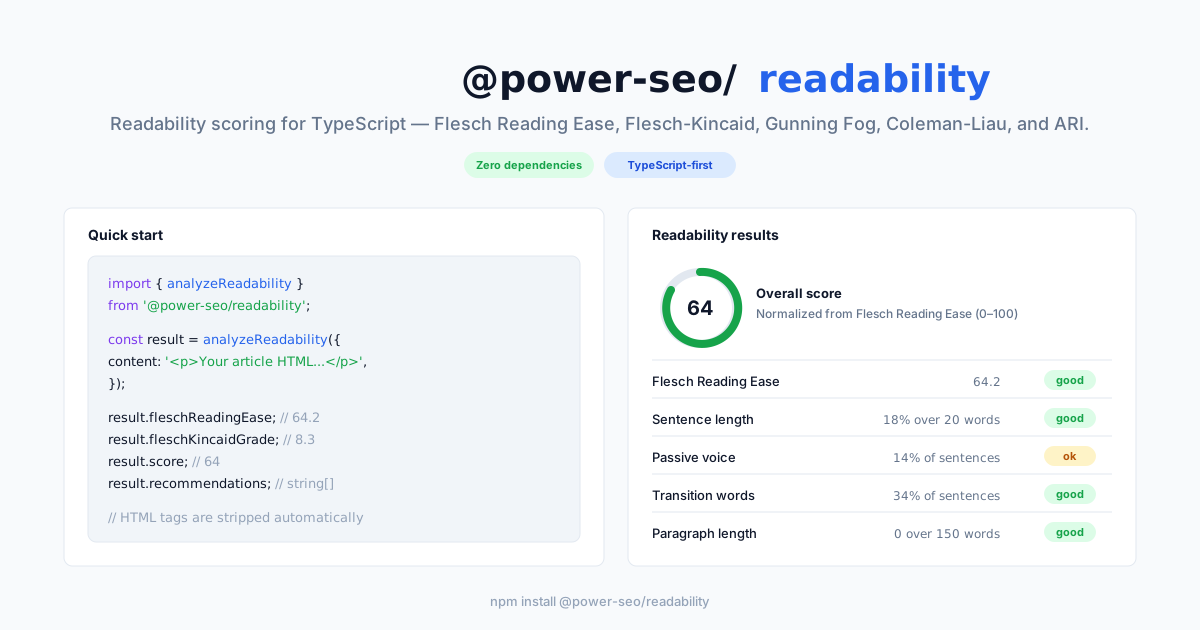
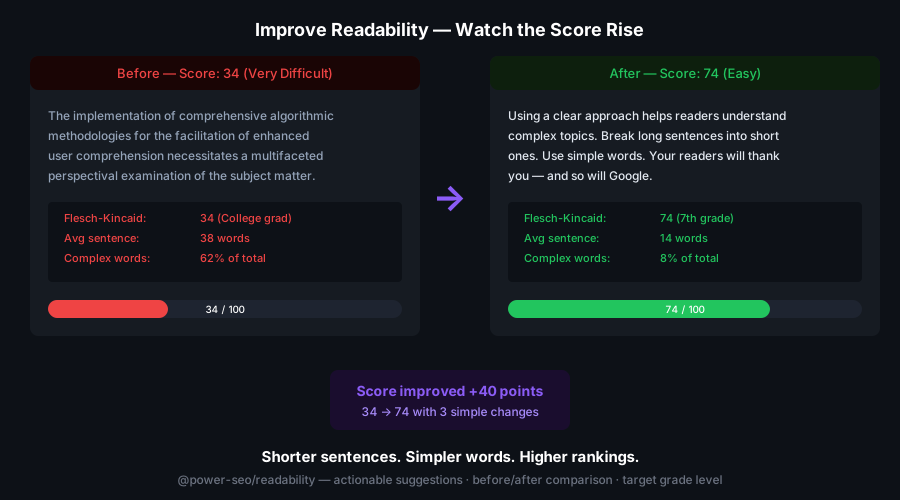
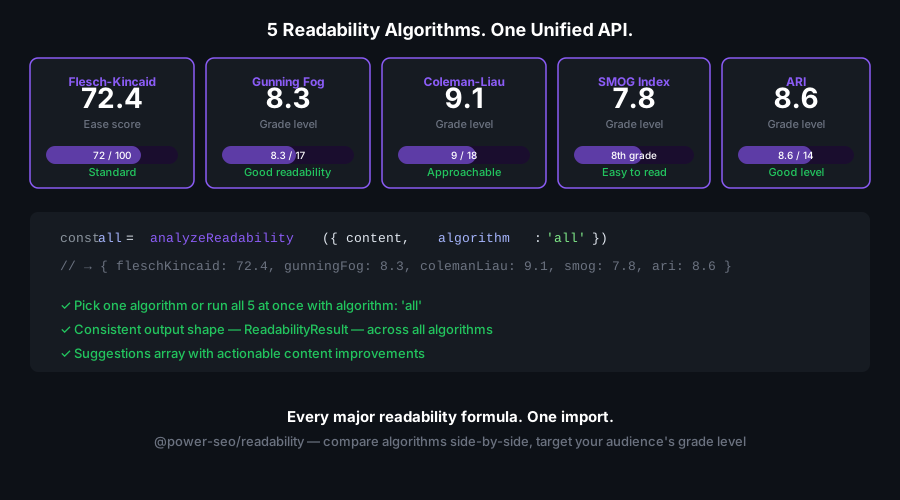
Readability scoring for TypeScript — Flesch Reading Ease, Flesch-Kincaid Grade, Gunning Fog, Coleman-Liau, and ARI plus a full content-quality analysis in one zero-dependency library.
@power-seo/readability is a zero-dependency TypeScript library that scores the readability of any text or HTML string. It computes five industry-standard readability formulas and runs a combined content analysis — passive voice, long sentences, transition words, paragraph length, and repetitive sentence openings — returning typed results with 'good' | 'ok' | 'poor' status labels and actionable recommendations. Run it server-side in a CMS pipeline, in a React editor, or inside a CI content-quality gate.
Why @power-seo/readability?
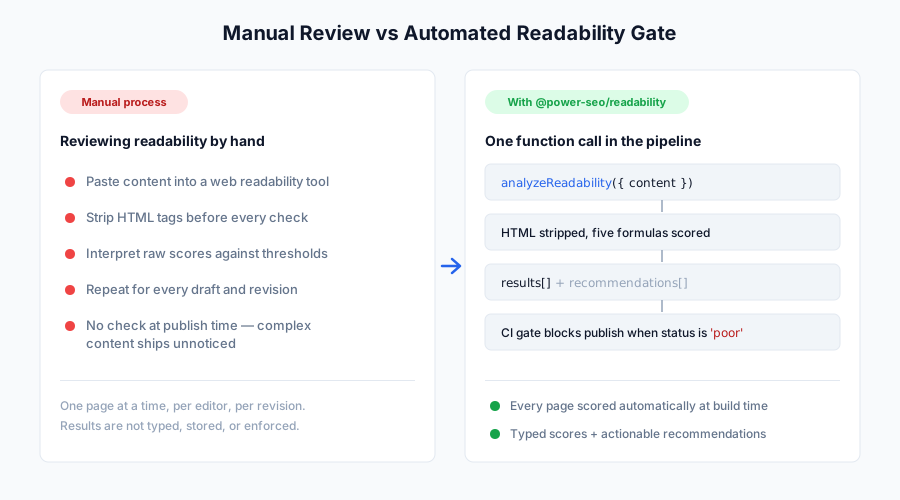
Most readability packages give you one raw number and leave interpretation to you. @power-seo/readability runs five formulas plus a structured content analysis, applies calibrated thresholds from a shared constant table, and returns per-check status labels and plain-English recommendations you can surface directly in an editor UI or fail a build on.
| | Without | With |
| -------------------- | ---------------------------------------------- | ------------------------------------------------------------------------------------ |
| Algorithm coverage | ❌ One-off Flesch score, no other formulas | ✅ Five formulas — Flesch Ease, Flesch-Kincaid, Gunning Fog, Coleman-Liau, ARI |
| Content analysis | ❌ Score only, no writing feedback | ✅ Passive voice, long sentences, transitions, paragraph length, repetitive openings |
| Status labels | ❌ Raw numbers — interpret thresholds manually | ✅ 'good' \| 'ok' \| 'poor' per check with a human-readable description |
| Recommendations | ❌ None | ✅ recommendations: string[] of concrete rewrite suggestions |
| HTML input | ❌ Must strip HTML before calling | ✅ HTML tags stripped automatically before scoring |
| CI integration | ❌ Manual threshold checks | ✅ Inspect results[].status or the score to fail builds |
| TypeScript | ❌ Untyped result objects | ✅ Full type inference for all inputs and outputs |
| Runtime dependencies | ❌ Pulls in NLP libraries | ✅ Zero third-party runtime dependencies |
Features
- Flesch Reading Ease — 0–100 score; higher = easier;
analyzeReadabilitygrades ≥ 60 asgood, ≥ 30 asok, below 30 aspoor - Flesch-Kincaid Grade Level — maps content to a US school grade level (e.g. 8.0 = 8th grade)
- Gunning Fog Index — grade estimate from complex-word (3+ syllable) density, excluding common inflected forms
- Coleman-Liau Index — character-based grade estimate; no syllable counting required
- Automated Readability Index (ARI) — grade estimate from character and word counts
- Combined
analyzeReadability()— one call returns both Flesch scores plus a full content analysis with per-check results and recommendations - Content-quality checks — passive voice %, long-sentence %, long-paragraph count, transition-word %, and consecutive-sentence groups
- Status labels — every check maps to
'good' | 'ok' | 'poor'with a description string - HTML stripping — HTML tags are removed automatically before scoring; no preprocessing required
- Zero runtime dependencies — depends only on
@power-seo/core; no NLP libraries - Tree-shakeable — import only the algorithm functions you need;
"sideEffects": false - Dual ESM + CJS — ships both formats for any bundler or
require()usage
Comparison
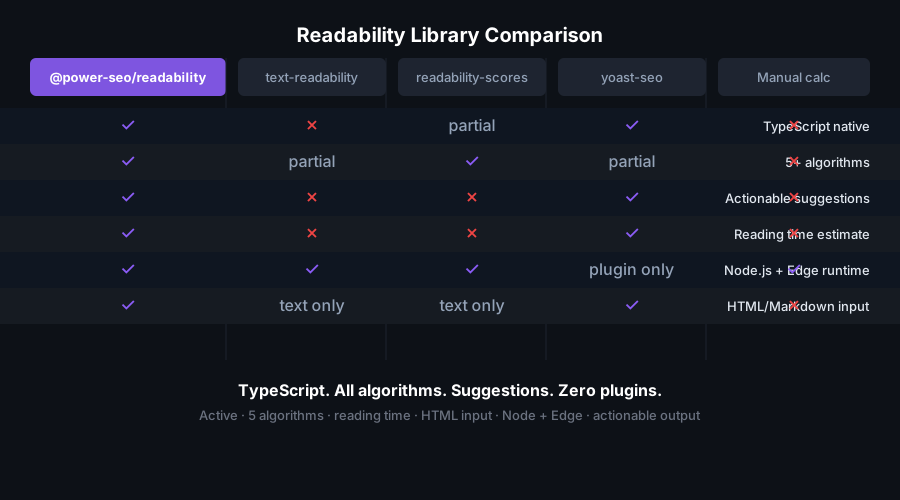
| Feature | @power-seo/readability | text-readability | readability-scores | flesch | | ------------------------------------- | :--------------------: | :--------------: | :----------------: | :----: | | Flesch Reading Ease | ✅ | ✅ | ✅ | ✅ | | Flesch-Kincaid Grade | ✅ | ✅ | ✅ | ❌ | | Gunning Fog Index | ✅ | ✅ | ✅ | ❌ | | Coleman-Liau Index | ✅ | ✅ | ✅ | ❌ | | Automated Readability Index | ✅ | ✅ | ✅ | ❌ | | Passive voice / writing analysis | ✅ | ❌ | ❌ | ❌ | | Status labels (good/ok/poor) | ✅ | ❌ | ❌ | ❌ | | Actionable recommendations | ✅ | ❌ | ❌ | ❌ | | HTML auto-stripping | ✅ | ❌ | ❌ | ❌ | | TypeScript-first with full types | ✅ | ❌ | ❌ | ✅ | | Zero third-party runtime dependencies | ✅ | ✅ | ✅ | ✅ | | Tree-shakeable individual functions | ✅ | ❌ | ❌ | ✅ |
Installation
npm install @power-seo/readabilityyarn add @power-seo/readabilitypnpm add @power-seo/readabilityUsage
How do I score content readability in one call?
Call analyzeReadability({ content }) with plain text or an HTML string. It strips HTML, computes the Flesch Reading Ease and Flesch-Kincaid Grade, and runs the full content analysis. The return is a flat ReadabilityOutput object: a normalized score (the rounded Flesch Ease), the two Flesch numbers, writing metrics, a results array of per-check statuses, and a recommendations array of rewrite suggestions.
import { analyzeReadability } from '@power-seo/readability';

const result = analyzeReadability({
  content:
    '<p>Search engine optimization improves web pages so they rank higher in search results. Good content uses clear sentences and relevant keywords.</p>',
});

console.log(result.score); // 0–100 (rounded Flesch Reading Ease)
console.log(result.fleschReadingEase); // e.g. 58.4
console.log(result.fleschKincaidGrade); // e.g. 10.2
console.log(result.results); // AnalysisResult[] — one entry per check
console.log(result.recommendations); // string[] — concrete rewrite suggestions
What checks does the content analysis run?
analyzeReadability returns a results array with one AnalysisResult per check. Each has an id, title, description, a status of 'good' | 'ok' | 'poor', and a score / maxScore pair. Thresholds come from the shared READABILITY constants in @power-seo/core.
const { results, passiveVoicePercentage, longSentencePercentage } = analyzeReadability({
  content: article,
});

for (const check of results) {
  console.log(`${check.title}: ${check.status} — ${check.description}`);
}
// flesch-reading-ease, sentence-length, passive-voice,
// transition-words, paragraph-length, consecutive-sentences
| Check | id | Threshold source (READABILITY) |
| --------------------- | ----------------------- | -------------------------------------------- |
| Flesch Reading Ease | flesch-reading-ease | FLESCH_EASE_GOOD 60, FLESCH_EASE_FAIR 30 |
| Sentence length | sentence-length | MAX_SENTENCE_LENGTH 20 words |
| Passive voice | passive-voice | MAX_PASSIVE_VOICE_PERCENT 10% |
| Transition words | transition-words | MIN_TRANSITION_WORD_PERCENT 30% |
| Paragraph length | paragraph-length | MAX_PARAGRAPH_WORDS 150 words |
| Consecutive sentences | consecutive-sentences | 3+ sentences starting with the same word |
How do I run a single readability formula?
Import the individual algorithm functions for targeted scoring. Four of them — fleschReadingEase, fleschKincaidGrade, colemanLiau, and automatedReadability — take a TextStatistics object (compute it with getTextStatistics from @power-seo/core). gunningFog is the exception: it takes the raw content string directly. Every function returns a number.
import {
  fleschReadingEase,
  fleschKincaidGrade,
  colemanLiau,
  automatedReadability,
  gunningFog,
} from '@power-seo/readability';
import { getTextStatistics } from '@power-seo/core';

const content = 'Your plain text or HTML here.';
const stats = getTextStatistics(content);

const ease = fleschReadingEase(stats); // 0–100 (higher = easier)
const fkGrade = fleschKincaidGrade(stats); // US grade level
const cli = colemanLiau(stats); // US grade level
const ari = automatedReadability(stats); // US grade level
const fog = gunningFog(content); // US grade level — takes the string
How do I fail a CI build on unreadable content?
Run analyzeReadability in a content-quality gate and inspect the results array or the normalized score. Any check with status === 'poor' indicates content that needs a rewrite before publication.
import { analyzeReadability } from '@power-seo/readability';

const result = analyzeReadability({ content: pageContent });

const failing = result.results.filter((r) => r.status === 'poor');

if (failing.length > 0) {
  console.error('Readability check failed:');
  for (const check of failing) console.error(`- ${check.title}: ${check.description}`);
  for (const tip of result.recommendations) console.error(`  → ${tip}`);
  process.exit(1);
}
Score interpretation
| Flesch Reading Ease | Difficulty | Typical audience | | ------------------- | ---------------- | ---------------------------------------------- | | 90–100 | Very Easy | 5th grade | | 80–90 | Easy | 6th grade | | 70–80 | Fairly Easy | 7th grade | | 60–70 | Standard | 8th–9th grade — ideal for most web content | | 50–60 | Fairly Difficult | 10th–12th grade | | 30–50 | Difficult | College | | 0–30 | Very Confusing | Graduate / professional |
analyzeReadability maps the Flesch Reading Ease to a status: good at ≥ 60, ok at ≥ 30, and poor below 30.
API Reference
analyzeReadability(input)
function analyzeReadability(input: ReadabilityInput): ReadabilityOutput;Runs both Flesch formulas and the full content analysis on input.content (plain text or HTML). HTML tags are stripped automatically.
ReadabilityInput
| Prop | Type | Description |
| --------- | -------- | ---------------------------------------------------- |
| content | string | Plain text or HTML string (HTML tags stripped) |
| locale | string | Optional locale hint (reserved; defaults to English) |
ReadabilityOutput
| Field | Type | Description |
| --------------------------- | ------------------ | ---------------------------------------------------- |
| score | number | Normalized 0–100 score (rounded Flesch Reading Ease) |
| fleschReadingEase | number | Flesch Reading Ease (0–100, higher = easier) |
| fleschKincaidGrade | number | Flesch-Kincaid US grade level |
| avgSentenceLength | number | Average words per sentence |
| avgSyllablesPerWord | number | Average syllables per word |
| passiveVoicePercentage | number | Percentage of sentences using passive voice |
| longSentencePercentage | number | Percentage of sentences over MAX_SENTENCE_LENGTH |
| longParagraphCount | number | Paragraphs exceeding MAX_PARAGRAPH_WORDS |
| transitionWordPercentage | number | Percentage of sentences containing transition words |
| consecutiveSentenceGroups | number | Groups of 3+ sentences starting with the same word |
| results | AnalysisResult[] | One status entry per readability check |
| recommendations | string[] | Concrete rewrite suggestions |
Individual algorithm functions
Each returns a number. Four accept TextStatistics; gunningFog accepts the content string.
function fleschReadingEase(stats: TextStatistics): number; // 0–100
function fleschKincaidGrade(stats: TextStatistics): number; // grade level
function colemanLiau(stats: TextStatistics): number; // grade level
function automatedReadability(stats: TextStatistics): number; // grade level
function gunningFog(content: string): number; // grade level
Computing text statistics
TextStatistics is produced by getTextStatistics() from @power-seo/core and consumed by the four stats-based algorithms. Input can be plain text or HTML.
import { getTextStatistics } from '@power-seo/core';

function getTextStatistics(content: string): TextStatistics;
Types
| Type | Shape |
| ------------------- | ------------------------------------------------------------------------------------------------------------------------------------------------------------------------------- |
| ReadabilityInput | { content: string; locale?: string } |
| ReadabilityOutput | Flat result with score, both Flesch numbers, writing metrics, results, and recommendations |
| AnalysisResult | { id: string; title: string; description: string; status: AnalysisStatus; score: number; maxScore: number } |
| AnalysisStatus | 'good' \| 'ok' \| 'poor' \| 'na' |
| TextStatistics | { wordCount: number; sentenceCount: number; paragraphCount: number; syllableCount: number; characterCount: number; avgWordsPerSentence: number; avgSyllablesPerWord: number } |
| AlgorithmScore | { name: string; score: number; grade?: string; description: string } |
Use Cases
- Programmatic SEO pages — score thousands of auto-generated pages at build time
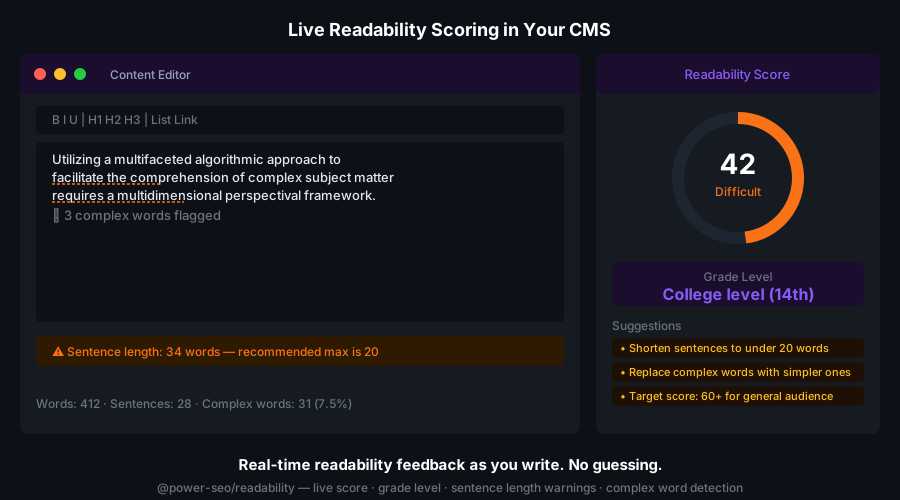
- CMS editorial dashboards — show live readability scores and recommendations as editors write
- Content publication gates — block content that scores
pooron readability or passive voice - Blog and content pipelines — CI check that fails when writing is too complex
- E-commerce product descriptions — keep product copy accessible to your target audience
- Educational platforms — match content grade level to the target student audience
- Next.js / Remix apps — score content server-side per route and expose scores in admin dashboards
Architecture Overview
- Pure TypeScript — no compiled binary, no native modules
- Single runtime dependency —
@power-seo/corefor text statistics and constants; no NLP libraries - Framework-agnostic — works in any JavaScript environment with no DOM requirement
- SSR compatible — safe in Next.js Server Components, Remix loaders, or Express handlers
- Edge runtime safe — no Node.js-specific APIs; runs on Cloudflare Workers, Vercel Edge, Deno
- HTML stripping —
stripHtmlfrom core uses a string-based tag-removal loop (no regex ReDoS risk) - Tree-shakeable —
"sideEffects": falsewith a named export per algorithm function - Dual ESM + CJS — ships both formats via tsup for any bundler or
require()usage
Supply Chain Security
- Published to npm with provenance attestation — every release is built and signed by the verified
github.com/CyberCraftBD/power-seoGitHub Actions workflow, so you can trace each tarball back to its exact source commit - Zero third-party runtime dependencies — packages depend only on other
@power-seopackages, nothing else gets pulled in - No network access at runtime — pure computation on the inputs you pass; nothing is fetched, phoned home, or telemetered
- No install scripts (
postinstall,preinstall) - No
evalor dynamic code execution - Safe for SSR, Edge, and server environments
The @power-seo Ecosystem
All 17 packages are independently installable — use only what you need.
| Package | Install | Description |
| ------------------------------------------------------------------------------------------ | ----------------------------------- | ---------------------------------------------------------------------------------- |
| @power-seo/ai | npm i @power-seo/ai | LLM-agnostic prompt templates and response parsers for AI-assisted SEO |
| @power-seo/analytics | npm i @power-seo/analytics | Merge Search Console data with audit results — trends and ranking insights |
| @power-seo/audit | npm i @power-seo/audit | SEO site health auditing with meta, content, structure, and performance rules |
| @power-seo/content-analysis | npm i @power-seo/content-analysis | Yoast-style SEO content analysis engine with scoring, checks, and React components |
| @power-seo/core | npm i @power-seo/core | Framework-agnostic SEO analysis engines, types, validators, and utilities |
| @power-seo/images | npm i @power-seo/images | Image SEO analysis — alt text quality, lazy loading, formats, image sitemaps |
| @power-seo/integrations | npm i @power-seo/integrations | Semrush and Ahrefs API clients with a shared rate-limited HTTP client |
| @power-seo/links | npm i @power-seo/links | Internal link graph analysis — orphan detection, suggestions, equity scoring |
| @power-seo/meta | npm i @power-seo/meta | SSR meta tag helpers for Next.js App Router, Remix v2, and generic SSR |
| @power-seo/preview | npm i @power-seo/preview | SERP, Open Graph, and Twitter Card preview generators with React components |
| @power-seo/react | npm i @power-seo/react | React SEO components — meta tags, Open Graph, Twitter Card, breadcrumbs |
| @power-seo/readability | npm i @power-seo/readability | Readability scoring — Flesch-Kincaid, Gunning Fog, Coleman-Liau, ARI |
| @power-seo/redirects | npm i @power-seo/redirects | Redirect rule engine with Next.js, Remix, and Express adapters |
| @power-seo/schema | npm i @power-seo/schema | Type-safe JSON-LD structured data — 23 schema.org builders plus React components |
| @power-seo/search-console | npm i @power-seo/search-console | Google Search Console API client — OAuth2, service accounts, rate limiting, retry |
| @power-seo/sitemap | npm i @power-seo/sitemap | XML sitemap generation, streaming, and validation with image, video, news support |
| @power-seo/tracking | npm i @power-seo/tracking | Analytics script builders with consent management and React components |
Keywords
readability, readability score, flesch-kincaid, flesch reading ease, gunning fog, coleman-liau, automated readability index, ari, reading level, text readability, content quality, readability checker, seo readability, passive voice, content scoring, typescript, zero-dependency, ci content gate, cms readability
About CyberCraft Bangladesh
CyberCraft Bangladesh is a Bangladesh-based enterprise-grade software development and Full Stack SEO service provider company specializing in ERP system development, AI-powered SaaS and business applications, full-stack SEO services, custom website development, and scalable eCommerce platforms. We design and develop intelligent, automation-driven SaaS and enterprise solutions that help startups, SMEs, NGOs, educational institutes, and large organizations streamline operations, enhance digital visibility, and accelerate growth through modern cloud-native technologies.




© 2026 CyberCraft Bangladesh · Released under the MIT License