
@power-seo/schema
v1.0.19
Published
Type-safe JSON-LD structured data builder with 23 schema builders and React components

Maintainers
 ccbd.dev
Readme
@power-seo/schema
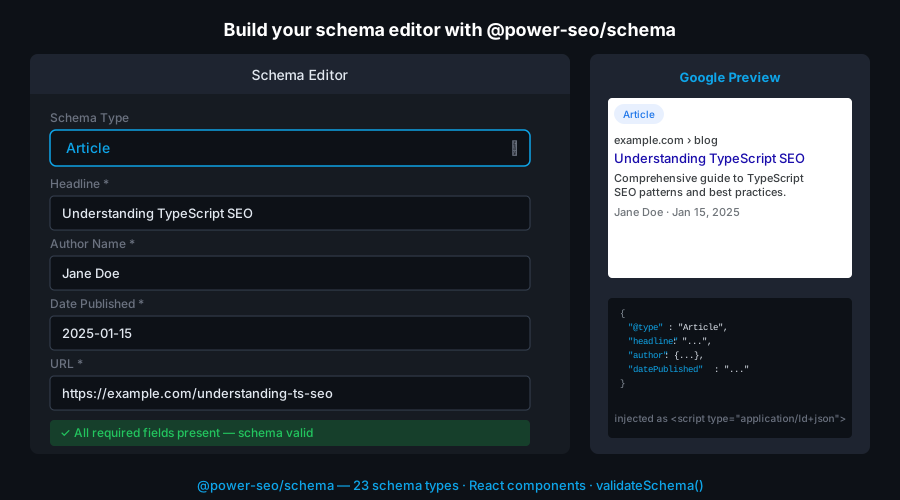
Type-safe JSON-LD structured data for TypeScript and React — 23 schema.org builder functions, 22 React components, @graph support, and Google Rich Results field validation. Works in Next.js, Remix, Node.js, and Edge runtimes.





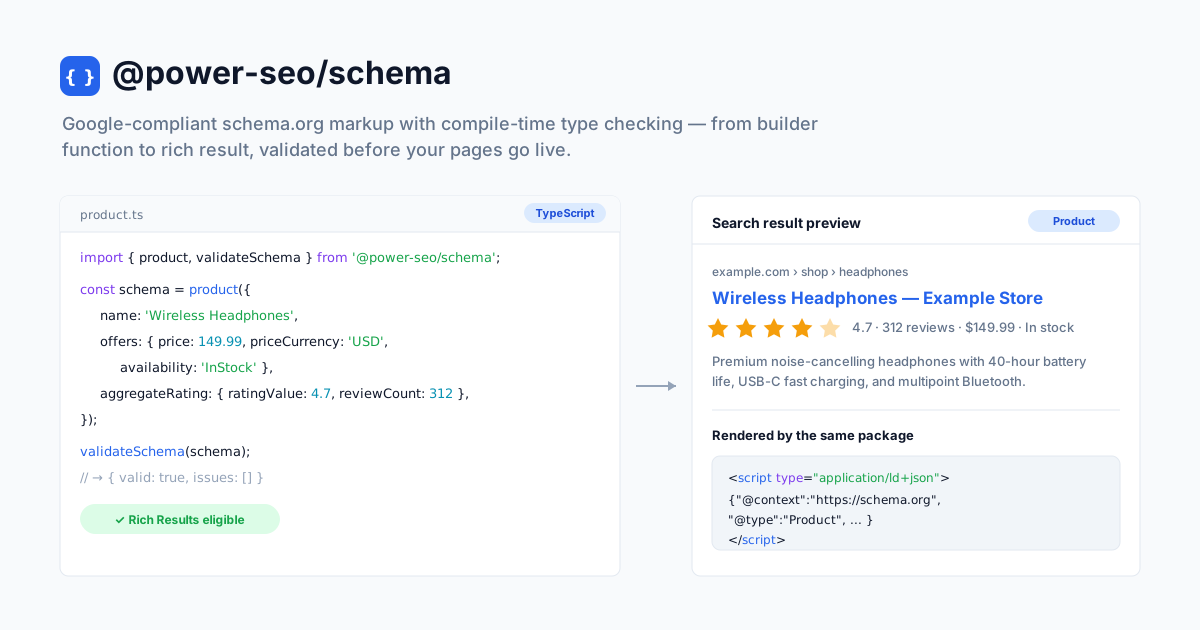
@power-seo/schema is a type-safe JSON-LD structured data library for developers who want Google-compliant schema.org markup without hand-writing raw JSON. It gives you 23 builder functions with compile-time type checking on every property, a validateSchema() utility that surfaces missing required fields before pages go live, and 22 pre-built React components that render <script type="application/ld+json"> tags in one line. Combine multiple schemas into a single @graph document with schemaGraph() so Google parses all of them.
Why @power-seo/schema?
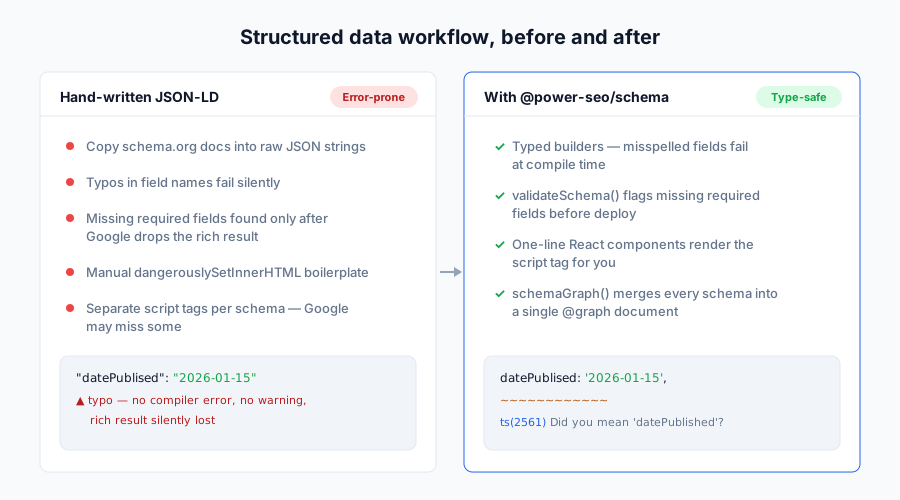
Structured data is how you earn rich results — star ratings, FAQ accordions, breadcrumbs, recipe cards, job listings. Writing that JSON-LD by hand means silent typos, missing required fields, and pages that quietly fail Google's Rich Results Test. This package makes every schema property type-checked at compile time and validated against Google's field requirements before deploy.
| | Without @power-seo/schema | With @power-seo/schema |
| ------------------------- | --------------------------------------------------------- | ----------------------------------------------------------------------- |
| Field type safety | Hand-written JSON, no types, typos ship silently | Typed builder functions catch missing/misspelled fields at compile time |
| Multiple schemas per page | Separate <script> tags, Google may parse only the first | schemaGraph() merges all into one @graph document |
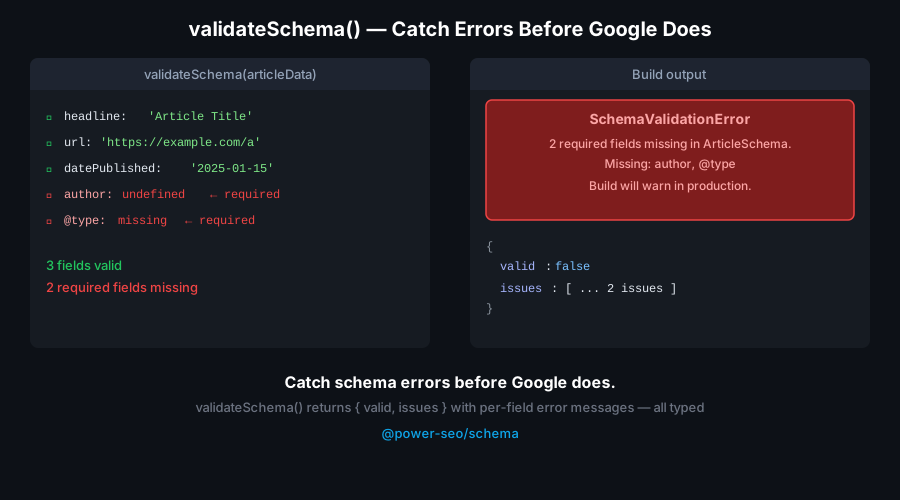
| Field validation | Silent failures in the Rich Results Test | validateSchema() returns structured { valid, issues } before deploy |
| React rendering | Manual dangerouslySetInnerHTML boilerplate | <ArticleJsonLd> and 21 other components in one import |
| XSS safety | "</script>" in a field can break out of the tag | <, >, & auto-escaped to <, >, & |
| Schema coverage | Only Article/FAQ in most libraries | 23 types incl. Product, LocalBusiness, Event, Recipe, JobPosting |
Features
- 23 schema.org builder functions —
article,blogPosting,newsArticle,product,faqPage,breadcrumbList,localBusiness,organization,person,event,recipe,howTo,videoObject,course,jobPosting,softwareApp,webSite,itemList,review,service,brand,siteNavigationElement,imageObject - 22 React components — 21 typed
*JsonLdcomponents (<ArticleJsonLd>,<FAQJsonLd>,<BreadcrumbJsonLd>,<ProductJsonLd>, and more) plus a generic<JsonLd>that renders any schema object schemaGraph(schemas[])— combine multiple schemas into a single@graphdocument so Google parses every schema on the page, not just the first script tagvalidateSchema(schema)— validate required fields against Google Rich Results requirements without throwing; accepts a single object or an array and returns{ valid, issues }toJsonLdString(schema, pretty?)— serialize any schema to a JSON-LD string with automatic XSS escaping (prettydefaults tofalse)- React optional — all 23 builders work with no React installed; components live on the
/reactsubpath andreactis an optional peer dependency - Tree-shakeable —
"sideEffects": falsewith named exports; import only the types you use - Dual ESM + CJS — ships both formats for any bundler or
require()
Comparison
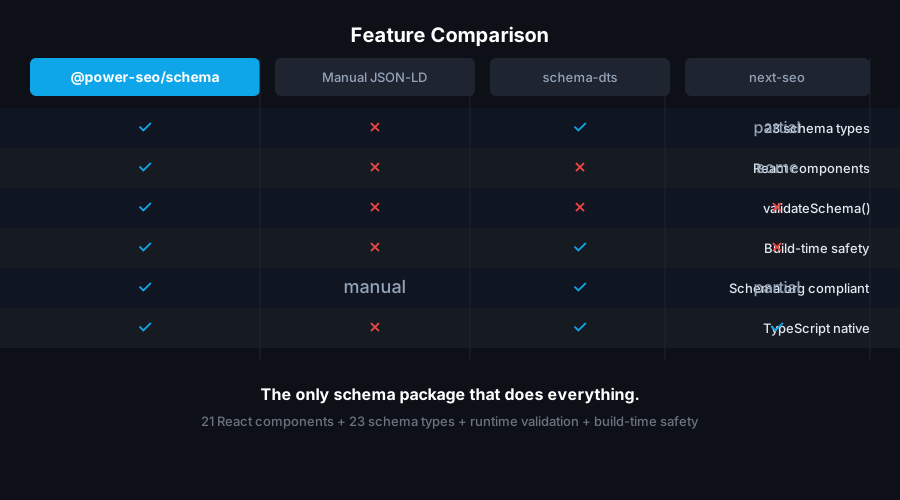
| Feature | @power-seo/schema | next-seo | schema-dts | json-ld.js | react-schemaorg |
| ----------------------------- | :---------------: | :------: | :--------: | :--------: | :-------------: |
| Typed builder functions | Yes | Partial | No | No | No |
| Ready-to-use React components | Yes | Yes | No | No | Partial |
| @graph support | Yes | No | No | Yes | No |
| Built-in field validation | Yes | No | No | No | No |
| Works without React | Yes | No | Yes | Yes | No |
| 23 schema types | Yes | Partial | Yes | Yes | No |
| CI / Node.js usage | Yes | No | Yes | Yes | No |
| Zero third-party runtime deps | Yes | No | Yes | No | No |
| XSS-escaped serialization | Yes | Partial | No | No | No |
Installation
npm install @power-seo/schemayarn add @power-seo/schemapnpm add @power-seo/schemaReact is an optional peer dependency (^18 || ^19). The builder functions work without it; install React only if you use the /react components.
Usage
How do I generate JSON-LD without React?
Call any builder function with a typed props object to get a schema-ready JSON-LD object, then pass it to toJsonLdString() to serialize it. The builders run in any JavaScript environment — Node.js, Edge, Deno, or the browser — with no DOM requirement. Every property is type-checked, and undefined fields are stripped automatically so your output stays clean.
import { article, toJsonLdString } from '@power-seo/schema';

const schema = article({
  headline: 'My Blog Post',
  description: 'An informative article about structured data.',
  datePublished: '2026-01-15',
  dateModified: '2026-01-20',
  author: { '@type': 'Person', name: 'Jane Doe', url: 'https://example.com/authors/jane-doe' },
  image: { '@type': 'ImageObject', url: 'https://example.com/cover.jpg', width: 1200, height: 630 },
});

const script = toJsonLdString(schema);
// → '{"@context":"https://schema.org","@type":"Article","headline":"My Blog Post",...}'
How do I add JSON-LD to a Next.js App Router page?
Import a builder in your Server Component, serialize it with toJsonLdString(), and inject the result into a <script> tag with dangerouslySetInnerHTML. Because toJsonLdString() escapes <, >, and &, a field value like "</script>" cannot break out of the tag. This runs entirely on the server, so the markup is in the initial HTML that Googlebot crawls.
import { article, toJsonLdString } from '@power-seo/schema';

export default function BlogPost({ post }: { post: Post }) {
  const schema = article({
    headline: post.title,
    description: post.excerpt,
    datePublished: post.publishedAt,
    dateModified: post.updatedAt,
    author: { '@type': 'Person', name: post.author.name, url: post.author.profileUrl },
    image: { '@type': 'ImageObject', url: post.coverImage, width: 1200, height: 630 },
  });

  return (
    <>
      <script
        type="application/ld+json"
        dangerouslySetInnerHTML={{ __html: toJsonLdString(schema) }}
      />
      <article>{/* page content */}</article>
    </>
  );
}
How do I render JSON-LD with React components?
Import from the /react subpath. Each *JsonLd component takes the same props as its builder (minus @type/@context) and renders a ready-to-place <script type="application/ld+json"> tag with the same automatic XSS escaping. There are 21 typed components plus a generic <JsonLd schema={...}> that accepts any schema object.
import { FAQJsonLd, BreadcrumbJsonLd } from '@power-seo/schema/react';

function PageHead() {
  return (
    <>
      <FAQJsonLd
        questions={[
          { question: 'What is JSON-LD?', answer: 'A structured data format Google recommends.' },
          { question: 'Do I need React?', answer: 'No — builder functions work without React.' },
        ]}
      />
      <BreadcrumbJsonLd
        items={[
          { name: 'Home', url: 'https://example.com' },
          { name: 'Blog', url: 'https://example.com/blog' },
          { name: 'My Post' },
        ]}
      />
    </>
  );
}
How do I put multiple schemas on one page?
Use schemaGraph(schemas[]) to merge several schema objects into a single @graph document. Google reliably parses every node in a @graph, whereas multiple separate <script> tags can be partially ignored. Pass the builder outputs straight in — the function wraps them with a shared @context.
import {
  article,
  breadcrumbList,
  organization,
  schemaGraph,
  toJsonLdString,
} from '@power-seo/schema';

const graph = schemaGraph([
  article({
    headline: 'My Post',
    datePublished: '2026-01-01',
    author: { '@type': 'Person', name: 'Jane Doe' },
  }),
  breadcrumbList([
    { name: 'Home', url: 'https://example.com' },
    { name: 'Blog', url: 'https://example.com/blog' },
    { name: 'My Post' },
  ]),
  organization({ name: 'Acme Corp', url: 'https://example.com' }),
]);

const script = toJsonLdString(graph);
// → '{"@context":"https://schema.org","@graph":[{...},{...},{...}]}'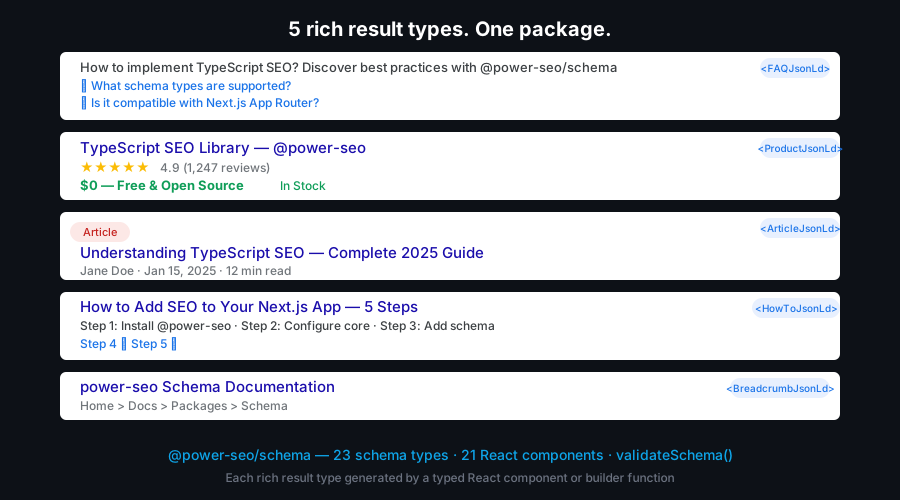
How do I validate schema before deploy?
validateSchema() checks a schema against Google Rich Results requirements and returns { valid, issues } without throwing. Each issue has a severity ('error' or 'warning'), a field, and a message. Errors are missing required fields; warnings are recommended fields. valid is true only when there are zero errors. Pass an array to validate a whole page graph at once.
import { article, validateSchema } from '@power-seo/schema';

const schema = article({ headline: 'Incomplete Article' }); // missing author, datePublished

const result = validateSchema(schema);
// result.valid  → false
// result.issues → [
//   { severity: 'error',   field: 'author',        message: 'Required field "author" is missing.' },
//   { severity: 'error',   field: 'datePublished', message: 'Required field "datePublished" is missing.' },
//   { severity: 'warning', field: 'image',         message: 'Recommended field "image" is missing.' },
//   ...
// ]

if (!result.valid) {
  const errors = result.issues.filter((i) => i.severity === 'error');
  errors.forEach((i) => console.error(` [${i.field}] ${i.message}`));
  process.exit(1);
}
FAQ and Breadcrumb builder signatures
faqPage() and breadcrumbList() take a plain array directly — not a config-object wrapper. faqPage maps each { question, answer } into a Question/Answer pair; breadcrumbList assigns sequential position values from your ordered { name, url? } list.
import { faqPage, breadcrumbList } from '@power-seo/schema';

const faq = faqPage([
  { question: 'What is schema.org?', answer: 'A shared vocabulary for structured data.' },
  { question: 'Is JSON-LD required?', answer: 'JSON-LD is the format Google recommends.' },
]);

const breadcrumb = breadcrumbList([
  { name: 'Home', url: 'https://example.com' },
  { name: 'Products', url: 'https://example.com/products' },
  { name: 'Headphones' }, // last item usually has no url
]);
CI validation gate
Block deploys when any page schema is missing a required field. validateSchema() accepts an array, so you can validate every page's schema in one pass.
import { validateSchema } from '@power-seo/schema';
import { allPageSchemas } from './build-schemas';

const result = validateSchema(allPageSchemas); // array in → merged issues out
if (!result.valid) {
  const errors = result.issues.filter((i) => i.severity === 'error');
  console.error('Schema validation failed:');
  errors.forEach((i) => console.error(` [${i.field}] ${i.message}`));
  process.exit(1);
}
API Reference
Entry points
| Import | Description |
| ------------------------- | ---------------------------------------------------------------------------------------------- |
| @power-seo/schema | Builder functions, schemaGraph, toJsonLdString, validateSchema, and all TypeScript types |
| @power-seo/schema/react | React components for rendering JSON-LD <script> tags |
Builder functions
Each builder returns a WithContext<...> object (schema plus @context: "https://schema.org"). undefined props are stripped automatically.
| Function | Schema @type | Rich result |
| ------------------------------ | ----------------------- | --------------------- |
| article(props) | Article | Article |
| blogPosting(props) | BlogPosting | Article |
| newsArticle(props) | NewsArticle | Top Stories |
| product(props) | Product | Product / star rating |
| faqPage(questions[]) | FAQPage | FAQ |
| breadcrumbList(items[]) | BreadcrumbList | Breadcrumbs |
| localBusiness(props) | LocalBusiness | Local Business panel |
| organization(props) | Organization | Knowledge Panel |
| person(props) | Person | Knowledge Panel |
| event(props) | Event | Events |
| recipe(props) | Recipe | Recipe |
| howTo(props) | HowTo | How-to |
| videoObject(props) | VideoObject | Video |
| course(props) | Course | Course |
| jobPosting(props) | JobPosting | Google for Jobs |
| softwareApp(props) | SoftwareApplication | App |
| webSite(props) | WebSite | Sitelinks Searchbox |
| itemList(props) | ItemList | Carousel |
| review(props) | Review | Review snippet |
| service(props) | Service | — |
| brand(props) | Brand | — |
| siteNavigationElement(props) | SiteNavigationElement | — |
| imageObject(props) | ImageObject | Image metadata |
Utility functions
| Function | Signature | Description |
| ---------------- | -------------------------------------------------------------------- | --------------------------------------------------------------------------------------------------------------------- |
| toJsonLdString | (schema, pretty?: boolean) => string | Serialize a schema or graph to a JSON-LD string with </>/& escaped for XSS safety. pretty defaults to false |
| schemaGraph | (schemas: SchemaObject[]) => SchemaGraph | Combine schemas into one @graph document under a shared @context |
| validateSchema | (schema: SchemaObject \| SchemaObject[]) => SchemaValidationResult | Validate required/recommended fields; returns { valid, issues } without throwing |
Validated schema types
validateSchema() runs type-specific field checks for these @type values (others pass through with no issues): Article, BlogPosting, NewsArticle, TechArticle, Product, FAQPage, BreadcrumbList, Event, MusicEvent, BusinessEvent, EducationEvent, Recipe, VideoObject, JobPosting, LocalBusiness, Restaurant, Store, Course. For example, Article requires headline, author, and datePublished, and warns when image, dateModified, or publisher are missing.
React components
Import from @power-seo/schema/react. Each *JsonLd component accepts the same props as its builder, minus @type/@context.
| Component | Props | Renders |
| ----------------------- | -------------------------------------------------------------- | ------------------- |
| <JsonLd> | { schema: WithContext \| SchemaGraph; dataTestId?: string } | Any schema object |
| <ArticleJsonLd> | Omit<ArticleSchema, '@type' \| '@context'> & { type? } | Article |
| <BlogPostingJsonLd> | Omit<ArticleSchema, '@type' \| '@context'> | BlogPosting |
| <NewsArticleJsonLd> | Omit<ArticleSchema, '@type' \| '@context'> | NewsArticle |
| <ProductJsonLd> | Omit<ProductSchema, '@type' \| '@context'> | Product |
| <FAQJsonLd> | { questions: Array<{ question; answer }> } | FAQPage |
| <BreadcrumbJsonLd> | { items: Array<{ name; url? }> } | BreadcrumbList |
| <LocalBusinessJsonLd> | Omit<LocalBusinessSchema, '@type' \| '@context'> & { type? } | LocalBusiness |
| <OrganizationJsonLd> | Omit<OrganizationSchema, '@type' \| '@context'> | Organization |
| <PersonJsonLd> | Omit<PersonSchema, '@type' \| '@context'> | Person |
| <EventJsonLd> | Omit<EventSchema, '@type' \| '@context'> & { type? } | Event |
| <RecipeJsonLd> | Omit<RecipeSchema, '@type' \| '@context'> | Recipe |
| <HowToJsonLd> | Omit<HowToSchema, '@type' \| '@context'> | HowTo |
| <VideoJsonLd> | Omit<VideoObjectSchema, '@type' \| '@context'> | VideoObject |
| <CourseJsonLd> | Omit<CourseSchema, '@type' \| '@context'> | Course |
| <JobPostingJsonLd> | Omit<JobPostingSchema, '@type' \| '@context'> | JobPosting |
| <SoftwareAppJsonLd> | Omit<SoftwareAppSchema, '@type' \| '@context'> & { type? } | SoftwareApplication |
| <WebSiteJsonLd> | Omit<WebSiteSchema, '@type' \| '@context'> | WebSite |
| <ItemListJsonLd> | Omit<ItemListSchema, '@type' \| '@context'> | ItemList |
| <ReviewJsonLd> | Omit<ReviewSchema, '@type' \| '@context'> | Review |
| <ServiceJsonLd> | Omit<ServiceSchema, '@type' \| '@context'> | Service |
| <BrandJsonLd> | Omit<BrandSchema, '@type' \| '@context'> | Brand |
Note:
siteNavigationElementandimageObjectship as builder functions only. Render them with the generic<JsonLd schema={...}>component in React.
Types
| Type | Description |
| ------------------------------------------------------------------------ | ------------------------------------------------------------------------------------------- |
| WithContext<T> | A schema T with @context: "https://schema.org" added — the return type of every builder |
| SchemaObject | Union of all builder output schemas |
| SchemaGraph | { '@context'; '@graph': SchemaObject[] } — the return type of schemaGraph() |
| SchemaValidationResult | { valid: boolean; issues: ValidationIssue[] } — the return type of validateSchema() |
| ValidationIssue | { severity: 'error' \| 'warning'; field: string; message: string } |
| ArticleSchema | Props for article, blogPosting, and newsArticle |
| ProductSchema, OfferSchema, AggregateRatingSchema | Product with offers and ratings |
| FAQPageSchema, BreadcrumbListSchema | Output types of faqPage() and breadcrumbList() |
| LocalBusinessSchema, OrganizationSchema, PersonSchema | Entity schemas |
| EventSchema, RecipeSchema, HowToSchema, VideoObjectSchema | Content schemas |
| CourseSchema, JobPostingSchema, SoftwareAppSchema, WebSiteSchema | Vertical schemas |
| ItemListSchema, ReviewSchema, ServiceSchema, BrandSchema | Additional schemas |
Use Cases
- Blog posts and articles —
article/blogPostingschema for Google Discover and Top Stories eligibility - FAQ pages —
faqPageschema for FAQ accordion rich results in the SERP - Product pages —
productschema with offers and aggregate ratings for star display - Local business sites —
localBusinessschema for the Google Business panel and Local Pack - Recipe sites —
recipeschema for cards with images, ratings, and cook time - Job boards —
jobPostingschema for Google for Jobs integration - Event pages —
eventschema for Google Events rich results - Course platforms —
courseschema for education carousels - Multi-schema pages —
schemaGraph()to merge Article + Breadcrumb + Organization into one@graph - CI content pipelines —
validateSchema()to block deploys when required fields are missing
Architecture Overview
- Pure TypeScript — no compiled binary, no native modules
- One workspace dependency — depends only on
@power-seo/core; no third-party runtime packages - Framework-agnostic core — builder functions run in any JavaScript environment with no DOM requirement
- SSR compatible — safe in Next.js Server Components, Remix loaders, and Express handlers
- Edge runtime safe — no Node.js-specific APIs; runs in Cloudflare Workers, Vercel Edge, and Deno
- XSS-safe serialization —
toJsonLdString()and every React component escape<,>,&to Unicode sequences - Tree-shakeable —
"sideEffects": falsewith named exports per schema type - Dual ESM + CJS — ships both formats via tsup for any bundler or
require()
Supply Chain Security
- Published to npm with provenance attestation — every release is built and signed by the verified
github.com/CyberCraftBD/power-seoGitHub Actions workflow, so you can trace each tarball back to its exact source commit - Zero third-party runtime dependencies — packages depend only on other
@power-seopackages, nothing else gets pulled in - No network access at runtime — pure computation on the inputs you pass; nothing is fetched, phoned home, or telemetered
- No install scripts (
postinstall,preinstall) - No
evalor dynamic code execution - Safe for SSR, Edge, and server environments
The @power-seo Ecosystem
All 17 packages are independently installable — use only what you need.
| Package | Install | Description |
| ------------------------------------------------------------------------------------------ | ----------------------------------- | ---------------------------------------------------------------------------------- |
| @power-seo/ai | npm i @power-seo/ai | LLM-agnostic prompt templates and response parsers for AI-assisted SEO |
| @power-seo/analytics | npm i @power-seo/analytics | Merge Search Console data with audit results — trends and ranking insights |
| @power-seo/audit | npm i @power-seo/audit | SEO site health auditing with meta, content, structure, and performance rules |
| @power-seo/content-analysis | npm i @power-seo/content-analysis | Yoast-style SEO content analysis engine with scoring, checks, and React components |
| @power-seo/core | npm i @power-seo/core | Framework-agnostic SEO analysis engines, types, validators, and utilities |
| @power-seo/images | npm i @power-seo/images | Image SEO analysis — alt text quality, lazy loading, formats, image sitemaps |
| @power-seo/integrations | npm i @power-seo/integrations | Semrush and Ahrefs API clients with a shared rate-limited HTTP client |
| @power-seo/links | npm i @power-seo/links | Internal link graph analysis — orphan detection, suggestions, equity scoring |
| @power-seo/meta | npm i @power-seo/meta | SSR meta tag helpers for Next.js App Router, Remix v2, and generic SSR |
| @power-seo/preview | npm i @power-seo/preview | SERP, Open Graph, and Twitter Card preview generators with React components |
| @power-seo/react | npm i @power-seo/react | React SEO components — meta tags, Open Graph, Twitter Card, breadcrumbs |
| @power-seo/readability | npm i @power-seo/readability | Readability scoring — Flesch-Kincaid, Gunning Fog, Coleman-Liau, ARI |
| @power-seo/redirects | npm i @power-seo/redirects | Redirect rule engine with Next.js, Remix, and Express adapters |
| @power-seo/schema | npm i @power-seo/schema | Type-safe JSON-LD structured data — 23 schema.org builders plus React components |
| @power-seo/search-console | npm i @power-seo/search-console | Google Search Console API client — OAuth2, service accounts, rate limiting, retry |
| @power-seo/sitemap | npm i @power-seo/sitemap | XML sitemap generation, streaming, and validation with image, video, news support |
| @power-seo/tracking | npm i @power-seo/tracking | Analytics script builders with consent management and React components |
Keywords
json-ld, schema.org, structured-data, rich-results, seo, nextjs-json-ld, react-json-ld, faq-schema, product-schema, article-schema, breadcrumb-schema, local-business-schema, job-posting-schema, schema-graph, validate-schema, typescript-json-ld, nextjs, remix, programmatic-seo, google-rich-results
About CyberCraft Bangladesh
CyberCraft Bangladesh is a Bangladesh-based enterprise-grade software development and Full Stack SEO service provider company specializing in ERP system development, AI-powered SaaS and business applications, full-stack SEO services, custom website development, and scalable eCommerce platforms. We design and develop intelligent, automation-driven SaaS and enterprise solutions that help startups, SMEs, NGOs, educational institutes, and large organizations streamline operations, enhance digital visibility, and accelerate growth through modern cloud-native technologies.




© 2026 CyberCraft Bangladesh · Released under the MIT License