
@power-seo/search-console
v1.0.15
Published
Google Search Console API client with OAuth2/service account auth, rate limiting, and retry
Downloads
142

Maintainers
 ccbd.dev
Readme
@power-seo/search-console
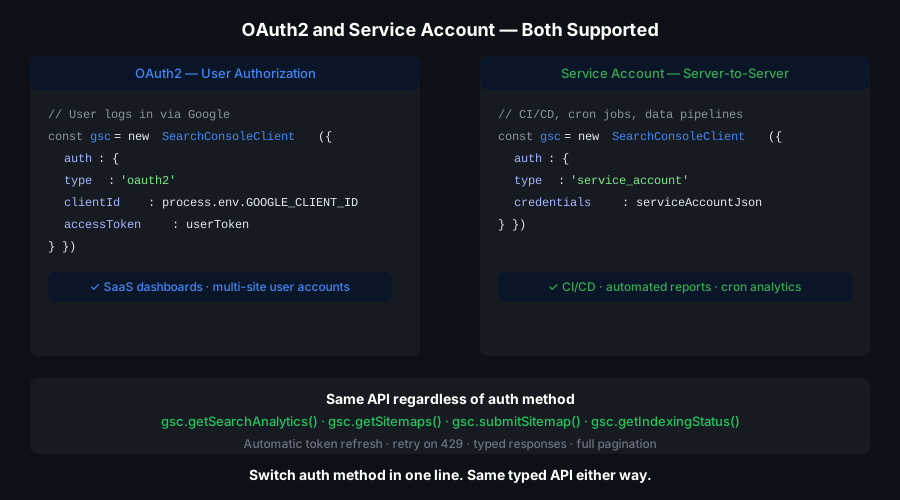
Typed Google Search Console API client for TypeScript — OAuth2 and service account auth, auto-paginated search analytics, URL inspection, and sitemap management with zero boilerplate.





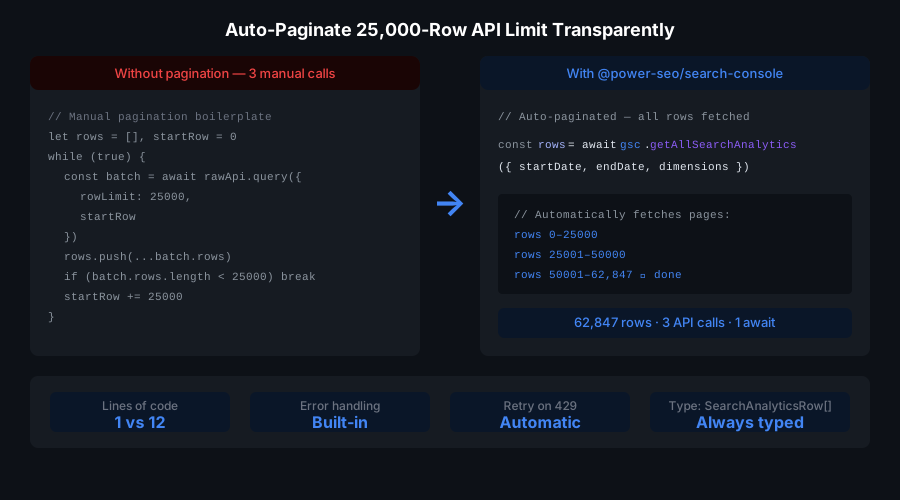
@power-seo/search-console is a production-ready Google Search Console API client for TypeScript. Provide OAuth2 credentials or a service account key — get back fully typed search analytics rows, URL inspection verdicts, and sitemap management operations. The token manager handles refresh cycles and JWT signing automatically. querySearchAnalyticsAll() transparently pages through the 25,000-row GSC API limit, merging all results into a single array. Use it in Next.js API routes, Remix loaders, Node.js scripts, and CI/CD pipelines. All operations are server-side only — service account credentials must never be exposed to the browser.
Zero runtime dependencies — pure TypeScript with native
fetchandcrypto; no googleapis package required.
Why @power-seo/search-console?
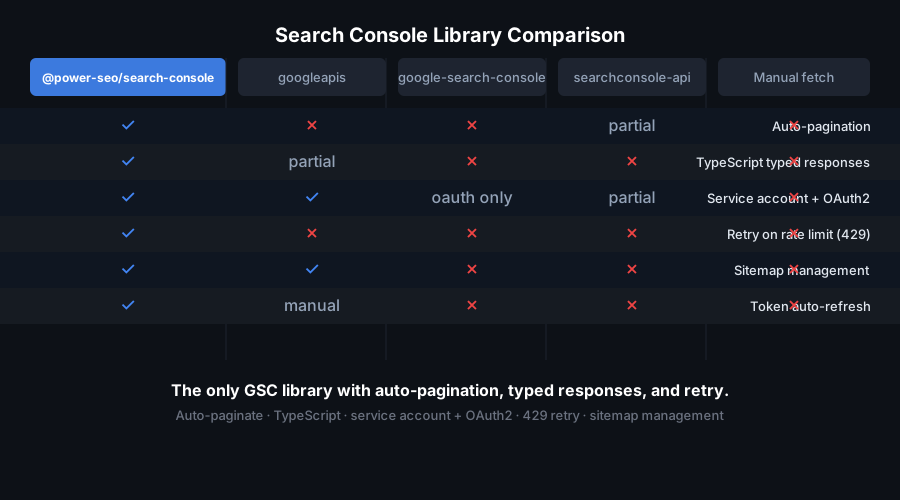
| | Without | With |
| -------------------- | ------------------------------------------- | --------------------------------------------------------- |
| OAuth2 token refresh | ❌ 50+ lines of boilerplate per project | ✅ Auto-refresh via createTokenManager() |
| GSC data pagination | ❌ Manual rowOffset loops and array merging | ✅ querySearchAnalyticsAll() — one call, all rows |
| URL inspection | ❌ Manual GSC UI check only | ✅ Programmatic inspectUrl() in CI pipelines |
| Service accounts | ❌ Complex JWT signing setup | ✅ createTokenManager({ type: 'service-account' }) |
| Type safety | ❌ Raw API responses typed as any | ✅ Fully typed request and response shapes |
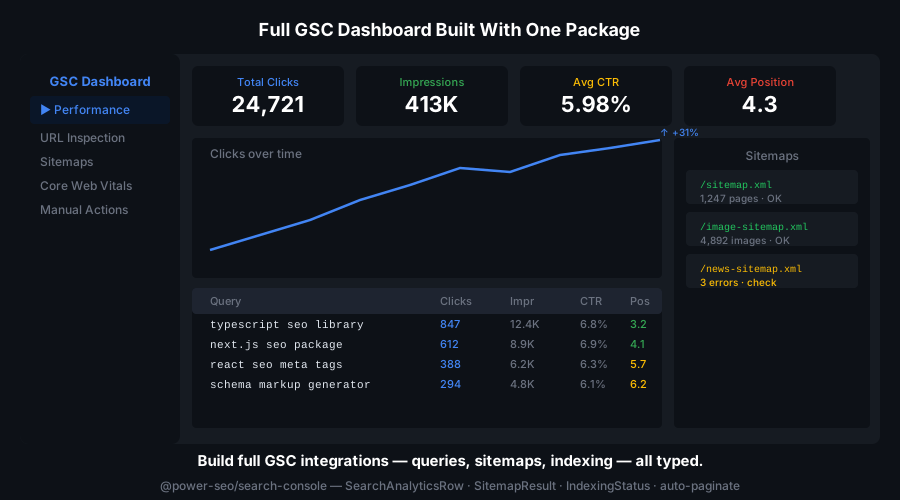
| Sitemap management | ❌ Manual GSC UI operations | ✅ submitSitemap(), listSitemaps(), deleteSitemap() |
| Framework support | ❌ Tied to googleapis setup | ✅ Works in Next.js, Remix, Node.js, CI/CD |
Features
- OAuth2 authentication —
createTokenManager({ type: 'oauth' })handles token refresh automatically - Service account JWT authentication —
createTokenManager({ type: 'service-account' })signs JWTs for server-to-server access without user interaction - Low-level auth primitives —
exchangeRefreshToken()andgetServiceAccountToken()for custom auth flows - Typed GSC client —
createGSCClient(config)returns aGSCClientscoped to a specific verified site URL - Search analytics —
querySearchAnalytics()supports all 6 dimensions:query,page,country,device,date,searchAppearance - All search types —
web,image,video, andnewssearch types - Auto-paginated full fetch —
querySearchAnalyticsAll()merges all pages into oneSearchAnalyticsRow[]array - URL inspection —
inspectUrl()returns verdict, indexing state, last crawl time, mobile usability, and rich result status - Direct URL inspection —
inspectUrlDirect()for the direct URL inspection API endpoint - Sitemap listing —
listSitemaps()with status, last download time, and error counts - Sitemap submission and deletion —
submitSitemap()anddeleteSitemap() - Typed error handling —
GSCApiErrorclass withstatus,code, andmessage - Full TypeScript support — complete type definitions for all request and response shapes
Comparison
| Feature | google-auth-library | googleapis | custom fetch | @power-seo/search-console | | ---------------------------------- | :-----------------: | :--------: | :----------: | :-----------------------: | | OAuth2 token auto-refresh | ✅ | ✅ | ❌ | ✅ | | Service account JWT signing | ✅ | ✅ | ❌ | ✅ | | Auto-paginated analytics fetch | ❌ | ❌ | ❌ | ✅ | | Typed GSC-specific response shapes | ❌ | ⚠️ | ❌ | ✅ | | URL inspection support | ❌ | ⚠️ | ❌ | ✅ | | Sitemap management | ❌ | ⚠️ | ❌ | ✅ | | Zero runtime dependencies | ❌ | ❌ | ✅ | ✅ | | TypeScript-first | ❌ | ⚠️ | ❌ | ✅ |
Installation
npm install @power-seo/search-consoleyarn add @power-seo/search-consolepnpm add @power-seo/search-consoleQuick Start
import {
  createTokenManager,
  createGSCClient,
  querySearchAnalyticsAll,
} from '@power-seo/search-console';

// 1. Create a token manager (OAuth2)
import { exchangeRefreshToken } from '@power-seo/search-console';

const tokenManager = createTokenManager(() =>
  exchangeRefreshToken({
    clientId: process.env.GSC_CLIENT_ID!,
    clientSecret: process.env.GSC_CLIENT_SECRET!,
    refreshToken: process.env.GSC_REFRESH_TOKEN!,
  }),
);

// 2. Create a client scoped to your site
const client = createGSCClient({
  siteUrl: 'https://example.com',
  auth: tokenManager,
});

// 3. Fetch all search analytics data (auto-paginated)
const rows = await querySearchAnalyticsAll(client, {
  startDate: '2026-01-01',
  endDate: '2026-01-31',
  dimensions: ['query', 'page'],
});

rows.forEach(({ keys, clicks, impressions, ctr, position }) => {
  console.log(`Query: "${keys[0]}", Page: ${keys[1]}`);
  console.log(`  ${clicks} clicks, ${impressions} impressions, pos ${position.toFixed(1)}`);
});
Usage
OAuth2 Authentication
import { createTokenManager, exchangeRefreshToken } from '@power-seo/search-console';

const tokenManager = createTokenManager(() =>
  exchangeRefreshToken({
    clientId: process.env.GSC_CLIENT_ID!,
    clientSecret: process.env.GSC_CLIENT_SECRET!,
    refreshToken: process.env.GSC_REFRESH_TOKEN!,
  }),
);

const accessToken = await tokenManager.getToken();
Service Account Authentication
import { createTokenManager, getServiceAccountToken } from '@power-seo/search-console';
import { subtle } from 'node:crypto';

// Parse service account JSON and create signing function
const serviceAccount = JSON.parse(process.env.GSC_SERVICE_ACCOUNT_JSON!);

async function signJwt(payload: Record<string, unknown>): Promise<string> {
  // Implement JWT signing using node:crypto or your preferred library
  // Returns signed JWT assertion string
}

const tokenManager = createTokenManager(() =>
  getServiceAccountToken({
    clientEmail: serviceAccount.client_email,
    privateKeyId: serviceAccount.private_key_id,
    signJwt,
  }),
);
Search Analytics Query
import { createGSCClient, querySearchAnalytics } from '@power-seo/search-console';

const client = createGSCClient({ siteUrl: 'https://example.com', tokenManager });

const response = await querySearchAnalytics(client, {
  startDate: '2026-01-01',
  endDate: '2026-01-31',
  dimensions: ['query', 'country'],
  searchType: 'web',
  rowLimit: 5000,
});

// response.rows → SearchAnalyticsRow[]
Auto-Paginated Full Fetch
import { querySearchAnalyticsAll } from '@power-seo/search-console';

// Fetches all rows automatically — handles the 25,000-row API limit
const allRows = await querySearchAnalyticsAll(client, {
  startDate: '2026-01-01',
  endDate: '2026-01-31',
  dimensions: ['query'],
});

console.log(`Total rows: ${allRows.length}`);
URL Inspection
import { inspectUrl } from '@power-seo/search-console';

const result = await inspectUrl(client, 'https://example.com/blog/my-post');

console.log(result.verdict); // 'PASS' | 'FAIL' | 'NEUTRAL'
console.log(result.indexingState); // 'INDEXING_ALLOWED' | ...
console.log(result.lastCrawlTime); // ISO timestamp
console.log(result.mobileUsabilityResult.verdict); // 'PASS' | 'FAIL'
Sitemap Management
import { listSitemaps, submitSitemap, deleteSitemap } from '@power-seo/search-console';

// List all submitted sitemaps
const sitemaps = await listSitemaps(client);
// sitemaps.sitemap → SitemapEntry[]

// Submit a new sitemap
await submitSitemap(client, 'https://example.com/sitemap.xml');

// Delete an old sitemap
await deleteSitemap(client, 'https://example.com/old-sitemap.xml');
CI/CD Keyword Position Check
import {
  createTokenManager,
  createGSCClient,
  querySearchAnalyticsAll,
  getServiceAccountToken,
} from '@power-seo/search-console';
import { subtle } from 'node:crypto';

// Parse service account JSON from environment
const serviceAccount = JSON.parse(process.env.GSC_SERVICE_ACCOUNT_JSON!);

async function signJwt(payload: Record<string, unknown>): Promise<string> {
  // Sign JWT assertion using node:crypto
  // Implementation depends on your preferred JWT signing library
  throw new Error('Implement JWT signing');
}

const tokenManager = createTokenManager(() =>
  getServiceAccountToken({
    clientEmail: serviceAccount.client_email,
    privateKeyId: serviceAccount.private_key_id,
    signJwt,
  }),
);

const client = createGSCClient({ siteUrl: 'sc-domain:example.com', tokenManager });

const rows = await querySearchAnalyticsAll(client, {
  startDate: '2026-01-24',
  endDate: '2026-01-31',
  dimensions: ['query', 'page'],
});

const dropped = rows.filter((r) => r.position > 20 && r.impressions > 100);
if (dropped.length > 0) {
  console.error('Pages dropped below position 20:');
  dropped.forEach((r) => console.error(' -', r.keys[1], `pos ${r.position.toFixed(1)}`));
  process.exit(1);
}
API Reference
createTokenManager(fetchToken)
| Parameter | Type | Description |
| ------------ | ---------------------------- | ---------------------------------- |
| fetchToken | () => Promise<TokenResult> | Function that returns token result |
Returns TokenManager: { getToken(): Promise<string>; invalidate(): void }. Token caching and refresh is handled automatically.
createGSCClient(config)
| Parameter | Type | Description |
| --------------------------- | -------------- | --------------------------------------------------------------------- |
| config.siteUrl | string | Verified GSC property URL (sc-domain: prefix for domain properties) |
| config.auth | TokenManager | Token manager from createTokenManager() |
| config.rateLimitPerMinute | number | Rate limit (default: 1200) |
| config.maxRetries | number | Max retries for failed requests (default: 3) |
| config.baseUrl | string | Base URL for GSC API (default: official Google endpoint) |
Returns GSCClient.
querySearchAnalytics(client, request)
| Parameter | Type | Default | Description |
| ------------------------------- | ------------- | -------- | ---------------------------------------------------------------------------- |
| request.startDate | string | required | YYYY-MM-DD |
| request.endDate | string | required | YYYY-MM-DD |
| request.dimensions | Dimension[] | [] | 'query', 'page', 'country', 'device', 'date', 'searchAppearance' |
| request.searchType | SearchType | 'web' | 'web', 'image', 'video', 'news', 'discover', 'googleNews' |
| request.rowLimit | number | 1000 | Rows per request (max 25,000) |
| request.startRow | number | 0 | Row offset for pagination |
| request.dimensionFilterGroups | object[] | [] | Filter groups to narrow results |
| request.aggregationType | string | 'auto' | Aggregation method: 'auto', 'byPage', 'byProperty' |
| request.dataState | string | 'all' | Include all or final data: 'all', 'final' |
querySearchAnalyticsAll(client, request)
Same parameters as querySearchAnalytics() but rowLimit and startRow are managed automatically. Returns Promise<SearchAnalyticsRow[]>.
inspectUrl(client, url) / inspectUrlDirect(client, url)
Returns Promise<InspectionResult>: { verdict, indexingState, lastCrawlTime, mobileUsabilityResult, richResultsResult, ... }.
listSitemaps(client) / submitSitemap(client, url) / deleteSitemap(client, url)
listSitemaps() returns Promise<SitemapListResponse>. submitSitemap() and deleteSitemap() return Promise<void>.
Types
| Type | Description |
| --------------------------- | ---------------------------------------------------------------------------- |
| OAuthCredentials | { clientId, clientSecret, refreshToken } |
| ServiceAccountCredentials | { clientEmail, privateKey, scopes } |
| TokenResult | { accessToken: string, expiresAt: number } |
| TokenManager | { getToken(): Promise<string>, invalidate(): void } |
| GSCClientConfig | { siteUrl: string, tokenManager: TokenManager } |
| GSCClient | Scoped API client instance |
| SearchType | 'web' \| 'image' \| 'video' \| 'news' |
| Dimension | 'query' \| 'page' \| 'country' \| 'device' \| 'date' \| 'searchAppearance' |
| SearchAnalyticsRequest | Request shape for querySearchAnalytics() |
| SearchAnalyticsRow | { keys: string[], clicks, impressions, ctr, position } |
| SearchAnalyticsResponse | API response wrapper with rows: SearchAnalyticsRow[] |
| InspectionResult | URL inspection verdict, indexing state, and details |
| SitemapEntry | Single sitemap with status, lastDownloaded, errors |
| SitemapListResponse | { sitemap: SitemapEntry[] } |
| GSCApiError | Error class with status, code, and message |
Use Cases
- Automated keyword ranking reports — fetch all queries weekly and diff against the previous week
- Indexing health monitoring —
inspectUrl()after deployments to verify new pages are indexed - Content gap analysis — merge GSC data with
@power-seo/analyticsto find high-impression, low-click pages - Sitemap automation — submit new sitemaps programmatically after content migrations
- CI/CD SEO checks — fail pipelines when key pages drop below a position threshold
- Multi-site SaaS dashboards — aggregate GSC data across multiple client properties with one
GSCClientper site - Image and news search analytics — query
imageandnewssearch types separately - Country and device breakdowns — segment click data by country or device for regional SEO analysis
Architecture Overview
- Pure TypeScript — no compiled binary, no native modules
- Server-side only — requires
cryptofor JWT signing; not edge or browser compatible - Zero runtime dependencies — no googleapis package; uses native
fetchandcrypto - Auto-pagination —
querySearchAnalyticsAll()managesrowOffsetand array merging transparently - Token caching — access tokens are cached and reused until 5 minutes before expiry
- Scoped clients — each
GSCClientis scoped to one verified GSC property viasiteUrl - Typed errors —
GSCApiErrorcarries HTTP status, error code, and message for reliable error handling - Dual ESM + CJS — ships both formats via tsup for any bundler or
require()usage
Supply Chain Security
- No install scripts (
postinstall,preinstall) - No runtime network access outside of GSC API calls
- No
evalor dynamic code execution - CI-signed builds — all releases published via verified
github.com/CyberCraftBD/power-seoworkflow - Safe for Node.js 18+ server environments
The @power-seo Ecosystem
All 17 packages are independently installable — use only what you need.
| Package | Install | Description |
| ------------------------------------------------------------------------------------------ | ----------------------------------- | ----------------------------------------------------------------------- |
| @power-seo/core | npm i @power-seo/core | Framework-agnostic utilities, types, validators, and constants |
| @power-seo/react | npm i @power-seo/react | React SEO components — meta, Open Graph, Twitter Card, breadcrumbs |
| @power-seo/meta | npm i @power-seo/meta | SSR meta helpers for Next.js App Router, Remix v2, and generic SSR |
| @power-seo/schema | npm i @power-seo/schema | Type-safe JSON-LD structured data — 23 builders + 21 React components |
| @power-seo/content-analysis | npm i @power-seo/content-analysis | Yoast-style SEO content scoring engine with React components |
| @power-seo/readability | npm i @power-seo/readability | Readability scoring — Flesch-Kincaid, Gunning Fog, Coleman-Liau, ARI |
| @power-seo/preview | npm i @power-seo/preview | SERP, Open Graph, and Twitter/X Card preview generators |
| @power-seo/sitemap | npm i @power-seo/sitemap | XML sitemap generation, streaming, index splitting, and validation |
| @power-seo/redirects | npm i @power-seo/redirects | Redirect engine with Next.js, Remix, and Express adapters |
| @power-seo/links | npm i @power-seo/links | Link graph analysis — orphan detection, suggestions, equity scoring |
| @power-seo/audit | npm i @power-seo/audit | Full SEO audit engine — meta, content, structure, performance rules |
| @power-seo/images | npm i @power-seo/images | Image SEO — alt text, lazy loading, format analysis, image sitemaps |
| @power-seo/ai | npm i @power-seo/ai | LLM-agnostic AI prompt templates and parsers for SEO tasks |
| @power-seo/analytics | npm i @power-seo/analytics | Merge GSC + audit data, trend analysis, ranking insights, dashboard |
| @power-seo/search-console | npm i @power-seo/search-console | Google Search Console API — OAuth2, service account, URL inspection |
| @power-seo/integrations | npm i @power-seo/integrations | Semrush and Ahrefs API clients with rate limiting and pagination |
| @power-seo/tracking | npm i @power-seo/tracking | GA4, Clarity, PostHog, Plausible, Fathom — scripts + consent management |
About CyberCraft Bangladesh
CyberCraft Bangladesh is a Bangladesh-based enterprise-grade software development and Full Stack SEO service provider company specializing in ERP system development, AI-powered SaaS and business applications, full-stack SEO services, custom website development, and scalable eCommerce platforms. We design and develop intelligent, automation-driven SaaS and enterprise solutions that help startups, SMEs, NGOs, educational institutes, and large organizations streamline operations, enhance digital visibility, and accelerate growth through modern cloud-native technologies.




© 2026 CyberCraft Bangladesh · Released under the MIT License