
@power-seo/tracking
v1.0.19
Published
Analytics platform integration with script builders, consent management, and React components
Downloads
156

Maintainers
 ccbd.dev
Readme
@power-seo/tracking

Consent-aware analytics script builders and GDPR consent management for TypeScript — GA4, Microsoft Clarity, PostHog, Plausible, and Fathom with a unified shouldLoad(consentState) API and React components.





@power-seo/tracking is a consent-aware analytics toolkit for TypeScript. It builds typed script configs for five analytics platforms, manages GDPR consent state through a reactive store, and renders consent-gated script tags and a cookie banner via optional React components. Every ScriptConfig exposes shouldLoad(consentState), so a tracking script is never emitted without its required consent category. Five typed API clients let you query GA4, Clarity, PostHog, Plausible, and Fathom data server-side for custom reporting.
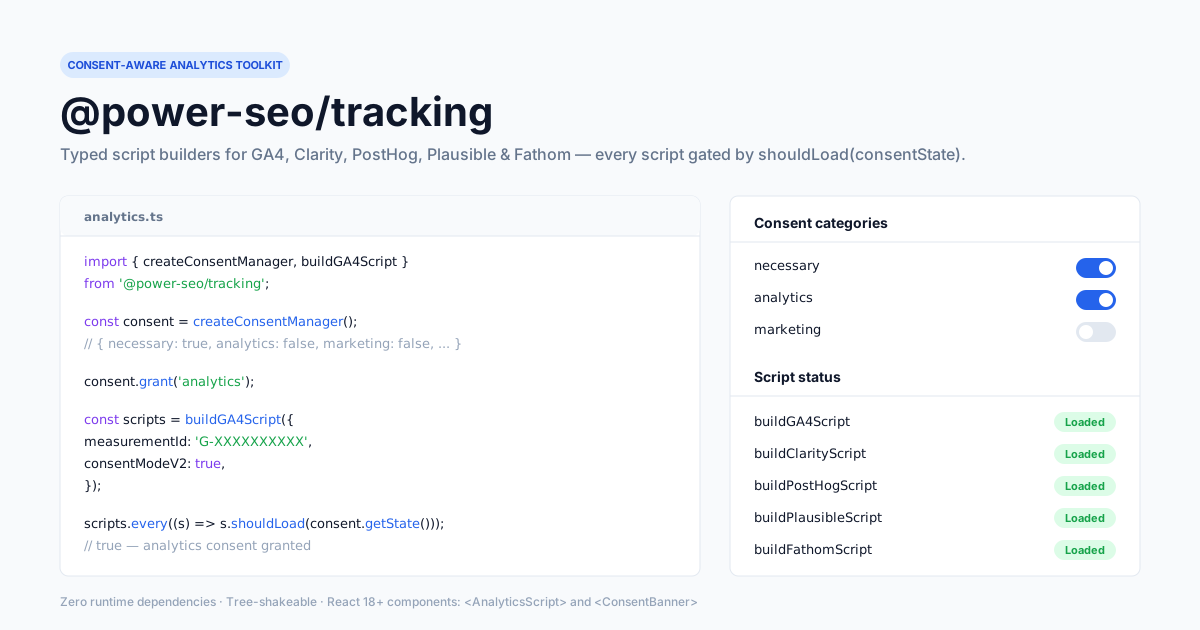
Zero third-party runtime dependencies — pure TypeScript with an optional React
^18 || ^19peer dependency for the<AnalyticsScript>and<ConsentBanner>components.
Why @power-seo/tracking?
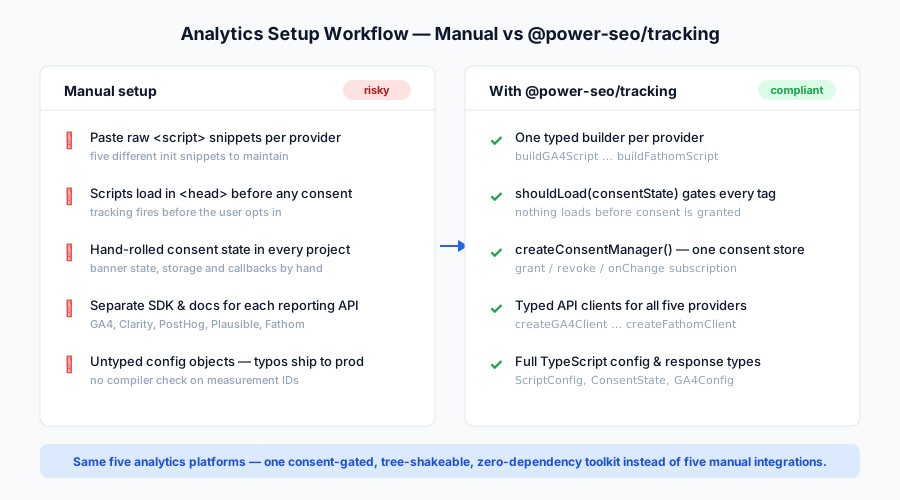
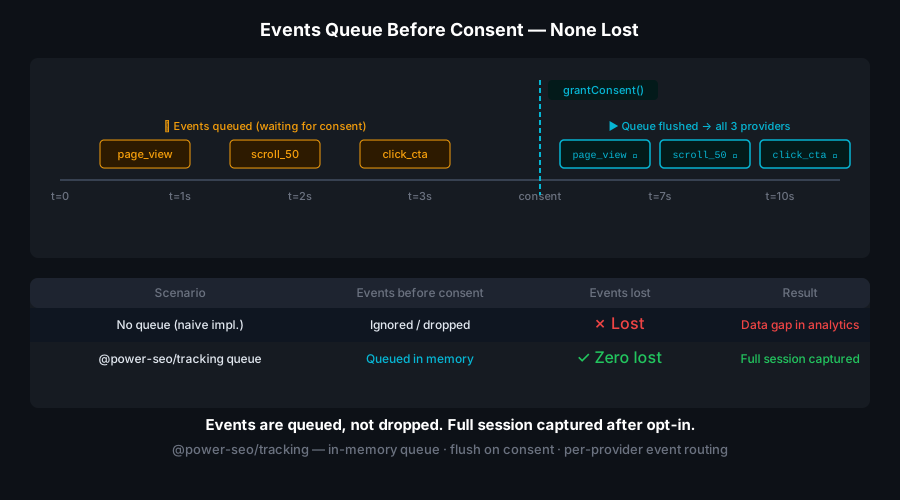
Loading analytics before a user grants consent is a GDPR violation and a Core Web Vitals liability. This package makes consent the gate for every script: createConsentManager() starts with only necessary granted, and each builder tags its output with a consentCategory that shouldLoad() checks against live consent state. You get typed configs, five API clients, and drop-in React UI without wiring platform-specific SDKs.
| | Without | With |
| ----------------- | ------------------------------------------- | ------------------------------------------------------ |
| GDPR consent | Scripts load unconditionally in <head> | shouldLoad(consentState) gates every script |
| Consent manager | Custom UI state per project | createConsentManager() with typed categories |
| Multi-provider | Different init code per analytics platform | One API for GA4, Clarity, PostHog, Plausible, Fathom |
| React integration | Manual <script> injection in layout | <AnalyticsScript> and <ConsentBanner> drop-in |
| API data access | Platform-specific SDK research per provider | Typed clients for all five providers |
| Default posture | Opt-out (tracking on until refused) | Opt-in (necessary only until granted) |
| TypeScript | Loose config objects, no checking | Typed ScriptConfig, ConsentState, ConsentManager |
Features
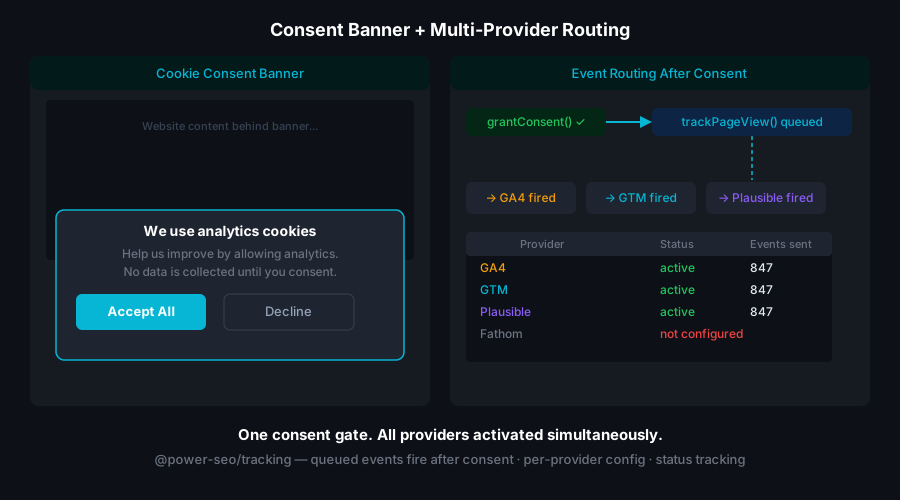
- Script builders for 5 platforms —
buildGA4Script(returns two or three script configs),buildClarityScript,buildPostHogScript,buildPlausibleScript,buildFathomScript - Consent-aware loading — every
ScriptConfigexposesshouldLoad(consentState); scripts never load without the right consent category - Consent manager —
createConsentManager()returns a typed store withgrant(),revoke(),grantAll(),revokeAll(),getState(),isGranted(), andonChange()subscription - GDPR-friendly defaults —
necessaryis alwaystrueand cannot be revoked;analytics,marketing,preferencesdefault tofalse - GA4 Consent Mode v2 —
buildGA4Scriptemits aconsent defaultsnippet (all storagedenied) by default, upgradeable togranted - React components —
<AnalyticsScript>renders only consented scripts;<ConsentBanner>is a ready-to-use GDPR cookie banner with Accept All / Reject All - Five typed API clients — query GA4 reports, Clarity insights, PostHog trends/funnels, Plausible stats, and Fathom pageviews server-side
- Framework-agnostic — script builders and consent manager work in Next.js, Remix, Vite, vanilla JS, and Edge runtimes
- Tree-shakeable — import only the providers you use;
sideEffects: false
Comparison
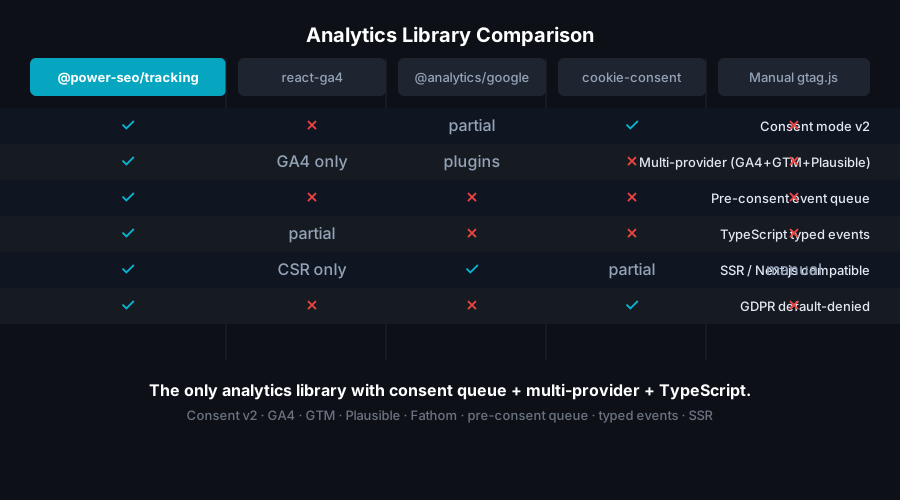
| Feature | @next/third-parties | partytown | @power-seo/tracking |
| ----------------------------- | :-----------------: | :-------: | :-----------------: |
| Typed script builders | ❌ | ❌ | ✅ |
| Consent-aware shouldLoad() | ❌ | ❌ | ✅ |
| Built-in consent manager | ❌ | ❌ | ✅ |
| Analytics API clients | ❌ | ❌ | ✅ |
| 5-provider support | ⚠️ | ⚠️ | ✅ |
| Zero third-party runtime deps | ✅ | ✅ | ✅ |
| TypeScript-first | ⚠️ | ⚠️ | ✅ |
| React components | ✅ | ❌ | ✅ |
Installation
npm install @power-seo/trackingyarn add @power-seo/trackingpnpm add @power-seo/trackingThe React components at @power-seo/tracking/react require React ^18.0.0 || ^19.0.0 as an optional peer dependency. Every other export is framework-agnostic and needs no peer.
Usage
How do I load analytics only after the user grants consent?
Create a consent manager (it defaults to opt-in — only necessary is granted), build script configs for your providers, then filter by shouldLoad(state). Until the visitor grants the analytics category, every analytics script is filtered out. After grantAll() (or grant('analytics')), the same filter now includes them. The GA4 Consent Mode default snippet is tagged necessary, so it loads immediately to set up denied storage.
import { createConsentManager, buildGA4Script, buildPlausibleScript } from '@power-seo/tracking';

// analytics off by default (GDPR opt-in) — necessary is forced true
const consent = createConsentManager({ analytics: false });

const scripts = [
  ...buildGA4Script({ measurementId: 'G-XXXXXXX' }), // ScriptConfig[]
  buildPlausibleScript({ domain: 'example.com' }), // ScriptConfig
];

let toLoad = scripts.filter((s) => s.shouldLoad(consent.getState()));
// → only the GA4 Consent Mode default snippet (consentCategory: 'necessary')

consent.grantAll(); // e.g. user clicks "Accept All"
toLoad = scripts.filter((s) => s.shouldLoad(consent.getState()));
// → now includes the GA4 gtag + config scripts and the Plausible script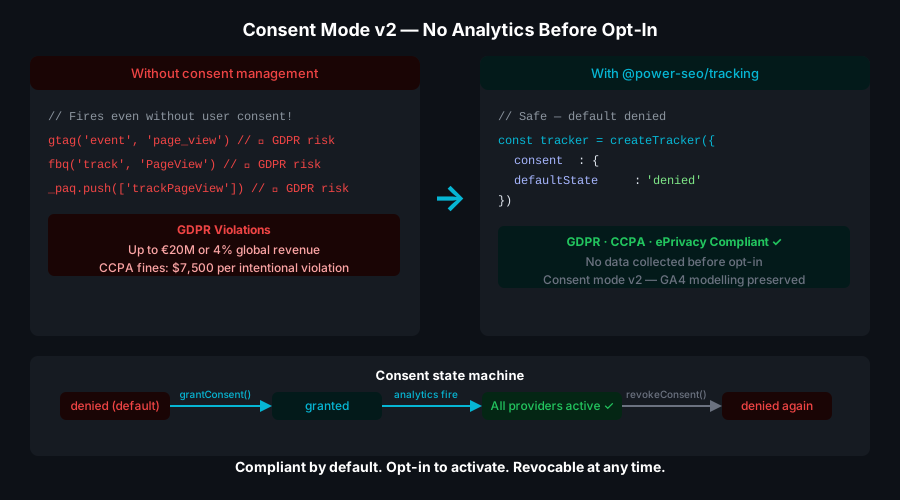
How do I build a script config for each provider?
Each builder takes a typed config and returns a ScriptConfig (or ScriptConfig[] for GA4). PostHog defaults host to https://us.i.posthog.com; Plausible accepts an optional selfHostedUrl; GA4 enables Consent Mode v2, IP anonymization, and page views by default. All analytics scripts are tagged consentCategory: 'analytics'.
import {
  buildGA4Script,
  buildClarityScript,
  buildPostHogScript,
  buildPlausibleScript,
  buildFathomScript,
} from '@power-seo/tracking';

const scripts = [
  ...buildGA4Script({ measurementId: 'G-XXXXXXX' }), // consentModeV2/anonymizeIp/sendPageView default true
  buildClarityScript({ projectId: 'abc123' }),
  buildPostHogScript({ apiKey: 'phc_xxx' }), // host defaults to https://us.i.posthog.com
  buildPlausibleScript({ domain: 'example.com' }), // or { domain, selfHostedUrl }
  buildFathomScript({ siteId: 'ABCDEFGH' }),
];
How do I manage consent state?
createConsentManager(initial?) returns a store. necessary is always coerced to true and revoke('necessary') is a no-op. grant/revoke act on a single category; grantAll/revokeAll toggle all three non-necessary categories at once. onChange returns an unsubscribe function and fires on every mutation.
import { createConsentManager } from '@power-seo/tracking';

const consent = createConsentManager({ analytics: false });

consent.grant('analytics'); // grant one category
consent.revoke('marketing'); // revoke one category
consent.grantAll(); // analytics + marketing + preferences
consent.revokeAll();

consent.isGranted('analytics'); // → true
consent.getState();
// { necessary: true, analytics: true, marketing: true, preferences: true }

const unsubscribe = consent.onChange((state) => {
  console.log('consent changed:', state);
});
unsubscribe();
How do I render consent-gated scripts in Next.js App Router?
Pass your built scripts and the current consent state to <AnalyticsScript>. It filters via shouldLoad(consent) and renders each surviving config as a <script> — external scripts use src/async/defer plus any attributes, inline scripts use dangerouslySetInnerHTML. It renders null when nothing passes the gate.
'use client';

import { AnalyticsScript } from '@power-seo/tracking/react';
import { buildGA4Script, createConsentManager } from '@power-seo/tracking';

const consent = createConsentManager({ analytics: false });
const scripts = buildGA4Script({ measurementId: 'G-XXXXXXX' });

export default function RootLayout({ children }: { children: React.ReactNode }) {
  return (
    <html>
      <head>
        <AnalyticsScript scripts={scripts} consent={consent.getState()} />
      </head>
      <body>{children}</body>
    </html>
  );
}
How do I show a GDPR cookie banner?
<ConsentBanner> takes the ConsentManager and an optional privacyPolicyUrl. It shows while analytics is not yet granted, wires "Accept All" to grantAll() and "Reject All" to revokeAll(), and hides itself after either action. It renders an accessible role="dialog" with inline styles — no CSS import required.
'use client';

import { ConsentBanner } from '@power-seo/tracking/react';
import { createConsentManager } from '@power-seo/tracking';

const consent = createConsentManager({ analytics: false });

export function CookieBanner() {
  return <ConsentBanner manager={consent} privacyPolicyUrl="/privacy-policy" />;
}
How do I query analytics data server-side?
Each create*Client factory takes an access token or API key and returns a typed client backed by fetch. Use it in route handlers, server components, or cron jobs to build dashboards. Requests go only to the provider's API — pass a propertyId/siteId/projectId per call.
import { createGA4Client, createPlausibleClient } from '@power-seo/tracking';

const ga4 = createGA4Client(process.env.GA4_ACCESS_TOKEN!);
const report = await ga4.queryReport('123456789', {
  startDate: '2026-06-01',
  endDate: '2026-06-30',
  metrics: ['activeUsers', 'sessions'],
  dimensions: ['country'],
});
console.log(report.rows, report.rowCount);

const plausible = createPlausibleClient(process.env.PLAUSIBLE_API_KEY!);
const stats = await plausible.getAggregate('example.com', '7d');
console.log(stats.visitors, stats.pageviews, stats.bounceRate);
API Reference
Script Builders
| Function | Config | Returns | Description |
| ---------------------- | ----------------- | ---------------- | --------------------------------------- |
| buildGA4Script | GA4Config | ScriptConfig[] | Google Analytics 4 with Consent Mode v2 |
| buildClarityScript | ClarityConfig | ScriptConfig | Microsoft Clarity |
| buildPostHogScript | PostHogConfig | ScriptConfig | PostHog |
| buildPlausibleScript | PlausibleConfig | ScriptConfig | Plausible Analytics |
| buildFathomScript | FathomConfig | ScriptConfig | Fathom Analytics |
buildGA4Script returns three configs when consentModeV2 is true (the default) — a necessary consent-default snippet plus the analytics gtag loader and config — or two when it is false.
GA4Config defaults
| Field | Type | Default | Notes |
| --------------- | --------- | ------- | ------------------------------------------- |
| measurementId | string | — | Required, e.g. G-XXXXXXX |
| consentModeV2 | boolean | true | Emits gtag('consent','default',…) snippet |
| anonymizeIp | boolean | true | Sets anonymize_ip: true in config |
| sendPageView | boolean | true | When false, sets send_page_view: false |
ScriptConfig
| Prop | Type | Description |
| ----------------- | ------------------------------------- | -------------------------------------- |
| id | string | Unique script identifier |
| src | string \| undefined | External script URL |
| innerHTML | string \| undefined | Inline JavaScript content |
| async | boolean \| undefined | Load asynchronously |
| defer | boolean \| undefined | Defer execution |
| consentCategory | ConsentCategory | Required consent category for loading |
| attributes | Record<string, string> \| undefined | Additional script attributes |
| shouldLoad | (consent: ConsentState) => boolean | Returns true if this script may load |
createConsentManager(initial?)
initial is a Partial<ConsentState>; necessary is forced to true regardless of input.
| Method | Signature | Description |
| ----------- | ------------------------------------------- | ------------------------------------------ |
| getState | () => ConsentState | Returns a copy of the current consent |
| grant | (category: ConsentCategory) => void | Grant a category (no-op if already set) |
| revoke | (category: ConsentCategory) => void | Revoke a category; ignores necessary |
| grantAll | () => void | Grant analytics, marketing, preferences |
| revokeAll | () => void | Revoke analytics, marketing, preferences |
| isGranted | (category: ConsentCategory) => boolean | Check whether a category is granted |
| onChange | (cb: ConsentChangeCallback) => () => void | Subscribe; returns an unsubscribe function |
API Clients
| Function | Parameters | Returns | Description |
| ----------------------- | ------------------------------------------ | ----------------- | --------------------------- |
| createGA4Client | (accessToken: string) | GA4Client | Google Analytics 4 Data API |
| createClarityClient | (apiKey: string) | ClarityClient | Microsoft Clarity API |
| createPostHogClient | (apiKey: string, host?: string) | PostHogClient | PostHog API |
| createPlausibleClient | (apiKey: string, selfHostedUrl?: string) | PlausibleClient | Plausible Stats API |
| createFathomClient | (apiKey: string) | FathomClient | Fathom Analytics API |
Client methods (all return promises): GA4Client — queryReport(propertyId, request), getRealtimeReport(propertyId, metrics), getMetadata(propertyId). ClarityClient — getProjects(), getInsights(projectId), getHeatmapData(projectId, url). PostHogClient — queryEvents(projectId, event, limit=100), getTrends(projectId, events, days=7), getFunnels(projectId, steps). PlausibleClient — getTimeseries(siteId, period='30d'), getBreakdown(siteId, property, period='30d'), getAggregate(siteId, period='30d'). FathomClient — getSites(), getPageviews(siteId, period='30d'), getReferrers(siteId, period='30d').
React Components (@power-seo/tracking/react)
| Component | Props | Description |
| ------------------- | -------------------------------------------------------- | ------------------------------------------------------------------------------- |
| <AnalyticsScript> | { scripts: ScriptConfig[]; consent: ConsentState } | Renders <script> tags that pass shouldLoad(consent); returns null if none |
| <ConsentBanner> | { manager: ConsentManager; privacyPolicyUrl?: string } | GDPR cookie banner with Accept All / Reject All |
Types
| Type | Definition / shape |
| ----------------------- | -------------------------------------------------------------------------------------- |
| ConsentCategory | 'necessary' \| 'analytics' \| 'marketing' \| 'preferences' |
| ConsentState | { necessary; analytics; marketing; preferences } — all boolean |
| ConsentManager | Store: getState, grant, revoke, grantAll, revokeAll, isGranted, onChange |
| ConsentChangeCallback | (state: ConsentState) => void |
| ScriptConfig | { id, src?, innerHTML?, async?, defer?, consentCategory, attributes?, shouldLoad } |
| GA4Config | { measurementId, consentModeV2?, anonymizeIp?, sendPageView? } |
| GA4ReportRequest | { startDate, endDate, metrics, dimensions?, limit? } |
| GA4ReportResponse | { rows: GA4ReportRow[], rowCount, metadata? } |
| ClarityConfig | { projectId: string } |
| PostHogConfig | { apiKey: string, host?: string } |
| PlausibleConfig | { domain: string, selfHostedUrl?: string } |
| FathomConfig | { siteId: string } |
Use Cases
- GDPR-compliant web apps — load analytics scripts only after the visitor grants consent
- SaaS marketing sites — track behavior with GA4 while respecting privacy regulations
- E-commerce stores — Clarity session insights for UX work behind a consent gate
- Multi-provider setups — run GA4 + Plausible + PostHog side by side for data validation
- Privacy-first apps — Plausible or Fathom as cookieless alternatives to GA4
- Analytics dashboards — query GA4, Plausible, or Fathom APIs server-side for custom reporting
- Product analytics — PostHog trends and funnels with a consent-managed loader
Architecture Overview
- Pure TypeScript — no compiled binary, no native modules
- Consent-first design —
shouldLoad(consentState)is evaluated before any script tag is created - GDPR defaults —
necessaryis alwaystrue;analytics,marketing,preferencesdefault tofalse - SSR-safe builders — script configs are generated server-side; consent is evaluated client-side
- Edge-compatible — builders, consent manager, and clients use only
fetch, no Node-specific APIs; runs in Cloudflare Workers, Vercel Edge, and Deno - Optional React peer —
<AnalyticsScript>and<ConsentBanner>require React^18 || ^19; all other exports are framework-agnostic - Dual ESM + CJS — ships both formats via tsup for any bundler or
require()usage
Supply Chain Security
- Published to npm with provenance attestation — every release is built and signed by the verified
github.com/CyberCraftBD/power-seoGitHub Actions workflow, so you can trace each tarball back to its exact source commit - Zero third-party runtime dependencies — the package depends only on other
@power-seopackages and an optional React peer, nothing else gets pulled in - Network access only when you call it — script builders and the consent manager perform pure computation; the API clients make HTTP requests exclusively to the analytics provider you configure (Google/Clarity/PostHog/Plausible/Fathom), with no telemetry or phoning home
- No install scripts (
postinstall,preinstall) - No
evalor dynamic code execution - Safe for SSR, Edge, and browser environments
The @power-seo Ecosystem
All 17 packages are independently installable — use only what you need.
| Package | Install | Description |
| ------------------------------------------------------------------------------------------ | ----------------------------------- | ---------------------------------------------------------------------------------- |
| @power-seo/ai | npm i @power-seo/ai | LLM-agnostic prompt templates and response parsers for AI-assisted SEO |
| @power-seo/analytics | npm i @power-seo/analytics | Merge Search Console data with audit results — trends and ranking insights |
| @power-seo/audit | npm i @power-seo/audit | SEO site health auditing with meta, content, structure, and performance rules |
| @power-seo/content-analysis | npm i @power-seo/content-analysis | Yoast-style SEO content analysis engine with scoring, checks, and React components |
| @power-seo/core | npm i @power-seo/core | Framework-agnostic SEO analysis engines, types, validators, and utilities |
| @power-seo/images | npm i @power-seo/images | Image SEO analysis — alt text quality, lazy loading, formats, image sitemaps |
| @power-seo/integrations | npm i @power-seo/integrations | Semrush and Ahrefs API clients with a shared rate-limited HTTP client |
| @power-seo/links | npm i @power-seo/links | Internal link graph analysis — orphan detection, suggestions, equity scoring |
| @power-seo/meta | npm i @power-seo/meta | SSR meta tag helpers for Next.js App Router, Remix v2, and generic SSR |
| @power-seo/preview | npm i @power-seo/preview | SERP, Open Graph, and Twitter Card preview generators with React components |
| @power-seo/react | npm i @power-seo/react | React SEO components — meta tags, Open Graph, Twitter Card, breadcrumbs |
| @power-seo/readability | npm i @power-seo/readability | Readability scoring — Flesch-Kincaid, Gunning Fog, Coleman-Liau, ARI |
| @power-seo/redirects | npm i @power-seo/redirects | Redirect rule engine with Next.js, Remix, and Express adapters |
| @power-seo/schema | npm i @power-seo/schema | Type-safe JSON-LD structured data — 23 schema.org builders plus React components |
| @power-seo/search-console | npm i @power-seo/search-console | Google Search Console API client — OAuth2, service accounts, rate limiting, retry |
| @power-seo/sitemap | npm i @power-seo/sitemap | XML sitemap generation, streaming, and validation with image, video, news support |
| @power-seo/tracking | npm i @power-seo/tracking | Analytics script builders with consent management and React components |
Keywords
analytics, tracking, GA4, Google Analytics 4, Microsoft Clarity, PostHog, Plausible, Fathom, GDPR, consent management, cookie consent, consent mode, script loader, privacy, opt-in, React, Next.js, TypeScript, tree-shakeable, SEO
About CyberCraft Bangladesh
CyberCraft Bangladesh is a Bangladesh-based enterprise-grade software development and Full Stack SEO service provider company specializing in ERP system development, AI-powered SaaS and business applications, full-stack SEO services, custom website development, and scalable eCommerce platforms. We design and develop intelligent, automation-driven SaaS and enterprise solutions that help startups, SMEs, NGOs, educational institutes, and large organizations streamline operations, enhance digital visibility, and accelerate growth through modern cloud-native technologies.




© 2026 CyberCraft Bangladesh · Released under the MIT License