
@prelayout/prelayout
v0.1.0
Published
Headless text layout with solved pieces, continuations, exclusions, and paginated pages.

Maintainers
 cosmiciron
Readme
prelayout
prelayout gives you text layout before you paint.
That is the whole trick, and it is a useful one. Browsers are great at drawing text after the DOM has had its say. Prelayout is for the moments when you need the answer first: where the text lands, what fit, what overflowed, which page it belongs to, and what shape it had to dodge on the way there.
The backstory: I have been building the VMPrint engine mostly with automated
desktop publishing and serious live editing surfaces in mind. Then chenglou's
pretext showed up and made a very clever point: developers want text answers
before rendering, not after a pile of DOM work. The only catch is that you
cannot build a house with just a measuring tape.
VMPrint is the bulldozer, forklift, and concrete mixer: a real DTP engine that
happens to be blazing fast and small. So prelayout wraps that engine in
pretext-inspired APIs that stay deliberately simple, headless, and stateless,
but stop a few steps later: not just measuring, not just asking "how big?", but
returning the actual layout pieces, continuations, shapes, and pages developers
deserve.
Install
npm install @prelayout/prelayoutThe package is @prelayout/prelayout because we believe in symmetry,
namespaces, and not fighting npm ghosts before breakfast.
What You Get
The package returns engine-authored data:
- text pieces with
x,y,width,height, text, baseline, and paint fields - line guides for overlays and inspection
- occupied heights
- consumed and remaining text reports
- reusable exclusion shapes
- paginated pages from
produce()
It does not ship a renderer. Your app can paint the results in HTML, canvas, SVG, WebGL, native UI, or whatever contraption you are building this week. The important part is that the layout answer came from the engine, not from a DOM node quietly improvising in the corner.
The API
import {
  form,
  fit,
  flow,
  pour,
  produce,
  exclusion
} from "@prelayout/prelayout";
form(content, options): lay out a fragment and tell me how tall it is.fit(content, options): lay out one bounded box and tell me what remains.flow(content, targets): carry content through several bounded boxes.pour(content, shape, options): fill text inside a shape.produce(source, options): paginate a document or structured element payload.exclusion: build circles, rectangles, ellipses, polygons, alpha masks, and replayable exclusion assemblies.
Most text APIs take strings. Plain strings are plain text. Mixed-style text is a
structured JSON string. produce() is the page-minded one: it can also take a
full document object, an elements object, an elements array, or a JSON string
containing those shapes.
Runtime
Prelayout is headless, but it is not currently server-runtime-free. The engine
uses browser text measurement, so layout calls need a browser-like environment
with Canvas text APIs. OffscreenCanvas is enough for basic measurement;
browser DOM font probes are used when CSS line-height metrics need them.
Importing the package in Node is fine, but calling form(), fit(), flow(),
pour(), or produce() in plain Node without browser canvas APIs will throw
[prelayout] Browser canvas APIs are unavailable.
Tiny Examples
Ask how a fragment lays out:
const result = form("Layout is data.", {
  width: 320,
  fontFamily: "Georgia, serif",
  fontSize: 18,
  lineHeight: 1.4
});

for (const piece of result.pieces) {
  console.log(piece.text, piece.x, piece.y, piece.width, piece.height);
}
Fit text into a bounded region:
const result = fit(longText, {
  width: 360,
  height: 240,
  hyphenation: "soft"
});

console.log(result.content.consumed.text);
console.log(result.content.remaining.text);
Make pages:
const pageResult = produce({
  elements: [
    { type: "p", content: "A document can become engine-authored pages." }
  ]
}, {
  width: 612,
  height: 792,
  margins: { top: 72, right: 72, bottom: 72, left: 72 }
});

console.log(pageResult.pages.length);
Why Bother?
Because some interfaces need text layout as data, not as a side effect:
- editor overlays and source mapping
- selectable generated text
- paginated previews and document thumbnails
- shaped reading surfaces
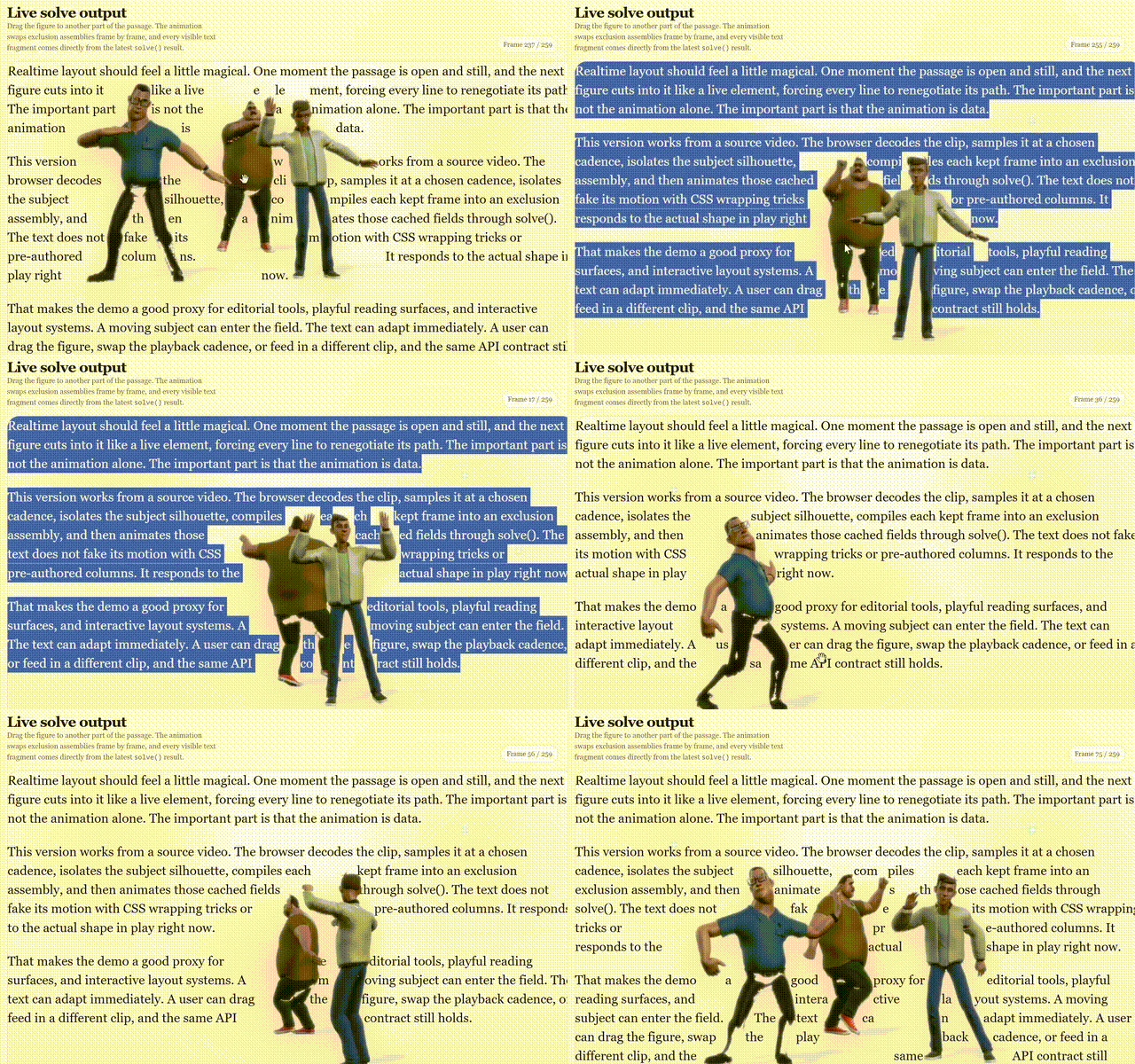
- text that wraps around image or video silhouettes
- multi-panel flows where continuation matters
- infinite scrolling masonry, chat, feeds, timelines, and generated UI
The DOM can still paint the glyphs. We love the DOM. We just do not want it to be the secret layout authority when the app needs exact answers.
Performance
This also attacks a classic frontend tax: DOM thrashing. If the only way to learn text size is to render, measure, mutate, render again, measure again, and hope the browser is still speaking to you, the UI pays for it in layout invalidations and frame drops. Prelayout lets you ask the engine for the layout up front, then paint once. That is a big deal for infinite lists, masonry grids, chat transcripts, live editors, and anything trying to stay smooth while content keeps arriving.
The performance is the fun part. The HTML Atlas demo lays out a 334-page book, with publishing-grade pagination, in about 600ms on a Surface Pro 11 tablet and around 300ms on an M4 Max MacBook. The whole wall of pages then renders as plain HTML in about 20ms and 10ms respectively. Trying to discover that same layout by shoving hundreds of pages through DOM measurement would be a very efficient way to make the browser reconsider its life choices.
The smaller interactive cases are just as telling. Moving irregular exclusion shapes through a sea of text can take around 0.5ms to lay out on the Mac, with rendering in the same neighborhood. So yes: the delightful "dragon swimming through text" sort of demo is absolutely in reach here too, with a fraction of the code and CPU. The difference is that nothing has to be hardcoded. The shape moves, the engine solves, the UI paints.
Footprint
The package stays small, too. A clean launch build currently packs to about 245 KiB on npm, unpacking to about 1.29 MiB across 18 files. The shipped runtime JavaScript is about 1.11 MiB raw, 213 KiB gzip, or 164 KiB Brotli. That includes the embedded layout engine. The declarations add about 175 KiB raw, or 30 KiB gzip. Not bad for the bulldozer, forklift, concrete mixer, and a few useful clipboards.
It matters even more for the next wave of interfaces. AI-generated UI and generative interactions produce content on the fly: cards, answers, annotations, summaries, previews, weird little custom surfaces nobody planned at design time. Those systems need cheap, deterministic layout data before they decide what to mount, recycle, stream, or animate. Prelayout gives them the answer without making the DOM do the whole audition first.
Repo Map
- src: the public package surface
- engine: the embedded engine copy built locally
- demos: browser demos and showcases
- demos/helpers: copyable helper source used by demos
- documents: API, rendering, helper, and product notes
- CONTRIBUTING.md: local setup and project boundaries
Useful reading:
Run The Demos
npm install
npm run build
npm run serve
The server starts at http://127.0.0.1:4173/.
Open http://127.0.0.1:4173/demos/ for the demo index.
Current demos:
form: width-bounded fragments and returned piecesfit: bounded layout with consumed and remaining contentflow: continuation through multiple targetspour: text contained inside a primitive shapepour-image: text contained inside image-derived alpha geometrypieces: minimal piece and baseline inspectionexclusion: live primitive exclusion fieldsexclusion-image: image alpha as wrap geometryhtml-atlas:produce()rendered as a searchable, selectable paginated atlasdancing-text: animated exclusion fields from video frames
Showcase clips:
- Anime Girl Dancing With Texts: the full demo UI, sliders and all.
- Man Dancing With Texts: the funny one, because layout engines deserve jokes too.
The demos use browser import maps and read the built engine from
/engine/dist/..., so serve them from the repo root. Opening the files directly
from disk is an excellent way to meet the less charming parts of browser module
loading.
Helpers
The npm package stays small. Browser image sampling, video frame extraction, and HTML piece painting live as source files under demos/helpers. They are official examples, but not package exports.
Copy them when they help. Change them when your app needs something slightly different. The deal is simple: helpers may prepare explicit inputs or paint returned results; they do not get to make up layout geometry.
The One Rule
Prelayout is a thin wrapper around the engine. Every layout decision belongs to the engine.
The short version:
- engine owns layout
- wrapper owns normalization and result projection
- helpers own adapter glue
- demos own inspection and presentation
- applications own rendering
If browser code starts inventing line breaks, baselines, page geometry, or continuation behavior, it has wandered into engine territory. Gently escort it back.