
@premiate/strapi-plugin-maplibre-field
v1.7.0
Published
Strapi plugin that provides a MapLibre custom field

Maintainers
 clankyboard
Readme
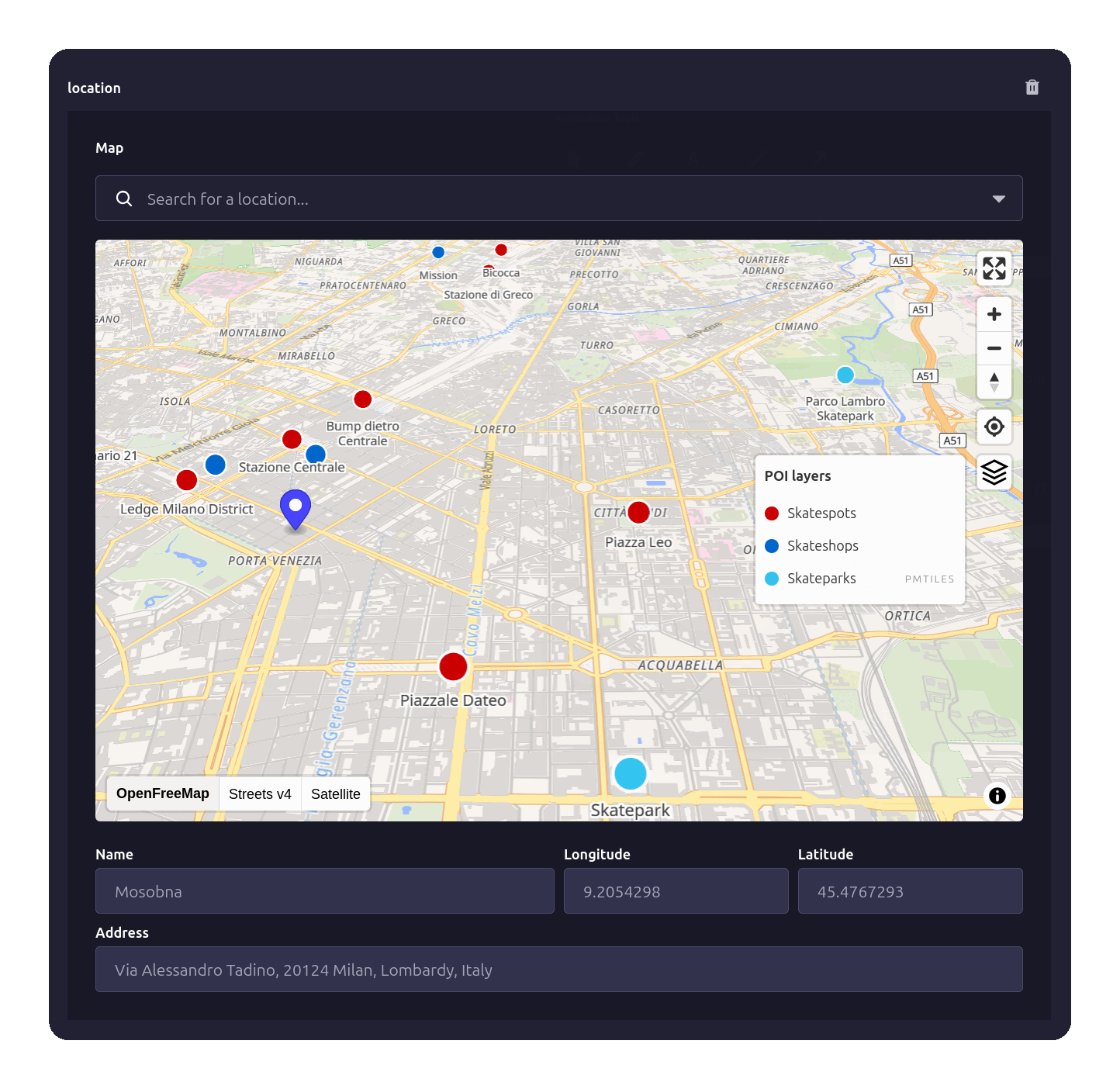
✨ Key Features
- No map provider setup required - works out of the box with OpenFreeMap tiles; swap in MapTiler, Stadia, PMTiles or a custom style anytime
- Interactive MapLibre GL map with fullscreen, zoom, compass and geolocate controls
- Four ways to place a point - search, POI click, double-click, or drag the marker
- OpenStreetMap geocoding via Nominatim, in the language of the admin panel
- Custom POI layers (GeoJSON or PMTiles) with a layer control panel to toggle sources
- Keyboard-accessible search built on Strapi's Combobox (WAI-ARIA combobox pattern)
- GeoJSON Feature storage (RFC 7946 compliant)
- Five UI languages - English, German, Spanish, French, Italian
📦 Installation
Requirements
- Strapi v5.0.0 or higher
- Node.js 22.0.0 or higher
Install
# Using npm
npm install @premiate/strapi-plugin-maplibre-field

# Using Yarn
yarn add @premiate/strapi-plugin-maplibre-field
⚙️ Quick Strapi Setup
1. Enable the plugin
Create or update config/plugins.ts:
export default {
  "maplibre-field": {
    enabled: true,
    config: {
      mapStyles: [
        {
          id: "ofm",
          name: "OpenFreeMap",
          url: "https://tiles.openfreemap.org/styles/liberty",
          isDefault: true,
        },
      ],
      defaultCenter: [9.19, 45.46], // [longitude, latitude]
      defaultZoom: 13,
    },
  },
};
2. Update security middleware
Open config/middlewares.ts and add 'worker-src': ["'self'", 'blob:']:
export default [
  "strapi::errors",
  {
    name: "strapi::security",
    config: {
      contentSecurityPolicy: {
        useDefaults: true,
        directives: {
          "connect-src": ["'self'", "https:"],
          "img-src": ["'self'", "data:", "blob:"],
          // MapLibre parses tiles in a Web Worker. `'self'` is the part that matters: the
          // plugin serves that worker from your own Strapi instance.
          "worker-src": ["'self'", "blob:"],
          upgradeInsecureRequests: null,
        },
      },
    },
  },
  // ... other middlewares
];
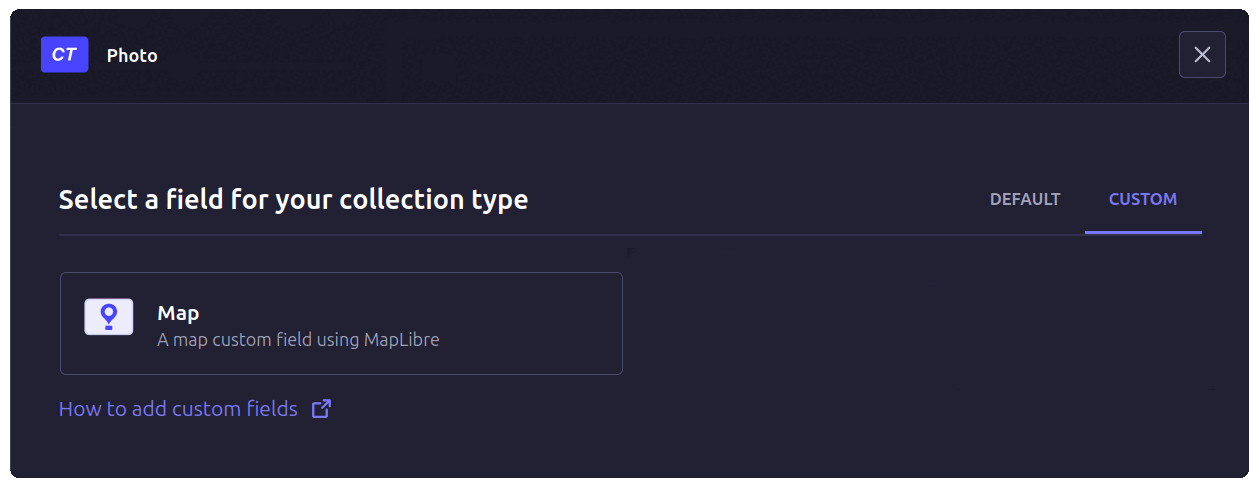
3. Add map field to content type
In the Strapi Content-Type Builder pick up your Collection Type, Single Type or Component and:
- Click Add another field
- Select the Custom tab
- Select the Map field
- Type a name for the field
- Click Finish
🎯 How to Select a Location
There are four ways to select a location:
- Search box - Type an address or place name, then press Enter
- Click POI marker - Select pre-defined points of interest
- Double-click map - Place marker at exact coordinates
- Drag the marker - Reposition an existing point directly on the map
The selected location is saved as a GeoJSON Feature with coordinates, name, address, and metadata.
📚 Documentation
- Configuration Guide - Map styles, geocoding, POI setup, all options
- Usage Guide - Adding fields, selecting locations, localization
- POI Integration - Custom POI sources, layer control, GeoJSON API
- Data Model - GeoJSON structure, properties reference
🗺️ Map Providers
The plugin supports any MapLibre Style Specification compatible provider — no lock-in to a single tile service:
- OpenFreeMap - the default, free and unlimited, no API key or account
- Commercial providers (e.g. MapTiler, Stadia Maps) - more style choice, require an API key
- PMTiles - self-host your own tile archive on any static storage (S3, R2, ...), no tile server needed
- Custom styles - build your own with Maputnik
See the Configuration Guide for detailed setup instructions.
🏢 POI Support
Integrate custom Points of Interest from a GeoJSON URL (static file or API) or a PMTiles vector tile archive:
- Display POI markers on the map
- Click to select and save complete POI data
- Layer control to toggle multiple POI sources
- Search integration (queries both Nominatim and custom APIs)
- Configurable zoom levels and display limits
See the POI Integration Guide for setup and examples.
🔧 Data Structure
Locations are stored as GeoJSON Features:
{
  "type": "Feature",
  "geometry": {
    "type": "Point",
    "coordinates": [9.1877, 45.4596]
  },
  "properties": {
    "name": "Torre Velasca",
    "address": "Piazza Velasca 5, 20122 Milano, Lombardia, Italia",
    "source": "nominatim",
    "inputMethod": "search"
  }
}
See the Data Model Guide for complete property reference.
🤝 Contributing
Bug reports and pull requests are welcome on GitHub.
See CONTRIBUTING.md for development setup and guidelines.
📝 Credits
This plugin was forked from strapi-plugin-map-field by Cédric Pontet and migrated from Mapbox to MapLibre with foundations on OpenStreetMap, Nominatim geocoding, and Protomaps.
Thanks to Enzo Brunii for initial contributions.
📄 License
MIT © Claudio Bernardini / Dipartimento di Cartografia Esistenzialista in Fotta, Premiate Edizioni