
@preprio/prepr-nextjs
v2.2.7
Published
Next.js package for Prepr CMS preview functionality with advanced debugging and visual editing capabilities


Readme
Prepr Next.js Package
A powerful TypeScript library that provides preview functionality, visual editing capabilities, and A/B testing for Prepr CMS integrated with Next.js applications.
⚡ Quick Start
# Install the package
npm install @preprio/prepr-nextjs
# or
pnpm add @preprio/prepr-nextjs
Add environment variables to your .env:
PREPR_GRAPHQL_URL=https://graphql.prepr.io/{YOUR_ACCESS_TOKEN}
PREPR_ENV=preview
Set up middleware in middleware.ts:
import type { NextRequest } from 'next/server'
import createPreprMiddleware from '@preprio/prepr-nextjs/middleware'

export function middleware(request: NextRequest) {
  return createPreprMiddleware(request, { preview: true })
}
Add toolbar and tracking to your layout:
import { getToolbarProps, extractAccessToken } from '@preprio/prepr-nextjs/server'
import { PreprToolbar, PreprToolbarProvider, PreprTrackingPixel } from '@preprio/prepr-nextjs/react'
import '@preprio/prepr-nextjs/index.css'

export default async function RootLayout({ children }: { children: React.ReactNode }) {
  const toolbarProps = await getToolbarProps(process.env.PREPR_GRAPHQL_URL!)
  const accessToken = extractAccessToken(process.env.PREPR_GRAPHQL_URL!)

  return (
    <html>
      <head>
        {accessToken && <PreprTrackingPixel accessToken={accessToken!} />}
      </head>
      <body>
        <PreprToolbarProvider props={toolbarProps}>
          <PreprToolbar />
          {children}
        </PreprToolbarProvider>
      </body>
    </html>
  )
}
📋 Prerequisites
Before installing, ensure you have:
- Next.js 13.0.0 or later (supports App Router)
- React 17.0.0 or later (React 18+ recommended)
- Node.js 16.0.0 or later
- A Prepr account
- Prepr GraphQL URL (found in Settings → Access tokens)
Prepr Account Setup
- Create a Prepr account at prepr.io
- Get your GraphQL URL:
Go to Settings → Access tokens
Find your GraphQL Preview access token
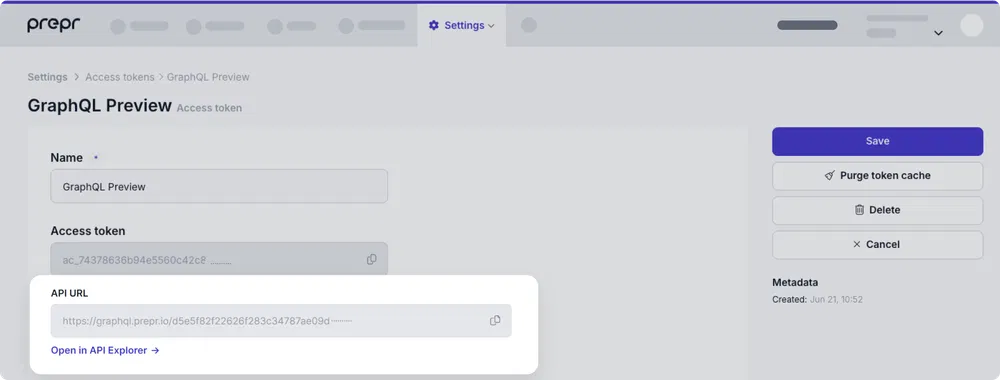
Copy the full GraphQL URL (e.g.,
https://graphql.prepr.io/e6f7a0521f11e5149ce65b0e9f372ced2dfc923490890e7f225da1db84cxxxxx)The URL format is always
https://graphql.prepr.io/{YOUR_ACCESS_TOKEN}
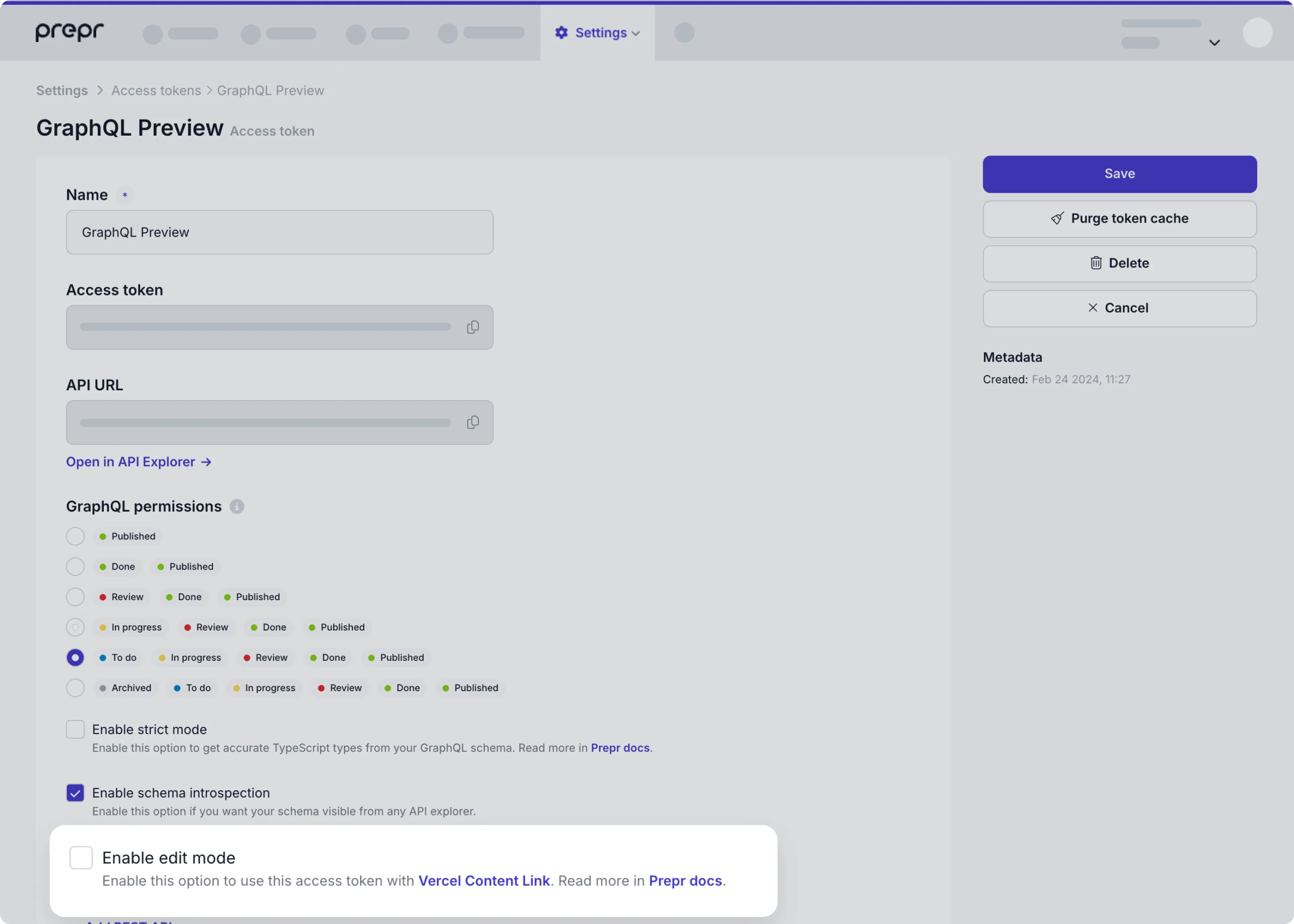
- Enable edit mode (for toolbar):
Open your GraphQL Preview access token
Check "Enable edit mode"
Save the token
🔧 Installation & Setup
1. Install the Package
npm install @preprio/prepr-nextjs
# or
pnpm add @preprio/prepr-nextjs
# or
yarn add @preprio/prepr-nextjs
2. Environment Configuration
Create or update your .env file:
# Required: Your Prepr GraphQL endpoint
PREPR_GRAPHQL_URL=https://graphql.prepr.io/{YOUR_ACCESS_TOKEN}

# Required: Environment mode
PREPR_ENV=preview    # Use 'preview' for staging/development
# PREPR_ENV=production # Use 'production' for live sites

# Optional: Enable debug logging (development only)
# PREPR_DEBUG=trueImportant: Replace
{YOUR_ACCESS_TOKEN}with your actual Prepr access token from Settings → Access tokens.
3. Middleware Setup
The middleware handles personalization headers, customer ID tracking, and preview mode functionality.
TypeScript Setup
Create or update middleware.ts in your project root:
import type { NextRequest } from 'next/server'
import createPreprMiddleware from '@preprio/prepr-nextjs/middleware'

export function middleware(request: NextRequest) {
  return createPreprMiddleware(request, {
    preview: process.env.PREPR_ENV === 'preview'
  })
}

export const config = {
  matcher: [
    /*
     * Match all request paths except for the ones starting with:
     * - api (API routes)
     * - _next/static (static files)
     * - _next/image (image optimization files)
     * - favicon.ico (favicon file)
     */
    '/((?!api|_next/static|_next/image|favicon.ico).*)',
  ],
}
JavaScript Setup
Create or update middleware.js in your project root:
import createPreprMiddleware from '@preprio/prepr-nextjs/middleware'

export async function middleware(request) {
  return createPreprMiddleware(request, {
    preview: process.env.PREPR_ENV === 'preview'
  })
}

export const config = {
  matcher: [
    '/((?!api|_next/static|_next/image|favicon.ico).*)',
  ],
}
Chaining with Existing Middleware
Basic Chaining Pattern
import type { NextRequest, NextResponse } from 'next/server'
import createPreprMiddleware from '@preprio/prepr-nextjs/middleware'

export function middleware(request: NextRequest) {
  // Start with your existing middleware
  let response = NextResponse.next()

  // Add your custom logic
  if (request.nextUrl.pathname.startsWith('/admin')) {
    response.headers.set('x-admin-route', 'true')
  }

  // Chain with Prepr middleware
  return createPreprMiddleware(request, response, {
    preview: process.env.PREPR_ENV === 'preview'
  })
}
With next-intl Integration
import type { NextRequest } from 'next/server'
import createIntlMiddleware from 'next-intl/middleware'
import createPreprMiddleware from '@preprio/prepr-nextjs/middleware'

const intlMiddleware = createIntlMiddleware({
  locales: ['en', 'de', 'fr'],
  defaultLocale: 'en'
})

export function middleware(request: NextRequest) {
  // First run internationalization middleware
  const intlResponse = intlMiddleware(request)

  // If next-intl returns a redirect, return it immediately
  if (intlResponse.status >= 300 && intlResponse.status < 400) {
    return intlResponse
  }

  // Otherwise, chain with Prepr middleware
  return createPreprMiddleware(request, intlResponse, {
    preview: process.env.PREPR_ENV === 'preview'
  })
}

export const config = {
  matcher: [
    '/((?!api|_next/static|_next/image|favicon.ico).*)',
  ],
}
Advanced Chaining with Multiple Middlewares
import type { NextRequest, NextResponse } from 'next/server'
import createPreprMiddleware from '@preprio/prepr-nextjs/middleware'
import { authMiddleware } from '@/lib/auth'
import { rateLimitMiddleware } from '@/lib/rate-limit'

export function middleware(request: NextRequest) {
  let response = NextResponse.next()

  // 1. Rate limiting
  response = rateLimitMiddleware(request, response)

  // 2. Authentication (if needed)
  if (request.nextUrl.pathname.startsWith('/dashboard')) {
    response = authMiddleware(request, response)
  }

  // 3. Custom headers
  response.headers.set('x-custom-header', 'my-value')

  // 4. Finally, Prepr middleware
  return createPreprMiddleware(request, response, {
    preview: process.env.PREPR_ENV === 'preview'
  })
}
Conditional Chaining
import type { NextRequest, NextResponse } from 'next/server'
import createPreprMiddleware from '@preprio/prepr-nextjs/middleware'

export function middleware(request: NextRequest) {
  const { pathname } = request.nextUrl

  // Skip Prepr middleware for API routes
  if (pathname.startsWith('/api/')) {
    return NextResponse.next()
  }

  // Apply different logic based on route
  let response = NextResponse.next()

  if (pathname.startsWith('/blog')) {
    response.headers.set('x-content-type', 'blog')
  } else if (pathname.startsWith('/product')) {
    response.headers.set('x-content-type', 'product')
  }

  // Always apply Prepr middleware for content routes
  return createPreprMiddleware(request, response, {
    preview: process.env.PREPR_ENV === 'preview'
  })
}
4. Layout Integration
App Router (Next.js 13+)
The toolbar should only be rendered in preview environments to avoid showing development tools in production. Here are several approaches for conditional rendering:
Basic Conditional Rendering
Update your app/layout.tsx:
import { getToolbarProps } from '@preprio/prepr-nextjs/server'
import {
  PreprToolbar,
  PreprToolbarProvider
} from '@preprio/prepr-nextjs/react'
import '@preprio/prepr-nextjs/index.css'

export default async function RootLayout({
  children,
}: {
  children: React.ReactNode
}) {
  const isPreview = process.env.PREPR_ENV === 'preview'
  const toolbarProps = isPreview ? await getToolbarProps(process.env.PREPR_GRAPHQL_URL!) : null

  return (
    <html lang="en">
      <body>
        {isPreview && toolbarProps ? (
          <PreprToolbarProvider props={toolbarProps}>
            <PreprToolbar />
            {children}
          </PreprToolbarProvider>
        ) : (
          children
        )}
      </body>
    </html>
  )
}
Advanced Conditional Rendering with Error Handling
For production applications, you may want more robust error handling:
import { getToolbarProps } from '@preprio/prepr-nextjs/server'
import {
  PreprToolbar,
  PreprToolbarProvider
} from '@preprio/prepr-nextjs/react'
import '@preprio/prepr-nextjs/index.css'

export default async function RootLayout({
  children,
}: {
  children: React.ReactNode
}) {
  const isPreview = process.env.PREPR_ENV === 'preview'
  const graphqlUrl = process.env.PREPR_GRAPHQL_URL

  // Only fetch toolbar props in preview mode with valid URL
  let toolbarProps = null
  if (isPreview && graphqlUrl) {
    try {
      toolbarProps = await getToolbarProps(graphqlUrl)
    } catch (error) {
      console.error('Failed to load toolbar:', error)
      // Continue without toolbar instead of breaking the app
    }
  }

  return (
    <html lang="en">
      <body>
        {isPreview && toolbarProps ? (
          <PreprToolbarProvider props={toolbarProps}>
            <PreprToolbar />
            {children}
          </PreprToolbarProvider>
        ) : (
          children
        )}
      </body>
    </html>
  )
}
Component-Level Conditional Rendering
For better separation of concerns, create a dedicated component:
// components/PreviewWrapper.tsx
import { getToolbarProps } from '@preprio/prepr-nextjs/server'
import {
  PreprToolbar,
  PreprToolbarProvider
} from '@preprio/prepr-nextjs/react'

interface PreviewWrapperProps {
  children: React.ReactNode
}

export default async function PreviewWrapper({ children }: PreviewWrapperProps) {
  const isPreview = process.env.PREPR_ENV === 'preview'

  if (!isPreview) {
    return <>{children}</>
  }

  const toolbarProps = await getToolbarProps(process.env.PREPR_GRAPHQL_URL!)

  return (
    <PreprToolbarProvider props={toolbarProps}>
      <PreprToolbar />
      {children}
    </PreprToolbarProvider>
  )
}

// app/layout.tsx
import PreviewWrapper from '@/components/PreviewWrapper'
import '@preprio/prepr-nextjs/index.css'

export default function RootLayout({
  children,
}: {
  children: React.ReactNode
}) {
  return (
    <html lang="en">
      <body>
        <PreviewWrapper>
          {children}
        </PreviewWrapper>
      </body>
    </html>
  )
}
Why Conditional Rendering Matters
- Performance: Prevents unnecessary API calls in production
- Security: Avoids exposing preview functionality to end users
- Bundle Size: Excludes toolbar code from production builds
- User Experience: Ensures clean production UI without development tools
Best Practices for Conditional Rendering
- Environment Variables: Always use environment variables to control preview mode
- Error Boundaries: Wrap preview components in error boundaries to prevent crashes
- Fallback UI: Always provide a fallback when toolbar fails to load
- TypeScript Safety: Use proper type guards when checking conditions
- Bundle Optimization: Consider dynamic imports for preview-only code
// Dynamic import example for advanced optimization
const ToolbarDynamic = dynamic(
  () => import('@preprio/prepr-nextjs/react').then(mod => mod.PreprToolbar),
  {
    ssr: false,
    loading: () => <div>Loading preview tools...</div>
  }
)
5. User Tracking Setup
The tracking pixel is essential for collecting user interaction data and enabling personalization features. It should be included in all environments (both preview and production).
Basic Setup
Add the tracking pixel to your layout's <head> section:
import { extractAccessToken } from '@preprio/prepr-nextjs/server'
import { PreprTrackingPixel } from '@preprio/prepr-nextjs/react'

export default function RootLayout({ children }: { children: React.ReactNode }) {
  const accessToken = extractAccessToken(process.env.PREPR_GRAPHQL_URL!)

  return (
    <html>
      <head>
        {accessToken && <PreprTrackingPixel accessToken={accessToken!} />}
      </head>
      <body>{children}</body>
    </html>
  )
}
Alternative: Body Placement
You can also place the tracking pixel in the body if needed:
export default function RootLayout({ children }: { children: React.ReactNode }) {
  const accessToken = extractAccessToken(process.env.PREPR_GRAPHQL_URL!)

  return (
    <html>
      <body>
        {accessToken && <PreprTrackingPixel accessToken={accessToken!} />}
        {children}
      </body>
    </html>
  )
}
6. API Integration
Use the getPreprHeaders() helper function in your data fetching to enable personalization and A/B testing:
With Apollo Client
import { getClient } from '@/lib/client'
import { GetPageBySlugDocument } from '@/gql/graphql'
import { getPreprHeaders } from '@preprio/prepr-nextjs/server'

const getData = async (slug: string) => {
  const { data } = await getClient().query({
    query: GetPageBySlugDocument,
    variables: { slug },
    context: {
      headers: await getPreprHeaders(),
    },
    fetchPolicy: 'no-cache',
  })
  return data
}
With Fetch API
import { getPreprHeaders } from '@preprio/prepr-nextjs/server'

const getData = async (slug: string) => {
  const headers = await getPreprHeaders()

  const response = await fetch(process.env.PREPR_GRAPHQL_URL!, {
    method: 'POST',
    headers: {
      'Content-Type': 'application/json',
      ...headers,
    },
    body: JSON.stringify({
      query: `
        query GetPageBySlug($slug: String!) {
          Page(slug: $slug) {
            title
            content
          }
        }
      `,
      variables: { slug },
    }),
  })

  return response.json()
}
🎛️ API Reference
Server Functions
getPreprHeaders()
Returns all Prepr headers for API requests.
import { getPreprHeaders } from '@preprio/prepr-nextjs/server'

const headers = await getPreprHeaders()
// Returns: { 'prepr-customer-id': 'uuid', 'Prepr-Segments': 'segment-id', ... }
getPreprUUID()
Returns the current customer ID from headers.
import { getPreprUUID } from '@preprio/prepr-nextjs/server'

const customerId = await getPreprUUID()
// Returns: 'uuid-string' or null
getActiveSegment()
Returns the currently active segment.
import { getActiveSegment } from '@preprio/prepr-nextjs/server'

const segment = await getActiveSegment()
// Returns: 'segment-id' or null
getActiveVariant()
Returns the currently active A/B testing variant.
import { getActiveVariant } from '@preprio/prepr-nextjs/server'

const variant = await getActiveVariant()
// Returns: 'A' | 'B' | null
getToolbarProps()
Fetches all necessary props for the toolbar component.
import { getToolbarProps } from '@preprio/prepr-nextjs/server'

const props = await getToolbarProps(process.env.PREPR_GRAPHQL_URL!)
// Returns: { activeSegment, activeVariant, data }
validatePreprToken()
Validates a Prepr GraphQL URL format.
import { validatePreprToken } from '@preprio/prepr-nextjs/server'

const result = validatePreprToken('https://graphql.prepr.io/YOUR_ACCESS_TOKEN')
// Returns: { valid: boolean, error?: string }
isPreviewMode()
Checks if the current environment is in preview mode.
import { isPreviewMode } from '@preprio/prepr-nextjs/server'

const isPreview = isPreviewMode()
// Returns: boolean
extractAccessToken()
Extracts the access token from a Prepr GraphQL URL.
import { extractAccessToken } from '@preprio/prepr-nextjs/server'

const token = extractAccessToken('https://graphql.prepr.io/abc123')
// Returns: 'abc123' or null
React Components
PreprToolbarProvider
Context provider that wraps your app with toolbar functionality.
import { PreprToolbarProvider } from '@preprio/prepr-nextjs/react'

<PreprToolbarProvider props={toolbarProps}>
  {children}
</PreprToolbarProvider>
PreprToolbar
The main toolbar component.
import { PreprToolbar } from '@preprio/prepr-nextjs/react'

<PreprToolbar />
PreprTrackingPixel
User tracking component that loads the Prepr tracking script.
import { PreprTrackingPixel } from '@preprio/prepr-nextjs/react'

<PreprTrackingPixel accessToken="your-access-token" />
🔧 Configuration Options
Environment Variables
| Variable | Required | Default | Description |
|----------|----------|---------|-------------|
| PREPR_GRAPHQL_URL | Yes | - | Your Prepr GraphQL endpoint URL |
| PREPR_ENV | Yes | - | Environment mode (preview or production) |
Middleware Options
// Simple usage (creates new NextResponse)
createPreprMiddleware(request, {
  preview: boolean // Enable preview mode functionality
})

// Chaining usage (uses existing NextResponse)
createPreprMiddleware(request, response, {
  preview: boolean // Enable preview mode functionality
})
Toolbar Options
<PreprToolbarProvider
  props={toolbarProps}
  options={{
    debug: true, // Enable debug logging
    locale: 'en', // Set UI locale (e.g., 'en', 'nl')
  }}
>
Internationalization (i18n)
This package includes simple, built-in i18n support with JSON dictionaries. You can:
- Pass a
localethroughPreprToolbarProvideroptions - Read the current locale from the store
- Translate UI strings via a
useTranslationshook - Omit
localeto auto-detect from the browser (supportsenandnl, defaults toen)
Usage:
import { PreprToolbarProvider, PreprToolbar, useTranslations } from '@preprio/prepr-nextjs/react'

export default function Layout({ children }: { children: React.ReactNode }) {
  const toolbarProps = /* ... */

  return (
    <PreprToolbarProvider props={toolbarProps} options={{ locale: 'nl' }}>
      <PreprToolbar />
      <ExampleComponent />
      {children}
    </PreprToolbarProvider>
  )
}

function ExampleComponent() {
  const { t, locale } = useTranslations()
  return (
    <div>
      <p>{t('common.viewingAs')}</p>
      <small>Locale: {locale}</small>
    </div>
  )
}
To add or customize translations, edit the JSON files under src/i18n/locales/ (e.g., en.json, nl.json).
🚨 Troubleshooting
Common Issues
Toolbar Not Showing
- Check environment: Ensure
PREPR_ENV=previewis set - Verify GraphQL URL: Make sure
PREPR_GRAPHQL_URLis correct and follows the formathttps://graphql.prepr.io/YOUR_ACCESS_TOKEN - Check token permissions: Ensure "Enable edit mode" is checked in Prepr
Headers Not Working
- Middleware setup: Verify middleware is properly configured
- API calls: Ensure you're using
getPreprHeaders()in your API calls - Environment: Check that environment variables are loaded
TypeScript Errors
- Version compatibility: Ensure you're using compatible versions of Next.js and React
- Type imports: Import types from
@preprio/prepr-nextjs/types
Build Issues
- CSS imports: Make sure to import the CSS file in your layout
- Server components: Ensure server functions are only called in server components
Error Handling
The package includes comprehensive error handling:
import { PreprError } from '@preprio/prepr-nextjs/server'

try {
  const segments = await getPreprEnvironmentSegments(process.env.PREPR_GRAPHQL_URL!)
} catch (error) {
  if (error instanceof PreprError) {
    console.log('Error code:', error.code)
    console.log('Context:', error.context)
  }
}
Debug Mode
Enable debug logging in development:
<PreprToolbarProvider
  props={toolbarProps}
  options={{ debug: true }}
>
Manual Stega Handling (v2.1.* and below)
Note: This section only applies to versions 2.1.* and below. Version 2.2.0+ handles stega encoding automatically.
In older versions, stega-encoded text could cause layout shifts with letter-spacing or ReactWrapBalancer. You needed to manually clean the text using vercelStegaSplit:
import { vercelStegaSplit } from '@vercel/stega'

export default function Component({ encodedText }: { encodedText: string }) {
  const { cleaned, encoded } = vercelStegaSplit(encodedText)

  return (
    <p data-prepr-edit-target>
      {cleaned}
      {encoded && (
        <span className="hidden" suppressHydrationWarning>
          {encoded}
        </span>
      )}
    </p>
  )
}
Key points for manual handling (legacy approach):
- Place
data-prepr-edit-targeton the root element (e.g.,<p>) - Render the cleaned text normally
- Put encoded text in a hidden
<span>for edit mode detection - Add
suppressHydrationWarningto prevent React warnings
Upgrade to v2.2.0+ to eliminate this manual work and benefit from automatic cleaning!
📊 How It Works
Middleware Functionality
The middleware automatically:
- Generates customer IDs: Creates unique visitor identifiers
- Tracks UTM parameters: Captures marketing campaign data
- Manages segments: Handles audience segmentation
- Processes A/B tests: Manages variant assignments
- Sets headers: Adds necessary headers for API calls
Toolbar Features
The toolbar provides:
- Segment selection: Switch between different audience segments
- A/B testing: Toggle between variants A and B
- Edit mode: Visual content editing capabilities
- Reset functionality: Clear personalization settings
Visual Editing
When edit mode is enabled, the package:
- Auto-cleans stega encoding (v2.2.0+): Automatically removes invisible Unicode characters that cause layout shifts
- Scans content: Identifies editable content using Stega encoding
- Highlights elements: Shows proximity-based highlighting
- Provides overlays: Click-to-edit functionality
- Syncs with Prepr: Direct integration with Prepr's editing interface
Automatic Stega Cleaning (v2.2.0+)
Version 2.2.0 introduces automatic stega text cleaning in preview mode:
- Stega-encoded text is automatically cleaned after page load
- No layout shifts from invisible Unicode characters
- Works seamlessly with
letter-spacingandReactWrapBalancer - Data attributes persist for instant edit mode activation
- Backward compatible with manual split patterns
No manual stega handling is required in v2.2.0 and later!
🔄 Upgrading from v1 to v2
If you're upgrading from v1, please follow the Upgrade Guide for detailed migration instructions.
📜 License
MIT License - see the LICENSE file for details.
🆘 Support
- Documentation: Prepr Documentation
- Issues: GitHub Issues
- Support: Prepr Support